GSC errors

kiriguy

Regular Member
Joined
Sep 14, 2017
Messages
381
Reaction score
70
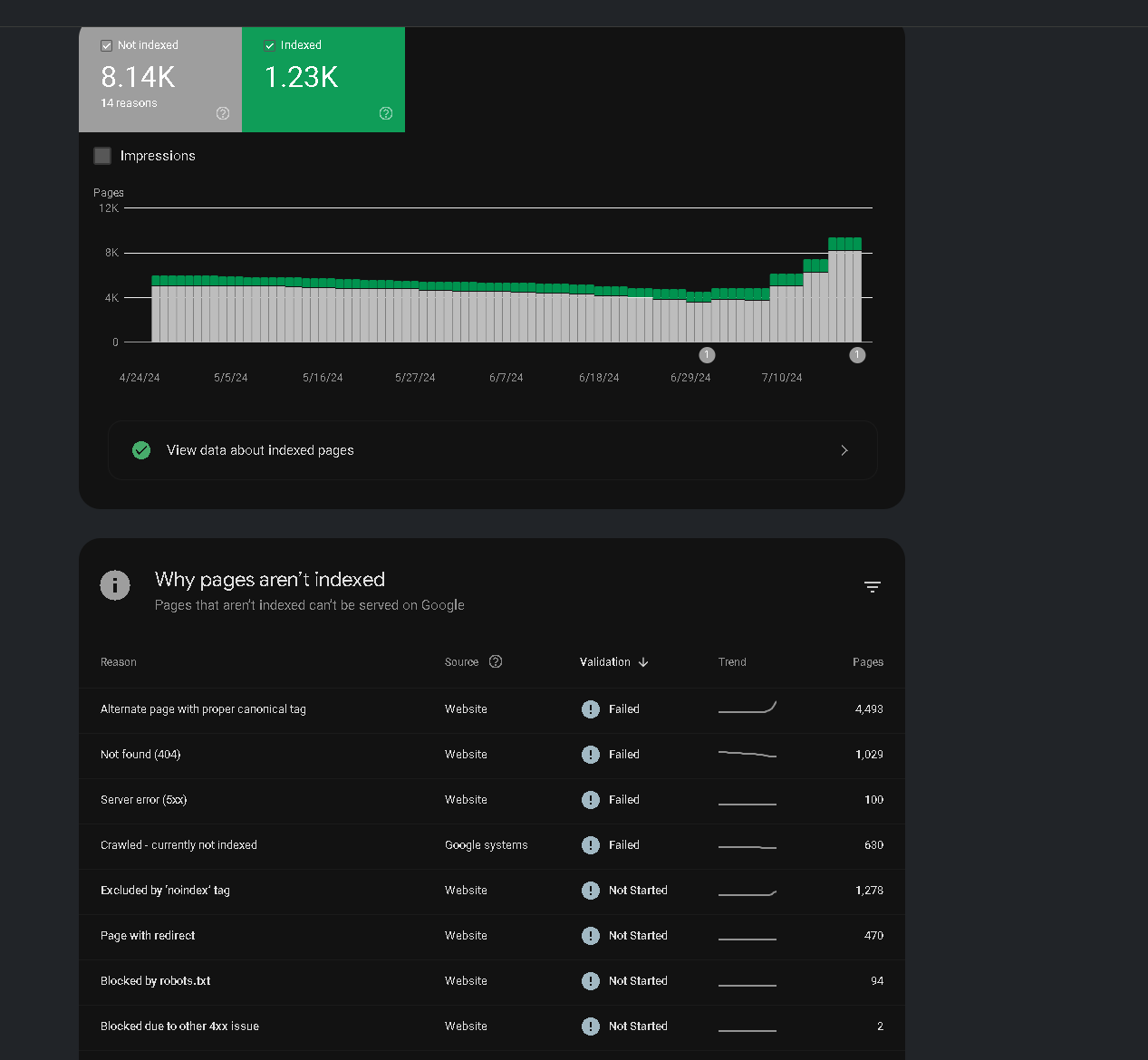
Trying to figure out if my dev is actually fixing /trying to fix the errors which one of these errors can be fixed. He is saying not to worry about gsc errors only fix important ones(which is like 1 section which he is trying to fix but keeps getting errors).
Am i wrong to ask him to fix the errors on the 2nd image (I have asked for 3 months to lessen but getting a blank stare).
2pages.png
 
Trying to find out if I am doing wrong.
Is there a section that can be fixed easy/medium/hard?
Are you websites similar or is it just me?
 
LOok if everything working fine on your site then Click the fix button on google console and wait for some times
 
LOok if everything working fine on your site then Click the fix button on google console and wait for some times
is it worth fixing it all? I know its not possible but worth it?
 
@kiriguy First of all, not every status that appears in the "Not Indexed" tab it´s a technical issue. Sometimes Google gets it right when deciding NOT to include a URL in its index.

Now, let´s break down the not-index statuses that are affecting the most URLs
  • Alternate page with proper canonical tag (4,493 URLs)
    • This often refers to URLs with a special parameter in the URL. Maybe it´s a tracking parameter (UTM), something that was dynamically generated by users (internal search box or filtering data on the page), etc - If this is the case, you will need to set a disallow rule inside the robots.txt file to prevent search engines from crawling these URL
  • Excluded by "no index" tab (1,278 URLs)
    • Check these URLs and make sure they are supposed to be noindex. If you feel any of those URLs provide any SEO value, remove the noindex tag
  • Not Found - 404 (1,029 URLs)
    • This is perhaps one of the worst technical issues you can run into. The last thing you want is to have search engine bots running into a URL that is returning a 4040 HTTP status code. Check this status and make sure those URLs are not important to your business. If that´s the case, dive deeper into the issues of why is returning a 404. On the other hand, if these URLs are NOT valuable to your business and/or do not add any value from an SEO perspective, just set a 301 redirect to a relevant URL. Maybe it´s a relevant blog post, a category page, a service page or, lastly, just the homepage.

I hope this helps!
 
Back
Top