

- Mar 22, 2013
- 9,150
- 10,490
There's a website I visit sometimes that has a Google ReCaptcha on the login page. When I solve the captcha I want Greasemonkey to click the Login button.
I've managed to find an identifier that can be used. This aria-checked="false" becomes this aria-checked="true" when the captcha is successfully solved and the green checkmark appears.
I even have a working script, sort of:
What this does is locate aria-checked="true" in the HTML of the page, and then displays the Hello World alert. But the Hello World shows as coming from Google.
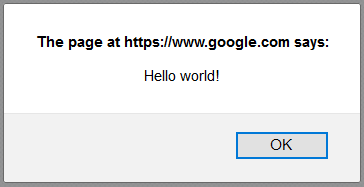
Which means that my code there runs inside of the iFrame, not on the actual site where I'm located.
I also tried this:
If I put the Hello World command in CODE TO RUN ON MAIN PAGE then nothing happens, and when I put it in CODE TO RUN IN IFRAME then it shows like in my screenshot above.
---
So how do I have my script fire a click on the Main page?
I've managed to find an identifier that can be used. This aria-checked="false" becomes this aria-checked="true" when the captcha is successfully solved and the green checkmark appears.
I even have a working script, sort of:
JavaScript:
// ==UserScript==
// @name         Click
// @namespace    http://tampermonkey.net/
// @version      0.1
// @description  Click Login
// @match        https://www.site.net/
// @match        https://www.site.net/index.php
// @match        https://www.google.com/recaptcha/*
// @require      http://ajax.googleapis.com/ajax/libs/jquery/1.9.1/jquery.min.js
// @grant        none
// ==/UserScript==


var intv = setInterval(function() {

if (/(aria-checked="true")|(mediumheight)/i.test (document.body.innerHTML) ){

{

alert('Hello world!');

}

}

    }, 1000);
What this does is locate aria-checked="true" in the HTML of the page, and then displays the Hello World alert. But the Hello World shows as coming from Google.
Which means that my code there runs inside of the iFrame, not on the actual site where I'm located.
I also tried this:
JavaScript:
// ==UserScript==
// @name         Click
// @namespace    http://tampermonkey.net/
// @version      0.1
// @description  Click Login
// @match        https://www.site.net/
// @match        https://www.site.net/index.php
// @match        https://www.google.com/recaptcha/*
// @require      http://ajax.googleapis.com/ajax/libs/jquery/1.9.1/jquery.min.js
// @grant        none
// ==/UserScript==

var intv = setInterval(function() {

if (/(aria-checked="true")|(mediumheight)/i.test (document.body.innerHTML) ){

{

if (window.top === window.self) {
    // CODE TO RUN ON MAIN PAGE
}
else {
    // CODE TO RUN IN IFRAME
}

}

}

    }, 1000);
If I put the Hello World command in CODE TO RUN ON MAIN PAGE then nothing happens, and when I put it in CODE TO RUN IN IFRAME then it shows like in my screenshot above.
---
So how do I have my script fire a click on the Main page?