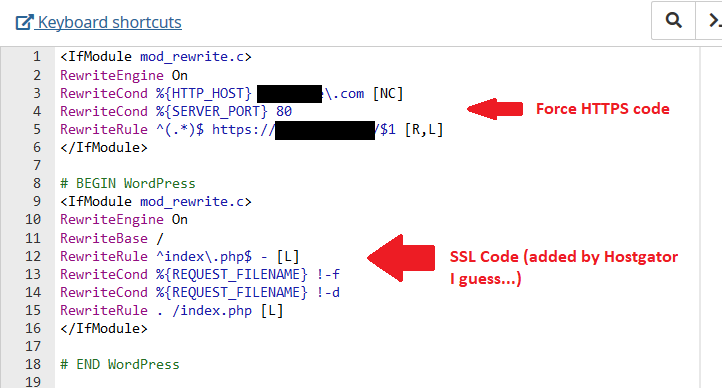
Got SSL by Hostgator, any extra steps?

Right, I'll be on to them about that! Robbing barstewards :mad:

Have you tried Really Simpls SSL plugin for your wordpress sites?

Yeah, I don't think you can do anything about it now. I doubt they'll issue a refund or anything. I don't know, I guess you could contact them and tell them you're not happy with what they did, maybe they give you some coupon or something, who knows. I doubt it though :/

No man, I didn't try any plugins for SSL for my wordpress sites. I mean, Hostgator automatically installed SSL, but then I went in and did the Force HTTPS manually, and I fixed the photos and stuff in the header/sidebar/footer and in the posts, wherever necessary. I did that all manually. I only used a plugin called "Better Search Replace" in order to change things in the Database easily, and then I removed the plugin once it was done.

I ran into a problem. My worpdress site that I did yesterday suddenly didn't have the Force HTTPS thing in the htaccess file today :devil:

I looked into it, and it seems I shouldn't have added the code between:

# BEGIN WordPress
....
# END WordPress

So I added it differently, above the "# BEGIN WordPress" bit, and it was done.

This helped me - https://stackoverflow.com/questions/47709708/code-disappear-sometimes-from-htaccess

Now, I'll check again tomorrow and in a few days to make sure the code doesn't disappear again. But I'm pretty confident it should be all right now :)
 
Last edited by a moderator:
Thank you for providing the insight on Hostgator being FREE SSL now - I just used that website for a quick scan - noticed i had SSL the whole time and wasn't using it - Hostgator should notify their customers a bit 'better' opposed to an email in my promotions tab.

On another note, this encouraged me to switch to SSL and I am now running on SSL flawlessly!

Have a great day.

PS. Used a plugin called Really Simple SSL - In which the support also replied to my ticket within 30 minutes. (Very minor issues resolved)
 
Thank you for providing the insight on Hostgator being FREE SSL now - I just used that website for a quick scan - noticed i had SSL the whole time and wasn't using it - Hostgator should notify their customers a bit 'better' opposed to an email in my promotions tab.

On another note, this encouraged me to switch to SSL and I am now running on SSL flawlessly!

Have a great day.

PS. Used a plugin called Really Simple SSL - In which the support also replied to my ticket within 30 minutes. (Very minor issues resolved)

You're welcome buddy :)

This is why I keep banging and posting my progress on this thread even though I doubt anyone's watching. One reason is to keep my self going and accountable, and the other is to help out the community.

Glad to hear you got it working. Feels good to be Green doesn't it :D
 
I was actually very scared to switch to SSL - which is why i have yet to purchase from Hostgator - didn't want my website to break.

When seeing it was free, was kind of a "just do it pussy" sort of thing.

All i had to do was install the plugin and click activate - done.

You encouraged me, thanks again =)
 
I was actually very scared to switch to SSL - which is why i have yet to purchase from Hostgator - didn't want my website to break.

When seeing it was free, was kind of a "just do it pussy" sort of thing.

All i had to do was install the plugin and click activate - done.

You encouraged me, thanks again =)

Yeah, I understand. Happy to help :)

I just had a problem. Both my Wordpress sites wouldn't load and were displaying a 500 internal server error. I went and removed the Force HTTPS code from the htaccess file on both of them, and they work again. I also checked my other 2 sites that are not wordpress, and they work just fine.

Now I added the Force HTTPS code in the htaccess file again for my wordpress sites, and they work. But will they break again? I don't know...

Did I add it correctly?

7w43KbL


I finished with the 4th site too.

Okay, I checked everything, I did everything. If I missed something and it matters, sooner or later it will pop up and bite me in the ass... and then I'll fix it :D

Now, according to the article I've been using on wpbeginner it says I should go and submit my HTTPS sites to Google Search Console. Of course, I'm holistic and methodical, so I'll also do Bing and Yandex.

Off I go...

Well, the article on wpbeginner shows steps which can't be completed. Submitting an HTTPS version of my site to Google Webmaster Tools works, but wpbeginner says to then go to the HTTP version of your site in GWT, click Settings and do "Change of Address." And they say that then GWT will automatically select your HTTPS version, or you can select it yourself, and then click submit.

But GWT does not select the new address, and you don't have an option to do it either...

So I read other articles and forum threads and things, and no one mentioned these steps. Everyone said to add the HTTPS version in GWT, and to verify the site.

The inconsistency I found was that some people said to go and then delete the HTTP property from GWT, others said to leave it as is, others said to leave it but go in and remove the sitemap from the HTTP property.

Fuck if I know what the right thing to do is... so I'll play it better safe than sorry. I'll leave the HTTP property as is, and I'll create an HTTPS property and verify it and submit a sitemap, and that's that.
 
Last edited by a moderator:
So after I submitted my HTTPS version to GWT I got an email from Google with tips on how to improve my presence. There's 6 steps there, one is sitemap which I already did. The other 3 are pretty useless to me, and the other two sent me down this rabbit hole of reading how I should submit 4 version of my site to GWT:

http://
https://
http://www.
https://www.

I tried setting up a "Preferred Version" of my site, and I got an error:

"Part of the process of setting a preferred domain is to verify that you own http://www.site.com/. Please verify http://www.site.com/."

Then I stopped for a second, and checked my other websites. I always only had the HTTP version of all my sites submitted to GWT, and I never set a preferred domain. So I figured fuck it, I won't set a preferred domain. Then I googled it.

Found this - https://www.seroundtable.com/google-preferred-domain-setting-not-needed-21062.html

"Google's John Mueller said in a Google Webmaster Help thread that if you have a 301 redirect in place, then you really don't need it. He wrote, "As long as you have your redirects set up, there's no need to set a preferred version for your domain -- it'll happen automatically.""

Okay, awesome. Fuck you Google, blow me, I'm done.

I also did a Fetch as Google on the homepage of my new HTTPS version. Just to give it a little push...

One of my websites is not wordpress. I never added a Sitemap for it. I decided to look into it now.

I created a sitemap here - https://www.xml-sitemaps.com/

I uploaded it to the root folder of my site, and added the sitemap to GWT. I hope I don't shoot myself in the foot here. The sitemap contains ALL (about 236) links from my site. Most of them are not really important for me to be indexed. But I figure give Google everything and let them sort it out.

Okay, finished. 4 sites submitted on GWT as HTTPS, and verified. And sitemap submitted for each. And each done "Fetch as Google" for the homepage. It's done!

Now I'll go do Bing...

For Bing:

"This is slightly different than GWT as you don’t have to create a new site. They simply need your new sitemap file and your good to go."

Well good boy Bing. YEAH!!! :D

Eh, I'm not sure about Bing. I added a HTTPS sitemap for each of my sites. But the sites show as HTTP on the dashboard.

I read online and different people say different things. Some say to just add your https sites, some say to just change the sitemap, some say to add https and remove the http.

Goddamnit I hate the internet sometimes.

Well, I added the new sitemaps and I'll leave it at that. If anyone knows REAL information about this, let me know. Should I add my HTTPS sites to Bing like I did on GWT, or is just adding updated sitemaps enough for Bing???

Now I'll do Yandex. According to a tutorial I read, Yandex is done exactly like Google. Add new properties as HTTPS, add new sitemaps, done.

I added 3 of my sites to Yandex, as HTTPS, submitted sitemaps, and did the reindexing thing for the homepage for each of the sites.

The 4th site, when I tried to add it I got this notification:

https://site.com is a secondary mirror of site siet.com. The bot only indexes the main mirror.

Add main mirror for site.com | Go ahead and add https://site.com

Why this happened for this one site and not for the other 3, I have no idea. Murphy's Law probably. I checked and the site is submitted as HTTP on Yandex now, not as HTTPS. So anyway, I'll just choose the second option there - "Go ahead and add https://socialesale.com"

So I'll just add the HTTPS version anyway, and let Yandex deal with it. I don't give a shit, I just wanna finish this.
 
Last edited by a moderator:
Done with Yandex.

I also went to Google Analytics and changed all my properties for my sites to HTTPS. I don't actually use Google Analytics, I use Statscounter. Google Analytics is a piece of crap, a SLOW piece of crap. Keep things simple baby, simplify, simplify ;)

But I added my sites in Google Analytics anyway, just, you know, Google, Search Engine, pay homage to Google God, bla bla bla, blow me...

Okay, that's all done...
 
Okay, I used this to check my sites - https://www.jitbit.com/sslcheck/

I checked one, and it found a bunch of pages with unsecure content. I opened the pages, I'm green in the address bar. I ran a few pages on the whynopadlock, and it's all good. So I don't know what that jitbit site is talking about.

Anyway, fuck it, it can't be perfect. I did my best, I'm done, all my sites are SSL/HTTPS secure now. If I missed something, or did something wrong anywhere in the process, if it matters I'll discover it sooner or later. Right now I need to finish jerking around with this because I'm tired of it.

Not to say it's over...

Now I'm gonna go to all my Youtubes/Facebooks/Twitters/Google+/Pinterest accounts, and change every link I can from HTTP to HTTPS (and there's a lot of them, especially on Pinterest).

Ready? Set? Go!!!
 
3 of my 4 sites are banned on Facebook, so I have nothing to change there.

3 of my 4 sites are banned on Instagram, and the 4th one I don't have a page for it, so nothing to change there.

Google+ recently banned my main Google+ profile, and with it pages for 3 of my 4 sites, so nothing to do there. I only changed the links on the 1 page/site remaining.

Twitter doesn't display http or https in the website field, so nothing to change there.

Pinterest also doesn't display http or https in the website field, so nothing to change there. I did edit about 400 pins spread on about 10 accounts, changed all destination links to HTTPS.

Youtube I went through a few channels and changed the website in the website field to HTTPS.

Soundcloud I went though a bunch of profiles I have and I changed HTTP to HTTPS in the website fields.

Dailymotion I changed the links from HTTP to HTTPS on a few channels I have.

I also changed things on some other minor social media sites - mylot, vk, mixcloud, ello and a few more...
 
Okay, I'm done. I won't summarize everything I've done, it's all written already.

I probably made some mistakes, missed a few things, but the mistakes and misses will be very few, I'm very detailed.

The one thing that's bugging me is the fact that I lost my social shares. I may try to get them back at least for my wordpress sites tomorrow. But even if I can't get them back, no matter, starting fresh socially, fine, no problem, part of the game.

Done and Done!


Rokamo, Kidamo, Nikada Dosta!!!
 
Back
Top