

namz123
BANNED
- Jun 14, 2014
- 79
- 24
Hi guys ,
A new b here (pls be gentle ) , sharing a small tip which most of the experts would already know but might help newbies like me.
When I signed up for Google Adwords , all i wanted to do was to use Keyword planner but whatever I tried Google but it kept me on 'Create your 1st Campaign' page and kept asking me how much i want to spend on my campaign and my billing details .
1st 2 screens after login onto a new account & if you are stuck as mentioned above are as follows
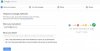

If you have reached 2nd screen (i.e. shown above) , you are stuck and you can not configure your Google Adword account without providing your billing details.
Trick to go straight to Keyword planner tool is to click "Skip the guided setup"
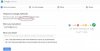
This configures your Adword account and now you have access to all the tools including Keyword Planner Tool.
In case you have not clicked "skip the guided setup" and you are stuck on "create your 1st campaign" , the only solution I see is to create a new Google account and setup your Adword account and skip the guide and enjoy Google's free Keyword planner tool.

PS: Again , I am a newbie and spent some time figuring this out . Dont know if its already been shared here or not, I will just post it out and it might help someone someday
Thanks !
A new b here (pls be gentle
) , sharing a small tip which most of the experts would already know but might help newbies like me. When I signed up for Google Adwords , all i wanted to do was to use Keyword planner but whatever I tried Google but it kept me on 'Create your 1st Campaign' page and kept asking me how much i want to spend on my campaign and my billing details .
1st 2 screens after login onto a new account & if you are stuck as mentioned above are as follows
If you have reached 2nd screen (i.e. shown above) , you are stuck and you can not configure your Google Adword account without providing your billing details.
Trick to go straight to Keyword planner tool is to click "Skip the guided setup"
This configures your Adword account and now you have access to all the tools including Keyword Planner Tool.
In case you have not clicked "skip the guided setup" and you are stuck on "create your 1st campaign" , the only solution I see is to create a new Google account and setup your Adword account and skip the guide and enjoy Google's free Keyword planner tool.
PS: Again , I am a newbie and spent some time figuring this out . Dont know if its already been shared here or not, I will just post it out and it might help someone someday
Thanks !
