

Mehedi Hasan Shanto
Registered Member
- Jan 27, 2019
- 71
- 32
Your Google Cloud Account is getting Disabled within 5 hours or within 2-3 days? Then Let me tell you its not your IP rather its a Bad Move by your Seller or Creator Who Simply Disable your Account On Purpose after your Warranty Time is Expired. I could have sold the trick which I'm giving here for free because I want a Scammer Free Cloud Market. You can call me your Saviour I don't mind. Ok Enough Talking lets get in to the Business. Why The Creators themselves disable the accounts it's simple so you buy more Accounts from Them or Their Collogues.
I will show you everything you need to know. After going through my BHW Tutorial your every single GCP Account will run for Atleast 90 days its My Guarantee. And one more thing My Main goal is to help GCP Buyers at Any Cost with This Tutorial.
I Can't Give a Video Tutorial Because BHW Thinks I am selling GCP Myself which is not True and I am also not sharing any of my Social Handle here and Also don't inbox me Please.
First of All What Type of Google Cloud You Should Buy & What are the Criterias. The Criterias are given below and keep in mind Even if a single Criteria Doesn't matches Dont Buy That Account.
The Criterias:
1.Gmail Based Account and not Domain Account.
2.Created by visa or Mastercard or American Express.
3.Atleast 12 hours Warrenty.
4.One Gmail is added in Billing Administrator and Payment Profile.
5.Delete OlD Project while you are on Escrow with the Seller.
Now I will Take you Through a Full Guide to Secure your GCP Properly Don't Miss Any of the Step or Your Account is Gone
Suppose Your Account Details are:
Gmail: [email protected]
Password: Isista2025eraf
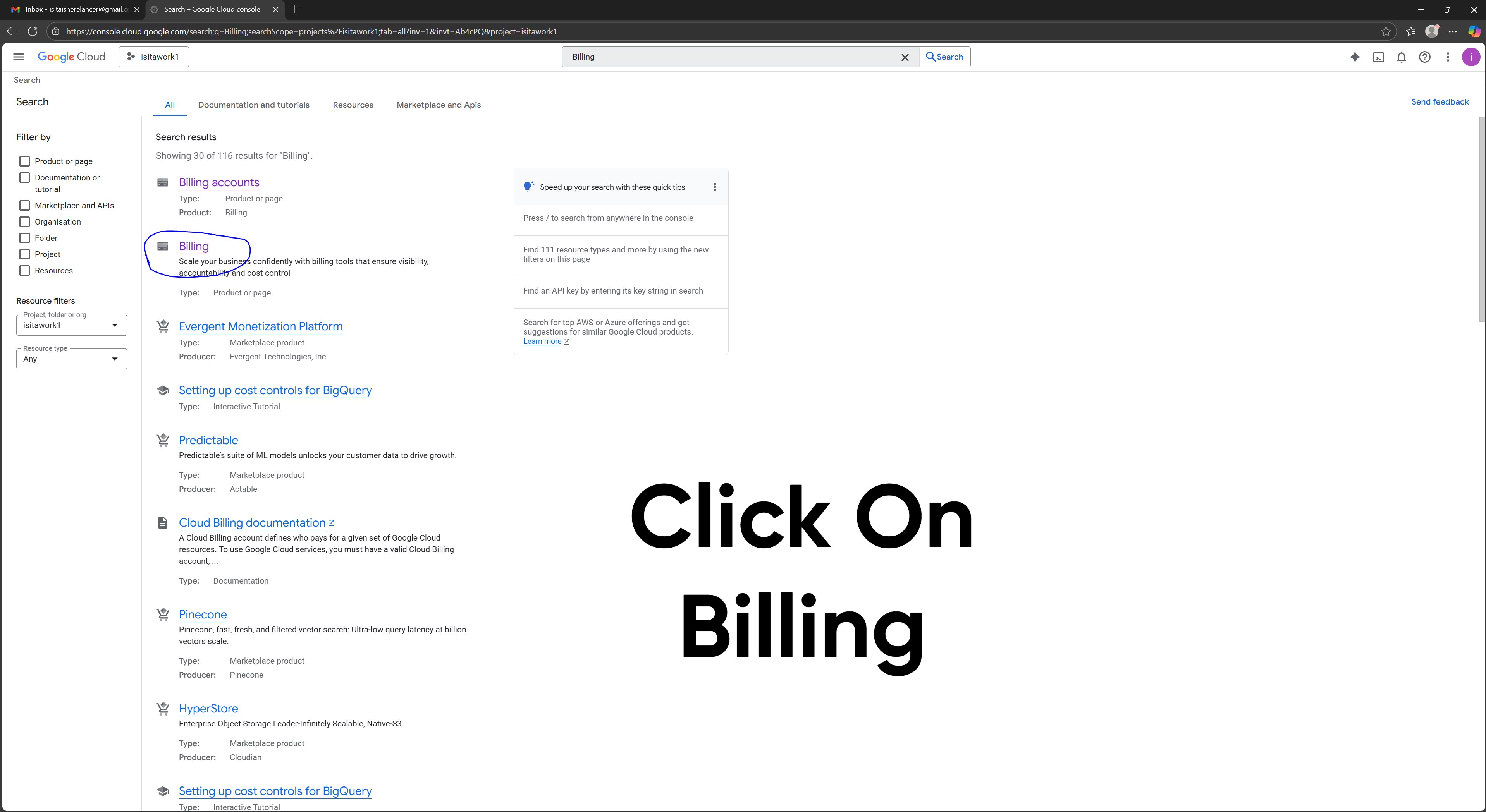
Step 1: After Logging into Gmail go to your Google Cloud and Search for Billing and Click Billing
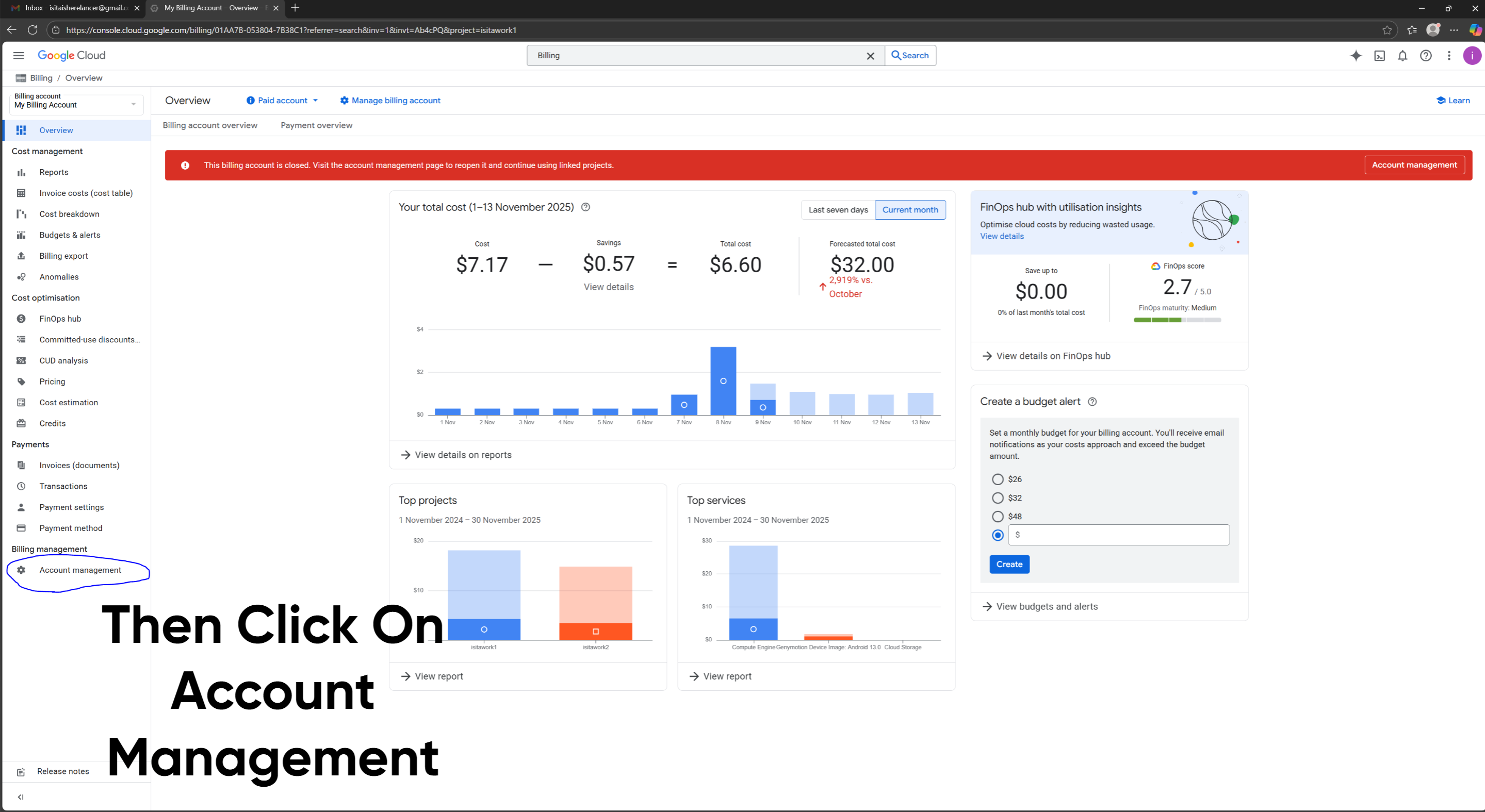
Then Click On Account Management
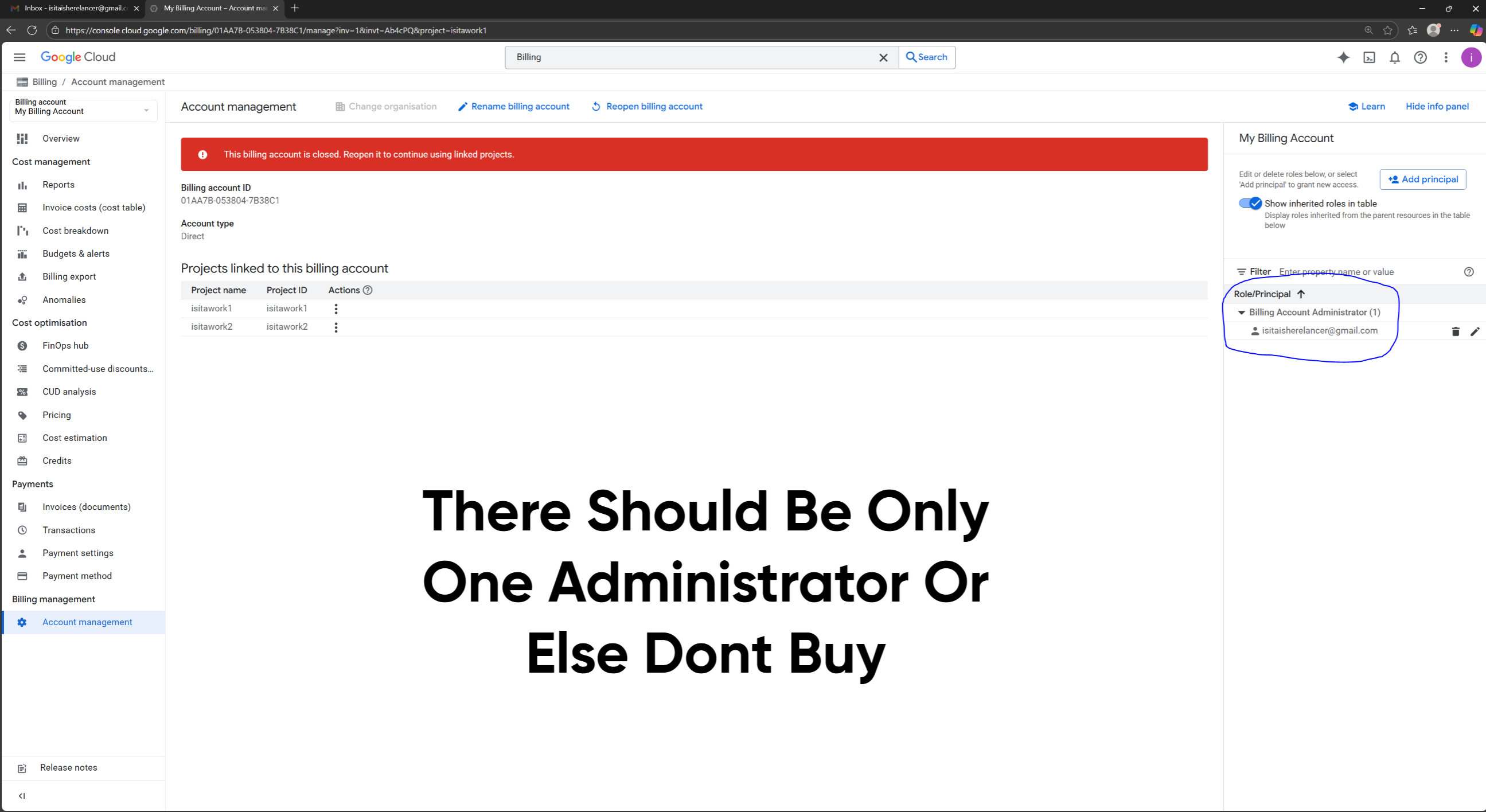
Then In the Corner Check if [email protected] (Your Gmail) is the Only Billing Account Administrator or Not. There must be only 1 Administrator and not 2 (Very Important)
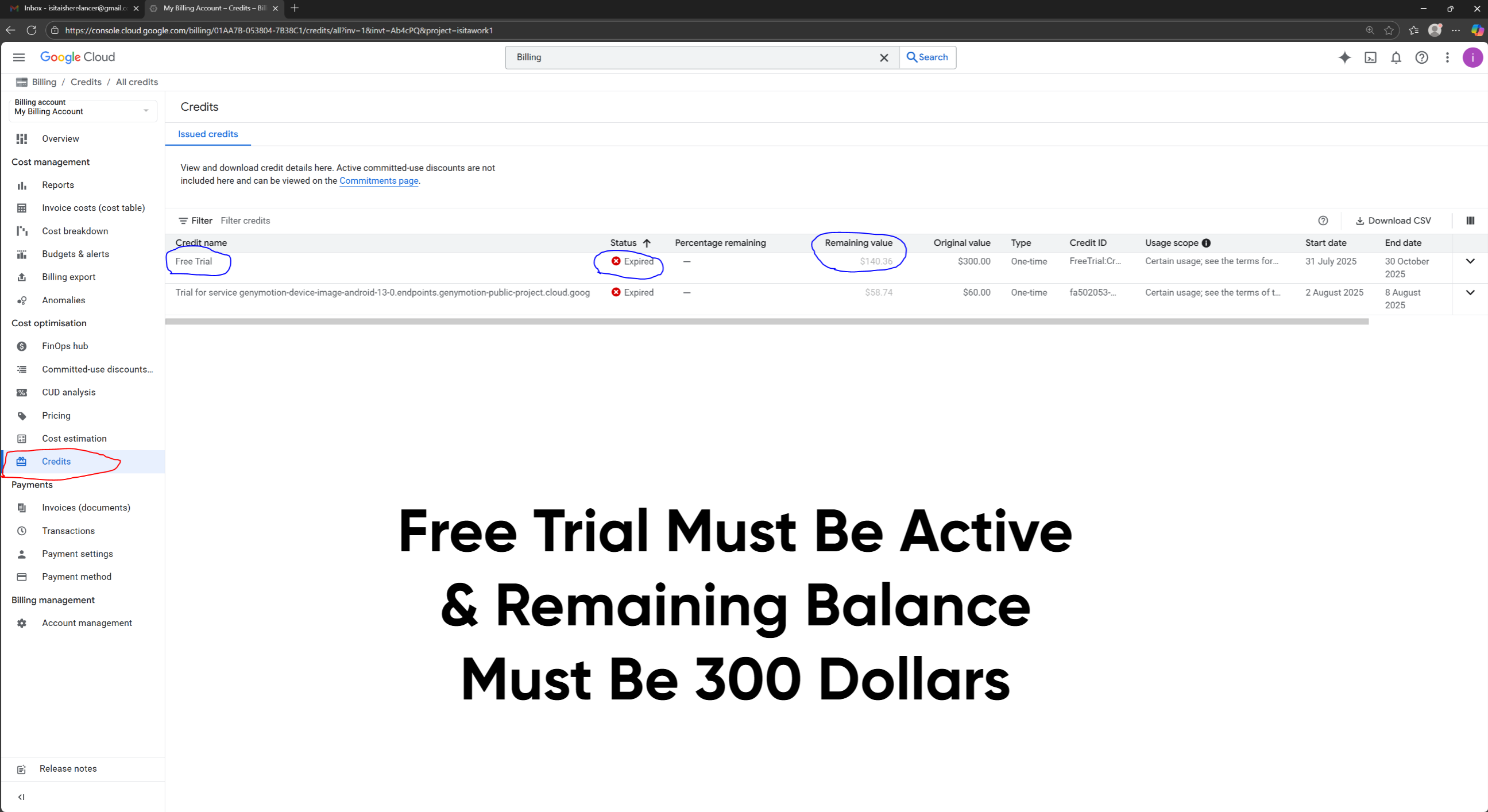
Then go to Credits and Check Few Things: Free Trial Status must be Active and not Expired my account recently got expired after Using 3 months and Remaining Value Should Be 300 Dollars
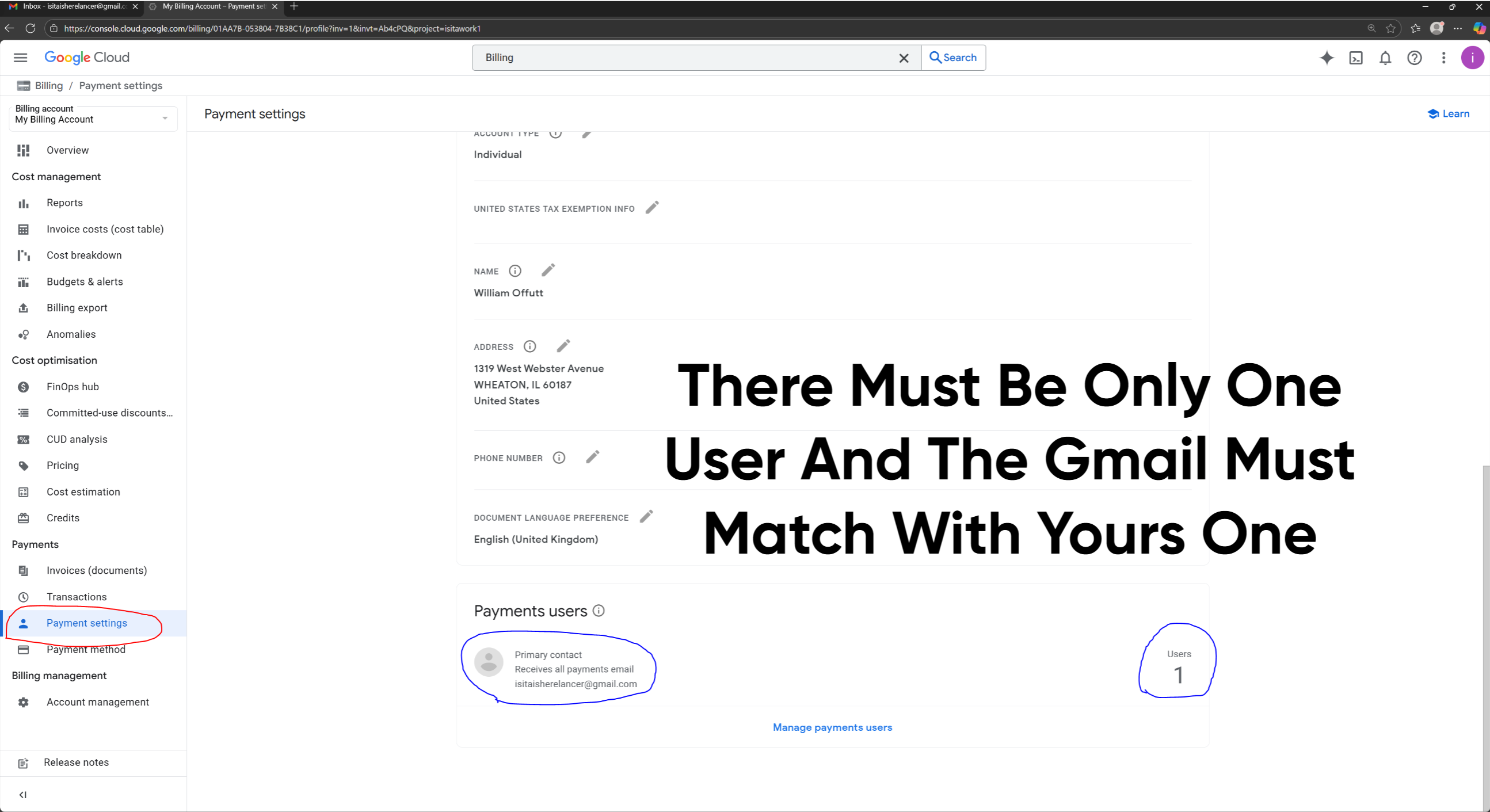
Then Go in Payment Setting and check 2 things: There must be only 1 User and That should be your Gmail and also match it properly even a Single Word or Alphabet Matters
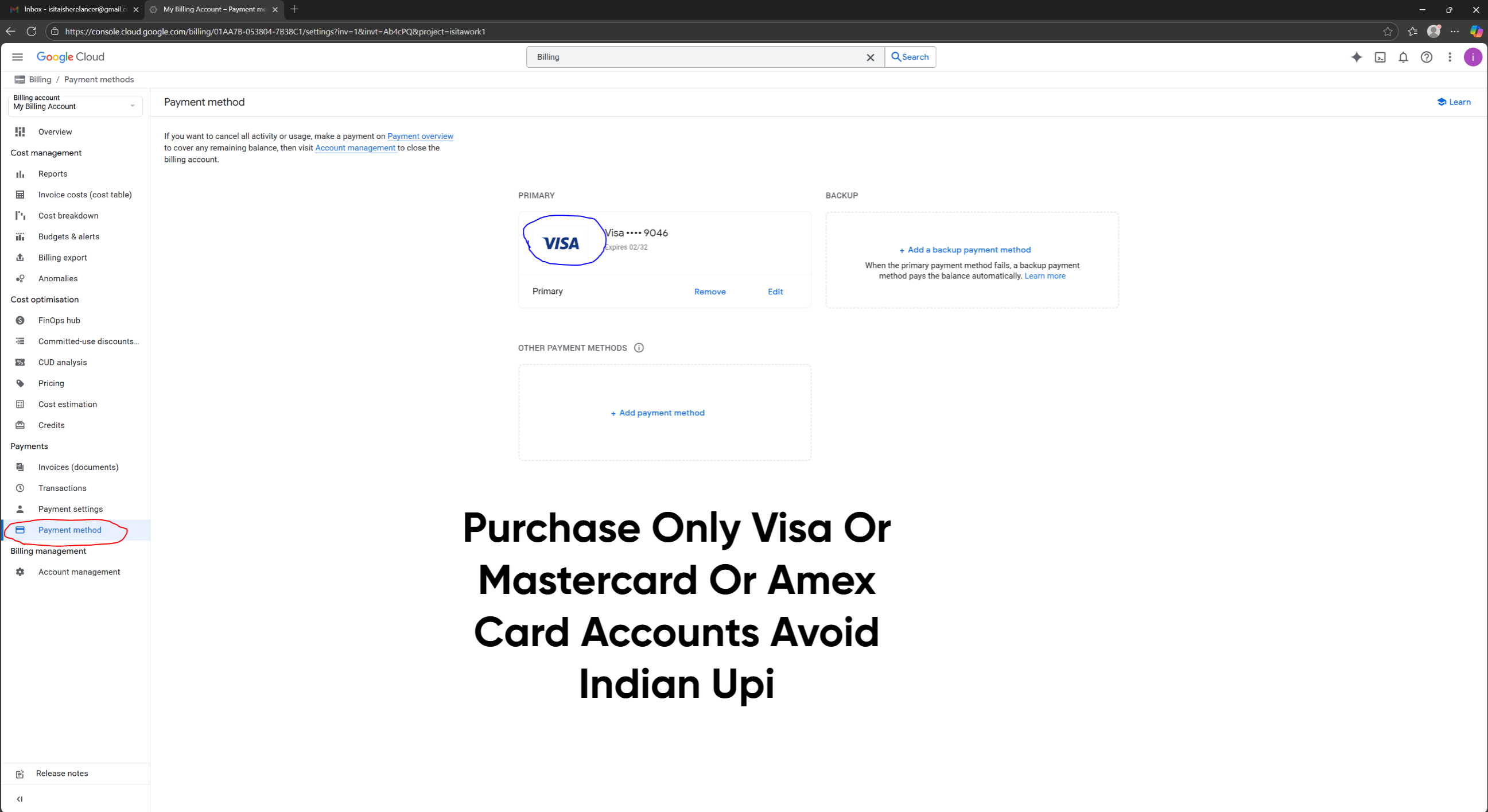
Purchase Only Visa, Mastercard or American Express Card Made Account and Avoid Buying Indian UPI Account
We are Almost 95 Percent Done and here comes the Magical Part where we have to delete The Project which in your Case will be My First Project
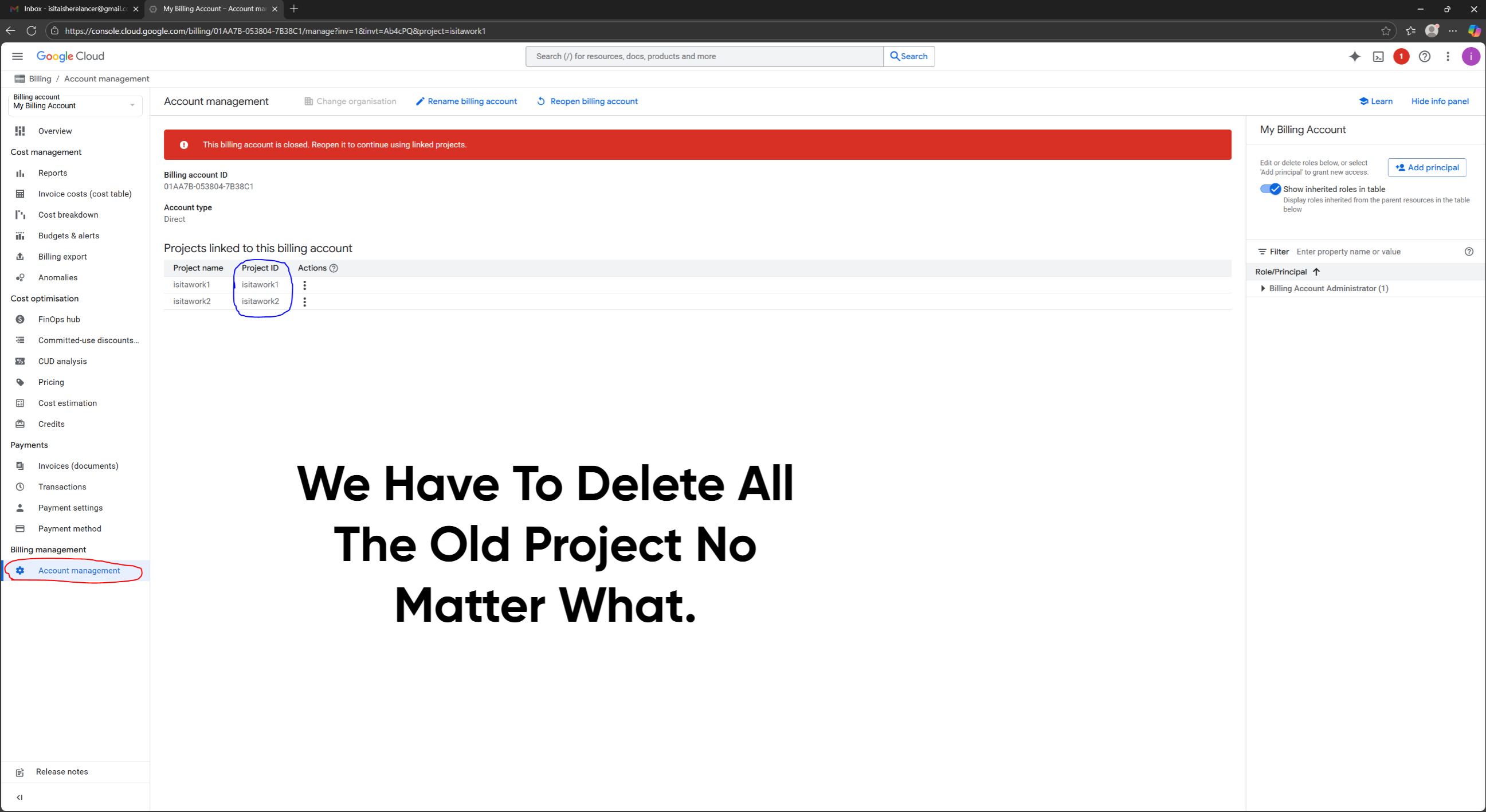
So to delete any project you must Copy the Project ID which in my case is isitawork1 and isitawork2 and in your case it can be like myfirstproject15qagf42 So to delete your project simply click on Activate Cloud Shell FIrst
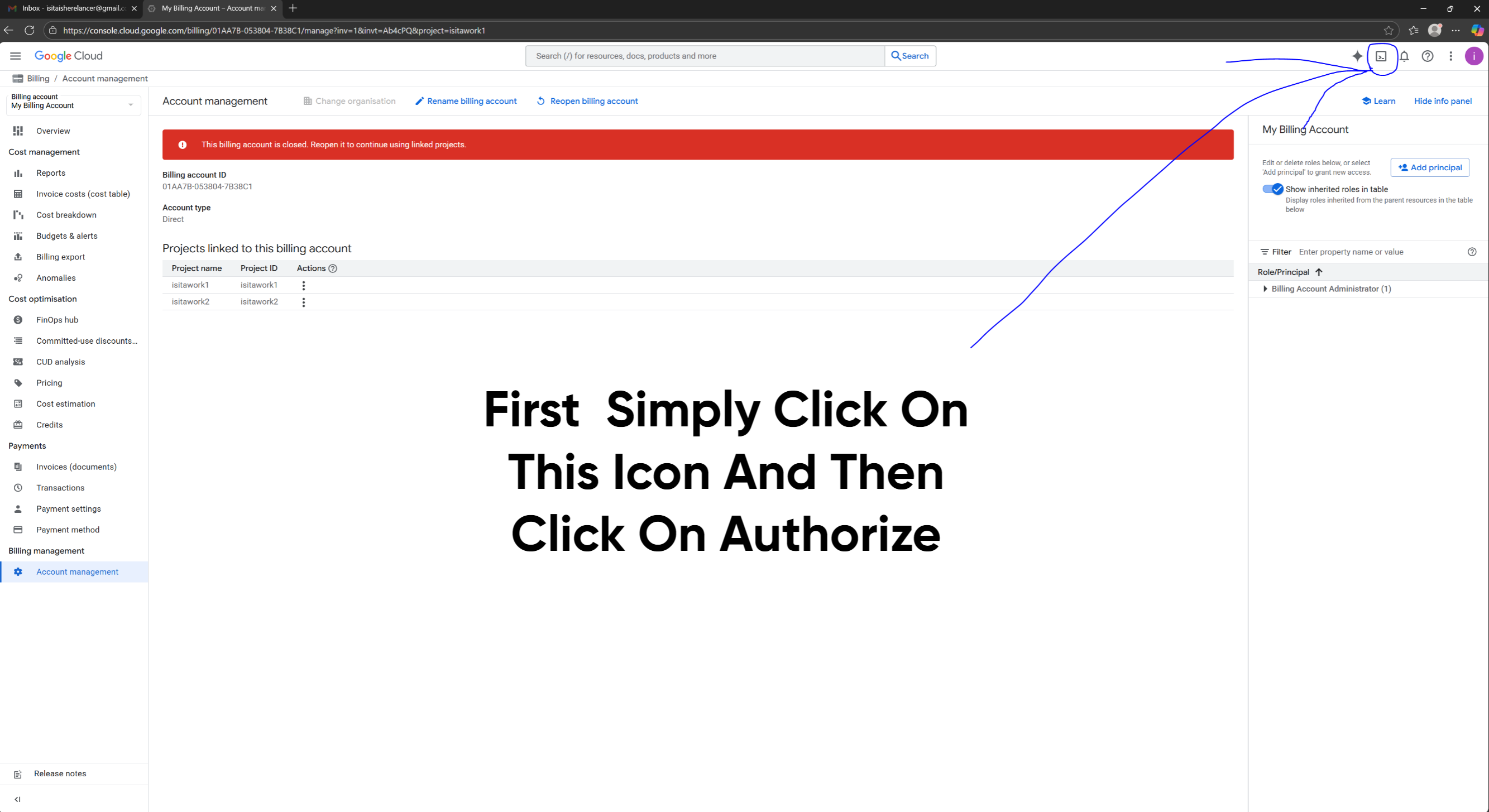
Then after clicking on Authorization wait 10 to 15 seconds
And Then Copy this Code and paste in there and press Enter and it will ask, Are you sure you want to delete your Project then Type Y and press Enter
The project Deletion code: gcloud projects delete isitawork1
Replace your Project ID with isitawork1 For Example if your Project id is myfirstproject15qagf42 then your code will be: gcloud projects delete myfirstproject15qagf42
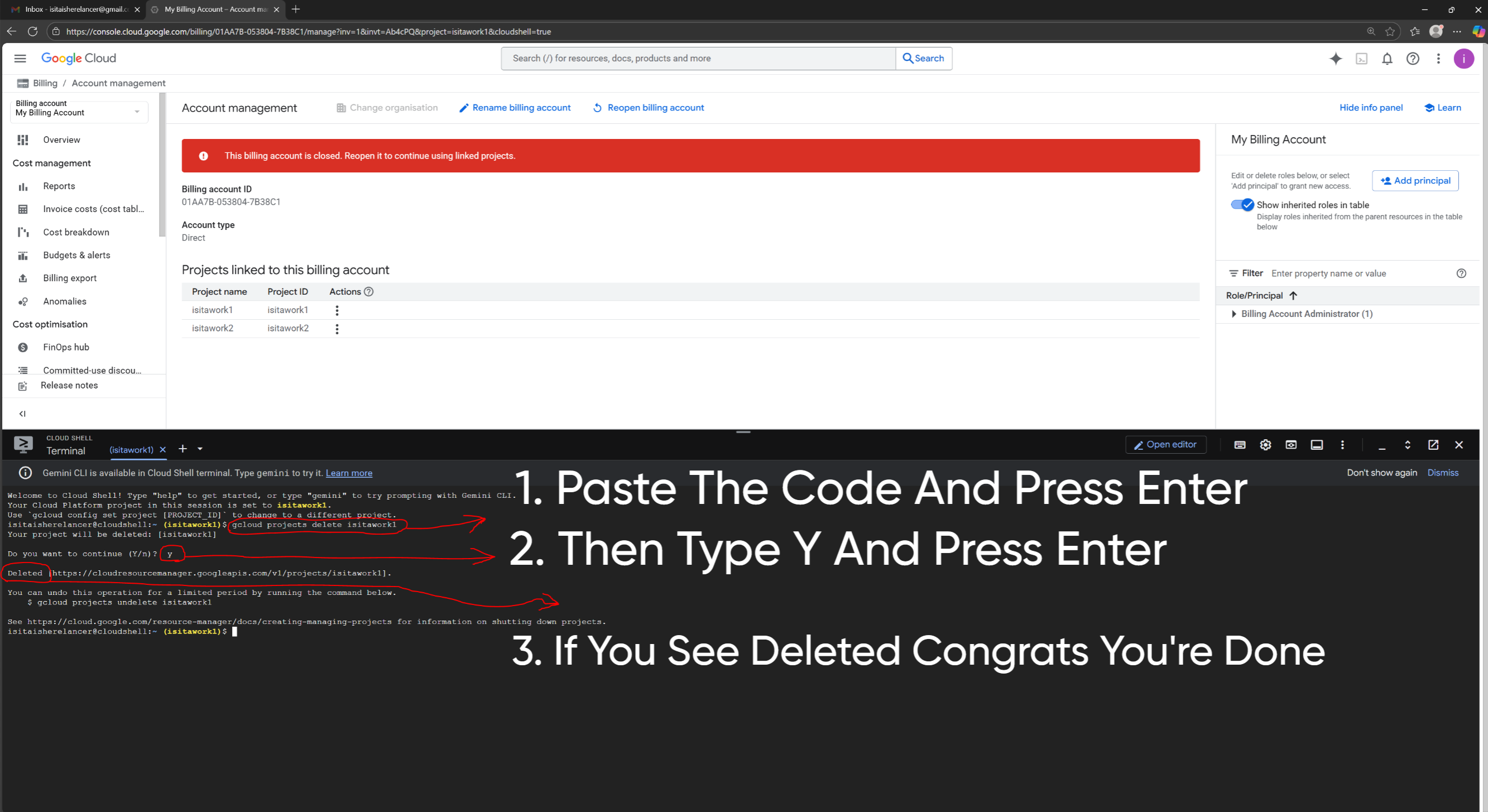
So When you See Deleted you are 100 percent done. Now you just create a new project and Do Whatever you want to do its not gonna be Disabled before 90 Days.
NOTE FOR ADMIN & MODERATOR: Please Note this is a Tutorial for People for Our Community So that People don't get Scammed by Cloud Sellers and also Note I am not a seller and haven't Provided any of my Social Media Handle and I don't want anyone to Inbox Me here in BHW.
Last Words: I hope all the people who saw this post may God Bless you and While Purchasing a GCP Account if Anything doesn't match with my Shown Tutorial then Please don't Buy that Account And Please Don't Inbox me because everything is here and I am not a GCP Seller
I will show you everything you need to know. After going through my BHW Tutorial your every single GCP Account will run for Atleast 90 days its My Guarantee. And one more thing My Main goal is to help GCP Buyers at Any Cost with This Tutorial.
I Can't Give a Video Tutorial Because BHW Thinks I am selling GCP Myself which is not True and I am also not sharing any of my Social Handle here and Also don't inbox me Please.
First of All What Type of Google Cloud You Should Buy & What are the Criterias. The Criterias are given below and keep in mind Even if a single Criteria Doesn't matches Dont Buy That Account.
The Criterias:
1.Gmail Based Account and not Domain Account.
2.Created by visa or Mastercard or American Express.
3.Atleast 12 hours Warrenty.
4.One Gmail is added in Billing Administrator and Payment Profile.
5.Delete OlD Project while you are on Escrow with the Seller.
Now I will Take you Through a Full Guide to Secure your GCP Properly Don't Miss Any of the Step or Your Account is Gone
Suppose Your Account Details are:
Gmail: [email protected]
Password: Isista2025eraf
Step 1: After Logging into Gmail go to your Google Cloud and Search for Billing and Click Billing
Then Click On Account Management
Then In the Corner Check if [email protected] (Your Gmail) is the Only Billing Account Administrator or Not. There must be only 1 Administrator and not 2 (Very Important)
Then go to Credits and Check Few Things: Free Trial Status must be Active and not Expired my account recently got expired after Using 3 months and Remaining Value Should Be 300 Dollars
Then Go in Payment Setting and check 2 things: There must be only 1 User and That should be your Gmail and also match it properly even a Single Word or Alphabet Matters
Purchase Only Visa, Mastercard or American Express Card Made Account and Avoid Buying Indian UPI Account
We are Almost 95 Percent Done and here comes the Magical Part where we have to delete The Project which in your Case will be My First Project
So to delete any project you must Copy the Project ID which in my case is isitawork1 and isitawork2 and in your case it can be like myfirstproject15qagf42 So to delete your project simply click on Activate Cloud Shell FIrst
Then after clicking on Authorization wait 10 to 15 seconds
And Then Copy this Code and paste in there and press Enter and it will ask, Are you sure you want to delete your Project then Type Y and press Enter
The project Deletion code: gcloud projects delete isitawork1
Replace your Project ID with isitawork1 For Example if your Project id is myfirstproject15qagf42 then your code will be: gcloud projects delete myfirstproject15qagf42
So When you See Deleted you are 100 percent done. Now you just create a new project and Do Whatever you want to do its not gonna be Disabled before 90 Days.
NOTE FOR ADMIN & MODERATOR: Please Note this is a Tutorial for People for Our Community So that People don't get Scammed by Cloud Sellers and also Note I am not a seller and haven't Provided any of my Social Media Handle and I don't want anyone to Inbox Me here in BHW.
Last Words: I hope all the people who saw this post may God Bless you and While Purchasing a GCP Account if Anything doesn't match with my Shown Tutorial then Please don't Buy that Account And Please Don't Inbox me because everything is here and I am not a GCP Seller


