

l33t_soup
Junior Member
- Nov 7, 2008
- 166
- 101
So you want your sitelinks to appear on Google?

From a study by PPC Hero:
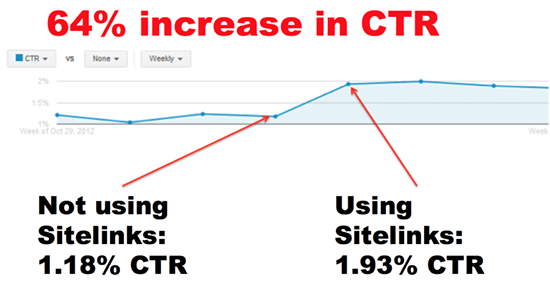
Those good looking links under your main website link are extremely powerful. Creating them is easy, believe it or not. For WordPress it's a click of a few buttons, but if you want to read about the power of sitelinks, I recommend this blog post. (I am not affiliated in any way)
Structured data is what gives Google the information about your website and inner pages, and it provides it in such a way that Google represents your links better for people who are searching.
Most people will know it as rich snippets and schema. These rich snippets are usually seen when you are looking for recipes or instructions - but it will work for general content & sitelinks too. You may also have seen search boxes, ratings/reviews (stars ratings under the listing).
So let's get started...
The first thing you need on your site is a schema plugin, if you're using a CMS like WordPress etc.
These are great plugins for schema:

Hope this helps!
PS: Need schema for local listings? Check here on Google: https://developers.google.com/search/docs/data-types/local-business
From a study by PPC Hero:
Those good looking links under your main website link are extremely powerful. Creating them is easy, believe it or not. For WordPress it's a click of a few buttons, but if you want to read about the power of sitelinks, I recommend this blog post. (I am not affiliated in any way)
Structured data is what gives Google the information about your website and inner pages, and it provides it in such a way that Google represents your links better for people who are searching.
Most people will know it as rich snippets and schema. These rich snippets are usually seen when you are looking for recipes or instructions - but it will work for general content & sitelinks too. You may also have seen search boxes, ratings/reviews (stars ratings under the listing).
So let's get started...
The first thing you need on your site is a schema plugin, if you're using a CMS like WordPress etc.
These are great plugins for schema:
- WP SEO Structured Data Schema
- YOAST (read first & then install)
- Schema and Structured Data for WP & AMP (this one is paid, and worth it if you are looking to make this a full on strategy, with a choice of 33 schema types)
Hope this helps!
PS: Need schema for local listings? Check here on Google: https://developers.google.com/search/docs/data-types/local-business
