

Nihilism
Senior Member
- Dec 19, 2015
- 893
- 1,007
It seems like, to the dismay of many marketers across the globe, Google will have completely discontinued Universal Analytics (GA3) in favor of GA4 by mid 2023. Google stated in a blog that they will no longer track new hits on GA3 properties starting July 1, 2023.
In this article, we'll give you the pros and cons of GA4, and some free and paid alternatives in case these changes don't work for you.
Many users have complained that frequently used features are hidden within the user interface, making it difficult to discover, and providing no benefit.
Users with admin permissions will be able to customize the Analytics interface, according to Google. That means users will be able to add extra panels on the left side of the screen that would expand specific dimensions and metrics, allowing them to personalize what their reports look like. For example, they showed how a user acquisition report might be customized with different measurements in the example presented.
However, these reports are not simple to set up like the old Google Analytics. This is why many users are upset with the platform.
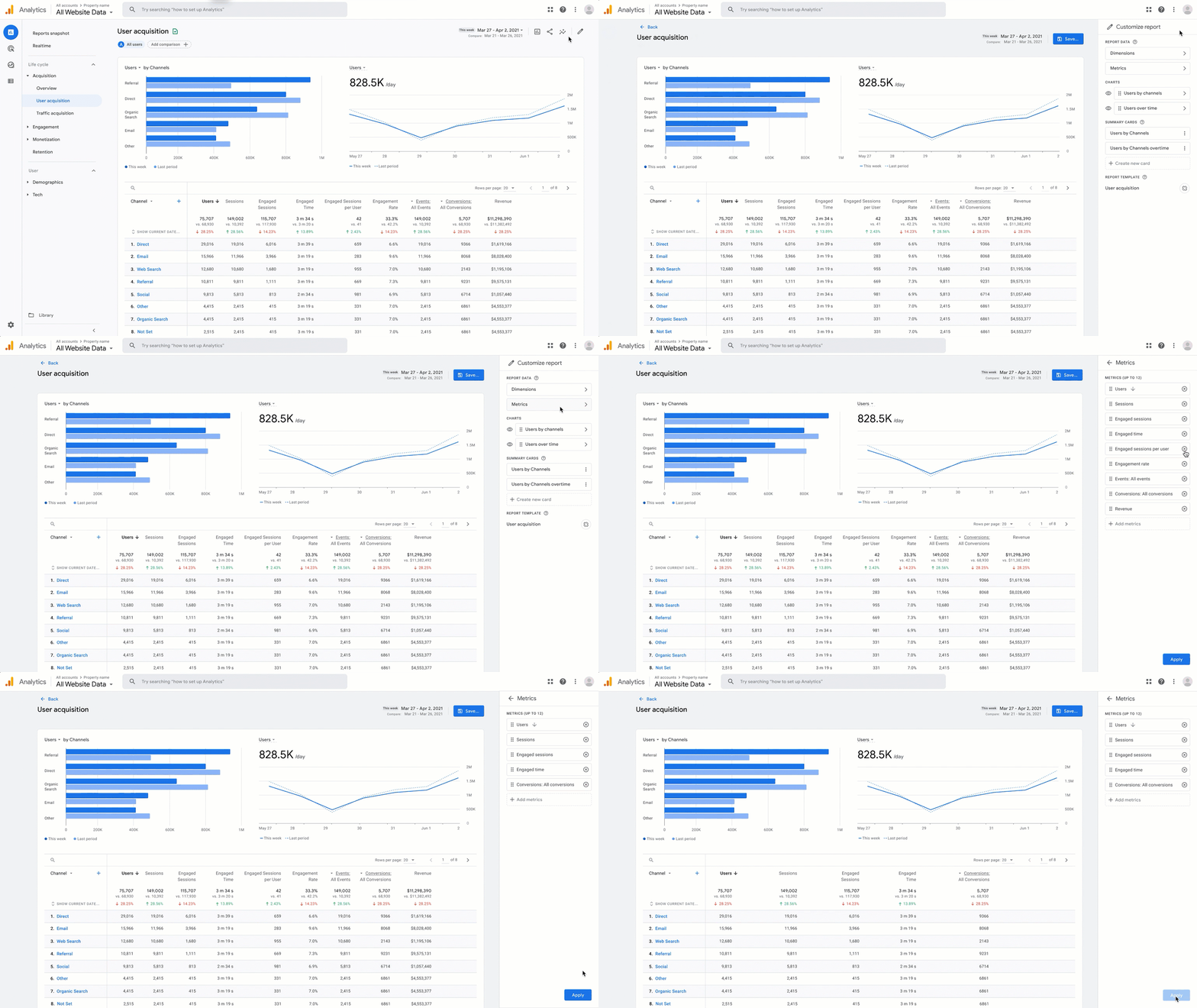
The intention of this update was to make it easier for users to discover the insights they require, but it requires tedious and obfuscated configuration, which is why many people are angry about the switch from GA3.
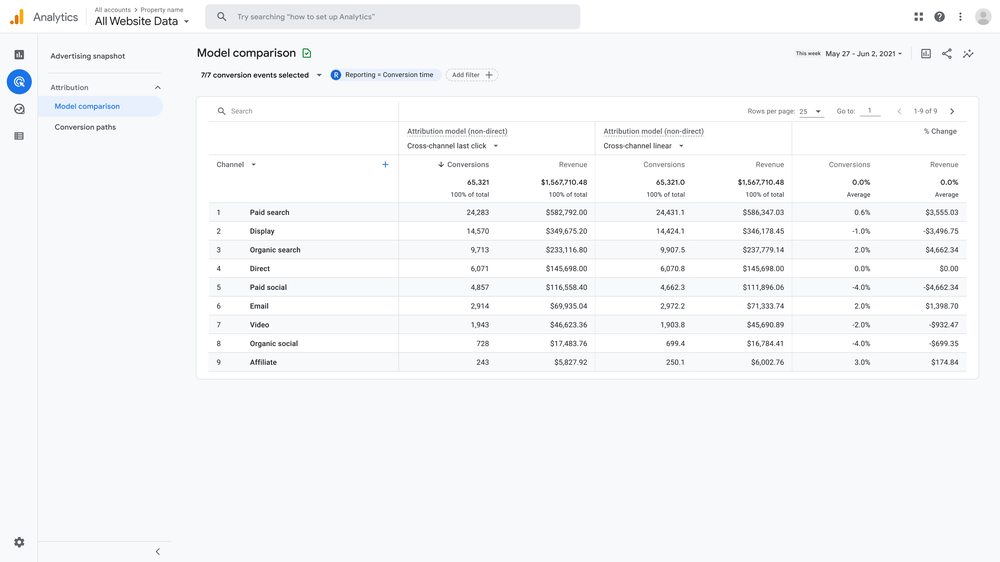
There will be a new report that is similar to the one that Universal Analytics users are familiar with. The new report will allow you to see how people move between different channels and how valuable each channel is by visualizing conversions. This addition to GA3 is cool but definitely not worth the amount of changes Google has put marketers through for such a feature.
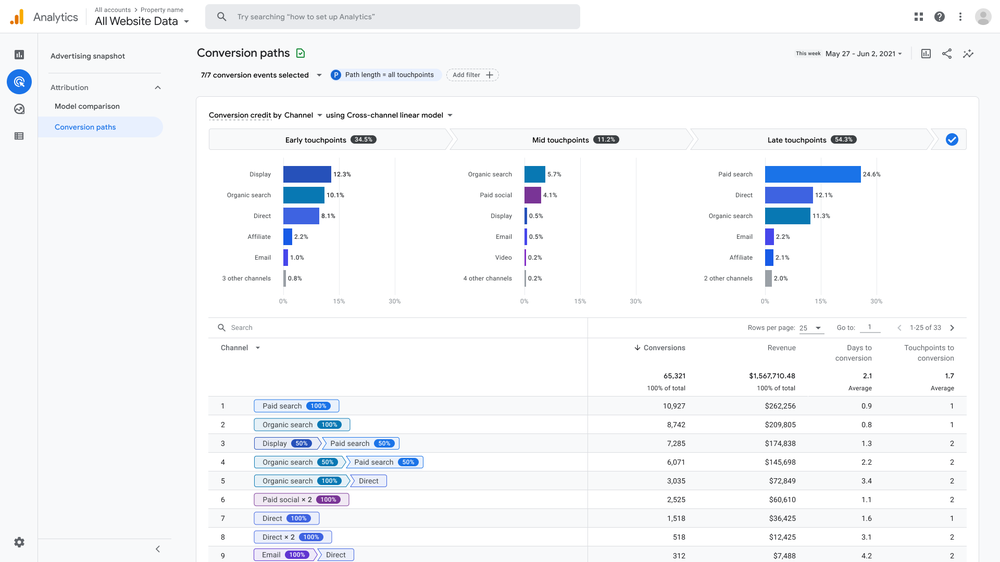
The Model Comparison report lets marketers compare different attribution models to see how they impact marketing channels.
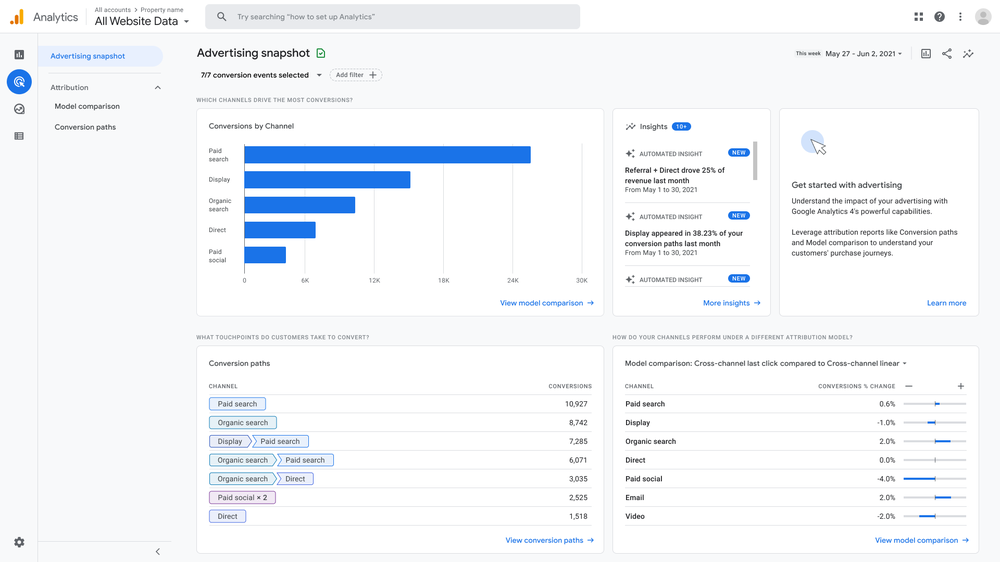
The new report includes a dashboard which shows how people convert using different channels, and how different channels work together. The report gives you a lot of information quickly, but it doesn't have as much detail as advertisers are used to from Universal Analytics.
Google Analytics has and will continue to be one of the best free analytics tools for marketers, however, if you don't like the new Google Analytics or its features, there are other tools out there that might work better for you. We'll take a look at some of our favorites — both paid and free.
Here are some versatile alternatives to Google Analytics.
SEMRush Traffic Analytics helps you understand how much traffic a website has, as well as other websites in the same market or niche, and even help you plan your marketing and advertising strategy.
Traffic analytics also helps you see where traffic to a website comes from, how the audience interacts with the website, what devices visitors prefer to use, and how the audiences of multiple websites overlap.
Even though SEMRush plans start at $100/mo, you can get a free trial or find a group-buy to share with.
Features
You can get a deeper understanding of your business' performance by looking at detailed analysis of your numbers. You can also create custom management reports to share your business results in a way that is easy to understand. With just a few clicks, you can put together reports with text, charts, tables, and financial statements. You can also automate the process of sending reports on a schedule that works for you.
Key Features
Pros
Visualize how people behave on your website. This will help you understand what they want, what they care about, and what they do on your site. By watching recordings of real people on your website, you can see what people see and eliminate guesswork about why people behave the way they do on your website.
Some HotJar Features
Cloudflare Analytics Tools
They offer two solutions: Cloud hosting and On-premise hosting. Cloud hosting is easy because you don't have to install anything. On-Premise hosting is free and open source, and you can install it on your own server.
That way, you have more control over what happens. This tool provides you with insights about your website using features like heatmaps, sessions recordings, goals, form analytics, visitor profiles, ecommerce and funnels.
In addition, Clicky offers heatmaps and on-site analytics to help you understand how people are using your website. Finally, Clicky also offers uptime monitoring to ensure that your website is always online and accessible to your customers.
You can learn a lot about what people do on your website by using heatmaps, session replay, conversion funnels, and form analytics. You can also use feedback campaigns to get more information about what people do on your website.

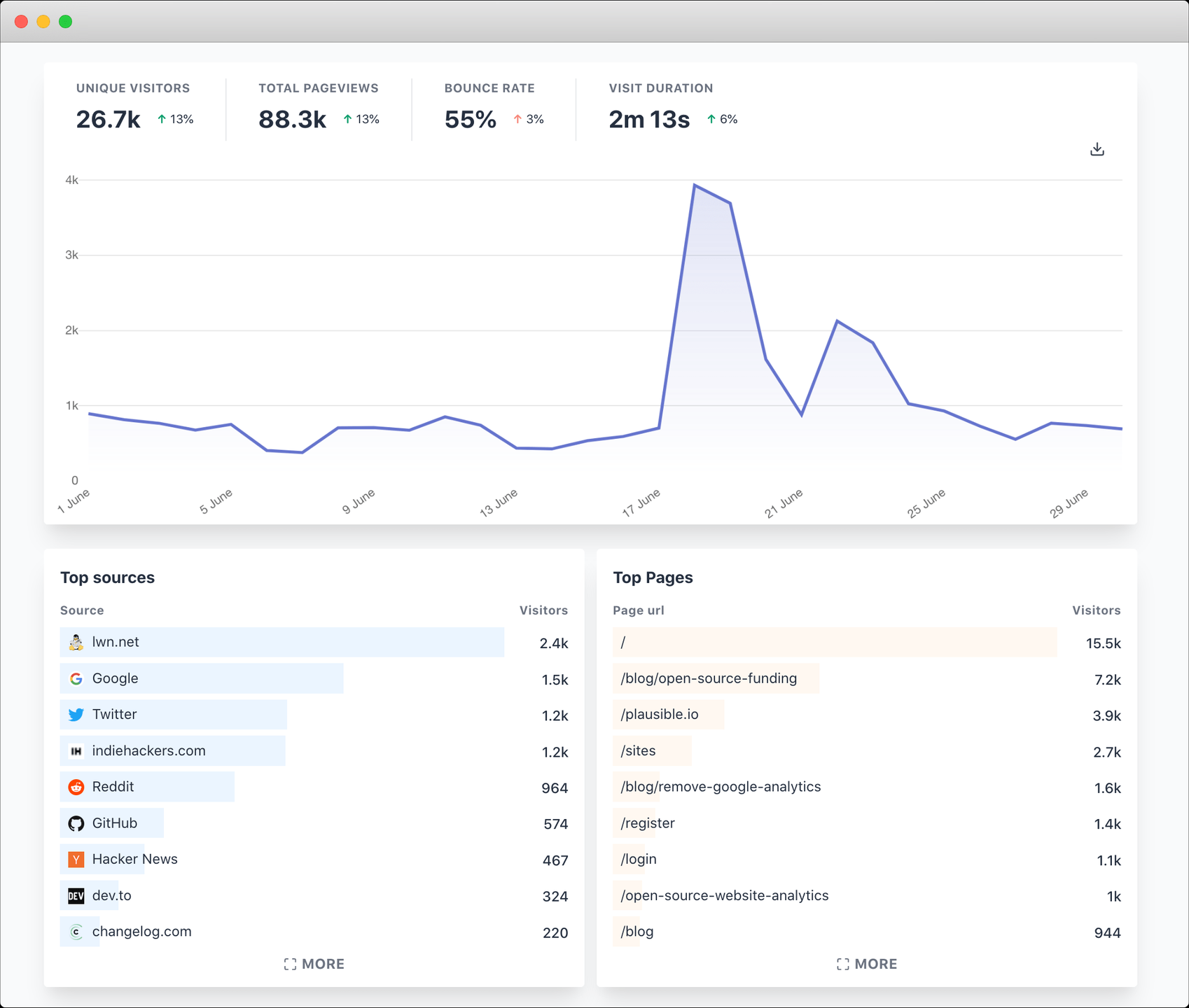
Web analytics is the process of measuring and analyzing how people use a website. Website owners use this information to figure out what they're doing well and what they can do better on their website.
Your site data will never be shared with or sold to any third-party companies. It will never be monetized, mined, or harvested for personal and behavioral trends. You can get more in-depth insights by filtering your dashboard by any metric you want.
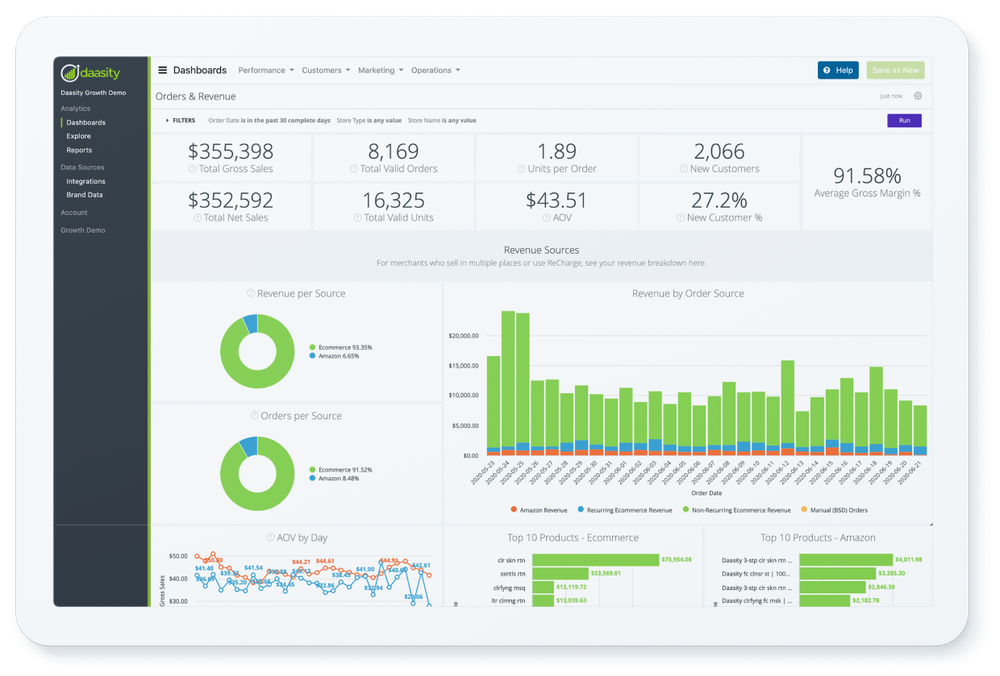
Daasity lets you make money by reducing your costs and increasing your revenue. We have built in dashboards to help you do this quickly and easily, however it's targeted more towards eCommerce users.
With Daasity, you can see how your business is doing across all channels and data sources in one view. Daasity was built by leaders in the direct-to-consumer space, so we know the unique needs of your eCommerce business. Daasity was designed just for you — it feels like it was made just for you.
While itself an iteration of the revered GA3, Google Analytics 4 does come with some changes and limitations that may severely impact the way marketers track interactions throughout their website.Google Analytics 4 is our next-generation measurement solution, and it’s replacing Universal Analytics. On July 1, 2023, standard Universal Analytics properties will stop processing new hits. If you still rely on Universal Analytics, we recommend that you prepare to use Google Analytics 4 going forward.
In this article, we'll give you the pros and cons of GA4, and some free and paid alternatives in case these changes don't work for you.
Why Marketers Already Hate GA4
GA4 is Difficult to Use
Some people find GA4 difficult to use because it is not very intuitive. They think that it is designed for bigger businesses, not smaller ones. It was surprising to see so many people say that GA4 sucks on Twitter because of the user interface, even looking up the topic on BlackHatWorld will yield results of users venting their frustrations.Many users have complained that frequently used features are hidden within the user interface, making it difficult to discover, and providing no benefit.
Confusing UI & Segmentation
Customizing your Google Analytics dashboard might also be difficult. Google Analytics is built to work "out of the box," and many companies stick with its stock layouts and parameters. But with the new updates, if you want to use dashboards you were used to with GA3, be prepared to invest time learning how to set it up.Why Some People Like GA4
More Flexible Reporting than GA3Users with admin permissions will be able to customize the Analytics interface, according to Google. That means users will be able to add extra panels on the left side of the screen that would expand specific dimensions and metrics, allowing them to personalize what their reports look like. For example, they showed how a user acquisition report might be customized with different measurements in the example presented.
However, these reports are not simple to set up like the old Google Analytics. This is why many users are upset with the platform.
The intention of this update was to make it easier for users to discover the insights they require, but it requires tedious and obfuscated configuration, which is why many people are angry about the switch from GA3.
Data-Driven Attribution Modeling
Google Analytics 4 will soon have data-driven attribution available. There will be two new reports: the conversion paths report and the model comparison report.There will be a new report that is similar to the one that Universal Analytics users are familiar with. The new report will allow you to see how people move between different channels and how valuable each channel is by visualizing conversions. This addition to GA3 is cool but definitely not worth the amount of changes Google has put marketers through for such a feature.
The Model Comparison report lets marketers compare different attribution models to see how they impact marketing channels.
The Advertising Snapshot
It was announced at the Google Marketing Live Stream that a new Advertising Workspace would be introduced, and today Google has given more information about what the reporting suite will look like.
The new report includes a dashboard which shows how people convert using different channels, and how different channels work together. The report gives you a lot of information quickly, but it doesn't have as much detail as advertisers are used to from Universal Analytics.
Google Analytics has and will continue to be one of the best free analytics tools for marketers, however, if you don't like the new Google Analytics or its features, there are other tools out there that might work better for you. We'll take a look at some of our favorites — both paid and free.
Here are some versatile alternatives to Google Analytics.
SEMRush Traffic Analytics
SEMRush is one of the most popular SEO tools for a very long time. They offer great tools for SEO managers and give you great data to work with, including SEMRush Traffic Analysis.SEMRush Traffic Analytics helps you understand how much traffic a website has, as well as other websites in the same market or niche, and even help you plan your marketing and advertising strategy.
Traffic analytics also helps you see where traffic to a website comes from, how the audience interacts with the website, what devices visitors prefer to use, and how the audiences of multiple websites overlap.
Even though SEMRush plans start at $100/mo, you can get a free trial or find a group-buy to share with.
Features
- Estimates of total traffic to any website
- Analyze visits, unique visitors, pages/visit, average visit duration, and bounce rate analysis
- View traffic sources
- Geolocation-based web traffic analysis
- Top “destination sites” that users visit directly through hyperlinks on the analyzed domain
- Historical data
- Mobile / desktop traffic
- Audiences’ overlaps
- Comparison for up to 5 domains
Fathom
Fathom is a Google Analytics alternative that protects your visitors' privacy while still providing data. They make website analytics just as easy to use as GA3, so they're easy to use and respect privacy laws. This allows you to track meaningful analytics for your website.You can get a deeper understanding of your business' performance by looking at detailed analysis of your numbers. You can also create custom management reports to share your business results in a way that is easy to understand. With just a few clicks, you can put together reports with text, charts, tables, and financial statements. You can also automate the process of sending reports on a schedule that works for you.
Key Features
- Ad Hoc Reports
- Ad hoc Analysis
- Budgeting & Forecasting
- Consolidation / Roll-Up
- Dashboard
- Key Performance Indicators
- Scorecarding
Simple Analytics
Almost all websites that track web traffic use Google Analytics, which is free but requires you to give away your data to Google. Simple Analytics is a solution that helps protect the privacy of people who visit your website by making it easy for you to get insights about your websites in a simple and easy-to-understand way, just like Google does.Pros
- Simple & intuitive UI
- Full control over data
- Tracks emails and tweets
- Bypasses ad-blockers
- Free Trial
- Not free, starts $19/mo
- Less tools than SEMRush and GA
- Events tracking in beta
HotJar
Track how satisfied your customers are with your product by watching session recordings of how people are using it. This will help you understand what they like and don't like about it, as well as where people get stuck. Hotjar works out of the box on most popular platforms.Visualize how people behave on your website. This will help you understand what they want, what they care about, and what they do on your site. By watching recordings of real people on your website, you can see what people see and eliminate guesswork about why people behave the way they do on your website.
Some HotJar Features
- Behavioral Analytics
- Surveys & Feedback
- Behavioral Mapping
- Eye Tracking
- Optimization Tools
- Session Recording
- Surveys
- User Experience Analysis
- Form Analytics
- Heatmaps
- Mouse Tracking
- Customer Journey Mapping
- Website Analytics
- A/B Testing
- Dynamic Maps
- Element Analytics
- Action Management
CloudFlare Web Analytics
Cloudflare offers accurate web analytics without invading your visitors' privacy. This is important for website owners because it allows you to understand how people are using your site and make changes to improve their experience. And the best part is that it's free! Other web analytics providers require you to give up some information about your visitors in order to use their services.Cloudflare Analytics Tools
- Multiple Site Management
- Pageview Tracking
- Referral Source Tracking
Heap
Heap collects data from your consumers in the same manner as Google Analytics does. It tells you what visitors click on, where they go, what they do, whether you're looking or not. Heap puts a focus on ways to improve your digital experience that have the greatest potential impact on your business, such as removing friction, delighting customers, and increasing revenue.- Gives lots of useful insights
- Provides analytics
- Gives suggestions and improvements
- Free plan available
- None that we can think of, as a free tool, you have nothing to lose by trying this.
Gauges
Gauges is a web analytics solution that includes features such as campaign management, conversion tracking, goal recording, keyword monitoring, multisite management, pageview tracking, referral source monitoring, site search tracking, time on site tracking, and user interaction measurement. Product pricing starts at $6.00/month. This real-time analytics software claims to be simple to use and comprehend.Matomo
Matomo is the most popular open-source analytics platform. It has over 1.4 million websites using it to track their traffic and analyze data. Matomo values privacy protection and protects your data by not sampling any of it.They offer two solutions: Cloud hosting and On-premise hosting. Cloud hosting is easy because you don't have to install anything. On-Premise hosting is free and open source, and you can install it on your own server.
That way, you have more control over what happens. This tool provides you with insights about your website using features like heatmaps, sessions recordings, goals, form analytics, visitor profiles, ecommerce and funnels.
Clicky
Clicky provides detailed information about website visitors in real time. You can see exactly which people are visiting your site and what they are doing on it. This information is accurate and reliable, because it is not based on bots or spam.In addition, Clicky offers heatmaps and on-site analytics to help you understand how people are using your website. Finally, Clicky also offers uptime monitoring to ensure that your website is always online and accessible to your customers.
Key Features
- Campaign Management
- Conversion Tracking
- Goal Tracking
- Multiple Site Management
- Pageview Tracking
- Site Search Tracking
- Time on Site Tracking
- User Interaction Tracking
Mouseflow
Mouseflow is an app that helps you understand how people are using your website. You can use it to see if people are doing what you want them to do on your website and if they are having a good experience.You can learn a lot about what people do on your website by using heatmaps, session replay, conversion funnels, and form analytics. You can also use feedback campaigns to get more information about what people do on your website.
Key Features
- Automatic friction detection
- Click rage / click error detection
- Works out-of-the-box: heatmaps are built for all pages right after installation
- Custom tagging is available
- Free plan available
Mixpanel
Mixpanel analytics and engagement tracker helps companies see how their users are interacting with their website or app in real time. They can see which parts of their site or app are being used the most, and how likely users are to convert or retain. This information is just like what Google Analytics provides.
Key Features
- Audience Targeting
- Campaign Segmentation
- Funnel Analysis
- Split Testing
- Analytics
- Goal Tracking
- User Interaction Tracking
- Customer Journey Mapping Tools
- Behavioral Analytics
- Collaboration
- Customer Profiles
- Statistical Relevance Analysis
Plausible
Plausible Analytics provides you with all the website traffic information that you need. You can see all the important statistics on one page, without having to go through a lot of menus or create custom reports.
Web analytics is the process of measuring and analyzing how people use a website. Website owners use this information to figure out what they're doing well and what they can do better on their website.
Your site data will never be shared with or sold to any third-party companies. It will never be monetized, mined, or harvested for personal and behavioral trends. You can get more in-depth insights by filtering your dashboard by any metric you want.
Key Features
- Conversion Tracking
- Referral Source Tracking
- Multiple Site Management
- User Interaction Tracking
- Campaign Management
- Keyword Tracking
- Time on Site Tracking
- Pageview Tracking
- Site Search Tracking
- Goal Tracking
- Form Analytics
Daasity
With Daasity, you can get all the benefits of a data analysis platform with just one product. You only need to provide one data set and our platform will give you limitless potential for analysis. The onboarding process only takes 15-30 minutes and doesn't require any IT work or skills, it overall takes less effort than setting up GA4.
Daasity lets you make money by reducing your costs and increasing your revenue. We have built in dashboards to help you do this quickly and easily, however it's targeted more towards eCommerce users.
With Daasity, you can see how your business is doing across all channels and data sources in one view. Daasity was built by leaders in the direct-to-consumer space, so we know the unique needs of your eCommerce business. Daasity was designed just for you — it feels like it was made just for you.
Key Takeaways
If you are serious about web analytics, there are many different tools that can help you track your website and your competitors'. Find a tool that fits your needs, and don't be fooled by all the features - only choose the ones you will actually use.
Last edited by a moderator: