Hi there,
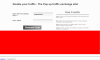
I am building this website popundernetwork (According to forum rules, I cannot enter the complete url) - I work on a small screen computer and when I check on the Form on the site homepage, I am not able to focus and click on either the two text input fields nor the submit button. However, when I zoom out the page and view it in smaller font, the focus and click happen seamlessly.
I tried the same on a big computer where the focus happened correctly, but when I zoom in and view it in larger font, I am unable to click into either the text fields or the submit button.
Could someone tell me what I should be doing to fix this?
I am building this website popundernetwork (According to forum rules, I cannot enter the complete url) - I work on a small screen computer and when I check on the Form on the site homepage, I am not able to focus and click on either the two text input fields nor the submit button. However, when I zoom out the page and view it in smaller font, the focus and click happen seamlessly.
I tried the same on a big computer where the focus happened correctly, but when I zoom in and view it in larger font, I am unable to click into either the text fields or the submit button.
Could someone tell me what I should be doing to fix this?