For http website, how did you do this?

roseczech

Regular Member
Joined
Mar 29, 2017
Messages
441
Reaction score
102
I am trying to figure out how websites with no SSL used but not showing unsecured lock.

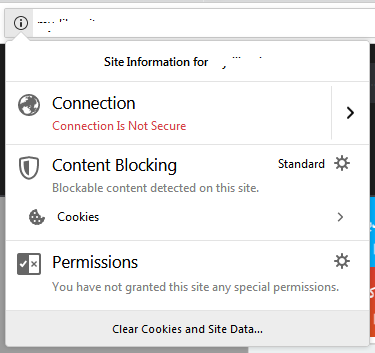
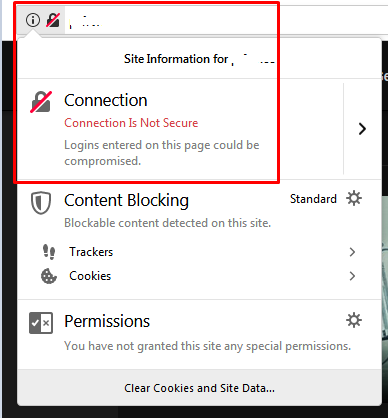
Both picture's does not have SSL on it so both are just http:// websites. But both picture shows different images. And both sites are being surf on firefox browsers. Take note this site's are different domains.

So I am trying to figure out here how domain-2 remove the unsecure lock like what is showing in domain-1? Please if anyone here can help me or have insight, feel free to comment. Thank you

Domain-1
Screenshot_3.png


Domain-2
Screenshot_2.png
 
Point DNS to Cloudflare, they will take care of the rest. You will get a ssl certificate, you can enable that all traffic gets redirected to httpS, site speeds up faster and is more secure. All of this for free!
 
I actually did this to one of my sites yesterday fairly painless to do. Sign up to Cloudflare use their free SSL service change settings in your current hostings DNS as required.

Use plugin Really Simple SSL to do the rest. Tip, @Festinger has the premium version in his vault works wonders.

or.......

pay someone on fiverr to do this all for you for around $10.
 
Point DNS to Cloudflare, they will take care of the rest. You will get a ssl certificate, you can enable that all traffic gets redirected to httpS, site speeds up faster and is more secure. All of this for free!
I actually did this to one of my sites yesterday fairly painless to do. Sign up to Cloudflare use their free SSL service change settings in your current hostings DNS as required.

Use plugin Really Simple SSL to do the rest. Tip, @Festinger has the premium version in his vault works wonders.

or.......

pay someone on fiverr to do this all for you for around $10.

If i will apply the free SSL service of cloudflare, does the unsecured lock will be gone? and it stay's as http?
Because what I want to happen is just removed the unsecure lock and I fine with http.
 
You need https:// for the site to be secure with the padlock.
 
:( I think my thread is clear that I dont need an https.
You don't need https. Most sites actually don't need https, especially ones without user input, but, it's being forced.

Browser (Chrome, and others as well) will show one of the following security symbols so it's up to you to decide and adapt which one will show for your website.
 
You don't need https. Most sites actually don't need https, especially ones without user input, but, it's being forced.

Browser (Chrome, and others as well) will show one of the following security symbols so it's up to you to decide and adapt which one will show for your website.

Hi, my point of that reply is basing on my thread. Thank you
 
if anyone have knowledge on this, Please feel free to comment. Thank you
 
Unfortunately now that SSL is pretty common place all browsers will soon start showing the red padlock and/or warnings to visitors going to non https sites. Even if you find a fix for your problem now, in the future the red padlock will 100% return.

Why do you not want https anyway?
 
Back
Top