

- Mar 22, 2013
- 9,199
- 10,495
I want to prevent the "Launch Application" popup boxes from appearing in Firefox.
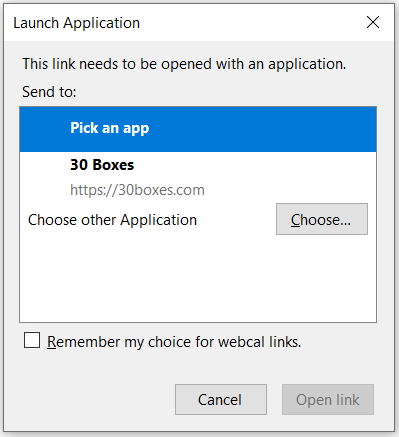
The one in the image is for "webcal" links. But I also get ones for Spotify and others. Sometimes I visit sites and these just pop up out of nowhere. I want to completely prevent these from appearing.
I actually think I have the solution already in a Firefox extension I have, but I'm not sure. I have this:
That was given to me by @sockpuppet a while ago here - https://www.blackhatworld.com/seo/g...-firefox-download-dialog-popup.1183643/page-2
And that code works to block any "Download boxes" from appearing. But these "Launch Application" boxes still appear, and I'd like to block them completely. I'm thinking adding or removing some code here would do it:
But I'm not sure what to do. Anyone knows? @Gogol
The one in the image is for "webcal" links. But I also get ones for Spotify and others. Sometimes I visit sites and these just pop up out of nowhere. I want to completely prevent these from appearing.
I actually think I have the solution already in a Firefox extension I have, but I'm not sure. I have this:
made an extension to cancel the request for all but some whitelisted content types
put both files in a directory and load it as a temporary addon
manifest.json
main.jsCode:{ "manifest_version": 2, "name": "mime-type-cancel", "version": "1.0", "permissions": [ "webRequest", "webRequestBlocking", "<all_urls>" ], "background": { "scripts": [ "main.js" ] } }
Code:'use strict'; const mimeTypeMatch = function (header) { if (header.name === undefined) { return false; } if (header.name.toLowerCase() != 'content-type') { return false; } if (header.value.startsWith('image')) return false; if (header.value.startsWith('text')) return false; if (header.value.startsWith('font')) return false; if (header.value.startsWith('application/json')) return false; if (header.value.startsWith('application/javascript')) return false; console.log('cancel content type'); console.log(header); return true; }; const headersReceived = function (request) { return new Promise((resolve) => { let filter = false; request.responseHeaders.forEach(h => { if (mimeTypeMatch(h)) { filter = true; return; } if (h.name.toLowerCase() === 'content-disposition') { filter = true; return; } }); if (filter) { resolve({ cancel:true }); return; } resolve(); }); }; browser.webRequest.onHeadersReceived.addListener( headersReceived, { urls: ['<all_urls>'] }, [ 'blocking', 'responseHeaders' ] );
That was given to me by @sockpuppet a while ago here - https://www.blackhatworld.com/seo/g...-firefox-download-dialog-popup.1183643/page-2
And that code works to block any "Download boxes" from appearing. But these "Launch Application" boxes still appear, and I'd like to block them completely. I'm thinking adding or removing some code here would do it:
JavaScript:
  if (header.value.startsWith('image')) return false;
  if (header.value.startsWith('text')) return false;
  if (header.value.startsWith('font')) return false;
  if (header.value.startsWith('application/json')) return false;
  if (header.value.startsWith('application/javascript')) return false;
  if (header.value.startsWith('application/x-javascript')) return false;
But I'm not sure what to do. Anyone knows? @Gogol

