

Crypto_Man
BANNED
- Sep 21, 2024
- 393
- 334
Ever wonder how some marketers always know what's trending before it even happens or how your competitors seem to jump on the best content ideas before you even spot them? They probably use different tools and technique but today, I'm going to show you a completely free tool that lets you track viral content in real time. This will help you to spot what your audience actually cares about right now and even uncover hidden traffic opportunities without paying for expensive software. And best of all, you can use this to drive real targeted traffic for free. Let’s jump into it.
How It Works?
The tool is called http://www.social-searcher.com. It’s like Google but for social media conversations, so instead of websites it scans platforms like Twitter, Facebook, Reddit, and YouTube, and it also searches blogs for public mentions of keywords, brands, or hashtags. You get a feed of real-time posts sorted by date, popularity, or sentiment, so now you can see what people are saying and how they feel about it.

No login needed and no credit card required! Just type in a keyword and start finding data instantly. And it’s not just basic mentions: it shows engagement metrics, post-type filters, and emotion analysis, so you can tell what’s blowing up and why.
Live Example
Let’s run a few live searches to see it in action. Head over to socialensarcher.com, and here in this example I’m going to type in AI tools, hit Enter, and now it’s searching sources in real time. Okay, it’s brought back almost 336 mentions from 170 users with a sentiment score of ten.

Now we can apply separate filters, such as post types if we want to find just Links, Statuses, Photos, or Videos, or if we want to find a sentiment that is Positive, Negative, or Neutral.

As you can see, to find trending posts on instagram, linkedin, facebook and twitter, you need to have premium account. Anyway, I’m going to leave it as default for this example. Let's check out the Sort By filter. It defaults to Date, but I’m going to switch that to Popularity.

So now we can find the threads where our audience is discussing the keywords we’ve chosen (ai tools). To join any discussion, all we have to do is click on three dots then click the link icon, and we'll be redirected to that thread to start engaging with the audience.

This is obviously a great way to drive traffic because we can jump into trending conversations, contribute to the discussion, add value, and promote our sites/links. But we can also use this to generate content ideas because we now know what topics the audience care about, the topics that the audience are discussing most at the moment.
And not only that, we can drill down into the Detailed Statistics. (top right cornet)


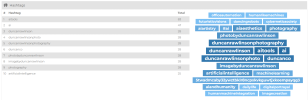
I’m going to show you a very powerful way to use this data in a second, but for the moment, scroll down under General. Here we can see the relevant hashtags that people are using
Under Posts by Week we can see the most popular day for this type of content or discussion to happen. In this example, Thursday is by far the most popular day for people to discuss about AI tools. Then if we go to Posts by Hour, we can see that most discussions are happening between 4am to 6am then following by 10am to 12pm, 14pm to 16pm and 18pm to 20pm, so now we know the precise day and time when we should be posting content relevant to those keywords.

Under Posts by Social Network we can see where these posts are taking place across social media, so now we know where your audience is specifically choosing to spend their time. And not only that, if we go to Sentiment, we can now see how people feel across all these social networks. Positive, negative or natural. So you can write or post you content based on the general feeling there is about your topic and by doing this, you get more engage from your audience.

If we scroll down, we have even more data. If we want to see popular positive posts, we have a list right there that we can just jump straight into and start adding value to. Likewise, we have a list of popular negative posts, and this is a gold mine of information because now we know what people like about AI tools and what they dislike. So we now know exactly how to communicate with the audience and what type of content to create that will resonate.

How to Use This Data Like a Pro
Now let me show you a little hack here. If we click on More, we can export this data.

Then go to ChatGPT, upload the spreadsheet (exported data), and add this prompt:
You are a content marketing analyst. Examine the spreadsheet carefully and create a table with 10 ideas for each of the following:
Tell me which topics resonate with the audience (filter by positive sentiment and high engagement to spot winning content themes or angles).
Reverse engineer winners and break down headlines, formats, and hooks from top-performing posts.
Fill content gaps (identify negative sentiment around topics and create content ideas that resolve confusion or frustration).
Discover trend-jacking opportunities (monitor post timing and cluster dates to show hot trends to piggyback on).
That's it! Dozens and dozens of content ideas complete with angles, hooks, and format suggestions. We can clearly see which topics are trending or are about to trend.
If you want to delve deeper into the content creation side of things, go back to Social Searcher, click on Keywords, and now we have a list of relevant long-tail keywords that we can target because we know there is demand at the moment for these specific keywords. We can grab these long-tail keywords and then use a prompt like this:
You are an SEO expert using keyword research tools like ahrefs and Google Keyword Planner. Analyze each of these keywords for search volume and difficulty. Ignore ambiguous keywords or ones that lack clear intent.
And there we go, we now know the approximate search volume. Then we can ask the chatgpt to give an additional 30 high-intent keywords that we may have missed and ask it to give the search volume and difficulty of each keyword. One thing to note with this keyword research: you may want to double-check and verify that the search volume and difficulty are accurate. In my experience, Chatgpt does a pretty good job of keyword research, but like all things in digital marketing, your result may vary.
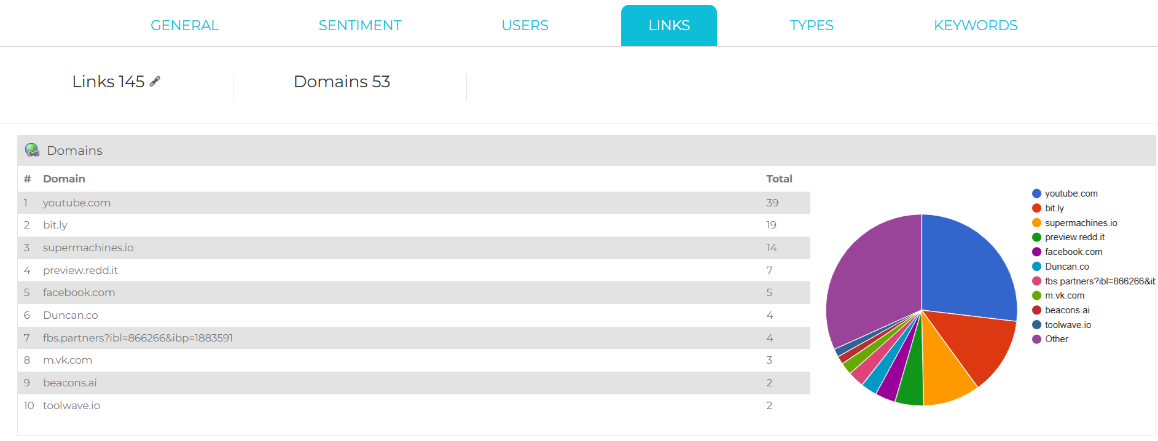
Okay, let’s head back to Social Searcher because there’s one more thing I want to show you. If we click on Links, we can now get a list of the popular domains where conversations are happening in your space or niche. And if we scroll down to Popular Links, we can go directly to the most popular discussions and conversations happening in your space.
When you know where to find the "traffic" there are tons of ways to monetize that traffic, so it's up to you how to use it, promote a cpa offer or an amazon link, the sky is limit.
That's it. Hope this will be helpful for at least some of you.
Good luck and feel free to ask your questions,
How It Works?
The tool is called http://www.social-searcher.com. It’s like Google but for social media conversations, so instead of websites it scans platforms like Twitter, Facebook, Reddit, and YouTube, and it also searches blogs for public mentions of keywords, brands, or hashtags. You get a feed of real-time posts sorted by date, popularity, or sentiment, so now you can see what people are saying and how they feel about it.
Live Example
Let’s run a few live searches to see it in action. Head over to socialensarcher.com, and here in this example I’m going to type in AI tools, hit Enter, and now it’s searching sources in real time. Okay, it’s brought back almost 336 mentions from 170 users with a sentiment score of ten.
Now we can apply separate filters, such as post types if we want to find just Links, Statuses, Photos, or Videos, or if we want to find a sentiment that is Positive, Negative, or Neutral.
As you can see, to find trending posts on instagram, linkedin, facebook and twitter, you need to have premium account. Anyway, I’m going to leave it as default for this example. Let's check out the Sort By filter. It defaults to Date, but I’m going to switch that to Popularity.
So now we can find the threads where our audience is discussing the keywords we’ve chosen (ai tools). To join any discussion, all we have to do is click on three dots then click the link icon, and we'll be redirected to that thread to start engaging with the audience.
This is obviously a great way to drive traffic because we can jump into trending conversations, contribute to the discussion, add value, and promote our sites/links. But we can also use this to generate content ideas because we now know what topics the audience care about, the topics that the audience are discussing most at the moment.
And not only that, we can drill down into the Detailed Statistics. (top right cornet)
I’m going to show you a very powerful way to use this data in a second, but for the moment, scroll down under General. Here we can see the relevant hashtags that people are using
Under Posts by Week we can see the most popular day for this type of content or discussion to happen. In this example, Thursday is by far the most popular day for people to discuss about AI tools. Then if we go to Posts by Hour, we can see that most discussions are happening between 4am to 6am then following by 10am to 12pm, 14pm to 16pm and 18pm to 20pm, so now we know the precise day and time when we should be posting content relevant to those keywords.
Under Posts by Social Network we can see where these posts are taking place across social media, so now we know where your audience is specifically choosing to spend their time. And not only that, if we go to Sentiment, we can now see how people feel across all these social networks. Positive, negative or natural. So you can write or post you content based on the general feeling there is about your topic and by doing this, you get more engage from your audience.
If we scroll down, we have even more data. If we want to see popular positive posts, we have a list right there that we can just jump straight into and start adding value to. Likewise, we have a list of popular negative posts, and this is a gold mine of information because now we know what people like about AI tools and what they dislike. So we now know exactly how to communicate with the audience and what type of content to create that will resonate.
How to Use This Data Like a Pro
Now let me show you a little hack here. If we click on More, we can export this data.
Then go to ChatGPT, upload the spreadsheet (exported data), and add this prompt:
You are a content marketing analyst. Examine the spreadsheet carefully and create a table with 10 ideas for each of the following:
Tell me which topics resonate with the audience (filter by positive sentiment and high engagement to spot winning content themes or angles).
Reverse engineer winners and break down headlines, formats, and hooks from top-performing posts.
Fill content gaps (identify negative sentiment around topics and create content ideas that resolve confusion or frustration).
Discover trend-jacking opportunities (monitor post timing and cluster dates to show hot trends to piggyback on).
That's it! Dozens and dozens of content ideas complete with angles, hooks, and format suggestions. We can clearly see which topics are trending or are about to trend.
If you want to delve deeper into the content creation side of things, go back to Social Searcher, click on Keywords, and now we have a list of relevant long-tail keywords that we can target because we know there is demand at the moment for these specific keywords. We can grab these long-tail keywords and then use a prompt like this:
You are an SEO expert using keyword research tools like ahrefs and Google Keyword Planner. Analyze each of these keywords for search volume and difficulty. Ignore ambiguous keywords or ones that lack clear intent.
And there we go, we now know the approximate search volume. Then we can ask the chatgpt to give an additional 30 high-intent keywords that we may have missed and ask it to give the search volume and difficulty of each keyword. One thing to note with this keyword research: you may want to double-check and verify that the search volume and difficulty are accurate. In my experience, Chatgpt does a pretty good job of keyword research, but like all things in digital marketing, your result may vary.
Okay, let’s head back to Social Searcher because there’s one more thing I want to show you. If we click on Links, we can now get a list of the popular domains where conversations are happening in your space or niche. And if we scroll down to Popular Links, we can go directly to the most popular discussions and conversations happening in your space.
When you know where to find the "traffic" there are tons of ways to monetize that traffic, so it's up to you how to use it, promote a cpa offer or an amazon link, the sky is limit.
That's it. Hope this will be helpful for at least some of you.
Good luck and feel free to ask your questions,


