

gzdani
Newbie
- Feb 8, 2024
- 14
- 12
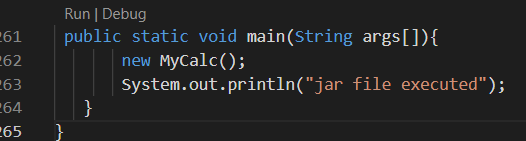
first u wanna go to the vscode marketplace install extension java extention pack for configuring java enviroment w/ vscode , then write ur program like this
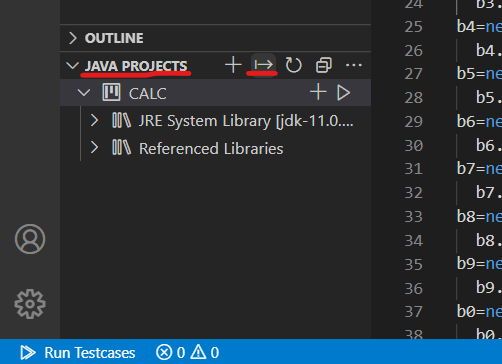
then u need to compile the code by packing jar inside vscode, (see bottom left corner) java projects , then look for export jar . click on that
its gon ask u to specify main class so select MyCalc . thats the entry point

thats it, ur exe jar has been created . gratz .
now if u wanna find the directory just click it and select open with java platform se binary

more info below about~(command lines)~read on
1st thing when ur usin command line u needa kno the jar tool 4 certain switches when makin an exejar
~some more shi u may need 2 kno below~
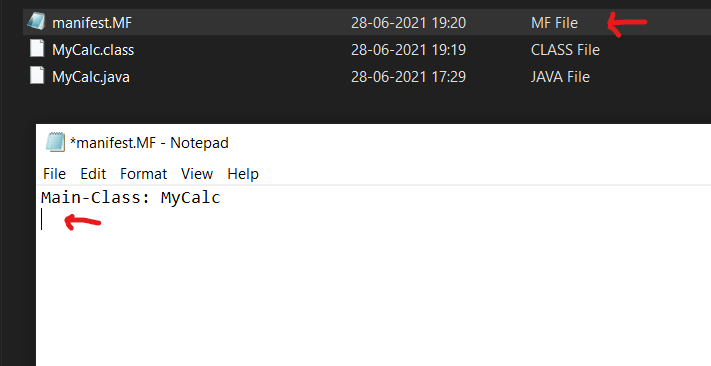
ur manifest file is key cuz it sets entry points ,to ur application so main class will execute the jarfile
now open the cmd , write this out usin ur jar tool switches that r provided
jar -cvfm <jarfilename.jar> <manifestfile> <classname.class>
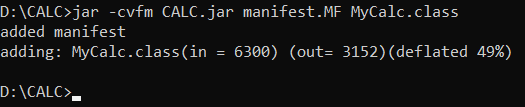
for this example i just named it CALC.jar it will be executed after u run the command . boom .
ur done . its that ez
then u need to compile the code by packing jar inside vscode, (see bottom left corner) java projects , then look for export jar . click on that
its gon ask u to specify main class so select MyCalc . thats the entry point
thats it, ur exe jar has been created . gratz .
now if u wanna find the directory just click it and select open with java platform se binary
more info below about~(command lines)~read on
1st thing when ur usin command line u needa kno the jar tool 4 certain switches when makin an exejar
- c creates new archive file
- v generates verbose output this is 4 ur extracted resource on standard output .
- m includes manifest information from the given mf file.
- f specifies the archive file name
- x extracts files from the archive file
~some more shi u may need 2 kno below~
ur manifest file is key cuz it sets entry points ,to ur application so main class will execute the jarfile
- so , create a manifest file with .mf extensions in same directories , that way u dont gotta set the class path explicitly
- you need to write main-class, hit " : " hit spacebar , then classname where ur entry point is gonna be (MyCalc) . after that hit enter
now open the cmd , write this out usin ur jar tool switches that r provided
jar -cvfm <jarfilename.jar> <manifestfile> <classname.class>
for this example i just named it CALC.jar it will be executed after u run the command . boom .
ur done . its that ez
Last edited: