
devkareem
Power Member
- Sep 15, 2016
- 563
- 217
No worriesThank you for helping me out with your knowledge, I understand things a bit better now which makes me feel more at ease.

No worriesThank you for helping me out with your knowledge, I understand things a bit better now which makes me feel more at ease.

when i use proxy i simply use Firefox proxy setting in network options.
If i use any plugin there is a chance , my real ip address can leak.
The only reason I started trying these plugins is because this one time I got some SOCKS5 proxies they would not work with Firefox as they wouldn't show the authentication pop up. They worked with FoxyProxy though and that's why I continued using this plugin with the HTTP(S) proxies. Thanks for mentioning though as I just tried Firefox proxy settings and these ones ask for a username/password so they will work for sure. I too was worried that these plugins may leak the real IP address possibly during a browser update where the plugin may stop being compatible.

Just to clarify. With regular proxies your location can be leaked (not IP but location) through DNS requests, you can test it https://www.dnsleaktest.com/
But with SOCKS since it can be used for whole system it can be used to proxy the DNS requests as well therefore it's more private. that's why TOR proxy uses SOCKS5.
From Firefox Proxy Settings:
I was just wondering if you had any idea about http(s) proxy download / upload speeds? I'm not sure if the proxies that I am using are bad or if it's normal for http(s) proxies to work like this.
Basically a UK http(s) proxy accessed from the UK gets detected in a weird way by speedtest.net which instead of using a UK server for the UK http(s) proxy uses a server in Switzerland and the results are terrible. 2 download and 3 upload.

When manually selecting a UK test server on speedtest.net for the UK http(s) proxy the results are much better. 41 download and 4 upload.
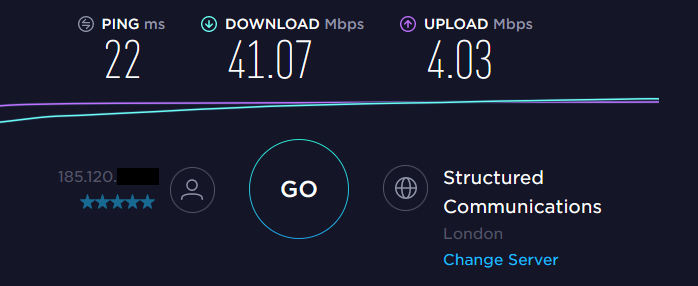
But then when I tested the same meddin.ch server from Switzerland using my direct fibre connection from within the UK the results make me think that I have a bad proxy as testing the same server using the UK http(s) proxy gives terrible results yet using my direct fibre connection it gives very good results with 59 download and 17 upload.
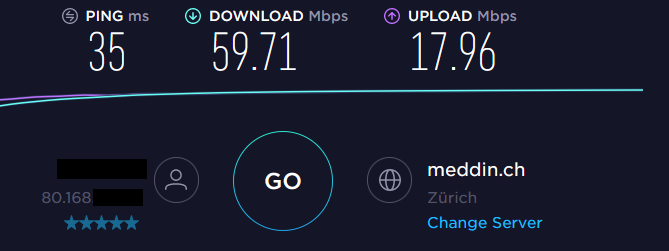
Any ideas?
Thank you.
Hey there, that's a really bad proxy, it should never take more than 50% of your current speed whatsoever. Although IPs starting with 80.168 are geolocated in UK but i can't think of something why it's using a server in Switzerland.
Thank you, I guess I will have to try another provider. Do you think it makes a difference if the proxy is an elite one? Are all https proxies elite? Is elite the same as high anonymouse? Sorry about the questions, I won't need to bother you much more after these last few questions as now thanks to you I've gained a better picture on how proxies work etc. Thank you once again.
different usage = different provider/proxy type
These are all just marketing words, you cannot guarantee whether if the proxy is safe/anonymous since you don't own it or know it's config.
It's really alright, I would just prefer if you publish it on the thread so others can be benefited. You can contact me anytime
I completely forgot about DNS was going to ask you a few questions about it too. So if I use https proxies will my DNS requests be leaked or do https proxies protect me from that? I've noticed that in Firefox there's an option to "Enable DNS over https". Does this work with https proxies?
man in the middle attacks from the proxy server itself is always there in any kind of tunneling (http, https, socks proxy or VPN). But if you mean local mitm attacks, well any communication over HTTP is mostly vulnerable to mitm attacks, the thing is it cannot be wrapped in general because there is tons of different configurations it really depends on client/server configurations for everything (even something simple as switching AP isolation on your router will disallow mitm attacks), for instance you can route socks5 over ssh thus it would be encrypted and not plain-text.In regards to SOCKS5 proxies, I understand that they are unencrypted and therefore information is passed over in plain text meaning that it is vulnerable to a man in the middle attack?
That would only work if the proxy server itself supports the DoH protocol (https://en.wikipedia.org/wiki/DNS_over_HTTPS)
Easiest fix is to disable webrtc and use a public dns server like google (8.8.8.8) or cloudflare (1.1.1.1). DNS leaks happen when dns requests are being sent to your ISP dns leaking it's ip to the target server which can make it easy to track your location.So how does one go about staying safe from DNS leaks?
Easiest fix is to disable webrtc and use a public dns server like google (8.8.8.8) or cloudflare (1.1.1.1). DNS leaks happen when dns requests are being sent to your ISP dns leaking it's ip to the target server which can make it easy to track your location.
when i use proxy i simply use Firefox proxy setting in network options.
If i use any plugin there is a chance , my real ip address can leak.

it's a low-chance but i don't trust Google myself, they mostly track users using their DNS server yeah. because when making a DNS request you are giving them the domain name you connecting to plus your IP and time. it's enough info in my opinion.But if I use https proxies and I want to use them to make Google account, won't google find out its the same person making them when I use the Google DNS?
Never faced that problem, Does your proxy itself uses authentication? Can you show me?I went back to FoxyProxy as Firefox kept asking for authentication even though the appropriate options to stop it from asking were selected. Welcome back btw.
There is nothing to worry about.
You need to select HTTP because this is how you will connect to the proxy server. When you send your initial request (usually, is the DNS request to get the IP of a website), you send it in HTTP (because DNS requests are not encrypted). Hence foxyproxy sends the request in HTTP to the proxy server which then forwards it to its DNS server.
The proxy server's DNS server resolves your query and then sends you the details. Only after this step your computer contacts the website via the proxy server.
And your connection then switches to HTTPS once you create an SSL tunnel with the web server of the website you want to visit.
This is a standard connection via a proxy and you shouldn't worry about the DNS over HTTP because usually (with most private proxies), DNS queries are resolve at the proxy server level so your real IP is not disclosed.
Never faced that problem, Does your proxy itself uses authentication? Can you show me?
This is correct. although it only applies if the proxy server itself supports "DOH" protocol. if not the browser will fail to using local DNS servers, this is how DNS Leaks happens.
