
You are using an out of date browser. It may not display this or other websites correctly.
You should upgrade or use an alternative browser.
You should upgrade or use an alternative browser.
[DIY] How To Create Your Own 4G Proxy
- Thread starter AlphaSupreme
- Start date


Bakidaki
Regular Member
- Feb 1, 2022
- 225
- 61
this is very interesting to be honest, I might start looking for other EU countries cheap mobile internet optionsI haven't researched how the routing happens when roaming but you usually don't need high-speed internet, for most of the time you run few automations tops on the same device at the same time, if you skip static assets from proxying(as you should) then you wouldnt notice the speed changes much.
 , nah im joking but it is an option in the future.
- Oct 6, 2020
- 2,626
- 9,935
You can but for some carriers sim activation needs to be done in the origin country, you are limited to 12 GB max usage per month and some carriers will close your sim if they detect that the majority of the usage is done abroad. As I said, it's doable but can be a pain in the ass to manage.this is very interesting to be honest, I might start looking for other EU countries cheap mobile internet options
Bakidaki
Regular Member
- Feb 1, 2022
- 225
- 61
yes it is, but the guide isnt complete, and you will have to adjust some things in your setup.Is this still working in 2023?
It can be a pain in the ass if you dont have programming experience.

- Jul 8, 2021
- 293
- 209
it's called mobile data roaming and it's possible in EU
.. and you will get IP of the country where you bought the SIM? Or the country where your mobile device is online? I think the latter.
but mobile data roaming would slow down the internet if using from other country right?
depends on your plan (contract with Cell operator who issued the SIM).
- Oct 6, 2020
- 2,626
- 9,935
Nop, it's the first. Every time I traveled around EU, checked this and I always get my home IP. I did buy few pre-activated SIMs to be sure and it works but as explained, the maintenance and management of such setup is just pain. When you can, please check your email... and you will get IP of the country where you bought the SIM? Or the country where your mobile device is online? I think the latter.
Tacticalsm
Newbie
- Apr 19, 2021
- 5
- 0
Hi SocialMediaNetwork, can you send me DM?Yes you will need 200 proxies + 200 simcards with 4G data on it. + you need a pc to install 3proxy or squid on it ++ you need a powered usb hub!.
Buy dongles from Alixpress they like $14 each
if you go to buy 200 in 1 time and fail gonna be a pain in the a*s

mycatmeows
Junior Member
- Jul 3, 2018
- 182
- 40
i might be able to help you out on this one with unlimited data plan dm me.this is very interesting to be honest, I might start looking for other EU countries cheap mobile internet options
hi, can you help me please with my proxy, I spent like 2 weeks non stop trying to make it work.You have configured it wrong
in the 3proxy file change to: 192.168.8.100 -> 192.168.0.100 is for ZTE
also change what you had to this:
sudo ip route add 192.168.8.0/24 dev eth1 table src 192.168.8.100 gw1
sudo ip route add default via 192.168.8.1 dev eth1 table gw1
sudo ip rule add from 192.168.8.100/32 table gw1
sudo ip rule add to 192.168.8.100/32 table gw1
You use: 192.168.8.1 because when you enter that in your adress bar when the dongle is conencted it will open the interface of the dongle thats why you use 192.168.8.1 instead of 192.168.0.1 (ZTE)
Should be working now.
I'm using Huawei E3372, Odroid XU4 with Ubuntu Minimal 22.04 installed.
here are the interfaces:
eth0: flags=4163<UP,BROADCAST,RUNNING,MULTICAST> mtu 1500
inet 192.168.1.111 netmask 255.255.255.0 broadcast 192.168.1.255
ether 00:1e:08:34:f1:2e txqueuelen 1000 (Ethernet)
RX packets 55 bytes 6838 (6.8 KB)
RX errors 0 dropped 11 overruns 0 frame 0
TX packets 46 bytes 7588 (7.5 KB)
TX errors 0 dropped 0 overruns 0 carrier 0 collisions 0
eth1: flags=4163<UP,BROADCAST,RUNNING,MULTICAST> mtu 1500
inet 192.168.8.117 netmask 255.255.255.0 broadcast 192.168.8.255
ether 00:1e:10:1f:00:00 txqueuelen 1000 (Ethernet)
RX packets 5 bytes 676 (676.0 B)
RX errors 0 dropped 0 overruns 0 frame 0
TX packets 19 bytes 1776 (1.7 KB)
TX errors 0 dropped 0 overruns 0 carrier 0 collisions 0
lo: flags=73<UP,LOOPBACK,RUNNING> mtu 65536
inet 127.0.0.1 netmask 255.0.0.0
loop txqueuelen 1000 (Local Loopback)
RX packets 80 bytes 5920 (5.9 KB)
RX errors 0 dropped 0 overruns 0 frame 0
TX packets 80 bytes 5920 (5.9 KB)
TX errors 0 dropped 0 overruns 0 carrier 0 collisions 0
I did put a static ip allocation on my router for eth0 192.168.1.111
eth0 is my wired connection, and eth1 is the 4g huawei dongle connection
I did put the following to /etc/iproute2/rt_tables
1 gw1
here is the content of 3proxy config file
#!/usr/local/bin/3proxy
daemon
pidfile /usr/local/etc/3proxy/3proxy.pid
nserver 1.1.1.1
nserver 1.0.0.1
nscache 65536
timeouts 1 5 30 60 180 1800 15 60
log /usr/local/etc/3proxy/log/3proxy.log D
logformat \"- +_L%t.%. %N.%p %E %U %C:%c %R:%r %O %I %h %T\"
archiver rar rar a -df -inul %A %F
rotate 30
internal 0.0.0.0
external 0.0.0.0
authcache ip 60
auth strong
users user:CL
assallow user
proxy -p3128 -a -n -i0.0.0.0 -e192.168.8.117
both the following commands return two different ips if I don't enable net.ipv4.ip_forward=1
curl --interface eth0 https://eth0.me
curl --interface eth1 https://eth0.me
now I need the routing commands for my case, I tried so many combinations nothing worked.
if someone can help me it would be really appreciated.
Hi bro please look at my previous message if you can help me, thank you in advance.Nop, it's the first. Every time I traveled around EU, checked this and I always get my home IP. I did buy few pre-activated SIMs to be sure and it works but as explained, the maintenance and management of such setup is just pain. When you can, please check your email.

SocialMediaNetwork
Regular Member
- Jan 24, 2019
- 490
- 253
With this setup you need ethernet cable connected to the RPI to make it work. there is another method to make it work by WIFI but thats not in this tutorial.great ,
Question I made all step no errors, I dont have internet on the pc only on the PI, when try to conect on proxy not work , need to be my PC connect to internet in order to use the PI proxy?
Internet is only on RPI and I connected with the ethernet on PC but not worksWith this setup you need ethernet cable connected to the RPI to make it work. there is another method to make it work by WIFI but thats not in this tutorial.



SocialMediaNetwork
Regular Member
- Jan 24, 2019
- 490
- 253
change what is in the startproxt.sh to this:
sudo ip route add 192.168.8.0/24 dev eth1 table src 192.168.8.100 gw1
sudo ip route add default via 192.168.8.1 dev eth1 table gw1
sudo ip rule add from 192.168.8.100/32 table gw1
sudo ip rule add to 192.168.8.100/32 table gw1
save it and run the script: sudo ./startproxy.sh also did you add gw1 to the routetable?
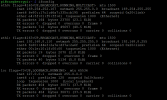
Let's setup the IP
Let's setup the routes for the proxy
Error: argument "src" is wrong: "table" value is invalid
MY RPI
=====
cat /etc/os-release
PRETTY_NAME="Raspbian GNU/Linux 11 (bullseye)"
NAME="Raspbian GNU/Linux"
VERSION_ID="11"
VERSION="11 (bullseye)"
VERSION_CODENAME=bullseye
ID=raspbian
ID_LIKE=debian
HOME_URL="http://www.raspbian.org/"
SUPPORT_URL="http://www.raspbian.org/RaspbianForums"
BUG_REPORT_URL="http://www.raspbian.org/RaspbianBugs
===

Attachments


CheapestContent
Senior Member
- Jan 30, 2023
- 895
- 259
Clear and in-detail explanation. Thanks for sharing with us this useful method with clear explanations.
thanks for help, but still not works
Let's setup the IP
Let's setup the routes for the proxy
Error: argument "src" is wrong: "table" value is invalid
MY RPI
=====
cat /etc/os-release
PRETTY_NAME="Raspbian GNU/Linux 11 (bullseye)"
NAME="Raspbian GNU/Linux"
VERSION_ID="11"
VERSION="11 (bullseye)"
VERSION_CODENAME=bullseye
ID=raspbian
ID_LIKE=debian
change what is in the startproxt.sh to this:
sudo ip route add 192.168.8.0/24 dev eth1 table src 192.168.8.100 gw1
sudo ip route add default via 192.168.8.1 dev eth1 table gw1
sudo ip rule add from 192.168.8.100/32 table gw1
sudo ip rule add to 192.168.8.100/32 table gw1
save it and run the script: sudo ./startproxy.sh also did you add gw1 to the routetable?
Let's setup the IP
Let's setup the routes for the proxy
Error: argument "src" is wrong: "table" value is invalid
MY RPI
=====
cat /etc/os-release
PRETTY_NAME="Raspbian GNU/Linux 11 (bullseye)"
NAME="Raspbian GNU/Linux"
VERSION_ID="11"
VERSION="11 (bullseye)"
VERSION_CODENAME=bullseye
ID=raspbian
ID_LIKE=debian
Attachments


GonnaLearnToday
Regular Member
- Dec 4, 2018
- 334
- 117
looks complicated, just buy the proxy (LOL)
Thanks for the guide. I correctly set up the 4G proxy on my Raspberry PI but seems it works only on LAN.
But when I try to access to my Raspberry PI from remote (WAN), all connections are refused/timed out (including SSH, HTTP and other services).
I can connect to my PI remotely from WAN (via SSH, HTTP etc.) only if I disable the Huawei interface with ifconfig eth1 down but obviously I can't use the proxy (if the Huawei remains down).
How to fix it?
But when I try to access to my Raspberry PI from remote (WAN), all connections are refused/timed out (including SSH, HTTP and other services).
I can connect to my PI remotely from WAN (via SSH, HTTP etc.) only if I disable the Huawei interface with ifconfig eth1 down but obviously I can't use the proxy (if the Huawei remains down).
How to fix it?