cPanel - Email Deliverability - Problems Exist?

Scorpion Ghost

Elite Member
Executive VIP
Jr. VIP
Joined
Mar 22, 2013
Messages
9,201
Reaction score
10,500
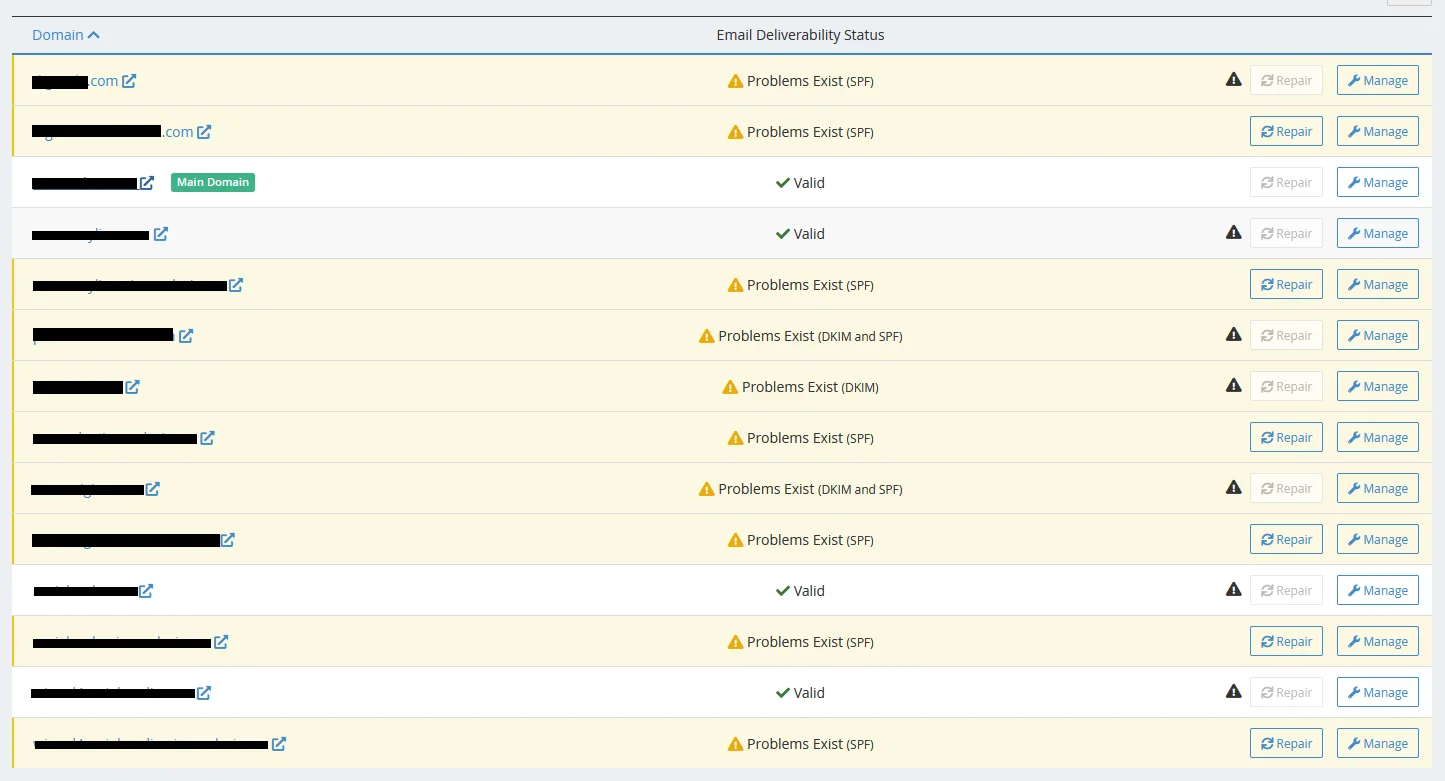
I landed on the "Email Deliverability" page in my cPanel a few days ago while doing something, and I have this:

emem.webp


All the sites are .com, and they're all behind Cloudflare except one. And none of them has any problems with email, as far as I know.

If I hover over any of those exclamation marks there, I get a message like this:

This system does not control DNS for the "site.com" domain. Contact the person responsible for the "xxx.xx.cloudflare.com" and "xxxx.xx.cloudflare.com" nameservers and request that they update the records.

But because I don't have any problems on my actual sites, I'm not sure if these problems are actually problems.

Any ideas? @BlogPro @TomTheCat @SirLouen
 
If you don’t have an SPF record then you will find some mail servers out your emails into spam.

so if you do send email on those domains it’s best to get it fixed.

Thread moved.
 
If you don’t have an SPF record then you will find some mail servers out your emails into spam.

so if you do send email on those domains it’s best to get it fixed.

Thread moved.

I see. I do send emails on those domains, yes.

I'm not sure what the problem is though, so I'm not sure how to fix it.

I did do the obvious thing, and clicked "Repair" on one of them, and now it shows as "Valid". Then I did it on all the ones where the "Repair" button can be clicked, and now they all show as valid.

But for some of them I can't click the "Repair" button, it's grayed out.

Does this have something to do with Cloudflare?

Since you use shared hosting, I don't have experience in fixing this, but on dedicated servers is pretty easy.

SPF
https://www.linuxbabe.com/redhat/set-up-spf-dkim-postfix-centos
DKIM
https://www.linuxbabe.com/redhat/set-up-opendkim-centos-8-rhel-8https://serverfault.com/questions/1...ed-as-spam-and-sometimes-not-delivered-at-all
Also, your domains should have PTR records in place.

SPF, DKIM, PTR, keep em coming man. Keep making up words, I'm enjoying it very much :D

SPF has something to do with email - that's all I know about it. And I've never heard of DKIM and PTR.

@BlogPro would know how to fix this. Let's hope he makes an appearance. But I'll try to get to the bottom of it.
 
Well all right dudes, long story short, I fixed the first one that had "Problems Exist (SPF)"

spf.webp


I just added a record in Cloudflare, using info from the cPanel, and poof, now it's Valid.

Moving on to the rest...
 
I just added a record in Cloudflare, using info from the cPanel, and poof, now it's Valid.

Moving on to the rest...

The problem with Cloudflare is that if you put in the mail server where you are hosting the websites, you give away to people the server IP address that is behind Cloudflare, thus making Cloudflare useless.
 
The one with "Problems Exist (DKIM)"

I clicked on "Manage" next to it, and there was a "Install the suggested record" button in there. I clicked it, and this popped up:

Danger:

If you send email from another server, you must use this server’s DKIM key on the remote server.


I have no idea what's going on here. What another server? I'm sending emails, from my one server, my website, my hosting. What other server? Ugh...

I clicked it, and a popup appeared the DKIM record was successfully updated.

Then another popup appeared:

Information: The server records have not updated after 11 seconds. The system will try again in 10 seconds.

And now it's just stuck in a loop:

Information: The server records have not updated after 50 seconds. The system will try again in 40 seconds.

I refreshed the page, because what's a guy to do eh. But after refreshing, the DKIM record is still not set.

So I went to Cloudflare and compared this domain with my other domains. My other domains have a DKIM record in there, but this one does not. So I added it. And then I went back to cPanel and clicked to install the record again. Now it was actually successful, and shows as Valid.

HOWEVER, I got this popup:

Warning: Because this is not an authoritative nameserver for the domain “site.com”, the current or suggested records will not reflect your changes. Use the Zone Editor to ensure that the system applied your changes.

So I went to zone editor, but I don't see any errors in there, or anything really. I don't know how to use it to ensure the system applied my changes.

Yeah you know what? Fuck you! I don't give a shit. This particular domain is just a front fake website so that I can use a certain payment processor. It's not a real site. So I don't give a fuck if the system applied my changes or not. Go fuck yourself technology!

When I check "Email Deliverablility" page now, it shows as "Valid" for this domain too.

Fixed, moving on...

---

The problem with Cloudflare is that if you put in the mail server where you are hosting the websites, you give away to people the server IP address that is behind Cloudflare, thus making Cloudflare useless.

Yeah bro, I'm seeing some shit:

ipip.webp


So what's your suggestion? How useless do I make it when I do this? Completely useless, or a little useless?

Anyway, what's your suggestion?
 

Oh fuck me.

You know what man, I can't, I don't know what to do about this. I don't really give a shit if the emails are being sent from my hosting, or if they're going through Cloudflare, or what. I don't care. I just want the thing to work.

@BlogPro is an expert with this Cloudflare crap. If he makes an appearance, he'll tell me what's what and what to do, and he'll make it shine.

If he doesn't appear, I'll do my usual half-assed fixing and leave the loose ends hang over in the corner under the carpet somewhere.

Whatever, I can't do everything...

---

There's 2 problems left. Both of them are "Problems exist (DKIM and SPF)". One is a domain, but the other is a subdomain.

I'll (try to) do the domain first, because that's less of a potential pain in my ass.

I did DKIM like before, now it's VALID.

I did SPF like before, now it's VALID.

Done.

---

And the subdomain, of course, there's a complication. There's already a DKIM and SPF record in Cloudflare. I'm guessing though they're being applied to the Domain, not the subdomain.

I tried installing both, and of course it was a success popup, but it actually failed.

I found this and now DKIM is verified - https://community.cloudflare.com/t/dkim-for-subdomain/106707

Okay, in the same way SPF is now verified too. I just had to add 2 new TXT records, one for each, but with a different name - the name that points to the subdomain.
 
Register for free on amazon ses and you will get free smtp.

So what you're saying is, I should take my hosting account, have it going through Cloudflare, and then have it go through Amazon ses for sending emails somehow.

See, I just feel it in my balls that this would just add another layer of complications and possible problems to my life. Another piece of shit thing that needs monitoring and updating and...

No matter, we're good now. Look, I show you good:

heaven.webp


See? We're in heaven, Jack :)

---

All I have to do now is remember that if I start having weird problems with emails cumming and going, it's because of what I did on this day. And then I need to come back here and find the problem, and then fix it. God Lord Jesus protect me from having to come back here for this again :p
 
Like Mr O'Leary once said:

"It's only a dream when it makes money. It's just a nightmare until then."

Truer words have NEVER been spoken. Never, in the history of humanity.

 
Okay I'll also put this here since it's related. So that I can have all the crap I did in one thread, and come back to it if I discover any issues with emails going forward.

I have this on 5 of my 6 domains in Cloudflare:

963.PNG


I read about DMARC and what it does. Okay, bla bla bla, thanks a lot, no idea what you're talking about, bla bla bla.

So I used the wizard, and on the final Submit I got:

conf.PNG


Sweet, thanks for letting me know, much appreciated, confirm confirm confirm get it fucking over with.

I went ahead and did it on all of the sites that needed it. There's this option:

Policy ---> Action for recipient server to take upon email that fails authentication.

None - No action. Reports will be sent for monitoring.

Quarantine - Depending on recipient, email may be marked as spam or suspicious.

Reject - Recipient will not accept email


The default was set to None. So I left it at None. Just, whatever, I have no idea what's going on here :p

---

Lastly, each of these 5 sites have these "problems" left in Cloudflare:

asdasd.PNG


Well, all 5 of them have the bottom problem, and 4 of them have the top problem.

Regarding the SPF problem, I checked and I noticed that the 4 domains that have the problems have this in Content:

v=spf1 a mx include:websitewelcome.com ~all

But the one that doesn't have the problem has this:

v=spf1 +ip4:###.###.###.### +ip4:###.###.###.### +include:MYACTUALSITE.com +all

Therefore, it would stand to reason that if I change the Content there to make them all like the one that doesn't have the problem, the error will go away. Genius, right? :D

So I tried doing that, but on cPanel, in Email Deliverability, all the sites have that websitewelcome.com thing in their SPF record (except the one that doesn't have the notification on cloudflare).

So I read some stuff...

Apparently, this SPF error is NOT related to Cloudflare - https://community.cloudflare.com/t/...t-in-emails-failing-spf-authentication/388585

That’s not really a Cloudflare issue per se and hence slightly off-topic for the forum here.

Oh really? Well, if it's not a Cloudflare issue, then why the fuck is Cloudflare alerting me to it? I'm on Hostgator shared, and say what you will about how hard they suck, I don't think they would have something set up that would be too hurtful for email deliverability. Because if it's not a Cloudflare issue, and my emails are sent from Hostgator, then it's a Hostgator issue. But since I didn't make any changes in the Hostgator records for my sites, then it's a non-issue, it's just Hostgator default way of doing this stuff.

Anyway, I've run a circle around this, and I don't see what to do about it, so I'll consider it a non-issue, and leave it be...

---

And the other error, I did a little google about it, and it's just a lot of junk. Who the hell knows what's going on here.

But like was said above:


Taking your word for it, nothing I can do to prevent my IP being exposed, other than having another server for emails.

But seeing as I'm not about to go to university for 4 years, or spend money, to figure out how to have another server for emails, I'll just have to let this one go...

---

So if @BlogPro shows up, he can tie up the loose ends and polish things to perfection. And if not, all I need to do going forward is to keep an eye out for the emails that are coming and going on my sites, and if I notice any problems, to come back here and figure out what the problem is.

That said, I'm done here, I hate all this shit. I'm gonna close all the tabs and go lay down or something. Fully drained right now, can't do another mouse click...
 
First and the most important question to ask yourself: are you using those domains to send emails at all?

For example, sending from [email protected]

If not, those policies are not super useful, but they could be just a method of protection against some type of pishing, given that many popular email servers will reject emails sent with your domain, if they don't apply such policies (people like to send with @yourdomain.com but Google with detect that their SMTP IP doesn't match your A DNS register, and they will decline if you have the right SPF set).

Also, DMARC (reporting register) could be useful to receive reports on who is pishing on your behalf.
But it is really useful? If you have the time to consolidate the info and check to generate some IP blacklists and all that s**t it could be somewhat great.
The reality? Probably noone around has the time to do this, so at best you could set a DMARC none, which means: I'm aware of this, but I don't give a f**k.

Conclusion: Since it's unlikely you will ever care about such stats, just set in your domain DNS the basic DMARC and SPF. And, unless you plan to send email from those domains, forget about DKIM.

Furthermore, I would recommend you to have a separate email server that offers for you all these configs. Personally, I use a very basic plan in mailcheap.co, which is rubbish though inexpensive mail server that does the trick for me (unlimited domains, automatic DKIM and all that), I can easily set up everything, and have my *@example.com configured there, so I can receive all notifications, specially those coming from DMCA claims and all that things, but I cannot care less about sending emails from those emails (although I could because they have their own SMPT smart host and with a plugin like this or PHPMailer for vanilla PHP sites, I can send emails through them with ease, without having to rely on my hostings.
 
Thanks for the reply. Sorry I didn't respond sooner.

First and the most important question to ask yourself: are you using those domains to send emails at all?

For example, sending from [email protected]

If not, those policies are not super useful, but they could be just a method of protection against some type of pishing, given that many popular email servers will reject emails sent with your domain, if they don't apply such policies (people like to send with @yourdomain.com but Google with detect that their SMTP IP doesn't match your A DNS register, and they will decline if you have the right SPF set).

Also, DMARC (reporting register) could be useful to receive reports on who is pishing on your behalf.
But it is really useful? If you have the time to consolidate the info and check to generate some IP blacklists and all that s**t it could be somewhat great.
The reality? Probably noone around has the time to do this, so at best you could set a DMARC none, which means: I'm aware of this, but I don't give a f**k.

Conclusion: Since it's unlikely you will ever care about such stats, just set in your domain DNS the basic DMARC and SPF. And, unless you plan to send email from those domains, forget about DKIM.

Furthermore, I would recommend you to have a separate email server that offers for you all these configs. Personally, I use a very basic plan in mailcheap.co, which is rubbish though inexpensive mail server that does the trick for me (unlimited domains, automatic DKIM and all that), I can easily set up everything, and have my *@example.com configured there, so I can receive all notifications, specially those coming from DMCA claims and all that things, but I cannot care less about sending emails from those emails (although I could because they have their own SMPT smart host and with a plugin like this or PHPMailer for vanilla PHP sites, I can send emails through them with ease, without having to rely on my hostings.

Only one of my domains sends emails to users proper. The rest of them only send an email to me if someone uses the contact form. And I think one of them sends like a "Thank you" email back to the person who submits the contact form. Everything seems to work fine.

I enabled DMARC, and it keeps spamming me with those DMARC emails, forcing me to delete them or move them to a saved folder. I just set a filter in my Gmail to make these emails skip the inbox, and be put in the folder called "Spam Shit". Fucking spam :p

The only non-issue-issue I have is one of my domains, when I receive a contact message, I get this:

phph.webp


So I don't really care, but I don't enjoy seeing that every time I get a message from someone on that site.

Coincidentally or not, this is the only site that I had no issues in Cloudflare that I needed to take care of. Also, this site only has 4 entries in the DNS area in Cloudflare, while all of my other sites have like 20+ entries each.

So I don't know. Something must be missing in the DNS area there I think. Any ideas?
 
Ok I did the google - https://community.cloudflare.com/t/cloudflare-issue-with-gmail/401206

Did what the guy said, apparently:

SPF: SOFTFAIL with IP 69.69.69.SEX

I checked the SPF record I have for the site in Cloudflare DNS, comparing it with the SPF record my host gives me for the site, and it's correct.

Here's what I get from gmail:

Code:
ARC-Authentication-Results: i=1; mx.google.com;
       spf=softfail (google.com: domain of transitioning [email protected] does not designate 69.69.69.69 as permitted sender) [email protected]
Return-Path: <[email protected]>
Received: from omta33.uswest2.a.cloudfilter.net (omta33.uswest2.a.cloudfilter.net. [22.22.22.22])
        by mx.google.com with ESMTPS id v36-65d1af65sdf1sd65f1s65fd1.555.5555.55.55.55.55.55
        for <[email protected]>
        (version=TLS1_2 cipher=AAAAA-AAAAA-AAAAA-AAA-SHA256 bits=128/128);
        Thu, 15 Sep 2022 00:33:36 -0700 (PDT)
Received-SPF: softfail (google.com: domain of transitioning [email protected] does not designate 69.69.69.69 as permitted sender) client-ip=35.89.44.32;
Authentication-Results: mx.google.com;
       spf=softfail (google.com: domain of transitioning [email protected] does not designate 69.69.69.69 as permitted sender) [email protected]

The thing is, that IP it mentiones (69.69.69.69) isn't the IP I have in my SPF record on Cloudflare. I'm not sure if it should match. The record I have there is like this:

Code:
v=spf1 +mx +a +ip4:333.333.333.33 ~all

So I don't know. Any ideas?
 
I checked my other sites and they all have an MX record. This one site doesn't. I know this MX record is somehow related to emails. So I created it.

mysite.commail.mysite.comDNS onlyAuto

I did a test message/email, but again google could not verify bla bla bla.

So there, I gave it my best shot :( :D
 
So after adding the MX record, Cloudflare asked me to create a DMARC spam thing. So I created that entry too.

Did another test, again gmail could not verify bla bla bla.

So, yeah, meh...
 
My best solution is I always use a 3rd party SMTP like, google workspace, Zoho , mailjet etc....
It doesn't expose my servers ip address when using cloudflare.
And my email delivery is better.
Most services have a Free plan to start so doesn't cost anything extra.
 
My best solution is I always use a 3rd party SMTP like, google workspace, Zoho , mailjet etc....
It doesn't expose my servers ip address when using cloudflare.
And my email delivery is better.
Most services have a Free plan to start so doesn't cost anything extra.

Yeah I'm considering something like that, at least for this one wordpress site where emails are being sent for private messages, orders, etc.

What does the "free plan to start" mean generally speaking? Free to register an account, free to send up to 100 emails per month?

Because I can put "free plan to start" on a website, like this:

"Free Plan To Start"
-free to visit our website
-the rest you have to pay for

:p

---

edit: I checked out SendGrid:

FREE - Try it out! Integrate fast and explore features with 100 emails/day forever.

Okay, that's not too bad. For the baby sites that I run, 100 emails/day limit I can put all my sites on 1 SendGrid account, and never cross the limit :D
 
Back
Top