chaning font on css stylesheet?

Retraction

Junior Member
Joined
Mar 3, 2014
Messages
170
Reaction score
183
Okay I am using a template first of all. I basically self-taught myself the basics of html. So this template has an HTML file (ex index.html) and a css stylesheet. Now I added this section in the html file, but it was default color and font. I changed the color in the css stylesheet by using

Code:
color: #000;

I don't know what the font syntax is. Sorry if this was stupid, I couldn't find it anywhere.
 
I guess that you're searching for "font-family" to change the font and "color" to change the color.
If not, check out http://www.w3schools.com/ . All codes for HTML and CSS are there, making your search easy as a pie.
 
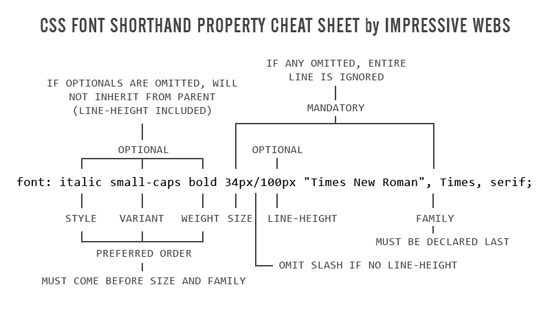
here is a cheat sheet for a short hand of the font property.

css-font-cheat-sheet.jpg


i would also suggest to learn html5 since that is the new web standard of html
 
Just use the font-family tag.

You can use the following link below to see the font names available. You can also use Google fonts etc..

Search for this on Google and choose the W3Schools site. CSS font name list
 
Back
Top