Almostbr0ke
BANNED
- Jan 11, 2021
- 1,821
- 718
Have any of you experience this issue?


Have any of you experience this issue?

I have the same issue so I give upHave any of you experience this issue?
I am sorry, but the website is running on blogger (blogspot) not wpYou can create a sitemap for your blog with the help of the plugins like Jetpack Plugin, Yoast SEO, or Google XML Sitemap... by submit your sitemap to Google, you are making the search engine easily crawl your site, find and index the contents you publish.
Is Google's own blog set on no-index tag??Maybe you try to request a page that is set to noindex.

NO sir my.post is more than a month old not yet IndexedBlogspot blogs have 5xx server errors in the past week. It should automatically index within a few days.
NO sir my.post is more than a month old not yet Indexed

Can I ask....do I need to submit a site map every time I add a new blog post?I've created a blogspot blog 5 days ago and the post is already indexed (with spun content). So, it should work without any issues.
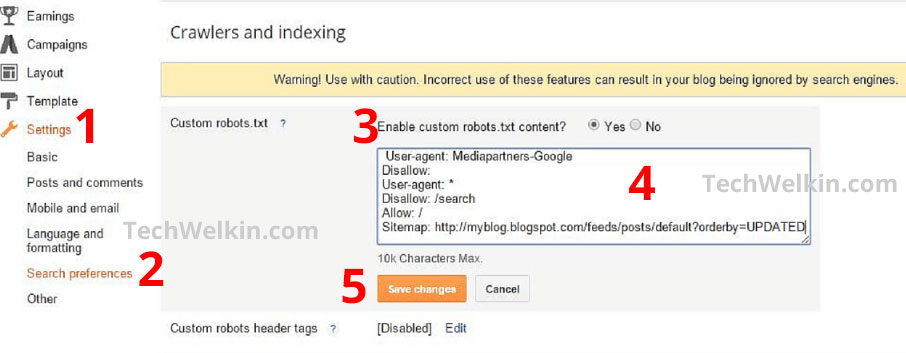
- Remove custom robots.txt & custom robots headers. The default ones work.
- Add "/atom.xml" as your sitemap.
- Check index status of your URL using URL inspection tool.
- Test your URL using testing tool and see if you have any 5xx server errors.
- If everything is fine, submit your link for indexing.
No. Once you submit a sitemap, you don't even need to open your GSC again. Your sitemap will be updated every time you publish a new post and Google will periodically crawl your links.Can I ask....do I need to submit a site map every time I add a new blog post?

Cool, thank you!No. Once you submit a sitemap, you don't even need to open your GSC again. Your sitemap will be updated every time you publish a new post and Google will periodically crawl your links.
Oh, hopefully you are rightBlogspot blogs have 5xx server errors in the past week. It should automatically index within a few days.
Google staff confirmed it on their support forum. It was a temporary error and they already fixed it.Oh, hopefully you are right
For removing robot txt do I need to customize theme?I've created a blogspot blog 5 days ago and the post is already indexed (with spun content). So, it should work without any issues.
- Remove custom robots.txt & custom robots headers. The default ones work.
- Add "/atom.xml" as your sitemap.
- Check index status of your URL using URL inspection tool.
- Test your URL using testing tool and see if you have any 5xx server errors.
- If everything is fine, submit your link for indexing.
No, it's an option in settings. By default, the custom robots.txt and custom robots headers are turned off. If you haven't turned them on, you can ignore it. The default settings work fine.For removing robot txt do I need to customize theme?