Can anyone help me to fix my computer?

yeah, pc working great in afe mode! but internet still not :) if i have it fixed, ill spread you all the $20 :D

Internet won't work in safe mode unless you select "Safe Mode with Networking" during the boot. Also, are the keys working while the system is booting?
 
I guess you found the option to run the system in safe mode with networking. If not, here's the instructions.

Open msconfig(Windows key+R). Type msconfig, press enter. Goto "Boot" tab and select the "safe boot" checkbox and select "Network" radio button under safe boot. Press ok. Press restart. You system will restart in safe mode with internet connectivity.

3882d1210658119-boot-advanced-options-number-processors-step1.jpg
 
Internet won't work in safe mode unless you select "Safe Mode with Networking" during the boot. Also, are the keys working while the system is booting?
no :s not working. Just tryed safe mode + networking, it us showing im connected but sites wont load.
 
Try to make a system restore run, just like what FBguru have said.

Restore to a point of time when you haven't downloaded that crap yet.
 
If you want a quick fix than reinstall your windows. IMO you will waste more time trying to fix it.
Get an external hard drive, copy all files, format your hard drive.
During the installation divide your hard drive in 2 parts: Disc C and D. Keep the OS and installed programs on C and all working files on D.

Next time it will be easier to reinstall and in case of OS crash, your files will be still fine.
I have a divided hard drive + 2 external.
Install CCleaner and SmartDefraq (hope you already have antivirus) and run them once a month.
Revo uninstall is also good for deleting installed programs.
 
oh skype and chrome started showing the same errors. prolly i must reinstall my windowses :) i am connected to internet but pc is doing shit. everything crashes, etc. or maybe i need a new pc, not sure
 
no :s not working. Just tryed safe mode + networking, it us showing im connected but sites wont load.

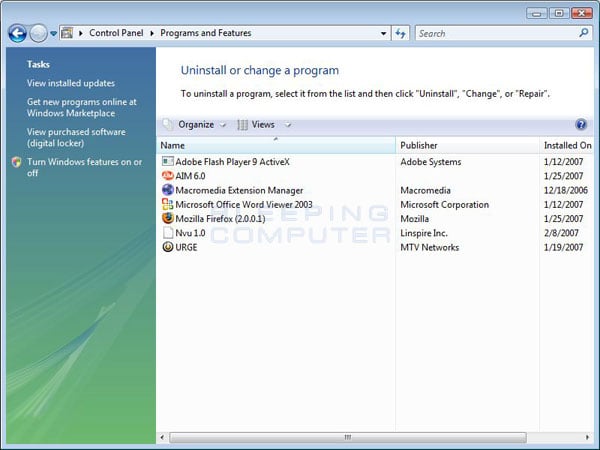
No probs. Just proceed with removing the crapware(donot delete the installation folder). Goto control panel. Open Programs and Features and click the "Installed On" button to sort out the installed date from newest to oldest.

programs-and-features.jpg


Select the program that you see on top of the list(YT Viewer?). It may also look like blasafeweb, bla,etc.., Remove whatever looks unfamiliar to you that are installed recently. Reboot the system in normal mode(by deselecting all the options you did in the above step). If it's still not working normally, we shall proceed with further complicated manual removal steps.
 
yes, but my pc lags when trying to uninstall it. and ive never done a backup system restore :/
 
yes, but my pc lags when trying to uninstall it. and ive never done a backup system restore :/

I'm sorry that you don't have any backups to restore. I'll let the pc crawl until the uninstall process is completed.
 
im now scanning for affecyed softwares and the only software i see is that yt views stuff lol
 
YT software?? Yeah right.. sounds like someone has been downloading too much pron. :joke:

My suggestions... Go to run, open MSCONFIG. Under startup, uncheck EVERYTHING. Then reboot the computer and see if it works properly. I know someone else mentioned this doesn't work because viruses don't show there, but I've never had any issues with doing this myself. Usually the viruses do show, but they try to put a sneaky software name in there to fool you or make it sound like your computer needs it to run.

If that doesn't work, you're going to need to get into safe mode and run anti-virus programs to clean it out. However, I understand you're having issues connecting to the internet in safe mode :|

Maybe while you're in safemode, try checking to make sure you're computer is not using a proxy or anything. Like go to Control Panel, then go to Internet Options. Assuming you're just using a basic plug and play internet connection, remove anything that's under "Dial-up and Virtual Private Network Settings". Then click "LAN Settings" and make sure there is nothing checked on this screen.

If that doesn't work, one last thing you could try checking is control panel->network connections... although on some windows versions it may say "Network and sharing center" first, then you click on manage network connections on the left and column. So from here just make sure that the connection you are using is enabled. Maybe you could try right clicking on the connection and repairing. If it doesn't fix your internet connection, it may atleast have some details as to why it's not working. Also try right clicking on the connection and going to properties, then click on "Internet Protocol Version 4" and then click properties. On the two tabs here, just make sure that everything is UNCHECKED.

I hope this helps. Good luck!
 
try to kill the process not the program. Next tab after the programs if you press ctrl+shift+del
My OS is a mix of Russian and German, so my screen shots won't help you.
 
im now scanning for affecyed softwares and the only software i see is that yt views stuff lol

I'd try the uninstaller before manually removing the software through antivirus because even if the antivirus removes the software, the support files and registry entries that comes with the software will still be left untouched. The uninstaller will work fine in safe mode.
 
thnx a lot for helping! it was really a yt software, lol. Video Pusher or like that, easily be found on another forum ;) well it was cracked or like that, but its original price is $999 haha! ok ill probably go sleep and try it all 2mrw, maybe to reinstall windowses... thnx a lot to everyone! will see if we got a winer! :p
 
thnx a lot for helping! it was really a yt software, lol. Video Pusher or like that, easily be found on another forum ;) well it was cracked or like that, but its original price is $999 haha! ok ill probably go sleep and try it all 2mrw, maybe to reinstall windowses... thnx a lot to everyone! will see if we got a winer! :p

We can fix it tomorrow without reinstalling the windows. But before you go to bed, make sure to watch this video : http://www.blackhatworld.com/blackhat-seo/blackhat-lounge/661126-i-dare-you-watch.html

Good night! ;)
 
Back
Top