Building New Computer!

We're moving bro.

I installed windows.

I cracked it (allegedly allegedly!!)

Im installing win updates right now. When theyre done imma disable future updates. Got a neat little program for that.

And then ill proceed to do the rest of the setting up. Disable indexing and animations and set power options and disable a bunch of background processes and install firefox and classic shell etc etc.

I still need to buy fans. Not sure if ill get 2 or 3 fans. Probably 2 of them get some airflow going. Im not sure if i can fit a 3rd fan. The lower fan slot on the box, if i put a fan there it will be too close to the GPU.

Also i may buy 32GB more ram. Id go for 16GB, but it seems i cant run dual channel with 3 sticks :(

Also havent decided whether or not to overclock yet. Ill probably do it though :D

That said. Not sure what else i can to. If anybody has any suggestions i am all ears? :)


About the CPU benchmark. Khm. What is that and how do i get it? :D
I think two fans is enough. As for overclocking at this point I would just play it safe.

More ram is always good :)
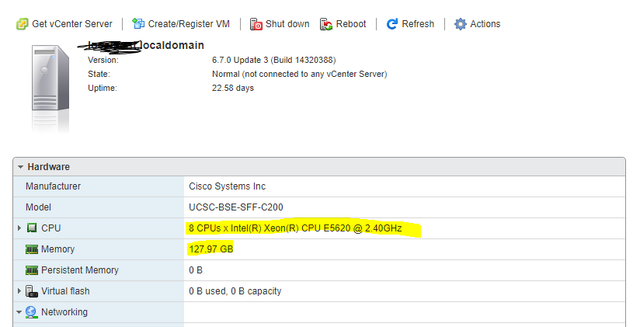
vmserver.png


and you get the benchmark software from here:
https://www.passmark.com/products/performancetest/download.php
 
Lol i did windows updates, now i cant open microsoft edge xD

It opens for a second and shuts down immediately. Wtf

Internet explorer works fine :D
 
Try to repair or reset it from "Apps & Programs" Setting

Thanks, but i dont care for it. I never use it.

Firefox baby love numero uno!
Chrome two
Opera three
Bravo or brave or what its called four
Internet explorer five

Edge can suck a fat.. um.. cookie :)
 
Check out operkin ltsb windows 10 lite+ if you want a clean win10 system with no MS BS and disabled updates xbox dvr etc...
 
Check out operkin ltsb windows 10 lite+ if you want a clean win10 system with no MS BS and disabled updates xbox dvr etc...

Its over now bro. Computer is det and ready to fly!

Just gotta return the ssd to primary boot device in bios... and overclock this bitch! :D
 
Ok so... in bios in oc tweaker i have DRAM Frequency at DDR4-2400 by default.

But why? Thats auto detected. But my rams are 3200, not 2400. I made sure when i bought them to be 3200. Amd i also checked the bix when they arrived, its 3200.

Anyway, i can choose between 2 XMP Settings:

Profile 1: DDR4-3200 16-18-18-36 1.35V
Profile 2: DDR4-3000 15-17-17-36 1.35V

Seeing as my rams are 3200, and seeing as my rams are CL16, ill go for Profile 1.

Fingers crossed it works :)
 
Ok i did it. Everything seems fine.

I mean, im not really overclocking am i?

The rams were being under-utilized by default, running at 2400. I just set them to run to their maximum capacity, at 3200.

I checked performance in task manager. It shows 32GB of ram recognized, running at 3200 MHz.

As it should be. Everything is right with the world :)

 
@underachieved bro only for you i downloaded this benchmark tool, installed it and its running tests now.

Ill tell you the results once its finished.

Please note that i have Disabled animations and all that fancy stuff on the computer. So i dont know of that will in any way affect the test this tool is doing.

Anyway, ill let you know what happens when its done testing.

Its doing a pretty comprehensive test actually. Doing all kinds of things.
 
Ok, here you go.

HJ00Z0L


Good?

Do you want any other info?
 
Ok guys. So i have to stop now.

In the past 48 hours ive eaten 2 yoghurts and some pumpkin seeds. And some milk with muesli and cookies mixed in.

I am burned out, but i am also starving. I cant focus cant concentrate. Im not feeling bad, just feeling abit lost.

So im gonna go out and buy food. Fat. Meat :D

Then imma come back, eat, and then continue. My brain lacks the nutrients to do any more nothing right now.

The computer is banging, but my cpu is burnin out!! :D
 
I ordered these guys

Ljg18ow


Thats like $10 bucks. Ill give the guy $11 cuz hes a nice guy and im a nice guy and is all nice :D

Theyll be here Tuesday.
 
Better then nothing though don't expect miracle cooldowns.. 1-3C most probably.

Better than nothing are the best odds id ever gotten :D

We'll be all right.

On Monday ill probably order 36GB more ram. I dont need it, i just need 16GB more. But in mb manual it says that dual channel wont work with 1 or 3 chips. So to keep dual core im forced to get 2x16GB more ram.

You know what, fuck it. I cheap out on the monitor, cheap out on the gpu, and cheap.out on the fans. But i will not cheap out on the ram. At some point a man has to stop and say enough is enough! :D
 
Better than nothing are the best odds id ever gotten :D

We'll be all right.

On Monday ill probably order 36GB more ram. I dont need it, i just need 16GB more. But in mb manual it says that dual channel wont work with 1 or 3 chips. So to keep dual core im forced to get 2x16GB more ram.

You know what, fuck it. I cheap out on the monitor, cheap out on the gpu, and cheap.out on the fans. But i will not cheap out on the ram. At some point a man has to stop and say enough is enough! :D

So much ram that wont be properly utilized. Well you know what you are doing I guess :) Am done giving my advice. Good luck with the pc.
 
So much ram that wont be properly utilized. Well you know what you are doing I guess :) Am done giving my advice. Good luck with the pc.

Im not sure what you mean man.

At 36GB my ram usage will be at 99% at all times.

At 48GB i figure it will be at a steady 90-95% usage

At 64GB im not sure, but since id like to have dual channel, i figure let it have 64GB and call it a day.

I dont know. Thats where im at. I dont know how to properly utilize, im not an expert. Jack of all trades master of none.

Cheers :)
 
So the computer is working fine. I've pushed it a little, but not yet fully. It's been running non-stop for about 30 hours now.

The noise is a tad bit loud, but the computer is a bit strong, so I think the level of noise is within acceptable levels.

The CPU at the moment is at around 62-65c

The GPU at the moment is at around 63-66c

That said, the reason I checked the temps is because the computer is Hot on the touch. My other 3 computers are not nearly as powerful (well, one of them is close) but they are not that hot.

The computer is Hot around the power supply and Hot around the GPU. It's hot on top and on the sides and in the back. The only "cool" areas is the side opening right above the CPU fan, and the front of the case. Though even the front of the case is warm-ish-ish-ish.

I don't know, it feels too hot to the touch, but the apps I used to test the temps show normal levels. I did the "touch test" by touching my other 3 computers and comparing, and they are all Much Much cooler. And they've been running for 6-12 months Non-Stop (other than a restart every 2-3 days).

I'll get the extra fans in a day or two and mount 2 on the computer, and we'll see what that does.

- so the PC is a bit louder than my other computers (possibly because it's the only one with a big ass GPU with 2 big fans - my other 2 pcs have integrated gpus and 1 pc has gpu with no fans).
- the PC is Hot to the touch, especially around the power supply and the gpu (but it's pretty hot on both sides and the back and the top)

That's what's up so far. I still haven't pushed it as much as I want. It's at about 50-60% of what I expect from it. I'll be pushing it to the limit in the coming days, and we'll see what happens.
 
Back
Top