

Synapses
Failed to resolve a dispute resolution thread.
- Jan 5, 2020
- 316
- 77
Awesome YouTube Bot (AYB) - Your YouTube’s growth assistant. With a full toolkit of IP-changing methods and versatile features, Awesome YouTube Bot is created to help automate and improve your channel and video ranking and performance!

What exactly is Awesome Youtube Robot?
Awesome YouTube Bot is a Windows application that uses custom traffic-sending methods to drive additional views, watch time, likes, comments, and more to your YouTube videos. This tool can:
Additionally, the bot can simulate ad views and even trigger the skip ad button when necessary. By incorporating random activities, it minimizes the risk of being detected as a bot.
AYB is an all-in-one package featuring multiple functionalities:
Why Use Awesome YouTube Bot for SEO?
YouTube’s algorithm often rewards strong CTR, watch time, engagement, and search relevancy. Awesome YouTube Bot focuses on these signals using human-like behavior that is intended to be harder for YouTube to flag as bot traffic.
Through features like custom keyword targeting, random browsing, and task chaining, AYB attempts to create realistic user journeys—from making it to search a keyword to clicking on your video, watching it, liking it, and possibly subscribing. This can send positive indicators to YouTube, which may help visibility.
You may ask yourself, “What’s the process here?”
At its core, the application uses diverse user agents and simulates multiple devices (It gets updated on a daily basis, and the bot gets the new fingerprints from our servers). You can import Gmail accounts to lower view drop rates, leave comments, subscribe, and all other account-based tasks. We also incorporated various methods to help the system remain undetected. While our improvements make the simulated actions resemble real human behavior, YouTube still scrutinizes the history and background of Gmail accounts. High-quality Gmail accounts are ideal, but even newly created ones can generate views—especially when paired with random warm-up activities.
We’ve also included a full and powerful toolkit for changing IP. You’ll need to set up one of the methods in the YouTube Bot, so it can change and generate new IPs to use.
Control the Type of Views Shown in YouTube Analytics

One of the powerful features of Awesome YouTube Bot is its ability to simulate the type of traffic source shown in your YouTube Analytics. This gives you full control over how your views appear — just like they came from real users.
You can flex your traffic stats and optimize for better rankings by choosing between:
Powerful IP-Changing Toolkit
 Awesome YouTube Bot employs four distinct methods for obtaining different IPs, and you can choose between them and set up your desired method.
Proxy:
Supports all types of proxies (HTTP/HTTPS/SOCKS4/SOCKS5).
VPN:
Supports using all premium VPNs that offer OpenVPN configuration files. In addition to standard proxy and VPN methods, we have developed 3 innovative approaches:
Phone Network Service:
Generate IPs via your mobile network—perfect for local views if you have unlimited SIM card data. All you need is an Android phone and SIM card internet, which you connect to your computer via a USB cable.
PPPoE Mode:
Automatically generate IPs without needing proxies. Your modem should support this mode. To use this method, you must connect to the internet by LAN cable and a broadband connection. Your modem should be in bridge mode/PPPOE.
Fritzbox Routers:
Utilize these popular European routers to obtain unique IPs.
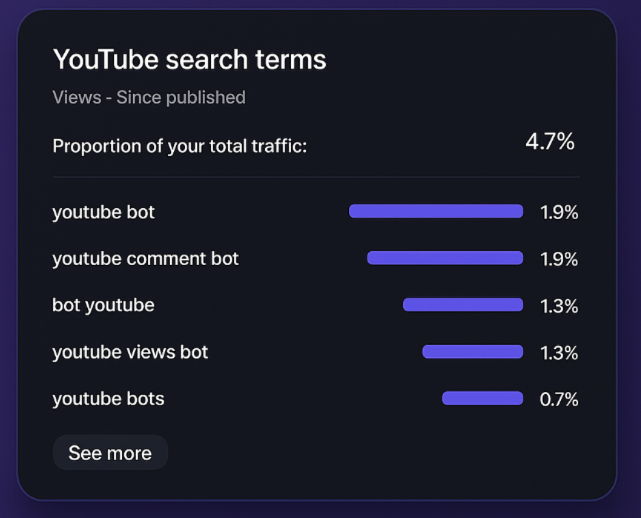 AYB allows you to boost your video CTR on targeted search terms by simulating real user behavior:
Want to appear for trending topics or long-tail phrases? Just enter your target keywords, define a viewing sequence, and let AYB handle the rest. This should help you gain more attention from YouTube.
By customizing the view source, you not only improve watch time and CTR but also feed YouTube’s algorithm the signals it expects from real audience discovery.
How many views can I send per day?
It depends on your method:
Multi-threading allows you to target different videos simultaneously — even with unique IP methods — for maximum reach.
How do like & subscription & comment features of the bot work?
To use these features, Gmail accounts are required. The bot handles everything automatically once imported.
Campaign Scripting: Define Custom User Journeys
 AYB’s campaign scripting feature (since version 1.2.6) lets you string together actions into a seamless experience per visitor. You can add different kinds of tasks to be done by every single session/visitor. This will make viewers look more real, and you can also do more tasks in a lesser time limit.
For instance, let’s assume you need to send 100 visitors to three of your videos, and you need those 100 visitors to watch your three videos in sequence, and also, at the end, you need those sessions/viewers to subscribe to your channel. It’s possible with this new feature! You’ll need only to define one campaign and add those tasks to it. So visitors will have such behavior:
You can automate 100 visitors to follow this path, resulting in 300 views and 100 subscriptions — all from a single campaign definition.
Random Act System — Warm-Up & Human Behavior Simulation

YouTube’s detection system is heavily reliant on behavioral patterns. That’s why Awesome YouTube Bot’s "Random Act" module is built, It is for warming up sessions and making your traffic look as human as it gets.
Before executing your campaign tasks, the bot can perform random, human-like interactions across the platform:
This pre-task activity mimics human curiosity and viewing patterns. It dramatically reduces footprint, warms up Gmail accounts, and gives your actual campaign (views, likes, comments, etc.) a much more authentic foundation.
Who Should Use Awesome YouTube Bot?
Anyone looking to grow their YouTube channel or run YouTube SEO campaigns. Whether you're an influencer, content creator, or part of a marketing agency, AYB takes the heavy lifting off your shoulders and helps you focus on what truly matters - creating great content.
Features
Below are each of the key features and relevant images:
 Increase YouTube views and watch time using real-user behavior
 AI Mode. Simulate everything that’s not already included in the bot, or even generate context-based comments for your YouTube. https://www.youtube.com/watch?v=Dup29IFMfOI.
Choose View sources: Direct, Suggested, YouTube Search, or Google Search (all visible in YT analytics)
Embedded YouTube video playing support (especially Twitter & Reddit). Just add the Twitter/Reddit/etc. URL that includes your YouTube video.
Ability to search on YouTube and Google Mode using the keyword you add to the bot (helps rank your videos on specific keywords).
Integrable with Awesome Traffic Bot for advanced SEO automation flows. https://www.youtube.com/watch?v=Xv_i-ejt9p8.
Use Android Emulators (LD Player and Memu) to emulate real Android phone devices! (Beta mode). https://www.youtube.com/watch?v=DWJxm3Ef-hg&list=PLm1aeymHRMx-wHLO8CNuXlYIR2VRcvcWH&index=3&ab_channel=DalgaDev.
Increase the count of likes (Gmail accounts needed)
Increase your comments (Gmail accounts needed)
Increase your subscriptions (Gmail accounts needed)
Increase the view of live videos
Clear the browser’s cache after completing the campaign
 Add a chain of activities (aka script) and tasks as a single campaign. It gives more flexibility and power to run different scenarios.
Simulate different devices with different screen resolutions and updated user agents
AYB has the most advanced anti-detected browsers developed at the core, making it difficult to detect.
IPs have different fingerprints (different operating systems, hardware specs, WebGL, etc.)
Loop feature: Enable it so the bot restarts the jobs queue after the last job ends. Campaigns will never end.
Ads are blocked by default to prevent misuse and legal issues. (You can turn off ad blocking at your own responsibility.)
Choose the playback speed or quality of videos. This saves data, mimics real users, and affects watch time.
Use Gmail accounts to lower the view drop rate. The bot logs in, saves cookies, etc.
Perform random activities before your main task (the "Random Act" feature) to look more real on YouTube.
The Random Act feature can randomly search for videos (keyword list), watch trending or short videos, like/dislike, etc.
Generate IPs using phone network services (Android Phone mode)
Create IPs using ADSL modems (PPPoE mode) or Fritzbox
If you don’t want these unique IP methods, use Proxy mode — which supports HTTP/HTTPS/SOCKS4/SOCKS5.
And above all, it is capable of multi-threading!
Multi-threading with two different configurations for improved speed and performance.
Please note that you must import Gmail accounts to send views, comments, likes, and subscriptions. It's best to use slightly warmed-up Gmail accounts; new or inactive ones suffer higher drop rates on YouTube.
FAQ
Can I use this to rank for specific keywords?
Yes - keyword CTR boosting is one of the core strengths of AYB.
How do I set it up?
Absolutely! A few clicks and you’re good to go. Our support is ready to assist anytime.
Can I run this on Windows Server (RDP)?
Of course! Just ensure you meet the requirements to use unique IP generation methods.
What does MultiThreading mean?
It means multiple bot cores working simultaneously. For example, 3 threads can reduce a task that normally takes 100 seconds down to ~30 seconds. The number of threads depends on your hardware specs.
Do you save our data on your servers?
No. Your data never touches our servers. We only have an update server with no storage or tracking.
Can Awesome YouTube Robot work 24/7?
Yes, it’s a robot — it can run 24/7/365.
Customization
The service does not include customizations. However, if you have suggestions, let us know. We highly value user feedback and ideas.
Requirements:
.NET Framework 4.7.2 or higher
The latest version of Google Chrome
Windows 10 or 11 / Windows Server 2016 R2 or above
8 GB RAM or higher (recommended)
4 CPU cores at ~2.6 GHz or higher
If you want to use the unique IP generation methods:
Bridge mode method: A LAN cable and internet that’s configured to bridge mode + PPPoE broadband (we guide you through these settings). Orange routers are unsupported – must have a dynamic IP.
Mobile Internet method: An Android phone with a SIM card that has internet data.
LD Player emulation mode: A system with GPU/OpenGL capability.
If you have any questions about any aspect of the bot, don’t hesitate to contact our team. We look forward to hearing from you!
Follow us for updates, offers, tips, and more:
https://youtube.com/@dalgadev
https://t.me/DalgaDev
https://facebook.com/DalgaLLC
Contact us:
https://www.blackhatworld.com/conversations/add?to=Synapses
https://dalga.dev/support
https://t.me/dalgadev1
Refund Policy:
1. Orders that meet the second condition can be refunded within 7 days of purchase. Refunds are not possible after 7 days.
2. The product will be refunded if the software has a technical problem and the support guidelines do not work while the problem is unresolved. (After checking the issue by remote desktop applications, if the problem persists.)
3. You are solely responsible for ensuring that your system meets the hardware, software, and any other applicable system requirements for the software specified on the product's page. You also need to make sure your internet speed is okay for sending traffic.
NEW AI Feature has been released to Awesome YouTube Bot! Powered by advanced AI, Awesome YouTube Bot can now simulate and perform a variety of actions beyond what the native application could do! https://www.youtube.com/watch?v=Dup29IFMfOI.
What exactly is Awesome Youtube Robot?
Awesome YouTube Bot is a Windows application that uses custom traffic-sending methods to drive additional views, watch time, likes, comments, and more to your YouTube videos. This tool can:
- Send thousands of human IPs to your videos
- Increase video watch time
- Improve your video keywords' CTR to gain more exposure potentially
- Boost likes, comments, and views through a tactful and randomized approach that reduces the detection
Additionally, the bot can simulate ad views and even trigger the skip ad button when necessary. By incorporating random activities, it minimizes the risk of being detected as a bot.
AYB is an all-in-one package featuring multiple functionalities:
- YouTube watch time bot
- YouTube like bot
- YouTube CTR bot
- And many other sophisticated assistant tools
Why Use Awesome YouTube Bot for SEO?
YouTube’s algorithm often rewards strong CTR, watch time, engagement, and search relevancy. Awesome YouTube Bot focuses on these signals using human-like behavior that is intended to be harder for YouTube to flag as bot traffic.
Through features like custom keyword targeting, random browsing, and task chaining, AYB attempts to create realistic user journeys—from making it to search a keyword to clicking on your video, watching it, liking it, and possibly subscribing. This can send positive indicators to YouTube, which may help visibility.
You may ask yourself, “What’s the process here?”
At its core, the application uses diverse user agents and simulates multiple devices (It gets updated on a daily basis, and the bot gets the new fingerprints from our servers). You can import Gmail accounts to lower view drop rates, leave comments, subscribe, and all other account-based tasks. We also incorporated various methods to help the system remain undetected. While our improvements make the simulated actions resemble real human behavior, YouTube still scrutinizes the history and background of Gmail accounts. High-quality Gmail accounts are ideal, but even newly created ones can generate views—especially when paired with random warm-up activities.
We’ve also included a full and powerful toolkit for changing IP. You’ll need to set up one of the methods in the YouTube Bot, so it can change and generate new IPs to use.
Pro Tip: While the app itself is highly sophisticated, the quality of your Gmail accounts matters. High-quality or aged Gmail accounts help reduce drop rates. But even new accounts can still be used effectively with the right setup. Also, using Gmail accounts can help you get a lot better results in terms of your YouTube Keywords CTR and exposure.
Control the Type of Views Shown in YouTube Analytics
One of the powerful features of Awesome YouTube Bot is its ability to simulate the type of traffic source shown in your YouTube Analytics. This gives you full control over how your views appear — just like they came from real users.
You can flex your traffic stats and optimize for better rankings by choosing between:
- Direct Views – Simulate traffic coming directly via shared links (great for external embeds or shares).
- YouTube Search Views – Mimic real users typing in your targeted keywords, finding your video, and clicking on it. This is a core part of CTR Boost and YouTube SEO.
- Suggested/Recommended Views – Emulate Video/Channel discovery through YouTube’s recommended sidebar. Helps build your video’s relevance and reach. It will be shown as “Suggested” in the YT analytics.
- Google Search Views – Simulate users discovering your video through Google search results and landing on YouTube.
- Embedded Views – Drive views from platforms like Twitter, Reddit, and more by simply pasting the post URL. These views show up as “External” traffic in analytics, helping diversify your traffic sources.
Powerful IP-Changing Toolkit
Proxy:
Supports all types of proxies (HTTP/HTTPS/SOCKS4/SOCKS5).
VPN:
Supports using all premium VPNs that offer OpenVPN configuration files. In addition to standard proxy and VPN methods, we have developed 3 innovative approaches:
Phone Network Service:
Generate IPs via your mobile network—perfect for local views if you have unlimited SIM card data. All you need is an Android phone and SIM card internet, which you connect to your computer via a USB cable.
PPPoE Mode:
Automatically generate IPs without needing proxies. Your modem should support this mode. To use this method, you must connect to the internet by LAN cable and a broadband connection. Your modem should be in bridge mode/PPPOE.
Fritzbox Routers:
Utilize these popular European routers to obtain unique IPs.
Keyword CTR Boost — Rank with Relevance
- Search your keyword on YouTube or Google
- Find your video among real results
- Click on it (increasing CTR)
- Watch it for a configured amount of time
- Interact (like, comment, subscribe)
Want to appear for trending topics or long-tail phrases? Just enter your target keywords, define a viewing sequence, and let AYB handle the rest. This should help you gain more attention from YouTube.
By customizing the view source, you not only improve watch time and CTR but also feed YouTube’s algorithm the signals it expects from real audience discovery.
How many views can I send per day?
It depends on your method:
- With unique IP-changing methods (Phone, PPPoE, FritzBox, VPN):
These methods will only give you one IP for all threads. So, you can send 1 view per video at a time. For a 60-second video, that’s 60 views per hour. You can use multi-threads to send the IP to different videos at the same time to increase performance. - With proxies and multi-threading:
You can scale up massively. For example, using 20 threads and 20 proxies, you can send 400 views per hour.
Multi-threading allows you to target different videos simultaneously — even with unique IP methods — for maximum reach.
Important Note: Some drop rates may occur for views if proxies or Gmail accounts are inactive. Our team is actively working on improving warm-up and ranking strategies. However, features like likes, comments, and subscriptions currently enjoy much higher stick rates and do not experience drops in most cases.
Note: For live views, we recommend using the regular view mode instead of API-based methods to avoid zero watch time and view drops.
How do like & subscription & comment features of the bot work?
To use these features, Gmail accounts are required. The bot handles everything automatically once imported.
- High-quality Gmail accounts are strongly recommended for optimal results.
- Even with real Gmail accounts, YouTube’s algorithm may drop some subscribers if the accounts are inactive.
- Use random activity to warm up and legitimize new accounts.
Update: As per the latest YouTube algorithm changes, Gmail accounts are now required for sending views. Even a single Gmail account can be used to send unlimited views with different IPs, but importing more accounts can improve ranking results.
Campaign Scripting: Define Custom User Journeys
For instance, let’s assume you need to send 100 visitors to three of your videos, and you need those 100 visitors to watch your three videos in sequence, and also, at the end, you need those sessions/viewers to subscribe to your channel. It’s possible with this new feature! You’ll need only to define one campaign and add those tasks to it. So visitors will have such behavior:
- Visitor watches Video A (for a set time) → Video B → Video C → Subscribes → Closes browser.
You can automate 100 visitors to follow this path, resulting in 300 views and 100 subscriptions — all from a single campaign definition.
Random Act System — Warm-Up & Human Behavior Simulation
Before executing your campaign tasks, the bot can perform random, human-like interactions across the platform:
- Browse & Watch Trending Videos – Interact with videos from the trending tab to appear like a regular user following platform trends.
- Engage with Shorts – Watch and scroll through YouTube Shorts - a key signal YouTube tracks with real users.
- Watch Recommended Videos – Simulate sidebar video hopping, mimicking a human-like watch session flow.
- Like or Dislike Videos – Adds interaction depth to your sessions. Randomly like or dislike videos to avoid detection and appear real. You can choose whether you want it to interact with videos or not.
- Keyword-Based Exploration (Spintax Supported) – Provide a list of keywords (even using spintax) that the bot will randomly select from to search for videos, watch them, and behave like an engaged viewer. This helps warm up your profile with relevant topics.
This pre-task activity mimics human curiosity and viewing patterns. It dramatically reduces footprint, warms up Gmail accounts, and gives your actual campaign (views, likes, comments, etc.) a much more authentic foundation.
Who Should Use Awesome YouTube Bot?
Anyone looking to grow their YouTube channel or run YouTube SEO campaigns. Whether you're an influencer, content creator, or part of a marketing agency, AYB takes the heavy lifting off your shoulders and helps you focus on what truly matters - creating great content.
Features
Below are each of the key features and relevant images:
Please note that you must import Gmail accounts to send views, comments, likes, and subscriptions. It's best to use slightly warmed-up Gmail accounts; new or inactive ones suffer higher drop rates on YouTube.
Disclaimer on Monetized Content
We strongly advise against using Awesome YouTube Bot for earning or manipulating YouTube's monitized program. If you already have monetized videos, you can use the bot’s ad-blocking feature.
DalgaDev assumes no responsibility for any misuse involving monetized content. This software is specifically designed to assist in growth, SEO experimentation, and channel visibility.
FAQ
Can I use this to rank for specific keywords?
Yes - keyword CTR boosting is one of the core strengths of AYB.
How do I set it up?
Absolutely! A few clicks and you’re good to go. Our support is ready to assist anytime.
Can I run this on Windows Server (RDP)?
Of course! Just ensure you meet the requirements to use unique IP generation methods.
What does MultiThreading mean?
It means multiple bot cores working simultaneously. For example, 3 threads can reduce a task that normally takes 100 seconds down to ~30 seconds. The number of threads depends on your hardware specs.
Do you save our data on your servers?
No. Your data never touches our servers. We only have an update server with no storage or tracking.
Can Awesome YouTube Robot work 24/7?
Yes, it’s a robot — it can run 24/7/365.
Customization
The service does not include customizations. However, if you have suggestions, let us know. We highly value user feedback and ideas.
Requirements:
.NET Framework 4.7.2 or higher
The latest version of Google Chrome
Windows 10 or 11 / Windows Server 2016 R2 or above
8 GB RAM or higher (recommended)
4 CPU cores at ~2.6 GHz or higher
If you want to use the unique IP generation methods:
Bridge mode method: A LAN cable and internet that’s configured to bridge mode + PPPoE broadband (we guide you through these settings). Orange routers are unsupported – must have a dynamic IP.
Mobile Internet method: An Android phone with a SIM card that has internet data.
LD Player emulation mode: A system with GPU/OpenGL capability.
If you have any questions about any aspect of the bot, don’t hesitate to contact our team. We look forward to hearing from you!
Pricing Plans
Awesome YouTube Bot is available in two convenient pricing options:
Monthly Subscription: $49/month - Bot can be installed on 2 Devices.
Annual Subscription: $24.9/ month (Billed annually for $299) - Bot can be installed on 2 Devices.
Special discount for long-standing BHW users (accounts older than 6 months): 20% off
Discounted Price: $19.93 /month! (Only $239.2 per year) - See below to receive your coupon code.
Purchase link & More information (Our website usually has the most updated information and recent news):
https://dalga.dev/product/awesome-youtube-bot/
Monthly Subscription: $49/month - Bot can be installed on 2 Devices.
Annual Subscription: $24.9/ month (Billed annually for $299) - Bot can be installed on 2 Devices.
Special discount for long-standing BHW users (accounts older than 6 months): 20% off
Discounted Price: $19.93 /month! (Only $239.2 per year) - See below to receive your coupon code.
Purchase link & More information (Our website usually has the most updated information and recent news):
https://dalga.dev/product/awesome-youtube-bot/
Exclusive BHW User Offer
While the official annual price is $299, we're offering an exclusive discount to BHW community members. Claim your discounted price of just $239.2 annually by using your unique coupon code.
To receive your exclusive coupon code, simply reply to the topic with: "Coupon code"
Stay Connected:To receive your exclusive coupon code, simply reply to the topic with: "Coupon code"
Follow us for updates, offers, tips, and more:
https://youtube.com/@dalgadev
https://t.me/DalgaDev
https://facebook.com/DalgaLLC
Contact us:
https://www.blackhatworld.com/conversations/add?to=Synapses
https://dalga.dev/support
https://t.me/dalgadev1
Refund Policy:
1. Orders that meet the second condition can be refunded within 7 days of purchase. Refunds are not possible after 7 days.
2. The product will be refunded if the software has a technical problem and the support guidelines do not work while the problem is unresolved. (After checking the issue by remote desktop applications, if the problem persists.)
3. You are solely responsible for ensuring that your system meets the hardware, software, and any other applicable system requirements for the software specified on the product's page. You also need to make sure your internet speed is okay for sending traffic.


