

CjTheFish
Regular Member
- May 3, 2014
- 380
- 89
Hey all,
This might be a bit of a long post but I wanted to reach out to see if anyone had some advice on improving my page load times.
Before you jump in with the typical recommendations, here me out and see what I've done.
I have a relatively popular image and gif sharing website, Alexa rank around 120kish.
It sits on a VPS server with another site in the same niche, with an Alexa rank around 170k.
Both sites get a decent amount of traffic per day, and both consume quite a bit of bandwidth per month. BUT my server is never under stress. Ram usage is perfect, and load averages are right where they need to be.
The site with Alexa 120kish is the problem site, and will be referred to as Site A from now on. Site B will be the 170k site.
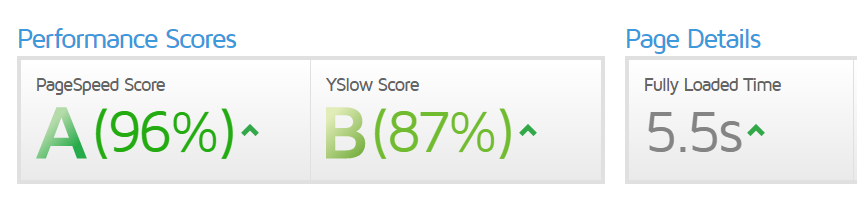
Site A loads incredibly slow, and I have done everything I believe I can in my power to optimize it, yet it's still taking upwards of 5 seconds to load the page, however on every major speed test I've run it through, it's getting A+ ratings on EVERY factor and showing zero recommendations for optimizations.
Site B however loads incredibly fast, it clocks in at around 0.10 seconds and has 5x bigger of a database and 5x more content.
Here's what I've done so far to try and combat these.
- Upgraded both sites to a paid tier 1 cloudflare plan, (mostly for WAF but also for speed benefits, not my first rodeo - it's all configured correctly, lazy loading, expires, etc etc)
- Tinkered with optimizing MYSQL query cache for around a month - saw no improvements
- upgraded to MARIADB, tinkered with query cache optimization tuning for around a month - saw no improvements and eventually disabled it. (sites loaded faster without it)
- Compressed all of the images on the site
- Set the cache and expires correctly
- Tried various caching plugins but most had an issue due to conflicts with cloudflare's caching, resulting in worse load times
- Used WP-Asset Cleaner to clean up anything that I don't need on the page
- Ran repairs and optimizations on the database
- Removed unnecessary plugins and kept only those necessary to run the site
- Checked, double check, triple checked that it was not a server related issue. The server is perfectly healthy, well optimized and quite frankly overkill in terms of it's specs for these two sites.
I should also note that site A is built on Wordpress, and site B is NOT, so it's not easy to mirror everything I have done on site B to site A. They are complete different frameworks.
For further information - Site A has around 40,000 images and gifs on it, and a DB size of around 280MB.
--
If you have any advice or suggestions on anything I can do to try and get these page speeds lower, I would greatly appreciate it. It is unfortunately one of the only factors holding the site back in the SE's right now in my opinion.
I consider myself to be someone very familiar with web development, server optimization, and SEO but this is really stumping me. It's entirely possible I might have missed something important here so if you have ANY advice for me it would be greatly appreciated
Thanks for your time!
- CJ
This might be a bit of a long post but I wanted to reach out to see if anyone had some advice on improving my page load times.
Before you jump in with the typical recommendations, here me out and see what I've done.
I have a relatively popular image and gif sharing website, Alexa rank around 120kish.
It sits on a VPS server with another site in the same niche, with an Alexa rank around 170k.
Both sites get a decent amount of traffic per day, and both consume quite a bit of bandwidth per month. BUT my server is never under stress. Ram usage is perfect, and load averages are right where they need to be.
The site with Alexa 120kish is the problem site, and will be referred to as Site A from now on. Site B will be the 170k site.
Site A loads incredibly slow, and I have done everything I believe I can in my power to optimize it, yet it's still taking upwards of 5 seconds to load the page, however on every major speed test I've run it through, it's getting A+ ratings on EVERY factor and showing zero recommendations for optimizations.
Site B however loads incredibly fast, it clocks in at around 0.10 seconds and has 5x bigger of a database and 5x more content.
Here's what I've done so far to try and combat these.
- Upgraded both sites to a paid tier 1 cloudflare plan, (mostly for WAF but also for speed benefits, not my first rodeo - it's all configured correctly, lazy loading, expires, etc etc)
- Tinkered with optimizing MYSQL query cache for around a month - saw no improvements
- upgraded to MARIADB, tinkered with query cache optimization tuning for around a month - saw no improvements and eventually disabled it. (sites loaded faster without it)
- Compressed all of the images on the site
- Set the cache and expires correctly
- Tried various caching plugins but most had an issue due to conflicts with cloudflare's caching, resulting in worse load times
- Used WP-Asset Cleaner to clean up anything that I don't need on the page
- Ran repairs and optimizations on the database
- Removed unnecessary plugins and kept only those necessary to run the site
- Checked, double check, triple checked that it was not a server related issue. The server is perfectly healthy, well optimized and quite frankly overkill in terms of it's specs for these two sites.
I should also note that site A is built on Wordpress, and site B is NOT, so it's not easy to mirror everything I have done on site B to site A. They are complete different frameworks.
For further information - Site A has around 40,000 images and gifs on it, and a DB size of around 280MB.
--
If you have any advice or suggestions on anything I can do to try and get these page speeds lower, I would greatly appreciate it. It is unfortunately one of the only factors holding the site back in the SE's right now in my opinion.
I consider myself to be someone very familiar with web development, server optimization, and SEO but this is really stumping me. It's entirely possible I might have missed something important here so if you have ANY advice for me it would be greatly appreciated
Thanks for your time!
- CJ


