Are you using Google Trends for finding Keyword opportunities? I have a helpful tip

Kha0s

Regular Member
Joined
Oct 31, 2023
Messages
370
Reaction score
156
Let me start with the fact that using Google Trends for SEO provides valuable insights into current search trends and help you optimize your content to align with popular topics.
How to start with Google Trends
  • Go to the Google Trends website (trends.google.com).
  • Enter a search term or topic related to your niche or industry in the search bar.
  • Explore the trending topics and queries related to your search term.

    How to use the information from Google Trends
Analyze Search Interest Over Time
  • Check the "Interest over time" graph to see how search interest in your topic has evolved over a specific period.
  • Identify any seasonality or recurring patterns in search interest.
Compare Multiple Topics:
  • Compare the search interest of multiple topics by entering additional terms in the search bar.
  • Analyze the relative popularity of different topics to prioritize your content creation.
Filter by Location and Time:
  • Refine your search by selecting specific locations and time ranges. This is particularly useful for local businesses targeting specific regions.
Explore Related Queries:
  • Scroll down to the "Related queries" section to discover other terms and queries associated with your main topic.
  • Identify long-tail keywords and niche topics that you can incorporate into your content.
Use Google Trends for Keyword Research:
  • Leverage Google Trends for keyword research by identifying rising search queries in your industry.
  • Focus on keywords with a consistent upward trend to align your content with growing interests.
Set Up Email Alerts:
  • Create email alerts for specific search terms to stay informed about any changes in search interest.
  • This helps you react promptly to emerging trends and update your content strategy accordingly.
Create Content Around Trending Topics:
  • Develop content based on trending topics identified through Google Trends.
  • Address user queries and provide valuable information to capture traffic from popular searches.


Many use Google Trends to get inspiration for keywords and topics to address on their websites.


When searching for trends related to specific keywords, Google Trends also provides 'Related queries' on the page, which are valuable pieces of information and represent opportunities for topics to cover on our site.
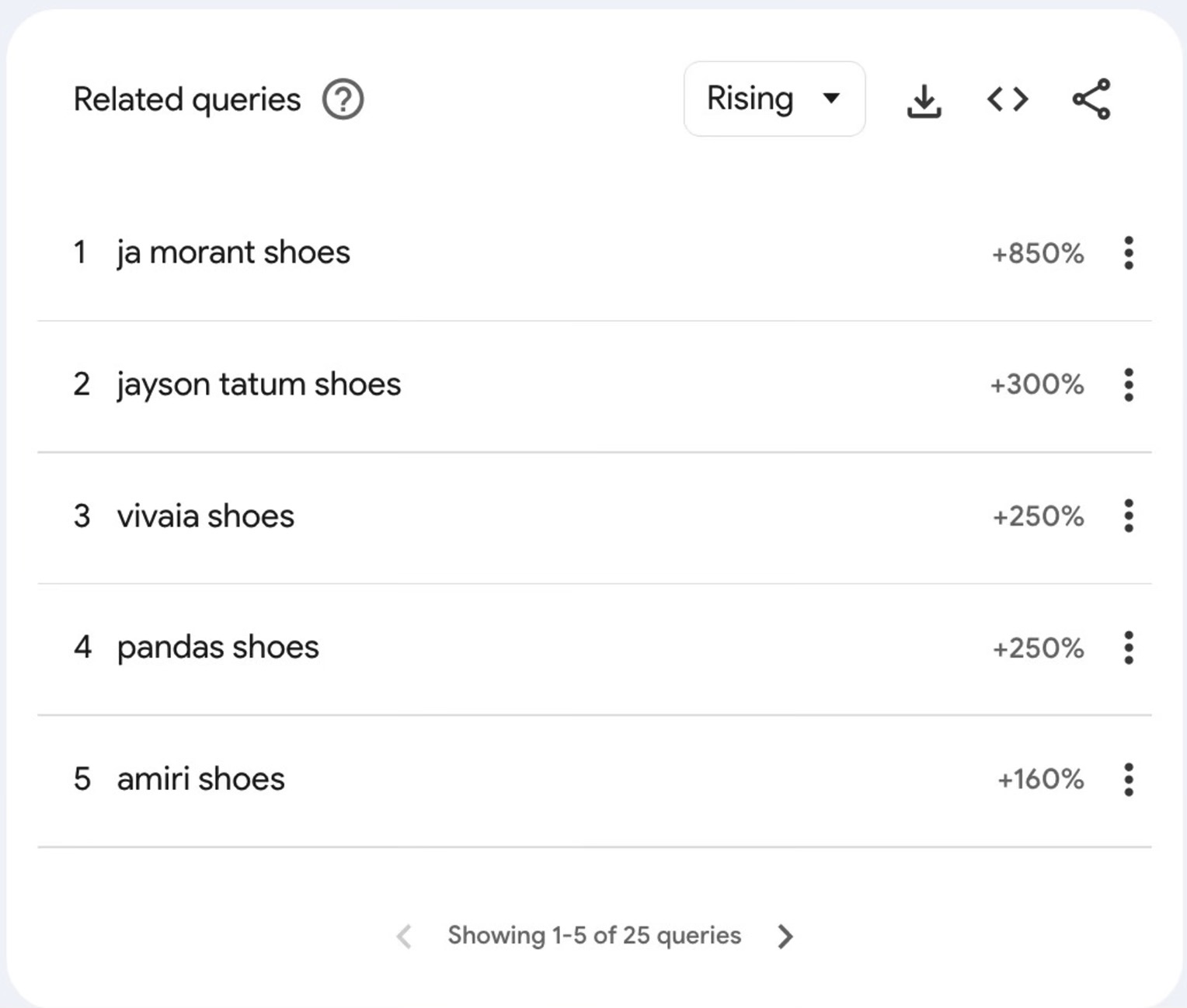

1700343606507.png


The downside, however, is that we only get 25 such queries. Neither more nor less than that.

1700343653321.png


Moreover, not all of the 25 query ideas displayed are relevant for our intent.


But did you know that you can filter these queries? And everytime you set a new filter, you receive 25 brand new relevant ideas for your next piece of content?


1700343714066.png


Not many know that you can use Google search operators in the Google Trends Search Bar, such as:


  • " " — Search for exact results that mention the word or phrase within quotes,

  • - (minus) — Search for results that don’t mention the word or phrase after the minus sign. You can combine the minus sign with the quotes mentioned above.

Here are all the Google Trends supported operators: https://support.google.com/trends/answer/4359582?hl=en


For example, if I'm looking for trends related to "shoes" but don't want to receive queries related to "Nike", then I'll use the query:


shoes -Nike


If, however, I want to eliminate multiple well-known brands, then I type:


shoes -nike -adidas -puma


And after each filter, Google will give us 25 new ideas each time for topics we can address, being trending subjects.


I hope this is helpful to those who are always on the hunt for content ideas.
 
Last edited:
Let me start with the fact that using Google Trends for SEO provides valuable insights into current search trends and help you optimize your content to align with popular topics.
How to start with Google Trends
  • Go to the Google Trends website (trends.google.com).
  • Enter a search term or topic related to your niche or industry in the search bar.
  • Explore the trending topics and queries related to your search term.

    How to use the information from Google Trends
Analyze Search Interest Over Time
  • Check the "Interest over time" graph to see how search interest in your topic has evolved over a specific period.
  • Identify any seasonality or recurring patterns in search interest.
Compare Multiple Topics:
  • Compare the search interest of multiple topics by entering additional terms in the search bar.
  • Analyze the relative popularity of different topics to prioritize your content creation.
Filter by Location and Time:
  • Refine your search by selecting specific locations and time ranges. This is particularly useful for local businesses targeting specific regions.
Explore Related Queries:
  • Scroll down to the "Related queries" section to discover other terms and queries associated with your main topic.
  • Identify long-tail keywords and niche topics that you can incorporate into your content.
Use Google Trends for Keyword Research:
  • Leverage Google Trends for keyword research by identifying rising search queries in your industry.
  • Focus on keywords with a consistent upward trend to align your content with growing interests.
Set Up Email Alerts:
  • Create email alerts for specific search terms to stay informed about any changes in search interest.
  • This helps you react promptly to emerging trends and update your content strategy accordingly.
Create Content Around Trending Topics:
  • Develop content based on trending topics identified through Google Trends.
  • Address user queries and provide valuable information to capture traffic from popular searches.


Many use Google Trends to get inspiration for keywords and topics to address on their websites.


When searching for trends related to specific keywords, Google Trends also provides 'Related queries' on the page, which are valuable pieces of information and represent opportunities for topics to cover on our site.


View attachment 299958

The downside, however, is that we only get 25 such queries. Neither more nor less than that.

View attachment 299959


Moreover, not all of the 25 query ideas displayed are relevant for our intent.


But did you know that you can filter these queries? And everytime you set a new filter, you receive 25 brand new relevant ideas for your next piece of content?


View attachment 299960


Not many know that you can use Google search operators in the Google Trends Search Bar, such as:


  • " " — Search for exact results that mention the word or phrase within quotes,

  • - (minus) — Search for results that don’t mention the word or phrase after the minus sign. You can combine the minus sign with the quotes mentioned above.

Here are all the Google Trends supported operators: https://support.google.com/trends/answer/4359582?hl=en


For example, if I'm looking for trends related to "shoes" but don't want to receive queries related to "Nike", then I'll use the query:


shoes -Nike


If, however, I want to eliminate multiple well-known brands, then I type:


shoes -nike -adidas -puma


And after each filter, Google will give us 25 new ideas each time for topics we can address, being trending subjects.


I hope this is helpful to those who are always on the hunt for content ideas.
Thank you for this helpful insight !

Happy Sunday !
 
Thank you, Marco!
Una domenica bella anche a te!
Italian ? Beautiful country.. As I was a child I was at Gardasea with my parents , Meran and Bozen, ok it's not deep Italy bit wonderful.
When I make enough money online I want go Spain around Andalusia the winter is mild, not so cold , blue sky and sun, now we have gray weather, wet ,rainy and cold, dark in the early evening, what horror.......

I can speak little little bit Spain (poco) not sure if they speak a little bit english in Andalusia...
Africa has modern clean cities today, I love south america the latinos great people, but have relationship with latina women , especial Cuba, most of them when they have a chance to marriage they want go Miami not go Europe.

I must take action beginning with tomorrow now I'm 54 years old, making 7 figures and have a young women or two.....a lot of work to do!

Feliz domingo para ti ! jjjjjjjj .......
 
Last edited:
I have a theory;

sometimes when I'm doing keyword research I get "no search results" answer from google on 5-6 words longtail keyword.
What does this exactly means?

a) I found a gold nugget- zero competitors?
b) I type in a keyword nobody on the whole plant (billions of humans) not search for?
c) The keyword not exist in reality ?
d) Google determines what you should see?
 
I have a theory;

sometimes when I'm doing keyword research I get "no search results" answer from google on 5-6 words longtail keyword.
What does this exactly means?

a) I found a gold nugget- zero competitors?
b) I type in a keyword nobody on the whole plant (billions of humans) not search for?
c) The keyword not exist in reality ?
d) Google determines what you should see?

d)
 
I have a theory;

sometimes when I'm doing keyword research I get "no search results" answer from google on 5-6 words longtail keyword.
What does this exactly means?

a) I found a gold nugget- zero competitors?
b) I type in a keyword nobody on the whole plant (billions of humans) not search for?
c) The keyword not exist in reality ?
d) Google determines what you should see?
It's A and B, Marco:D
Even if there are a few people from the whole planet searched the same as you, it does not mean that there should be pages that correspond to that search.
 
It's A and B, Marco:D
Even if there are a few people from the whole planet searched the same as you, it does not mean that there should be pages that correspond to that search.
What is the probability that from the 8 billion people on earth, subtract those who do not have internet, small children, how likely is it that no one will come up with the same or similar 6 word keyword phrase? Win 6 numbers in the lottery is more likely.
Thank you for your Like !

Happy Friday !
 
Back
Top