
You are using an out of date browser. It may not display this or other websites correctly.
You should upgrade or use an alternative browser.
You should upgrade or use an alternative browser.
Anyone know how this is done?
- Thread starter rkay47
- Start date


Rufai
Supreme Member
- May 23, 2020
- 1,363
- 1,177
This is an ad. Just search on YouTube how to run Google PPC ads
yh i’m not really on about that though am iThis is an ad. Just search on YouTube how to run Google PPC ads

Retracra
BANNED
- Jul 19, 2023
- 284
- 74
Yeah it’s done through Google Search ads. They’re targeting the keyword “trust wallet” even though it’s branded, which normally gets you flagged if you use that exact name in the ad text. So what they do is bid on the keyword but keep the ad copy clean or generic—stuff like “Secure Crypto Wallet” or “Official App.” The landing page does the rest. To pull this off without getting slapped, they’re clearly using high-trust, aged accounts that can handle branded terms and manual reviews. If you're using normal fresh accounts, it won’t last. You need something built for this kind of push.
how do they get the website name as trustwallet.com even though that’s not the final urlYeah it’s done through Google Search ads. They’re targeting the keyword “trust wallet” even though it’s branded, which normally gets you flagged if you use that exact name in the ad text. So what they do is bid on the keyword but keep the ad copy clean or generic—stuff like “Secure Crypto Wallet” or “Official App.” The landing page does the rest. To pull this off without getting slapped, they’re clearly using high-trust, aged accounts that can handle branded terms and manual reviews. If you're using normal fresh accounts, it won’t last. You need something built for this kind of push.
Retracra
BANNED
- Jul 19, 2023
- 284
- 74
They’re able to show “trustwallet.com” as the website name in the ad because Google lets you display a “path” or “display URL” that looks clean and relevant—even if it’s not the exact final landing page URL. So the actual link might go somewhere else, but the ad shows “trustwallet.com” or something close to it to build trust and look official.how do they get the website name as trustwallet.com even though that’s no the final url
This works because the display URL just has to match the root domain you own or control, or at least look similar. With clever setups—like redirects or cloaking—they keep the real final URL hidden while showing that trusted domain. But to do this without getting banned, you need strong accounts and setups that can handle Google’s manual checks and automated filters. like agency accounts.
bro that answer makes no sense, you even contradicted yourself and some of the info is just wrong. stop using ai to replyThey’re able to show “trustwallet.com” as the website name in the ad because Google lets you display a “path” or “display URL” that looks clean and relevant—even if it’s not the exact final landing page URL. So the actual link might go somewhere else, but the ad shows “trustwallet.com” or something close to it to build trust and look official.
This works because the display URL just has to match the root domain you own or control, or at least look similar. With clever setups—like redirects or cloaking—they keep the real final URL hidden while showing that trusted domain. But to do this without getting banned, you need strong accounts and setups that can handle Google’s manual checks and automated filters. like agency accounts.

TheAdChap
BANNED
- Jun 16, 2025
- 95
- 64
Once you are approved by Google, you are granted permission to display other URLs that belong to you. This advertisement is a Google Play advertisement, but it has been duplicated with a search advertisement. In the search advertisement, other URLs are displayed.how do they get the website name as trustwallet.com even though that’s not the final url

- May 13, 2013
- 6,961
- 1,959
He is right if you try to understand what he is explainingbro that answer makes no sense, you even contradicted yourself and some of the info is just wrong. stop using ai to reply
Meanwhile..what you trying to do is pure black hat,even that ads above won't last long
Try and do real business please

prince_nirala
Junior Member
- May 5, 2025
- 108
- 61
This is just an ad to promote the app.
Go to Google Ads and login to it.
Create a new campaign
Select campaign type - App campaign
Select objective - App installs or app promotion and follow the steps (set targeting audience, keywords, title, description etc.)
But to do this, you need to have your app on the Google Play Store first and also be linked with the Google Ads account.
different site in the final url box? that would just make the ad go directly to that siteYou just need to add a different site to the visible link section, it's very simple.

yh i’m on about the name being trustwallet.com even though that’s not the final urlJust create a Google Ads account and start running ads.

SamiADS
Newbie
- Jun 15, 2025
- 5
- 0
No, when creating an ad there is a "Display link" section, it is only visible, it is not the site you will go to.different site in the final url box? that would just make the ad go directly to that site
i only see these two options to with the linkNo, when creating an ad there is a "Display link" section, it is only visible, it is not the site you will go to.

SamiADS
Newbie
- Jun 15, 2025
- 5
- 0
let me check this againi only see these two options to with the link
View attachment 451973

- Apr 23, 2012
- 2,844
- 5,854
how do they get the website name as trustwallet.com even though that’s not the final url
That's because they're using unguided search ads and not app install ads. To get there, you click "Create a campaign without guidance" and then select "Search"
Once you've set your conversion goals, you're allowed to create ads with a Playstore URL and a corresponding domain.
You are then allowed to add a Business Name - This needs to be preapproved. Read - https://support.google.com/adspolicy/answer/12499303/

Your site name should be that of the app, or it needs to be the domain you use for deeplinks.
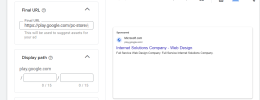
thanks that explains how they got the trustwallet.com name, but they are also redirecting to their own domain from play.google somehow, i used a redirect checker and it showed it went to news.google before redirecting so somehow they’re using thatThat's because they're using unguided search ads and not app install ads. To get there, you click "Create a campaign without guidance" and then select "Search"
Once you've set your conversion goals, you're allowed to create ads with a Playstore URL and a corresponding domain.
You are then allowed to add a Business Name - This needs to be preapproved. Read - https://support.google.com/adspolicy/answer/12499303/
View attachment 451975
Your site name should be that of the app, or it needs to be the domain you use for deeplinks.
View attachment 451977
Retracra
BANNED
- Jul 19, 2023
- 284
- 74
Bro, I don’t get it — these days, if someone speaks proper English, people assume it’s AI.bro that answer makes no sense, you even contradicted yourself and some of the info is just wrong. stop using ai to reply
It’s really simple:
Blue text = Title
Red text = URL
In my earlier explanation, I was just giving more complex examples. That’s all.
