
MasonBookwright
Registered Member
- Jun 23, 2026
- 87
- 26
Here is a really simple method I use to create my AI Influencer.
First I look for someone who has the look I am after. For this let’s say Tricia Helfer. Famous people or models are good as they already have lots of photos out there.

Then head over to grok and put in this prompt
Create a json prompt to replicate this image without naming them
This is something like what you will get
{
"prompt": "Photorealistic studio portrait of a confident adult woman with long wavy honey-blonde hair cascading over her shoulders, intense blue eyes looking directly at the camera, defined facial features with high cheekbones and full lips, subtle professional makeup, serious and strong expression. She wears a fitted black racerback tank top that shows athletic shoulders and collarbones. Hands placed on hips, upper body framed tightly. Soft even studio lighting, clean light gray seamless background, high detail skin texture, sharp focus, professional fashion photography style, 85mm lens look, natural skin tones",
"negative_prompt": "blurry, low quality, deformed, extra limbs, text, watermark, logo, cartoon, anime, oversaturated, harsh shadows, busy background, jewelry, smile, open mouth, glasses",
"style": "photorealistic portrait",
"lighting": "soft studio key light with gentle fill",
"camera": "medium close-up, eye-level, shallow depth of field",
"aspect_ratio": "3:4",
"quality": "ultra detailed, 8k"
}
Paste this into your image generator of choice and you will get something along the lines of
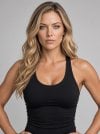
Ask the Ai to improve the skin tone and make her less shiney.
Upscale as best as you can.
Go back into the AI and ask for a character sheet and then a full body character sheet. It will bring back something like

Head over to google flow and create a character with these images. You can now make consistent images and videos with this model.
It’s a simple method but works for me.
First I look for someone who has the look I am after. For this let’s say Tricia Helfer. Famous people or models are good as they already have lots of photos out there.
Then head over to grok and put in this prompt
Create a json prompt to replicate this image without naming them
This is something like what you will get
{
"prompt": "Photorealistic studio portrait of a confident adult woman with long wavy honey-blonde hair cascading over her shoulders, intense blue eyes looking directly at the camera, defined facial features with high cheekbones and full lips, subtle professional makeup, serious and strong expression. She wears a fitted black racerback tank top that shows athletic shoulders and collarbones. Hands placed on hips, upper body framed tightly. Soft even studio lighting, clean light gray seamless background, high detail skin texture, sharp focus, professional fashion photography style, 85mm lens look, natural skin tones",
"negative_prompt": "blurry, low quality, deformed, extra limbs, text, watermark, logo, cartoon, anime, oversaturated, harsh shadows, busy background, jewelry, smile, open mouth, glasses",
"style": "photorealistic portrait",
"lighting": "soft studio key light with gentle fill",
"camera": "medium close-up, eye-level, shallow depth of field",
"aspect_ratio": "3:4",
"quality": "ultra detailed, 8k"
}
Paste this into your image generator of choice and you will get something along the lines of
Ask the Ai to improve the skin tone and make her less shiney.
Upscale as best as you can.
Go back into the AI and ask for a character sheet and then a full body character sheet. It will bring back something like
Head over to google flow and create a character with these images. You can now make consistent images and videos with this model.
It’s a simple method but works for me.

