Advanced WordPress SEO Optimization

Status
Not open for further replies.
I never used it. Plus I don't like the idea to give others access to my hosting account :)

Oh wow man! I didn't notice this plugin had that kind of security risk, sorry for recommending it!

I honestly have never even researched it, just taking notes on good plugins with my iPhone.
 
Oh wow man! I didn't notice this plugin had that kind of security risk, sorry for recommending it!

I honestly have never even researched it, just taking notes on good plugins with my iPhone.

I wouldn't call it a security risk but it does seem to require access to your files and stuff. Otherwise it couldn't figure out what to recommend.
 
This is definitely what I was searching for, thank you a lot, have to study it later...
 
1. What in your opinion would be the WP Themes that are best optimized for SEO?
2. Would using the same WP Theme on several websites be a bad idea?
 
Great stuff shared here, need to sort out some of my themes now that i've read this!
 
Oh, I almost forgot, for all of those who think WordPress is great for SEO and Google loves WordPress and all that... wait for it... here it goes:


Then, what is? :)
 
Oh, I almost forgot, for all of those who think WordPress is great for SEO and Google loves WordPress and all that... wait for it... here it goes:

VPmjH


Updates:
I've made an addition over here read that too.
I may add more stuff so keep an eye for future posts in the thread (I'm not sure if I can edit this post forever).

At last a kindred soul. I can't tell you how many people i have tried o tell NOT to build their company web site as a WP installation.

Great post, I had the same header issue come up with the Qualifire theme. They use the text logo as an H1 tag. I built this site, and it wouldn't go anywhere. Took me a while to figure out that the theme already had the build in H1 Tag and I used n H1 tag in my content.

I am ashamed to say it took me a month to figure out about the two header tags on each and every page.

Yep, that'll affect your rankings.
 
On one of my sites that got hit on October 14th, I went in and cleaned stuff up after reading through G Webmaster help threads desperately seeking answers (before I realized that Panda has no quick fixes etc)

People in all of those threads were basically saying to no-index category pages (during the Panda hysteria). How do you feel about that?

IMO and experiences, a super optimized category page (WITH UNIQUE CONTENT) reaps major benefits...but Panda paranoia had me no-indexing like a madman. With Panda I honestly don't know what to expect anymore...even if your onpage is tight AND offpage is diverse, I feel almost like they reclassified certain niches/longtails that pass a certain search volume threshold...and if your site is not a big brand/giving off the "right" authority signals/deemed worthy of this traffic in Google's eyes for whatever reason (and becoming a brand is not as easy as just registering your site's name at a place like Knowem and building links with your brand name/website URL as anchor etc)...welp that traffic is gone. :rolleyes:

Wish I had this thread 4 years ago!

Does anyone here no-index their category pages for any SEO reasons? I didn't see any benefit of doing so with my one site (that would be too easy lol and trust me I don't take advice from those areas of the web seriously that often as most of those people believe you should just write posts all day, let your neighbors know about your hobby site, and then hope people visit your website)...so curious about others experiences particularly on this forum.

This is pretty interesting, I recently just came back from an Oct. 14th blow (well...75% came back so far) and I began ranking again a few days after no-indexing category pages. This is either extreme coincidence or I should've done that a lot sooner.

I recently also no-indexed tag pages, we'll see how it goes.

I have a lot of posts in multiple categories, and I have tons of the same tags on tons of posts...so I think this really helps me to no-index them. May be different for you.
 
Then, what is? :)

Anything, including WordPress, but you have to customize it and optimize it yourself.

CMS developers are not SEOs. They are coders. Hence you can't expect them to build a properly optimized CMS. Not just that but different people have different opinions about "the right way".

Years ago I rebuilt a Dutch site. did it in PHP+MySQL (custom coding). Obviously all HTML was hand coded and SEO optimized. They ranked about #150+ in yahoo and they didn't rank in Google for any of the terms. They maybe had 10-20 weak links.

After finishing the new version and deploying it, they got to #1 in Yahoo for the main terms and on 1st page for every single other keyword related. In Google they got to #70 or so.

In other words they were ranking in Yahoo with just on-site SEO and gained visiblity in Google. Yes, they did had competition and quite a lot. I think to rank #3 in Yahoo for "rent apartment" or "apartment for rent" (in Dutch) with just on-site SEO and no links is quite an achievement. Even for that period of time.

What people fail to understand though is that today, no matter how great on-site SEO is, if you don't have links, trust and some age, it will not help you much.

It does however help a lot even today for sites with dynamically generated content that are targeting longtail keywords. Even with very few links, if you're optimizing for longtails you will rank with just on-site SEO and a few authority links to the homepage.
 
I was asked by PM for help how and where to modify the theme files to make those changes for SEO.

Here are some resources to start with:

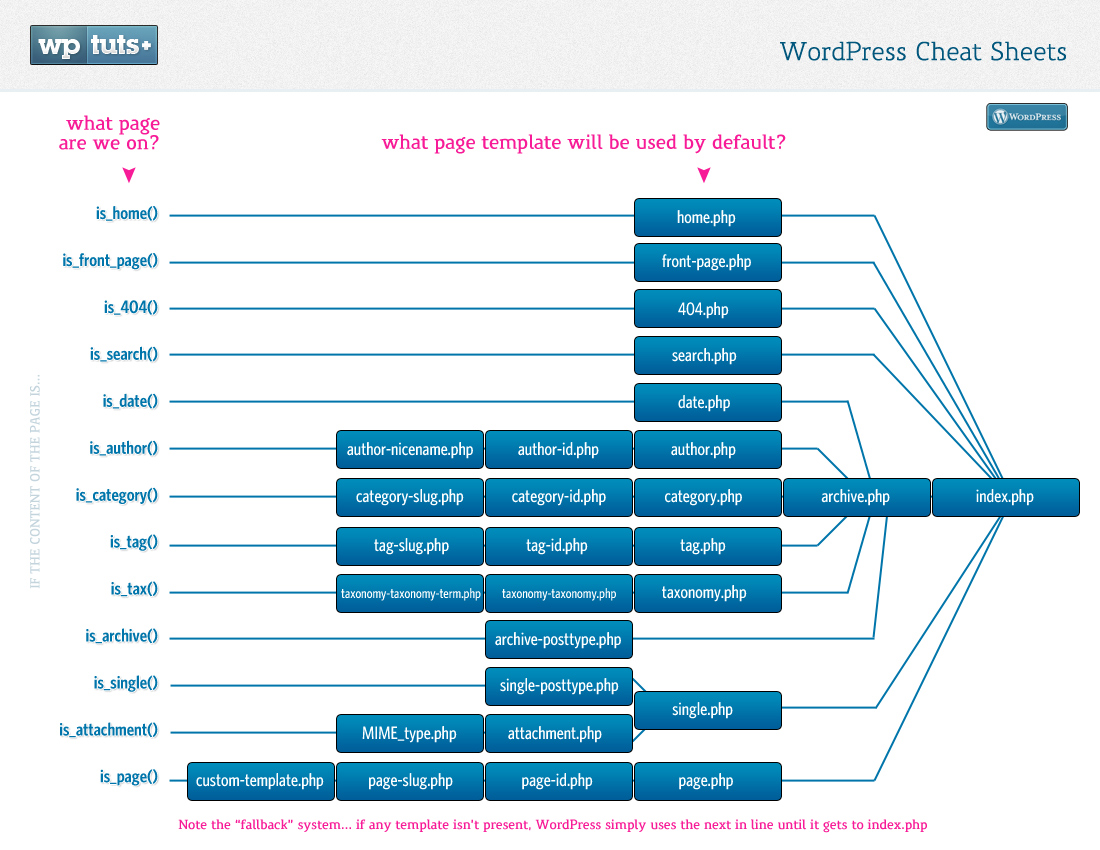
wp_template_hierarchy.png


Template_Hierarchy.png


WP_CheatSheet_TemplateMap.jpg


theme-files.png


As you see only 2 files are required for a theme. index.php and style.css.

While most commonly the files of a template are usually the common ones shown in those diagrams, many themes use additional files for various purposes, including for specific blocks in the template and modifying default behavious of WP. Sometimes functions for this are in functions.php other times there are additional files that are used.

Now, in order to modify your theme, you have to know which file handles that part you want to modify. For example if your blog name is in the header with H1 and you want to make it a DIV, you would look in header.php. If there is a "Theme by XYZ" link in the footer and you want to remove it, you would look into footer.php.

If you want to modify listings those are in categories.php, tags.php, search.php, author.php, archive.php, index.php, etc. This depends on how the theme was built. Some themes have specific files for listings (e.g. categories.php for categories) others handle all listing from a single file (usually index.php).

As you see from the images above there's an inheritance system. First WP looks for category-slug.php the if that file doesn't exists it looks for category-id.php, if that doesn't exist either it looks for category.php and if that doesn't exist it looks for archive.php. If none of these exists it uses index.php. Which file exactly is used and where in the file you have to make the changes depends from theme to theme. That's why you have to be familiar with PHP and HTML to get around a theme and change it.

Basically you just look for all files in the theme, especially those listed in the hierarchy images above. In each file you search for what you're interested in - for example "<h1".

Just to get up to speed fast, you can also look for the WP template tags (functions). For example a post's title is displayed using the function "the_title()".

Obviously you might want to consult the WP codex (documentation) or maybe even download a book from torrents (or buy it) about WordPress themes.
 
Good stuff!

WP is a good CMS, if you use SEO theme. Sadly most of designers and coders dont have clue what seo is.

I edit almost all themes i use. Its not complicated if you know basic html and css.
 
Good stuff!

WP is a good CMS, if you use SEO theme. Sadly most of designers and coders dont have clue what seo is.

I edit almost all themes i use. Its not complicated if you know basic html and css.

Despite I have basic knowledge of html and css, some themes (as mine) has complicated stuff inside and sometimes its pretty hard to get everything to work :)
 
Status
Not open for further replies.
Back
Top