

Poppa Rotzee
Power Member
- Apr 10, 2011
- 511
- 144
A 301 Case Study
After the last email a ton of people asked for more detail on 301s, how they work, why they work, etc. I don't want to get in the training game, but I'm more than happy to share what we've seen. And what better way than with a real world example using a current client. I'm giving you step by step instructions for doing this yourself. If you already know how, just skim over the details and enjoy the screenshots.
Recap
When working with clients you lose a bit of control. You do the work to rank them, but they have the option of not paying you. Unlike the power company, you can't just turn off their web site ranking - unless you use a 301 redirect. In this example I build a page on a site I control and I link to that page with my target keyword. When the time is right I change that URL to a 301 redirect that points to my client. After a day or three your client will rank for the term. And as you saw in the last newsletter, if they don't pay I turn off the 301 their site drops like a rock.
Step 1 - Build Links
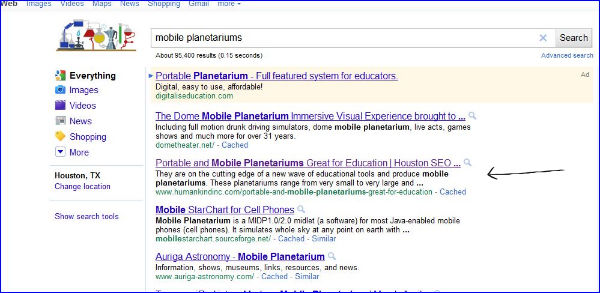
First we create a placeholder page on a domain we control. This page is empty except for a couple of sentences containing our keyword(s). The page can be used to rank any number of keywords but using more than one page gives you the ability to control redirects individually later. You can point this page (build a 301) directly to the target site before you build links or after - it really doesn't matter. In this example we do the redirect after we build links. Notice below our static page ranking at #2 after building the links.
Step 2 - Implement the Redirect
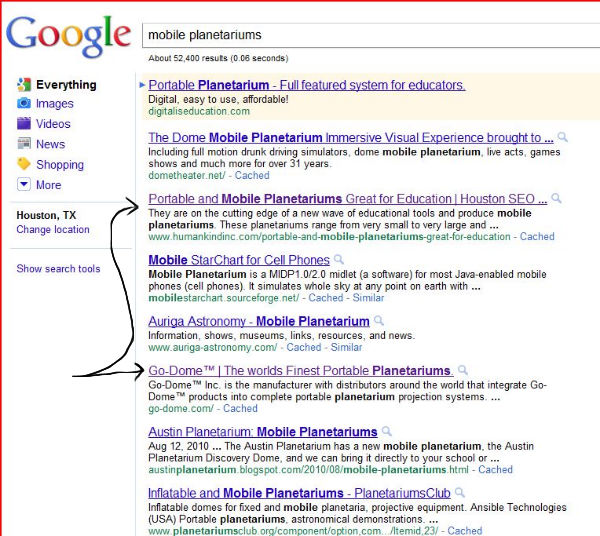
We now take our static page and (via cpanel or http directive or whatever approach you want) do a 301 redirect to the client site. We'll re-ping the URL and whatever backlinks we've kept track of using Linklicious. This is key as it tells Google to update the pointer of the 301 from the old page to the new one. It took two days for one term to show up and about a week for the second term to follow on. Everything was done the same for both terms all along the way. Google just isn't always completely predictable. In this screenshot below the client's term shows up on the first page along with our old redirect page. If clicked, the redirect leads to the client's site.
Step 3 - Watch the Site Rank
Over the next few days the client page moves up while other page drops. And of course we end with just the client site ranking. In the example below you can see the client replacing the 301s location. Often you'll find the client's site ranking better than the 301 site because it has the domain's inherent strength. In this case that didn't happen.

Ranking Progression and Links Built
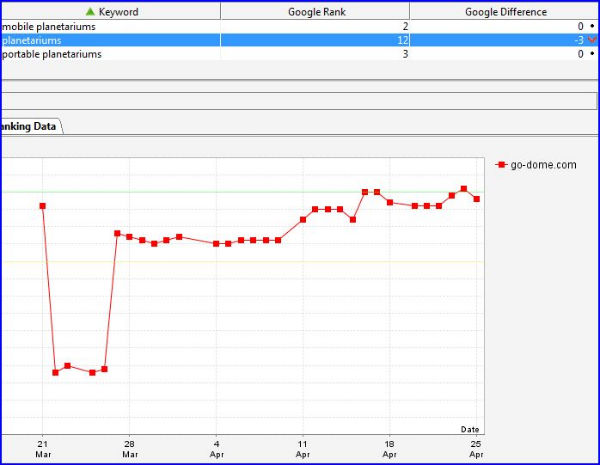
All three terms danced a bit differently on their way up. As many of you know, there is no great way to predict how a term will dance. Here is the chart for the harder word as it went from 'not in the top 250' to ~15, down, and gradually back up and knocking on page 1.
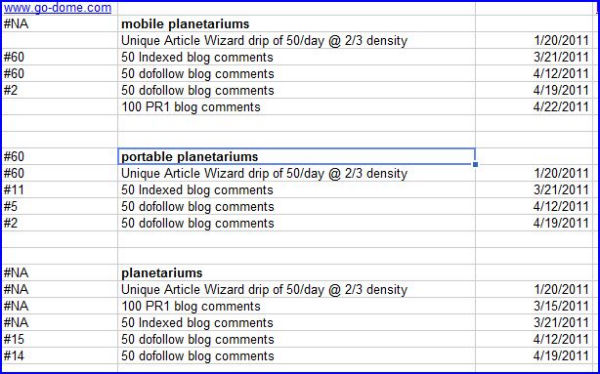
With all of our work we fully track links built to do a better job of deducing what works and what doesn't. (And of course to test out the effect of using our OneHourBacklinks.com comment links!) You can see two of the three terms started outside of the top 250 and have gradually moved up over time. You can see the links that built in the chart below.
Other Takeaways
All three terms danced differently. Don't expect your terms to follow the same progression, even if you are link building evenly.
No feeder sites were used - only low quality links directly to the site. Higher competion KWs would need the usual array of parasites and pyramiding.
This site has good PR and age, so it was safe to build links.
So thereyago. A cool case study showing 301s from start to finish. The next case study I send will be on a new interior page of a web site for some local search terms. We've ranked it only using OneHourBacklinks.com blog comments.
After the last email a ton of people asked for more detail on 301s, how they work, why they work, etc. I don't want to get in the training game, but I'm more than happy to share what we've seen. And what better way than with a real world example using a current client. I'm giving you step by step instructions for doing this yourself. If you already know how, just skim over the details and enjoy the screenshots.
Recap
When working with clients you lose a bit of control. You do the work to rank them, but they have the option of not paying you. Unlike the power company, you can't just turn off their web site ranking - unless you use a 301 redirect. In this example I build a page on a site I control and I link to that page with my target keyword. When the time is right I change that URL to a 301 redirect that points to my client. After a day or three your client will rank for the term. And as you saw in the last newsletter, if they don't pay I turn off the 301 their site drops like a rock.
Step 1 - Build Links
First we create a placeholder page on a domain we control. This page is empty except for a couple of sentences containing our keyword(s). The page can be used to rank any number of keywords but using more than one page gives you the ability to control redirects individually later. You can point this page (build a 301) directly to the target site before you build links or after - it really doesn't matter. In this example we do the redirect after we build links. Notice below our static page ranking at #2 after building the links.
Step 2 - Implement the Redirect
We now take our static page and (via cpanel or http directive or whatever approach you want) do a 301 redirect to the client site. We'll re-ping the URL and whatever backlinks we've kept track of using Linklicious. This is key as it tells Google to update the pointer of the 301 from the old page to the new one. It took two days for one term to show up and about a week for the second term to follow on. Everything was done the same for both terms all along the way. Google just isn't always completely predictable. In this screenshot below the client's term shows up on the first page along with our old redirect page. If clicked, the redirect leads to the client's site.
Step 3 - Watch the Site Rank
Over the next few days the client page moves up while other page drops. And of course we end with just the client site ranking. In the example below you can see the client replacing the 301s location. Often you'll find the client's site ranking better than the 301 site because it has the domain's inherent strength. In this case that didn't happen.
Ranking Progression and Links Built
All three terms danced a bit differently on their way up. As many of you know, there is no great way to predict how a term will dance. Here is the chart for the harder word as it went from 'not in the top 250' to ~15, down, and gradually back up and knocking on page 1.
With all of our work we fully track links built to do a better job of deducing what works and what doesn't. (And of course to test out the effect of using our OneHourBacklinks.com comment links!) You can see two of the three terms started outside of the top 250 and have gradually moved up over time. You can see the links that built in the chart below.
Other Takeaways
All three terms danced differently. Don't expect your terms to follow the same progression, even if you are link building evenly.
No feeder sites were used - only low quality links directly to the site. Higher competion KWs would need the usual array of parasites and pyramiding.
This site has good PR and age, so it was safe to build links.
So thereyago. A cool case study showing 301s from start to finish. The next case study I send will be on a new interior page of a web site for some local search terms. We've ranked it only using OneHourBacklinks.com blog comments.


