
AncientElevator9
Newbie
- Jun 19, 2020
- 4
- 8
Just created an account here, so I thought I'd share something useful.
LinkedIn has a feature that shows you who has viewed your profile. Oftentimes people will view your profile if you first view their profile... Once I had this idea it was as simple as isolating the network request sent to LinkedIn's servers saying that you "viewed" someone's profile, and then looping through profile IDs... on Linkedin many of the IDs just start at one and go up
The endpoint is:
https://www.linkedin.com/li/track
You only need this event body, and you can send up to 1000 of these in one request, more than that and it's too big of a request for their servers to handle.

Results:
LinkedIn:
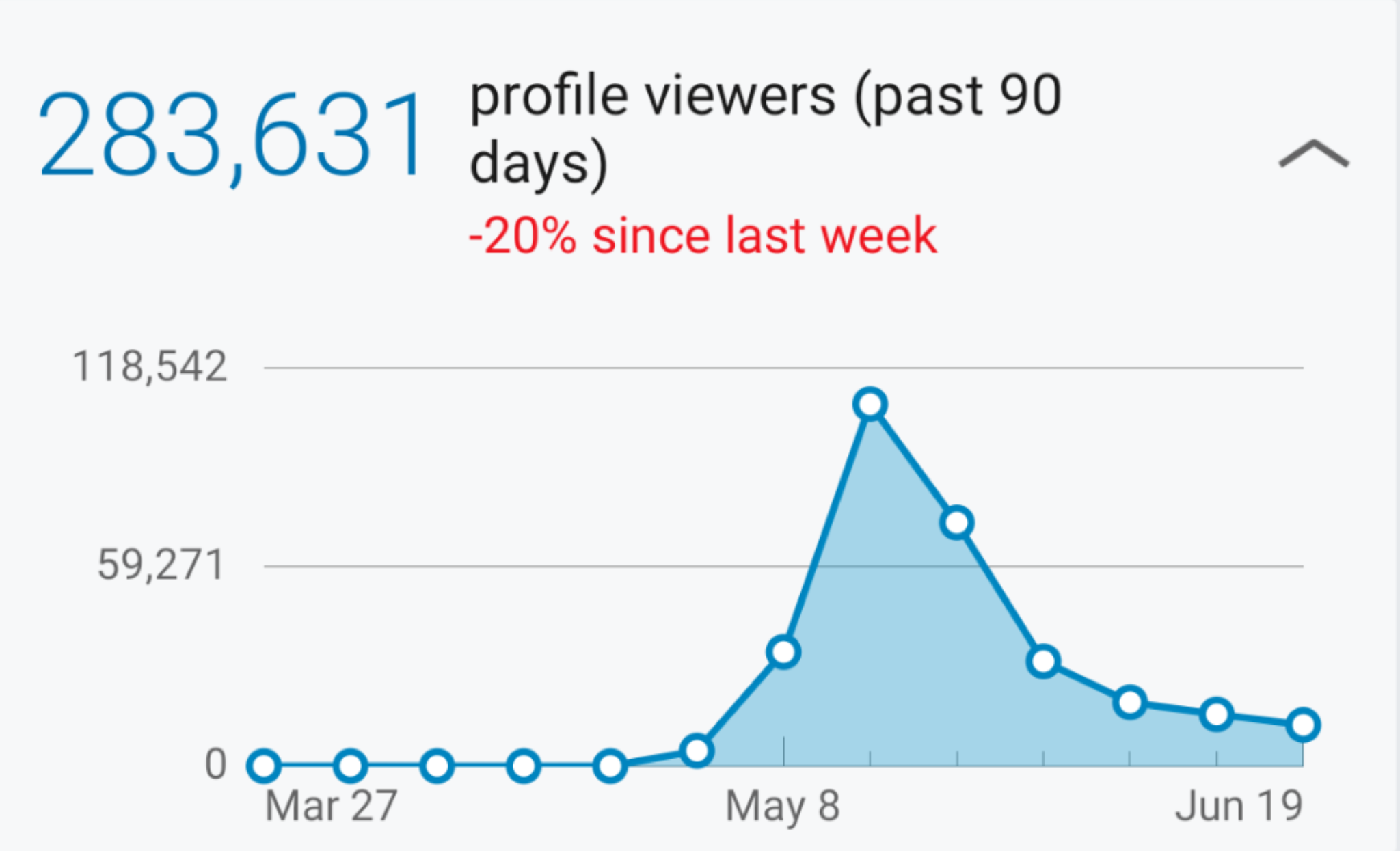
Traffic flow through to my Website:

Caution: As I was scaling this up, I found that I could "view" 1000 profiles with one network request and could make a request every 100ms or so without being 429'ed, so I was able to "view" 10 - 20M in a couple of hours... but then my account was restricted.
To unrestrict the account you just need to upload a photo id to the third party verification service and then respond to LinkedIn's email saying that you agree to follow their T&Cs.
I've since had a few test accounts get banned while doing various other scraping activities, but not going to risk it again on my main.
Here is the code, I'm not sure if it still works, they may have changed it a bit, but just check for a 200 response and it a few minutes your profile will be getting viewed if you "view" about 100K, I haven't really tried with lower than that. You can use chrome dev tools -> sources -> snippets to run userscripts.
Also note, the code isn't built in a way to avoid detection, only to do a massive amount of views, you'll have to build that in yourself if you want it.
P.S. If you want to see what experiments LinkedIn is running on your account -- (if they are aware of your nefarious activities) -- look for a network request called chameleonConfig
LinkedIn has a feature that shows you who has viewed your profile. Oftentimes people will view your profile if you first view their profile... Once I had this idea it was as simple as isolating the network request sent to LinkedIn's servers saying that you "viewed" someone's profile, and then looping through profile IDs... on Linkedin many of the IDs just start at one and go up
The endpoint is:
https://www.linkedin.com/li/track
You only need this event body, and you can send up to 1000 of these in one request, more than that and it's too big of a request for their servers to handle.
Results:
LinkedIn:
Traffic flow through to my Website:
Caution: As I was scaling this up, I found that I could "view" 1000 profiles with one network request and could make a request every 100ms or so without being 429'ed, so I was able to "view" 10 - 20M in a couple of hours... but then my account was restricted.
To unrestrict the account you just need to upload a photo id to the third party verification service and then respond to LinkedIn's email saying that you agree to follow their T&Cs.
I've since had a few test accounts get banned while doing various other scraping activities, but not going to risk it again on my main.
Here is the code, I'm not sure if it still works, they may have changed it a bit, but just check for a 200 response and it a few minutes your profile will be getting viewed if you "view" about 100K, I haven't really tried with lower than that. You can use chrome dev tools -> sources -> snippets to run userscripts.
Code:
let FailReqCnt = 0;

//Set these before running
let startID = 120200200;
let numProfilesToView = 5000000;
let numPerReq = 1000;
let delayInMs = 500;
//

setIntervalX(function(viewNum) {
    let body = createBody(startID + viewNum, numPerReq);
    if(viewNum % 100000 === 0){
    console.log(viewNum)
    };
    CallAPI(body);
    viewNum += numPerReq;
}, delayInMs, numProfilesToView);

function setIntervalX(callback, delay, repetitions) {
    let viewCnt = 0;
    let intervalID = window.setInterval(function() {

        callback(viewCnt);

        if ((viewCnt +=  numPerReq) === repetitions || FailReqCnt === 500) {
            console.log("FailReqCnt: " + FailReqCnt);
            console.log("ItemNum: " + (startID + viewCnt))
            window.clearInterval(intervalID);
        }
    }, delay);
}

function createBody(firstViewID, numEvents){
    let body = "[";

    for(let profileId = firstViewID; profileId < (firstViewID + numEvents); profileId++){
        let bodyPart = "{\"eventBody\":{\"viewerPrivacySetting\":\"F\",\"networkDistance\":-1,\"vieweeMemberUrn\":\"urn:li:member:1337\",\"profileTrackingId\":\"1337\",\"entityView\":{\"viewType\":\"profile-view\",\"viewerId\":1337,\"targetId\":" + profileId + "},\"header\":{\"pageInstance\":{\"pageUrn\":\"urn:li:page:d_flagship3_profile_view_base\",\"trackingId\":\"xdsgdggsffgs==\"},\"time\":1613345371270,\"version\":\"1.6.4081\",\"clientApplicationInstance\":{\"applicationUrn\":\"urn:li:application:(voyager-web,voyager-web)\",\"version\":\"1.6.4081\",\"trackingId\":[1,3,3,7,1,3,3,7,1,3,3,7,1,3,3,7]}},\"requestHeader\":{\"interfaceLocale\":\"en_US\",\"pageKey\":\"d_flagship3_profile_view_base\",\"path\":\"/feed/\",\"referer\":\"https://www.linkedin.com/feed\"}},\"eventInfo\":{\"appId\":\"com.linkedin.flagship3.d_web\",\"eventName\":\"ProfileViewEvent\",\"topicName\":\"ProfileViewEvent\"}},";
        body += bodyPart;
    }

    body = body.substring(0, body.lastIndexOf(",")) + "]";

    return body;
}

function CallAPI(body) {

    fetch("https://www.linkedin.com/li/track", {
        "headers": {
            "accept": "*/*",
            "accept-language": "en-US,en;q=0.9",
            "cache-control": "no-cache",
            "content-type": "text/plain;charset=UTF-8",
            "pragma": "no-cache",
            "sec-fetch-dest": "empty",
            "sec-fetch-mode": "no-cors",
            "sec-fetch-site": "same-origin"
        },
        "referrer": "https://www.linkedin.com/feed/",
        "referrerPolicy": "no-referrer-when-downgrade",
        "body": body,
        "method": "POST",
        "mode": "cors",
        "credentials": "include"
    }).then((res)=>{
        if (res.status !== 200) {
            console.log(res.status);
            FailReqCnt += 1;
        }
    }
    );

}
Also note, the code isn't built in a way to avoid detection, only to do a massive amount of views, you'll have to build that in yourself if you want it.
P.S. If you want to see what experiments LinkedIn is running on your account -- (if they are aware of your nefarious activities) -- look for a network request called chameleonConfig
