

- Oct 30, 2013
- 1,014
- 596
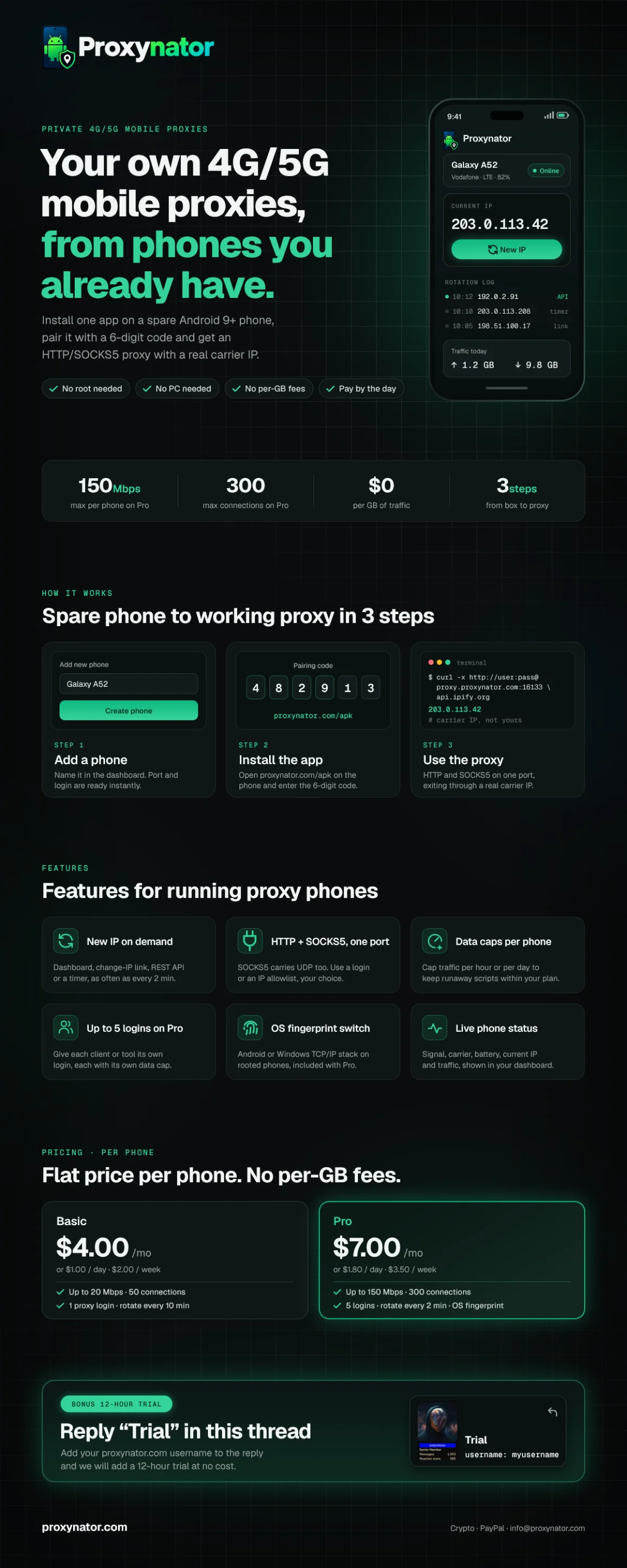
Proxynator is a mobile proxy creation platform that allows you to convert your Android devices into 4G or 5G mobile proxies.
All you need to get started is an Android 9+ device and a SIM card with an active 4G/5G mobile data plan. Instead of renting mobile proxies, run them on phones and SIMs you control.
Built for digital marketing work that needs real mobile carrier IPs: social media and multi-account management, ad verification, web scraping and automation, and e-commerce accounts. You provide the phone and the SIM; Proxynator provides the Android app, the relay servers and the web dashboard.
Pricing (per phone)
Basic: $1.00 / day, $2.00 / week, $4.00 / month
Pro: $1.80 / day, $3.50 / week, $7.00 / month
Plan limits are in the image above. Delivery: instant, the proxy works as soon as the phone is paired.
Proxy details
Type and origin: private 4G/5G mobile proxies on your own phone and SIM. Websites see your carrier's IP; our relays only forward the traffic.
Location: the country and network where your phone and SIM are.
Rotation: on request or timed. New IPs come from your carrier and may have been used before.
Authentication: username and password, or IP whitelisting.
FAQ:
1) What is Proxynator?
Proxynator is an Android app and traffic relay system that turns your own Android devices into private 4G/5G mobile proxies in a few steps.
All you need is an Android phone and a SIM card with mobile data.
2) What do I need to get started?
An Android phone with Android 9 or newer and a SIM card with mobile data. Install the app, enter the pairing code from your dashboard, and your proxy is live.
No coding or network setup is needed: no port forwarding, no static IP and no PC.
3) Does the phone have to be rooted?
No, root is optional.
4) What is your refund policy?
We will issue a full refund in cases where you paid for a plan and can't start using it for more than 12 hours due to service downtime. Partial downtime
is compensated with bonus hours added to your plan at no cost.
5) Which protocols do you support?
HTTP and SOCKS5, both on the same port. SOCKS5 also carries UDP.
Log in with a username and password, or allow your own IP addresses so no password is needed for TCP.
6) Is there a traffic limit?
We don't charge per gigabyte. The only data limit is your SIM's data plan.
You can also set your own data cap per hour or per day.
7) How fast is it?
Speed is capped per phone at 20 Mbps on Basic and 150 Mbps on Pro. These are upper limits, not a guarantee.
Real speed depends on your carrier, signal and how busy the local cell is. Phones on 4G usually reach 20-30 Mbps in our tests.
8) How do I pay?
Top up your balance with cryptocurrency or PayPal (PayPal adds a 15% fee), then buy a plan for a day, a week or a month.
Plans renew from your balance automatically. To cancel, let the balance run out or remove the phone from your dashboard.
9) Can I use my own domain?
Yes. Point a CNAME record at your phone's proxy host (shown in the dashboard) and use the same port and login. Contact
support if you need help with this.
10) What is the proxy not allowed to be used for?
Anything illegal: fraud, attacks on other systems, or content that breaks the law.
You are responsible for what goes through your phone and SIM.
11) How do I change the IP?
The app turns Airplane mode on and off, and the carrier gives the phone a new IP.
You can do it from the dashboard, with a change-IP link, through the API, or on a timer.
12) How do I get a trial?
Register on the platform, pair your phone in the dashboard and reply below with "Trial" and your Proxynator username. We will add 12 bonus hours of the Pro plan, at no cost, to the phone paired in your account.
Payment options
Cryptocurrency (USDT, BTC, ETH and more, via Plisio) and PayPal (+15% fee). Payments go to your Proxynator balance.
How to order
To place an order, sign up at https://proxynator.com/register, top up your balance, add a phone and buy a plan for it.
Contact info:
BHW DM: Click here
Email: [email protected]
Telegram: https://t.me/tomprx
Visit our website to get started with your personal Mobile Proxy farm: https://proxynator.com

