
- Sep 18, 2026
- 4
- 1
Rent a real Android smartphone in your chosen country and control it as if it were in your hands.
Connect from your computer through a browser or desktop client. The phone stays at its physical location while you operate it remotely.
What you get
• A physical Android phone — choose from the models available in the catalog.
• A real location — the smartphone is physically hosted in the listed country and city.
• Local internet access — LTE/5G or residential Wi-Fi, depending on the device.
• Android apps — Google Play, APK installation, and supported system settings on eligible plans.
• Your own eSIM — install it on a compatible phone with the required access level.
• Flexible rentals — from 1 hour to 1 month, with the option to extend.
• One phone or several — rent available devices and access them through your dashboard.
DroidDesk connects phone owners with renters. Hosts make their own smartphones available on the platform, and you choose the devices you want to access remotely.
DroidDesk.io
https://t.me/+p0AalwOOo4Y2MzU6
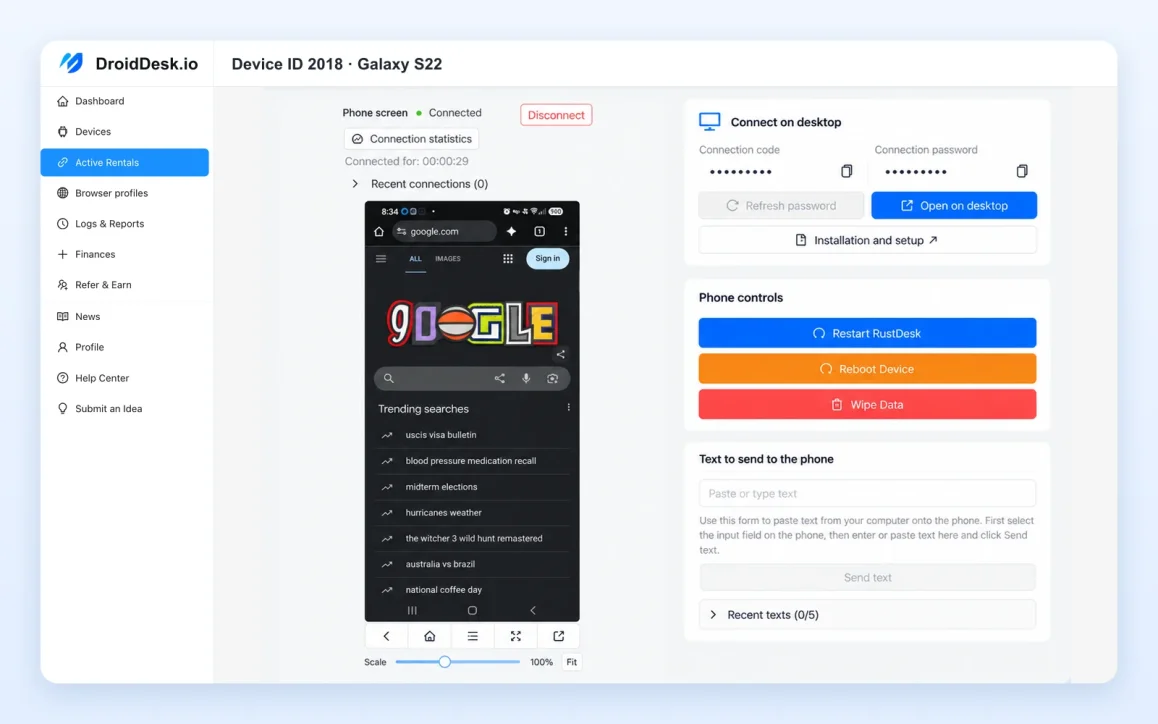
Choose your phone, location, and connection
Compare available devices by model, physical location, and network connection.
Need mobile internet? Choose a phone connected through LTE/5G. Prefer residential Wi-Fi? Select a device with that connection. Check each listing for its features and rental options.
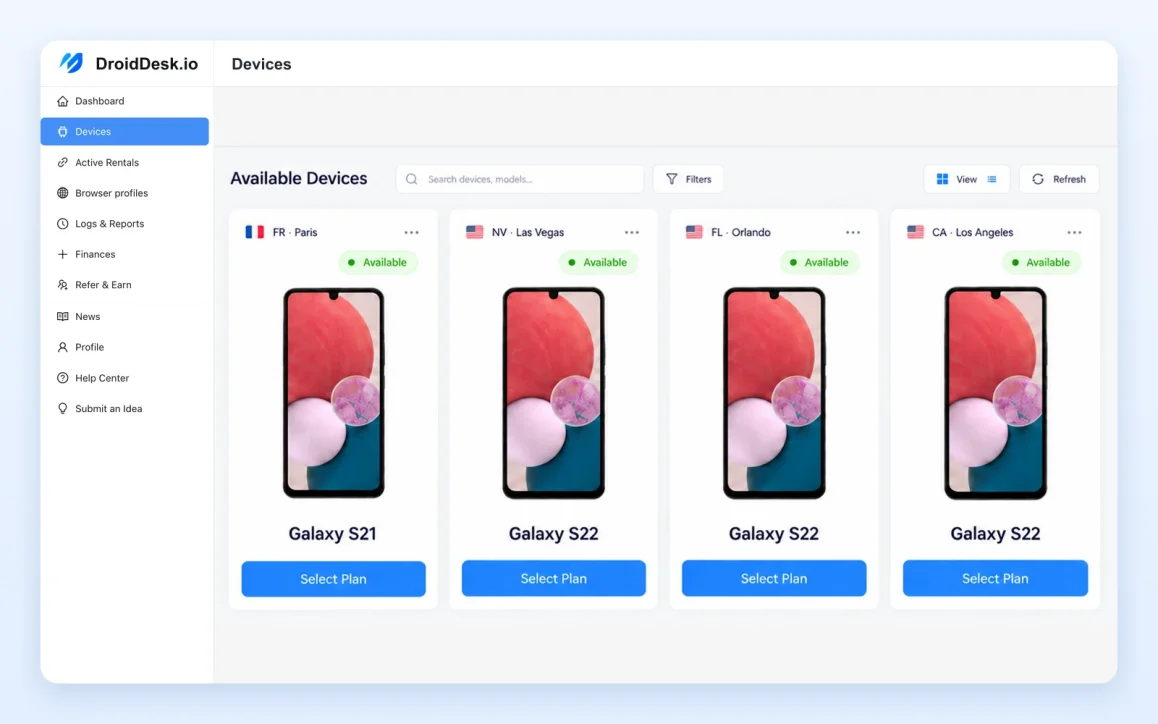
Use Android apps on real hardware
Eligible plans include Google Play installation, uploading your own APK files, and access to supported system settings.
You can also install your own eSIM on compatible phones. Choose the device and access level that support the features you need. Plan details are shown before you rent.
DroidDesk Browser — keep your browsing environment ready
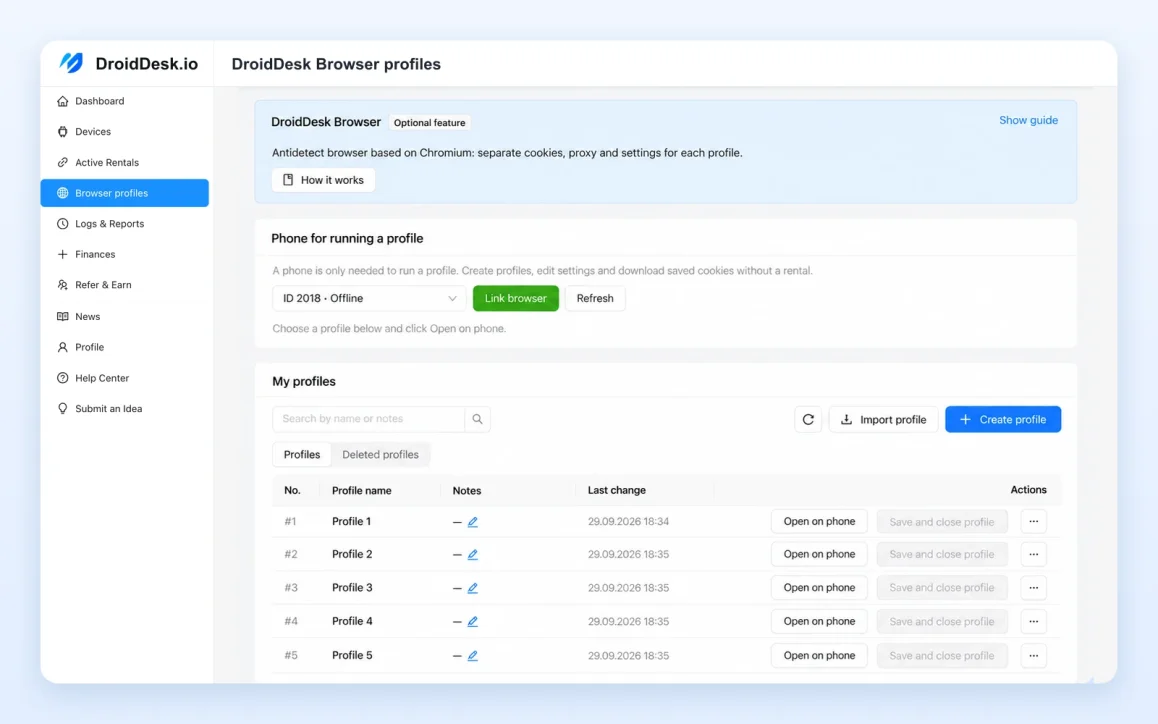
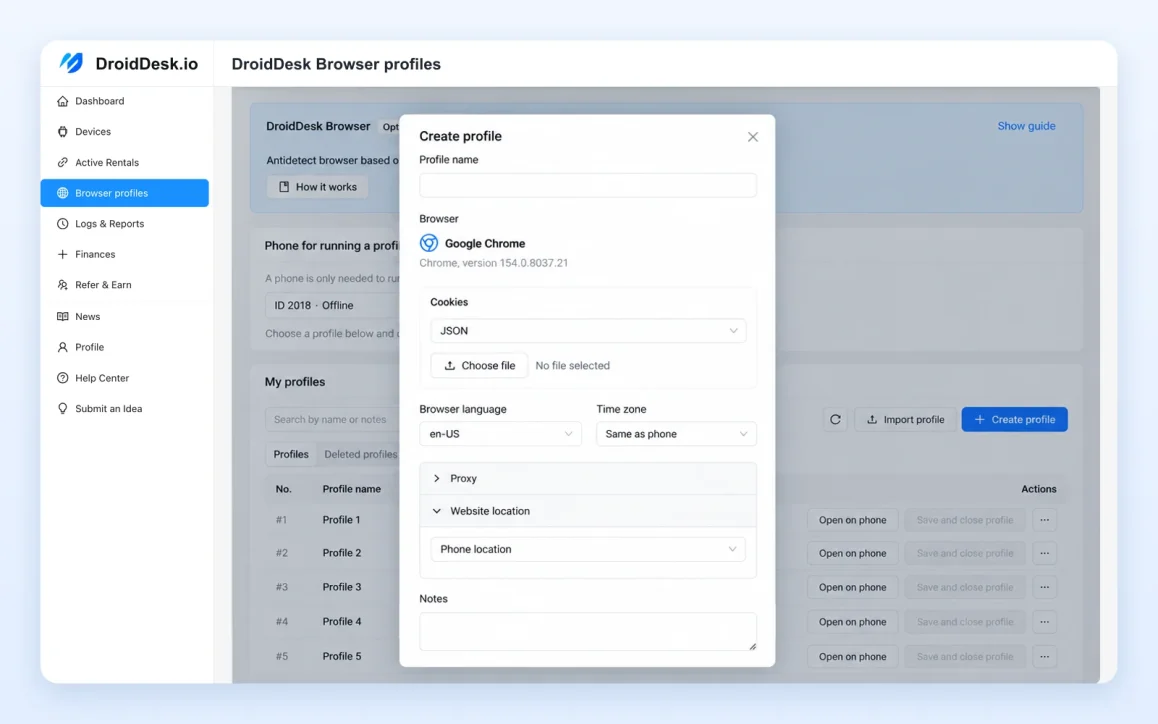
Use separate browser profiles inside DroidDesk Browser on the rented phone. Manage profiles from your dashboard and open the one you need on the device.
• Separate cookies and site data for each profile.
• Cloud saving and restoration of your browser session.
• Move saved profiles to another compatible phone.
• Import and export profiles.
• Import cookies in JSON and Netscape formats.
• Configure proxies, language, time zone, and website geolocation.
• Organize profiles with tags and notes.
Return to your saved browsing environment without setting everything up from scratch. Profile saving covers browser data; websites may still require you to sign in again.
Virtual Camera — use your own image or video
Select an image or video in your dashboard and use it as the camera source for supported websites in DroidDesk Browser.
Adjust its scale, position, and mirroring while viewing the result on the phone.

Rent for as long as you need
Choose a rental from one hour to one month, with the option to extend. Available durations, prices, and access levels are shown in your dashboard.
Connect directly from your computer’s browser or use the optional desktop client.
Pricing
• 1 hour — from $5
• 3 hours — from $7
• 1 day — from $10
• 1 week — from $60
• 1 month — from $150
Prices and included features vary by device and rental plan.
Refund Policy
• Device issues: If a device is faulty or unreachable, we provide a replacement or a refund to your DroidDesk account balance.
• Account balance: Credits cannot be withdrawn. Refunds are issued as account credit, not cash withdrawals.
• Claim deadline: Refund claims must be submitted within 24 hours.
• Account bans: Bans or restrictions on your personal accounts are not eligible for refunds.
DroidDesk.io
https://t.me/+p0AalwOOo4Y2MzU6
Own an Android smartphone? Become a DroidDesk host
Connect a compatible device to the platform, make it available for rent, and earn income from rentals. Contact us to learn about hosting: https://droiddesk.io/rent-out-your-phone
Connect from your computer through a browser or desktop client. The phone stays at its physical location while you operate it remotely.
What you get
• A physical Android phone — choose from the models available in the catalog.
• A real location — the smartphone is physically hosted in the listed country and city.
• Local internet access — LTE/5G or residential Wi-Fi, depending on the device.
• Android apps — Google Play, APK installation, and supported system settings on eligible plans.
• Your own eSIM — install it on a compatible phone with the required access level.
• Flexible rentals — from 1 hour to 1 month, with the option to extend.
• One phone or several — rent available devices and access them through your dashboard.
DroidDesk connects phone owners with renters. Hosts make their own smartphones available on the platform, and you choose the devices you want to access remotely.
DroidDesk.io
https://t.me/+p0AalwOOo4Y2MzU6
Choose your phone, location, and connection
Compare available devices by model, physical location, and network connection.
Need mobile internet? Choose a phone connected through LTE/5G. Prefer residential Wi-Fi? Select a device with that connection. Check each listing for its features and rental options.
Use Android apps on real hardware
Eligible plans include Google Play installation, uploading your own APK files, and access to supported system settings.
You can also install your own eSIM on compatible phones. Choose the device and access level that support the features you need. Plan details are shown before you rent.
DroidDesk Browser — keep your browsing environment ready
Use separate browser profiles inside DroidDesk Browser on the rented phone. Manage profiles from your dashboard and open the one you need on the device.
• Separate cookies and site data for each profile.
• Cloud saving and restoration of your browser session.
• Move saved profiles to another compatible phone.
• Import and export profiles.
• Import cookies in JSON and Netscape formats.
• Configure proxies, language, time zone, and website geolocation.
• Organize profiles with tags and notes.
Return to your saved browsing environment without setting everything up from scratch. Profile saving covers browser data; websites may still require you to sign in again.
Virtual Camera — use your own image or video
Select an image or video in your dashboard and use it as the camera source for supported websites in DroidDesk Browser.
Adjust its scale, position, and mirroring while viewing the result on the phone.
Rent for as long as you need
Choose a rental from one hour to one month, with the option to extend. Available durations, prices, and access levels are shown in your dashboard.
Connect directly from your computer’s browser or use the optional desktop client.
Pricing
• 1 hour — from $5
• 3 hours — from $7
• 1 day — from $10
• 1 week — from $60
• 1 month — from $150
Prices and included features vary by device and rental plan.
Refund Policy
• Device issues: If a device is faulty or unreachable, we provide a replacement or a refund to your DroidDesk account balance.
• Account balance: Credits cannot be withdrawn. Refunds are issued as account credit, not cash withdrawals.
• Claim deadline: Refund claims must be submitted within 24 hours.
• Account bans: Bans or restrictions on your personal accounts are not eligible for refunds.
DroidDesk.io
https://t.me/+p0AalwOOo4Y2MzU6
Own an Android smartphone? Become a DroidDesk host
Connect a compatible device to the platform, make it available for rent, and earn income from rentals. Contact us to learn about hosting: https://droiddesk.io/rent-out-your-phone

