Karma.Domains ‒ Expired Domain Aggregator & Analyzer via Wayback Machine

Did you know…

You can save a custom filter for quick access


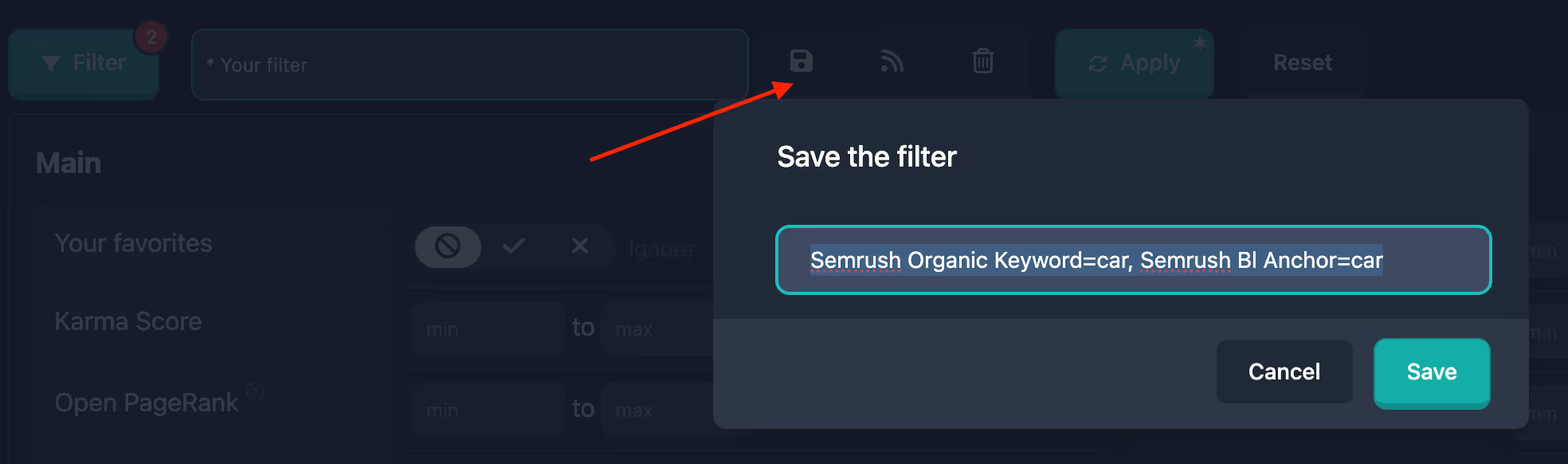
Any filter settings can be saved for quick access in the future. By default, the filter name will be generated based on its parameters, but you can rename it to anything you like.
save-filter.avif


Use invite code icBHWFOREVER during registration for 10 FREE credits and a 10% lifetime discount on the unlimited plan.​
 
New Pro plan features for working with reports

The PRO plan now includes four features that help you track domains, share analytics, and never miss auction deadlines — right from the report.

report-header.avif

Report notes and tags — personal notes for a report (up to 200 characters) and up to 10 tags per domain. Bookmark icon in the header next to the favorites star; marks are visible only to you, shown in the domain table, and filterable in search (With notes, Report tags). In the print version, tags and text appear on the title page.

Print/PDF — full print-ready report in A4 format: summary, metrics, Wayback, and all other data blocks. Save as PDF via the browser print dialog. Available for any full report from databases and Checker.

Share report — personal link to the full report for a colleague or partner without a Karma.Domains account. The link is valid for 60 days; the recipient sees all tabs and metrics. For reports from Auctions, Expired, Backorder, and Buy Now.

Calendar reminder1 hour before the end of bidding or listing: an event with links to the lot and report. Google Calendar, Apple, Outlook, Yahoo, .ics file, QR code, and Share. Calendar button for each active lot in the report.

All features are already available to Pro subscribers in the app interface.


Use invite code icBHWFOREVER during registration for 10 FREE credits and a 10% lifetime discount on the unlimited plan.​
 
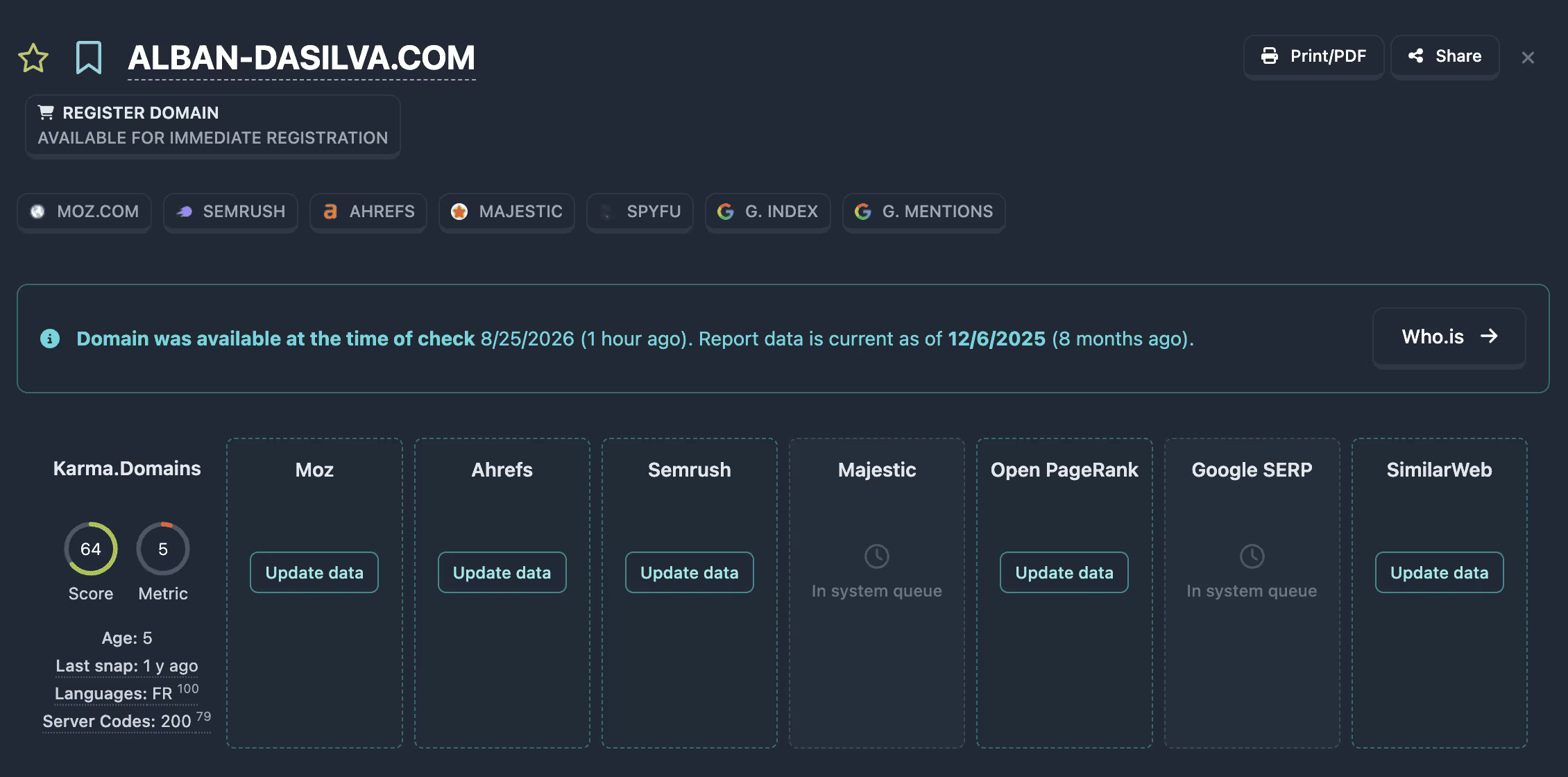
Incomplete reports: load missing SEO metrics with credits

In the report card you can now load missing SEO metrics that are not yet in the summary — outside the shared system queue, using credits.

enrich-report.avif

If a service still has no data, the Summary block shows an “Update data” button. One request can fetch the missing Ahrefs, Moz, Semrush, SimilarWeb, Keywords Everywhere, Brand Score, and Open PageRank metrics.

The feature is available on Pro and Unlimited plans for a full (non-demo) report. The cost is shown in the confirmation dialog (⚡). While loading runs, a waiting indicator is displayed on screen.

Majestic and Google are still processed only in the system queue: for them the summary keeps the clock icon and the “In system queue” status.


Use invite code icBHWFOREVER during registration for 10 FREE credits and a 10% lifetime discount on the unlimited plan.​
 
Did you know…

Filters and reports: Ahrefs metrics (DR, UR, AR)


Base filters now include an Ahrefs tab: you can set ranges for Domain Rating (DR) and URL Rating (UR) (0–100), plus Ahrefs Rank (AR)—the domain’s global rank (a lower number means a stronger site).

Each domain report includes an Ahrefs block with the same metrics; list tables offer DR and UR columns for sorting and quick comparison. The same parameters are honored by the AI filter when you describe your criteria in natural language.

ahrefs-filters-png.514431


Use invite code icBHWFOREVER during registration for 10 FREE credits and a 10% lifetime discount on the unlimited plan.

 
Updates

Public API and MCP 2.4: filters, annotations, share, and SEO enrich


The Public API and MCP server now support the full report workflow — what used to be web-app only. One Bearer key from Profile → Settings; the 60 requests per minute limit is shared by REST and MCP.

MCP now has 31 tools (was 21). A new Report workflow group — REST endpoints are grouped the same way: Reports, Account, Report workflow, Live checkers.

Saved filters​

Save a search filter set by name and call it from a script or chat.

  • REST: GET / PUT / DELETE /v1/user/saved-filters
  • MCP: list_saved_filters, save_saved_filter, delete_saved_filter

Annotations and tags​

Notes up to 200 characters and up to 10 tags per report — for shortlists, CRM, and team workflows.

  • REST: GET /v1/reports/annotations/tags, GET / PUT / DELETE /v1/reports/annotations
  • MCP: list_annotation_tags, get_report_annotation, set_report_annotation, delete_report_annotation

Guest share links​

Send a report to a colleague or client without account access.

  • REST: POST /v1/reports/share → share_url in the response
  • MCP: create_share_link
The request body uses report_type and report_id from search or the full report.

SEO enrich via API​

Loading missing SEO metrics is now available programmatically — outside the system queue, like on the report page.

  • REST: POST /v1/reports/{report_type}/{report_id}/enrich-seo (202 + job_id), then GET /v1/reports/enrich-jobs/{job_id} until status done
  • MCP: enrich_report_seo, get_enrich_report_seo_job

If MCP is already connected​

You do not need to change the URL or key. The client caches the tool list for the session — open a new chat or restart Cursor / Claude / ChatGPT. New REST routes are available immediately.

Details, curl examples, and field schemas are on the updated API and MCP landing pages; the full schema is in Swagger UI.


Use invite code icBHWFOREVER during registration for 10 FREE credits and a 10% lifetime discount on the unlimited plan.
 
Did you know…

You can find expired domains with the traffic and GEO you need.


A new advanced filter based on SimilarWeb data is now available. You can filter not only by the number of visits, but also by the country of origin (by specifying the percentage of traffic from a specific GEO) and the traffic source — direct, search, paid, etc.

For example, if you’re looking for a domain with search traffic from the USA, you can configure the filter accordingly.

screenshot-2025-07-29-at-12-01-57-min-png.462356


Now it’s easier than ever to find domains with the exact traffic you need!

Use invite code icBHWFOREVER during registration for 10 FREE credits and a 10% lifetime discount on the unlimited plan.​
 
Did you know…

AI-generated domain history summary and categorization


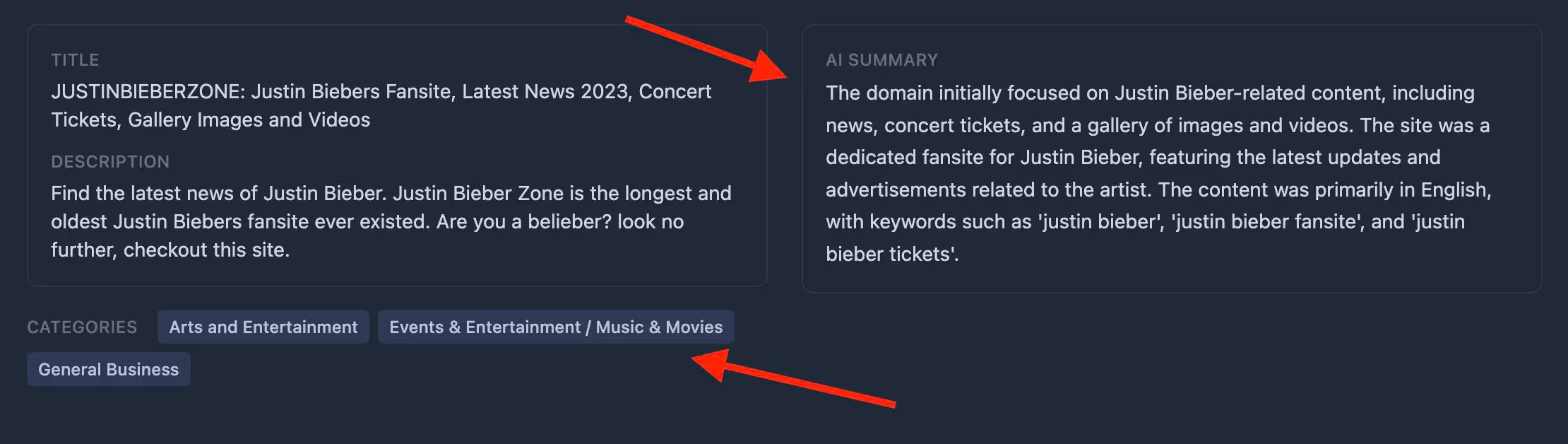
Now when you open any domain report, you immediately see an AI-generated concise overview of its entire history—what sites were hosted, how the domain was used, and when and how often its profile changed.

AI also assigns the most relevant category for the domain (for example, “news,” “technology,” “education,” and more). This helps you quickly see whether the domain fits your goals without spending time on manual analysis of its history and topic. Perfect for quickly filtering quality domains in the right category!

ai-summary-categories.avif


Use invite code icBHWFOREVER during registration for 10 FREE credits and a 10% lifetime discount on the unlimited plan.
 
Did you know…
Include and exclude categories in main filters


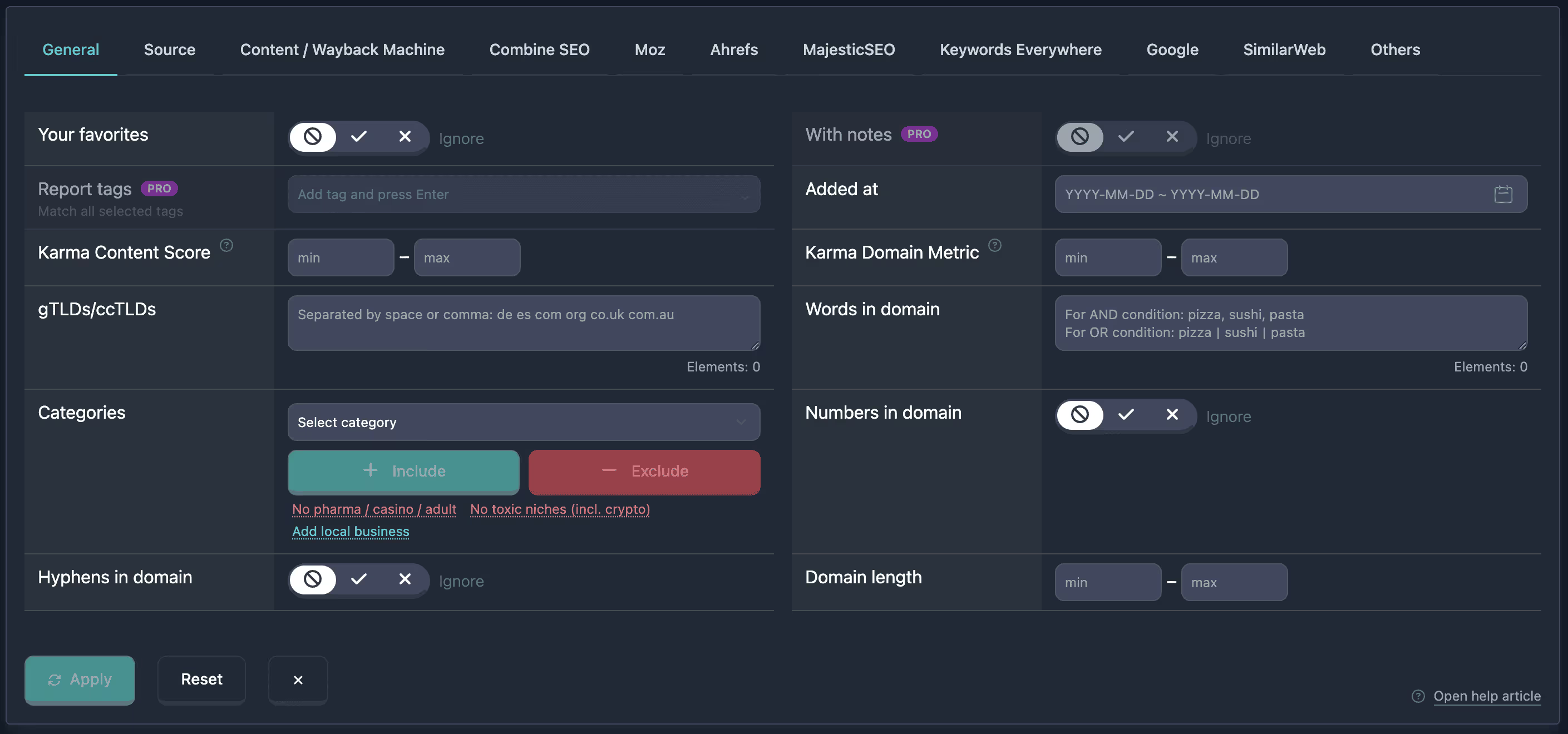
The Categories block in the main filters has been updated. You can now filter domains by topic not only through inclusion, but also by excluding unwanted niches — or combine both lists in a single search.

Select a category in the dropdown and click Include or Exclude. Selected values appear as badges in the Included and Excluded sections; Clear All resets both lists. Below the buttons — quick presets: one click adds a ready-made set of categories to your current selection, without duplicates.

  • No pharma / casino / adult — excludes gambling, adult, and pseudo-health
  • No toxic niches (incl. crypto) — excludes crypto, scams, extremism, and other high-risk categories
  • Add local business — includes restaurants, shops, home services, and related topics
The category catalog is now flat — no subcategories. The filter is available to all users and in all table types.

general-filter.avif


Would you like a 10% lifetime discount on unlimited plan?
Use invite code icBHWFOREVER during registration for 10 FREE credits and a 10% lifetime discount on the unlimited plan.​
 
Did you know…

Filters and reports: Ahrefs metrics (DR, UR, AR)


Base filters now include an Ahrefs tab: you can set ranges for Domain Rating (DR) and URL Rating (UR) (0–100), plus Ahrefs Rank (AR)—the domain’s global rank (a lower number means a stronger site).

Each domain report includes an Ahrefs block with the same metrics; list tables offer DR and UR columns for sorting and quick comparison. The same parameters are honored by the AI filter when you describe your criteria in natural language.

ahrefs-filters-png.514431


Would you like a 15% discount on your first unlimited plan purchase?
Use invite code icBHWFOREVER during registration for 10 FREE credits and a 10% lifetime discount on the unlimited plan.
For a one-time 15% discount, just reply to the thread and we’ll send you a discount code by PM.​
 
Did you know…

You can customize the table columns


The service allows you to choose which columns to display in the domain table. This helps you focus only on the information that matters to you.

screenshot-2025-08-08-at-19-19-22-min-png.464798


Would you like a 15% discount on your first unlimited plan purchase?
Use invite code icBHWFOREVER during registration for 10 FREE credits and a 10% lifetime discount on the unlimited plan.
For a one-time 15% discount, just reply to the thread and we’ll send you a discount code by PM.​
 
Did you know…

European domains from NicSell have been added


Domains from the NicSell marketplace are now included in Karma.Domains auctions: dropcatch and expiring-domain auctions, including auction formats NicSell is known for. In the app you can filter by the nicsell source to see only these lots next to other marketplaces.

Supported TLDs include: .de, .eu, .at, .ch, .li, .se, .nu, .pl, .cz, .me, .it, .be, .fr, .uk, .nl, .es, .ai.

NicSell domains in the auctions section is one list with price, bids, end time, and metrics. The landing page explains how NicSell auctions work and how to use them with Karma.Domains.


Would you like a 15% discount on your first unlimited plan purchase?
Use invite code icBHWFOREVER during registration for 10 FREE credits and a 10% lifetime discount on the unlimited plan.
For a one-time 15% discount, just reply to the thread and we’ll send you a discount code by PM.​
 
Did you know…

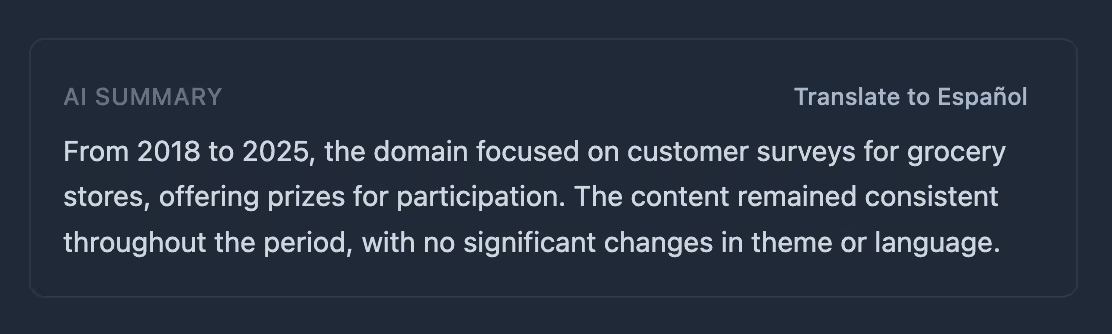
Translate AI domain summary to browser language


In the AI Summary block in domain reports, you can now translate the English description to your browser language. Just click the «Translate to [language]» button next to the heading — the text will be translated, and you can restore the original with the «Original» button if needed.

summary-translation.avif


Use invite code icBHWFOREVER during registration for 10 FREE credits and a 10% lifetime discount on the unlimited plan.​
 
Did you know…

You can quickly add a report to favorites

You can save any domain by clicking the ⭐ icon directly in the domain report. Later, you can easily select your saved list using the filter.

screenshot-2025-07-18-at-19-30-17-min-png.459718


Would you like a 10% lifetime discount on unlimited plan?
Use invite code icBHWFOREVER during registration for 10 FREE credits and a 10% lifetime discount on the unlimited plan.​
 
Did you know…
You can see red and green flags of the Karma Score in the domain report

The Karma Score summary shows the overall quality score of a domain’s history. It helps you quickly understand how “clean” a domain is.

The score is calculated as an average across all analyzed snapshots from the Wayback Machine, with a time-based adjustment: more recent snapshots carry more weight than older ones.

The report displays all red and green flags detected for the domain, which were taken into account in the score calculation.

screenshot-2025-07-28-at-19-04-55-min-png.462185


Use invite code icBHWFOREVER during registration for 10 FREE credits and a 10% lifetime discount on the unlimited plan.​
 
Did you know…
Affiliate Program: 50% Lifetime Commission and a 100-Day Cookie


We've launched the SEO affiliate program — now you can monetize your audience by recommending the ultimate domain analysis tool.

A 50% commission on every referral for life, plus one of the longest cookie lifetimes on the market — 100 days, so you're guaranteed to get credited for the users you bring in.


screenshot-2026-07-13-at-21-01-02-png.534732


Would you like a 10% lifetime discount on unlimited plan?
Use invite code icBHWFOREVER during registration for 10 FREE credits and a 10% lifetime discount on the unlimited plan.​
 
Did you know…

Filters and reports: Ahrefs metrics (DR, UR, AR)


Base filters now include an Ahrefs tab: you can set ranges for Domain Rating (DR) and URL Rating (UR) (0–100), plus Ahrefs Rank (AR)—the domain’s global rank (a lower number means a stronger site).

Each domain report includes an Ahrefs block with the same metrics; list tables offer DR and UR columns for sorting and quick comparison. The same parameters are honored by the AI filter when you describe your criteria in natural language.

ahrefs-filters-png.514431


Would you like a 15% discount on your first unlimited plan purchase?
Use invite code icBHWFOREVER during registration for 10 FREE credits and a 10% lifetime discount on the unlimited plan.
For a one-time 15% discount, just reply to the thread and we’ll send you a discount code by PM.​
 
Back
Top