KUMOMTA ADVANCED CONFIGURATIONS + CUSTOM UI | Deliver Emails at Lightning Speed


██████████████████████
KUMOMTA ADVANCED CONFIGURATIONS + CUSTOM UI
Send Emails at Lightning Speed • Thoroughly-Tested • Drop-In Simple
██████████████████████


Regular: $1500 — First 5 Buyers: $997


Why This Is a Game-Changer
Let’s be real: using an enterprise MTA without deep MailOps knowledge = disaster.

KumoMTA is a fast Message Transfer Agent (MTA) on the planet (proof here).
But out of the box, its configs are barebones. That’s where I come in.

I’ve invested my time, money, and countless server tests to produce a Thoroughly-tested KumoMTA configuration package + a working UI for KumoMTA (released as a bonus on GitHub).

No more drowning in Lua/TOML. I’ve already tuned automations, retry policies, shaping, DKIM, webhooks, pools, TTL, and more.
Drop it in, tweak your details, and you’re sending.

full


✅ What You’re Getting
  • Full structured config bundle – tested and stable with MailWizz (webhooks verified for bounce/complaint flow).
  • Webhooks ready – real-time event batching so your CRM/MailWizz stays in sync.
  • Advanced ISP shaping – pre-tuned for Gmail, Yahoo, Outlook/Office365, , QQ, France, US Cable, Apple, Verizon & more.
  • Per-ISP automations – auto-slowdown or suspend on TS01/TS02/deferrals and more, to protect your reputation.
  • Pool + source logic – clean multi-IP, multi-domain sending pools with weighted routing.
  • TTL overrides – per-pool bounce-after logic so retries are efficient, not abusive.
  • DKIM signing ready – oversigned headers and secure key paths.
  • Metrics + Queue API – HTTP listener pre-enabled to power dashboards and future UI improvements.
  • Documentation + sane defaults – folder/file structure you can understand at a glance.
  • Security – KUMOMTA is secure, and my configuration even makes it more secure. Provided you are not hacked via your provider level, or the intruder got your root password somehow, somewhere. You are set!

full


Why Trust KumoMTA?
1) Even AWeber migrated to KumoMTA (case study)
2) Laposta moved from Postfix with Postmastery (details)
3) More case studies (AhaSend)
4) It outperforms PowerMTA & MailerQ — and at NO COST. No more cracked/nulled PMTA junk.
5) Strategic thinking behind it: KumoMTA Performance Update, Moving beyond IP reputation (Spamresource)


My Bonus Service
Already on another MTA (PMTA/MailerQ/Postfix, etc.)?
I’ll migrate you to KumoMTA without data loss (DKIM, SPF, DMARC, PTR, usernames, passwords — preserved).
(Custom order, priced separately from this offer. Typically between $500 to $10,000, depending on how large your data are.)


⚠️ Note on IP Warmup
KumoMTA won’t magically heat up a cold IP.
The difference is: warmup with KumoMTA is faster and easier thanks to the built-in shaping, retry, and automation rules I’ve baked in.
Start right, scale cleanly, and stop tripping global throttles.


What Happens After Purchase?
  1. You receive the structured config pack + quick-start notes.
  2. I guide you on essential edits (domains, keys, IPs, pools).
  3. We validate MailWizz webhooks (bounces/complaints) are flowing.
  4. You start sending — with good defaults and protective automations.


Pricing


FAQ
Q: Will this work with my existing ESP stack?
A: Yes — configs are modular. If you already use MailWizz, you’re set. Others can adapt quickly.

Q: Do you include a delivery UI?
A: KumoMTA has no official UI. I built a working community UI (open-source) and the configs expose the metrics/queue APIs to power it.

Q: Can you handle migration from PMTA and other MTA's without breaking auth?
A: Yes — that’s a separate service. Your DKIM/SPF/DMARC/PTR and auth users are preserved.

Q: Does this bypass warmup?
A: No tool should. Warmup is required for cold IPs/domains. The difference here is automated guardrails that make warmup fast and smoother.

Q: Operating System?
A: It works well with Almalinux, Rocky, Ubuntu etc. But I prefer Almalinux 9 please.
KumoMTA is a performance MTA that will leverage every bit of power you provide. It may be kind of obvious, but 'more is better' so if you plan to send many millions of messages per hour, deploy the large server you can. You can deploy in bare metal, public or private cloud, with or without Kubernetes.

At an absolute minimum, you will need 4Gb RAM and 20Gb Storage. KumoMTA makes heavy use of both resources and response time is going to be a factor. For high-performance systems you will want to select storage with a fast IOPS and low latency, so local disk is going to be much better than NAS or SAN. Likewise, you can benefit from faster RAM if it is available. Medium is adequate for a minimal install.

KumoMTA is capable of processing many millions of message per hour, or more relevant to this conversation, many thousands of bytes per second. Your network interface could be your big bottleneck. Below is a quick calculation:

Assuming the average message is 50kB and you plan to send 1 Million of those per hour, your bandwidth requirement will be:

You can see that a 10Mbps Network interface would fail you quickly. Any performance system should use at least a 10Gb NIC.

full


Payment Method

I accept different payment methods:


1. Card payment (Additional processing fees would be added)
2. Crypto USDT (No additional fees)
3. Skrill (No additional Fees)
4. Wise (No additional Fees)


How To Purchase

Step 1 - Reach out to us via eMail, Telegram, WhatsApp or other contact methods listed below.
Step 2 - Specify the service(s) you wish to purchase and any customization preferences.
Step 3 - Our team will assist you in completing the order and generating the invoice for you.


Refund Policy
If you buy my advanced configurations, you follow my instructions, and it refuses to work for you, you contact me, and I am unable to provide you with a solution. Request for your refund, and I shall process it fully within 5-7 days.


Contact Me


Ready to send faster than you’ve ever imagined?
Drop a comment below or DM me right away.
Spots at $997 won’t last.

Bump!!!


██████████████████████
KUMOMTA ADVANCED CONFIGURATIONS + CUSTOM UI
Send Emails at Lightning Speed • Thoroughly-Tested • Drop-In Simple
██████████████████████


Regular: $1500 — First 5 Buyers: $997


Why This Is a Game-Changer
Let’s be real: using an enterprise MTA without deep MailOps knowledge = disaster.

KumoMTA is a fast Message Transfer Agent (MTA) on the planet (proof here).
But out of the box, its configs are barebones. That’s where I come in.

I’ve invested my time, money, and countless server tests to produce a Thoroughly-tested KumoMTA configuration package + a working UI for KumoMTA (released as a bonus on GitHub).

No more drowning in Lua/TOML. I’ve already tuned automations, retry policies, shaping, DKIM, webhooks, pools, TTL, and more.
Drop it in, tweak your details, and you’re sending.

full


✅ What You’re Getting
  • Full structured config bundle – tested and stable with MailWizz (webhooks verified for bounce/complaint flow).
  • Webhooks ready – real-time event batching so your CRM/MailWizz stays in sync.
  • Advanced ISP shaping – pre-tuned for Gmail, Yahoo, Outlook/Office365, , QQ, France, US Cable, Apple, Verizon & more.
  • Per-ISP automations – auto-slowdown or suspend on TS01/TS02/deferrals and more, to protect your reputation.
  • Pool + source logic – clean multi-IP, multi-domain sending pools with weighted routing.
  • TTL overrides – per-pool bounce-after logic so retries are efficient, not abusive.
  • DKIM signing ready – oversigned headers and secure key paths.
  • Metrics + Queue API – HTTP listener pre-enabled to power dashboards and future UI improvements.
  • Documentation + sane defaults – folder/file structure you can understand at a glance.
  • Security – KUMOMTA is secure, and my configuration even makes it more secure. Provided you are not hacked via your provider level, or the intruder got your root password somehow, somewhere. You are set!

full


Why Trust KumoMTA?
1) Even AWeber migrated to KumoMTA (case study)
2) Laposta moved from Postfix with Postmastery (details)
3) More case studies (AhaSend)
4) It outperforms PowerMTA & MailerQ — and at NO COST. No more cracked/nulled PMTA junk.
5) Strategic thinking behind it: KumoMTA Performance Update, Moving beyond IP reputation (Spamresource)


My Bonus Service
Already on another MTA (PMTA/MailerQ/Postfix, etc.)?
I’ll migrate you to KumoMTA without data loss (DKIM, SPF, DMARC, PTR, usernames, passwords — preserved).
(Custom order, priced separately from this offer. Typically between $500 to $10,000, depending on how large your data are.)


⚠️ Note on IP Warmup
KumoMTA won’t magically heat up a cold IP.
The difference is: warmup with KumoMTA is faster and easier thanks to the built-in shaping, retry, and automation rules I’ve baked in.
Start right, scale cleanly, and stop tripping global throttles.


What Happens After Purchase?
  1. You receive the structured config pack + quick-start notes.
  2. I guide you on essential edits (domains, keys, IPs, pools).
  3. We validate MailWizz webhooks (bounces/complaints) are flowing.
  4. You start sending — with good defaults and protective automations.


Pricing


FAQ
Q: Will this work with my existing ESP stack?
A: Yes — configs are modular. If you already use MailWizz, you’re set. Others can adapt quickly.

Q: Do you include a delivery UI?
A: KumoMTA has no official UI. I built a working community UI (open-source) and the configs expose the metrics/queue APIs to power it.

Q: Can you handle migration from PMTA and other MTA's without breaking auth?
A: Yes — that’s a separate service. Your DKIM/SPF/DMARC/PTR and auth users are preserved.

Q: Does this bypass warmup?
A: No tool should. Warmup is required for cold IPs/domains. The difference here is automated guardrails that make warmup fast and smoother.

Q: Operating System?
A: It works well with Almalinux, Rocky, Ubuntu etc. But I prefer Almalinux 9 please.
KumoMTA is a performance MTA that will leverage every bit of power you provide. It may be kind of obvious, but 'more is better' so if you plan to send many millions of messages per hour, deploy the large server you can. You can deploy in bare metal, public or private cloud, with or without Kubernetes.

At an absolute minimum, you will need 4Gb RAM and 20Gb Storage. KumoMTA makes heavy use of both resources and response time is going to be a factor. For high-performance systems you will want to select storage with a fast IOPS and low latency, so local disk is going to be much better than NAS or SAN. Likewise, you can benefit from faster RAM if it is available. Medium is adequate for a minimal install.

KumoMTA is capable of processing many millions of message per hour, or more relevant to this conversation, many thousands of bytes per second. Your network interface could be your big bottleneck. Below is a quick calculation:

Assuming the average message is 50kB and you plan to send 1 Million of those per hour, your bandwidth requirement will be:

You can see that a 10Mbps Network interface would fail you quickly. Any performance system should use at least a 10Gb NIC.

full


Payment Method

I accept different payment methods:


1. Card payment (Additional processing fees would be added)
2. Crypto USDT (No additional fees)
3. Skrill (No additional Fees)
4. Wise (No additional Fees)


How To Purchase

Step 1 - Reach out to us via eMail, Telegram, WhatsApp or other contact methods listed below.
Step 2 - Specify the service(s) you wish to purchase and any customization preferences.
Step 3 - Our team will assist you in completing the order and generating the invoice for you.


Refund Policy
If you buy my advanced configurations, you follow my instructions, and it refuses to work for you, you contact me, and I am unable to provide you with a solution. Request for your refund, and I shall process it fully within 5-7 days.


Contact Me


Ready to send faster than you’ve ever imagined?
Drop a comment below or DM me right away.
Spots at $997 won’t last.
BUMP!!!


██████████████████████
KUMOMTA ADVANCED CONFIGURATIONS + CUSTOM UI
Send Emails at Lightning Speed • Thoroughly-Tested • Drop-In Simple
██████████████████████


Regular: $1500 — First 5 Buyers: $997


Why This Is a Game-Changer
Let’s be real: using an enterprise MTA without deep MailOps knowledge = disaster.

KumoMTA is a fast Message Transfer Agent (MTA) on the planet (proof here).
But out of the box, its configs are barebones. That’s where I come in.

I’ve invested my time, money, and countless server tests to produce a Thoroughly-tested KumoMTA configuration package + a working UI for KumoMTA (released as a bonus on GitHub).

No more drowning in Lua/TOML. I’ve already tuned automations, retry policies, shaping, DKIM, webhooks, pools, TTL, and more.
Drop it in, tweak your details, and you’re sending.

full


✅ What You’re Getting
  • Full structured config bundle – tested and stable with MailWizz (webhooks verified for bounce/complaint flow).
  • Webhooks ready – real-time event batching so your CRM/MailWizz stays in sync.
  • Advanced ISP shaping – pre-tuned for Gmail, Yahoo, Outlook/Office365, , QQ, France, US Cable, Apple, Verizon & more.
  • Per-ISP automations – auto-slowdown or suspend on TS01/TS02/deferrals and more, to protect your reputation.
  • Pool + source logic – clean multi-IP, multi-domain sending pools with weighted routing.
  • TTL overrides – per-pool bounce-after logic so retries are efficient, not abusive.
  • DKIM signing ready – oversigned headers and secure key paths.
  • Metrics + Queue API – HTTP listener pre-enabled to power dashboards and future UI improvements.
  • Documentation + sane defaults – folder/file structure you can understand at a glance.
  • Security – KUMOMTA is secure, and my configuration even makes it more secure. Provided you are not hacked via your provider level, or the intruder got your root password somehow, somewhere. You are set!

full


Why Trust KumoMTA?
1) Even AWeber migrated to KumoMTA (case study)
2) Laposta moved from Postfix with Postmastery (details)
3) More case studies (AhaSend)
4) It outperforms PowerMTA & MailerQ — and at NO COST. No more cracked/nulled PMTA junk.
5) Strategic thinking behind it: KumoMTA Performance Update, Moving beyond IP reputation (Spamresource)


My Bonus Service
Already on another MTA (PMTA/MailerQ/Postfix, etc.)?
I’ll migrate you to KumoMTA without data loss (DKIM, SPF, DMARC, PTR, usernames, passwords — preserved).
(Custom order, priced separately from this offer. Typically between $500 to $10,000, depending on how large your data are.)


⚠️ Note on IP Warmup
KumoMTA won’t magically heat up a cold IP.
The difference is: warmup with KumoMTA is faster and easier thanks to the built-in shaping, retry, and automation rules I’ve baked in.
Start right, scale cleanly, and stop tripping global throttles.


What Happens After Purchase?
  1. You receive the structured config pack + quick-start notes.
  2. I guide you on essential edits (domains, keys, IPs, pools).
  3. We validate MailWizz webhooks (bounces/complaints) are flowing.
  4. You start sending — with good defaults and protective automations.


Pricing


FAQ
Q: Will this work with my existing ESP stack?
A: Yes — configs are modular. If you already use MailWizz, you’re set. Others can adapt quickly.

Q: Do you include a delivery UI?
A: KumoMTA has no official UI. I built a working community UI (open-source) and the configs expose the metrics/queue APIs to power it.

Q: Can you handle migration from PMTA and other MTA's without breaking auth?
A: Yes — that’s a separate service. Your DKIM/SPF/DMARC/PTR and auth users are preserved.

Q: Does this bypass warmup?
A: No tool should. Warmup is required for cold IPs/domains. The difference here is automated guardrails that make warmup fast and smoother.

Q: Operating System?
A: It works well with Almalinux, Rocky, Ubuntu etc. But I prefer Almalinux 9 please.
KumoMTA is a performance MTA that will leverage every bit of power you provide. It may be kind of obvious, but 'more is better' so if you plan to send many millions of messages per hour, deploy the large server you can. You can deploy in bare metal, public or private cloud, with or without Kubernetes.

At an absolute minimum, you will need 4Gb RAM and 20Gb Storage. KumoMTA makes heavy use of both resources and response time is going to be a factor. For high-performance systems you will want to select storage with a fast IOPS and low latency, so local disk is going to be much better than NAS or SAN. Likewise, you can benefit from faster RAM if it is available. Medium is adequate for a minimal install.

KumoMTA is capable of processing many millions of message per hour, or more relevant to this conversation, many thousands of bytes per second. Your network interface could be your big bottleneck. Below is a quick calculation:

Assuming the average message is 50kB and you plan to send 1 Million of those per hour, your bandwidth requirement will be:

You can see that a 10Mbps Network interface would fail you quickly. Any performance system should use at least a 10Gb NIC.

full


Payment Method

I accept different payment methods:


1. Card payment (Additional processing fees would be added)
2. Crypto USDT (No additional fees)
3. Skrill (No additional Fees)
4. Wise (No additional Fees)


How To Purchase

Step 1 - Reach out to us via eMail, Telegram, WhatsApp or other contact methods listed below.
Step 2 - Specify the service(s) you wish to purchase and any customization preferences.
Step 3 - Our team will assist you in completing the order and generating the invoice for you.


Refund Policy
If you buy my advanced configurations, you follow my instructions, and it refuses to work for you, you contact me, and I am unable to provide you with a solution. Request for your refund, and I shall process it fully within 5-7 days.


Contact Me


Ready to send faster than you’ve ever imagined?
Drop a comment below or DM me right away.
Spots at $997 won’t last.
Bump
 
full


Massive improvements and new features.

Works flawlessly with the latest Kumomta release

https://www.kumoui.com/


#kumomta #kumoui #omniknoweth #autowarmup
 
full


Massive improvements and new features.

Works flawlessly with the latest Kumomta release


https://www.kumoui.com/


#kumomta #kumoui #omniknoweth #autowarmup


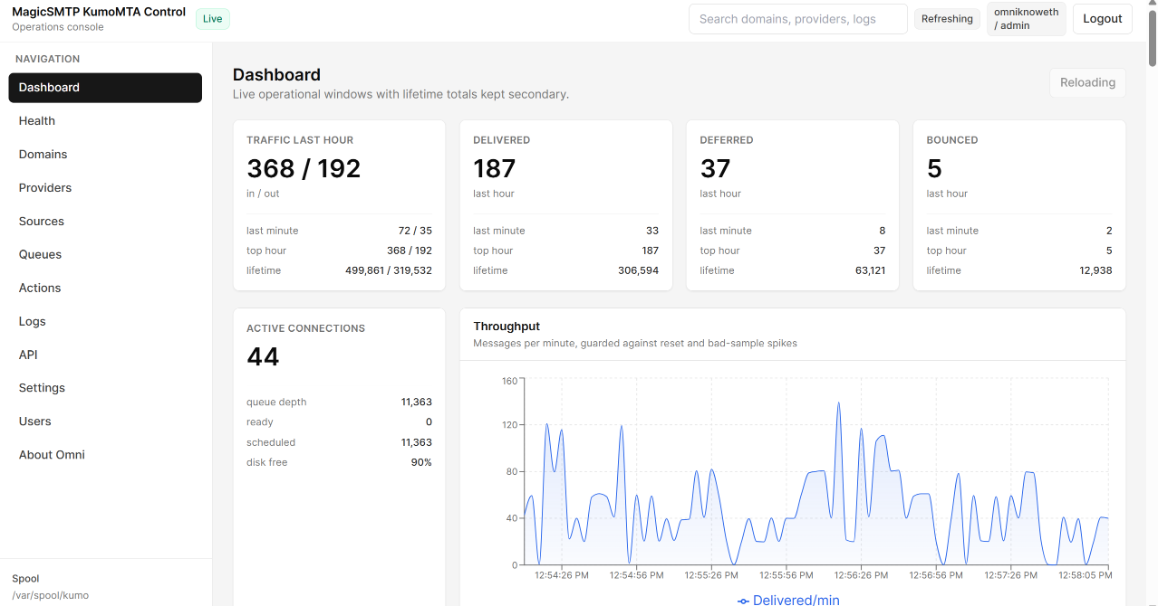
The Kumo UI/config pack has been improved a lot since. It’s no longer just basic monitoring now.

Some of the new things added:

- Live dashboard counters are now accurate, no more crazy counter jumps from things like 160k to 160 million.
- Health page added, so you can see API status, Kumo metrics age, latency, poll errors, tailer status, memory usage, and state size.
- Domain details page added with queued, delivered, deferred, bounced, provider/MX hints, and last errors.
- Provider view added for Gmail, Yahoo, Outlook, Proofpoint, etc, with throughput, deferrals, bounce trends, and affected domains.
- Source IP x Provider Performance added, so you can see how each sending IP/source is performing against providers over 7, 14, 21, or 30 days.
- Sources now show the actual source IP, not just the source name, so you don’t have to guess which IP is having issues.
- Login system added with admin, operator, and viewer roles.
- User management added, so admin can create users and control permissions.
- IP allowlist added, so only allowed IPs can log in or run actions.
- Queue search added, so you can quickly find a domain.
- Safe Pause/Resume actions added for domains, with confirmation and audit logs.
- Source pause/resume and bulk source controls added.
- Provider, Domains, Queues, and Sources now have pagination/page size, so the UI stays fast even with thousands of rows.
- Action audit log added, so every pause/resume/flush is recorded with user, IP, role, reason, mode, and result.
- Deployment/security cleanup added: env secrets protected, audit clean, and safer nginx/API setup.
- The UI is much smoother now under heavy sending volume.

It’s now more like a proper PMTA/MailerQ-style operations panel for KumoMTA, not just a simple dashboard.

Works flawlessly with the latest Kumomta release

https://www.kumoui.com/
 
The Kumo UI/config pack has been improved a lot since. It’s no longer just basic monitoring now.

Some of the new things added:

- Live dashboard counters are now accurate, no more crazy counter jumps from things like 160k to 160 million.
- Health page added, so you can see API status, Kumo metrics age, latency, poll errors, tailer status, memory usage, and state size.
- Domain details page added with queued, delivered, deferred, bounced, provider/MX hints, and last errors.
- Provider view added for Gmail, Yahoo, Outlook, Proofpoint, etc, with throughput, deferrals, bounce trends, and affected domains.
- Source IP x Provider Performance added, so you can see how each sending IP/source is performing against providers over 7, 14, 21, or 30 days.
- Sources now show the actual source IP, not just the source name, so you don’t have to guess which IP is having issues.
- Login system added with admin, operator, and viewer roles.
- User management added, so admin can create users and control permissions.
- IP allowlist added, so only allowed IPs can log in or run actions.
- Queue search added, so you can quickly find a domain.
- Safe Pause/Resume actions added for domains, with confirmation and audit logs.
- Source pause/resume and bulk source controls added.
- Provider, Domains, Queues, and Sources now have pagination/page size, so the UI stays fast even with thousands of rows.
- Action audit log added, so every pause/resume/flush is recorded with user, IP, role, reason, mode, and result.
- Deployment/security cleanup added: env secrets protected, audit clean, and safer nginx/API setup.
- The UI is much smoother now under heavy sending volume.

It’s now more like a proper PMTA/MailerQ-style operations panel for KumoMTA, not just a simple dashboard.

Works flawlessly with the latest Kumomta release

https://www.kumoui.com/
Bump!!!
 
The Kumo UI/config pack has been improved a lot since. It’s no longer just basic monitoring now.

Some of the new things added:

- Live dashboard counters are now accurate, no more crazy counter jumps from things like 160k to 160 million.
- Health page added, so you can see API status, Kumo metrics age, latency, poll errors, tailer status, memory usage, and state size.
- Domain details page added with queued, delivered, deferred, bounced, provider/MX hints, and last errors.
- Provider view added for Gmail, Yahoo, Outlook, Proofpoint, etc, with throughput, deferrals, bounce trends, and affected domains.
- Source IP x Provider Performance added, so you can see how each sending IP/source is performing against providers over 7, 14, 21, or 30 days.
- Sources now show the actual source IP, not just the source name, so you don’t have to guess which IP is having issues.
- Login system added with admin, operator, and viewer roles.
- User management added, so admin can create users and control permissions.
- IP allowlist added, so only allowed IPs can log in or run actions.
- Queue search added, so you can quickly find a domain.
- Safe Pause/Resume actions added for domains, with confirmation and audit logs.
- Source pause/resume and bulk source controls added.
- Provider, Domains, Queues, and Sources now have pagination/page size, so the UI stays fast even with thousands of rows.
- Action audit log added, so every pause/resume/flush is recorded with user, IP, role, reason, mode, and result.
- Deployment/security cleanup added: env secrets protected, audit clean, and safer nginx/API setup.
- The UI is much smoother now under heavy sending volume.

It’s now more like a proper PMTA/MailerQ-style operations panel for KumoMTA, not just a simple dashboard.

Works flawlessly with the latest Kumomta release

https://www.kumoui.com/

Bump
 
The Kumo UI/config pack has been improved a lot since. It’s no longer just basic monitoring now.

Some of the new things added:

- Live dashboard counters are now accurate, no more crazy counter jumps from things like 160k to 160 million.
- Health page added, so you can see API status, Kumo metrics age, latency, poll errors, tailer status, memory usage, and state size.
- Domain details page added with queued, delivered, deferred, bounced, provider/MX hints, and last errors.
- Provider view added for Gmail, Yahoo, Outlook, Proofpoint, etc, with throughput, deferrals, bounce trends, and affected domains.
- Source IP x Provider Performance added, so you can see how each sending IP/source is performing against providers over 7, 14, 21, or 30 days.
- Sources now show the actual source IP, not just the source name, so you don’t have to guess which IP is having issues.
- Login system added with admin, operator, and viewer roles.
- User management added, so admin can create users and control permissions.
- IP allowlist added, so only allowed IPs can log in or run actions.
- Queue search added, so you can quickly find a domain.
- Safe Pause/Resume actions added for domains, with confirmation and audit logs.
- Source pause/resume and bulk source controls added.
- Provider, Domains, Queues, and Sources now have pagination/page size, so the UI stays fast even with thousands of rows.
- Action audit log added, so every pause/resume/flush is recorded with user, IP, role, reason, mode, and result.
- Deployment/security cleanup added: env secrets protected, audit clean, and safer nginx/API setup.
- The UI is much smoother now under heavy sending volume.

It’s now more like a proper PMTA/MailerQ-style operations panel for KumoMTA, not just a simple dashboard.

Works flawlessly with the latest Kumomta release

https://www.kumoui.com/
Bump
 
The Kumo UI/config pack has been improved a lot since. It’s no longer just basic monitoring now.

Some of the new things added:

- Live dashboard counters are now accurate, no more crazy counter jumps from things like 160k to 160 million.
- Health page added, so you can see API status, Kumo metrics age, latency, poll errors, tailer status, memory usage, and state size.
- Domain details page added with queued, delivered, deferred, bounced, provider/MX hints, and last errors.
- Provider view added for Gmail, Yahoo, Outlook, Proofpoint, etc, with throughput, deferrals, bounce trends, and affected domains.
- Source IP x Provider Performance added, so you can see how each sending IP/source is performing against providers over 7, 14, 21, or 30 days.
- Sources now show the actual source IP, not just the source name, so you don’t have to guess which IP is having issues.
- Login system added with admin, operator, and viewer roles.
- User management added, so admin can create users and control permissions.
- IP allowlist added, so only allowed IPs can log in or run actions.
- Queue search added, so you can quickly find a domain.
- Safe Pause/Resume actions added for domains, with confirmation and audit logs.
- Source pause/resume and bulk source controls added.
- Provider, Domains, Queues, and Sources now have pagination/page size, so the UI stays fast even with thousands of rows.
- Action audit log added, so every pause/resume/flush is recorded with user, IP, role, reason, mode, and result.
- Deployment/security cleanup added: env secrets protected, audit clean, and safer nginx/API setup.
- The UI is much smoother now under heavy sending volume.

It’s now more like a proper PMTA/MailerQ-style operations panel for KumoMTA, not just a simple dashboard.

Works flawlessly with the latest Kumomta release

https://www.kumoui.com/
Bump!!!
 
The Kumo UI/config pack has been improved a lot since. It’s no longer just basic monitoring now.

Some of the new things added:

- Live dashboard counters are now accurate, no more crazy counter jumps from things like 160k to 160 million.
- Health page added, so you can see API status, Kumo metrics age, latency, poll errors, tailer status, memory usage, and state size.
- Domain details page added with queued, delivered, deferred, bounced, provider/MX hints, and last errors.
- Provider view added for Gmail, Yahoo, Outlook, Proofpoint, etc, with throughput, deferrals, bounce trends, and affected domains.
- Source IP x Provider Performance added, so you can see how each sending IP/source is performing against providers over 7, 14, 21, or 30 days.
- Sources now show the actual source IP, not just the source name, so you don’t have to guess which IP is having issues.
- Login system added with admin, operator, and viewer roles.
- User management added, so admin can create users and control permissions.
- IP allowlist added, so only allowed IPs can log in or run actions.
- Queue search added, so you can quickly find a domain.
- Safe Pause/Resume actions added for domains, with confirmation and audit logs.
- Source pause/resume and bulk source controls added.
- Provider, Domains, Queues, and Sources now have pagination/page size, so the UI stays fast even with thousands of rows.
- Action audit log added, so every pause/resume/flush is recorded with user, IP, role, reason, mode, and result.
- Deployment/security cleanup added: env secrets protected, audit clean, and safer nginx/API setup.
- The UI is much smoother now under heavy sending volume.

It’s now more like a proper PMTA/MailerQ-style operations panel for KumoMTA, not just a simple dashboard.

Works flawlessly with the latest Kumomta release

https://www.kumoui.com/
Bump!!!
 
The Kumo UI/config pack has been improved a lot since. It’s no longer just basic monitoring now.

Some of the new things added:

- Live dashboard counters are now accurate, no more crazy counter jumps from things like 160k to 160 million.
- Health page added, so you can see API status, Kumo metrics age, latency, poll errors, tailer status, memory usage, and state size.
- Domain details page added with queued, delivered, deferred, bounced, provider/MX hints, and last errors.
- Provider view added for Gmail, Yahoo, Outlook, Proofpoint, etc, with throughput, deferrals, bounce trends, and affected domains.
- Source IP x Provider Performance added, so you can see how each sending IP/source is performing against providers over 7, 14, 21, or 30 days.
- Sources now show the actual source IP, not just the source name, so you don’t have to guess which IP is having issues.
- Login system added with admin, operator, and viewer roles.
- User management added, so admin can create users and control permissions.
- IP allowlist added, so only allowed IPs can log in or run actions.
- Queue search added, so you can quickly find a domain.
- Safe Pause/Resume actions added for domains, with confirmation and audit logs.
- Source pause/resume and bulk source controls added.
- Provider, Domains, Queues, and Sources now have pagination/page size, so the UI stays fast even with thousands of rows.
- Action audit log added, so every pause/resume/flush is recorded with user, IP, role, reason, mode, and result.
- Deployment/security cleanup added: env secrets protected, audit clean, and safer nginx/API setup.
- The UI is much smoother now under heavy sending volume.

It’s now more like a proper PMTA/MailerQ-style operations panel for KumoMTA, not just a simple dashboard.

Works flawlessly with the latest Kumomta release

https://www.kumoui.com/
Bump
 
The Kumo UI/config pack has been improved a lot since. It’s no longer just basic monitoring now.

Some of the new things added:

- Live dashboard counters are now accurate, no more crazy counter jumps from things like 160k to 160 million.
- Health page added, so you can see API status, Kumo metrics age, latency, poll errors, tailer status, memory usage, and state size.
- Domain details page added with queued, delivered, deferred, bounced, provider/MX hints, and last errors.
- Provider view added for Gmail, Yahoo, Outlook, Proofpoint, etc, with throughput, deferrals, bounce trends, and affected domains.
- Source IP x Provider Performance added, so you can see how each sending IP/source is performing against providers over 7, 14, 21, or 30 days.
- Sources now show the actual source IP, not just the source name, so you don’t have to guess which IP is having issues.
- Login system added with admin, operator, and viewer roles.
- User management added, so admin can create users and control permissions.
- IP allowlist added, so only allowed IPs can log in or run actions.
- Queue search added, so you can quickly find a domain.
- Safe Pause/Resume actions added for domains, with confirmation and audit logs.
- Source pause/resume and bulk source controls added.
- Provider, Domains, Queues, and Sources now have pagination/page size, so the UI stays fast even with thousands of rows.
- Action audit log added, so every pause/resume/flush is recorded with user, IP, role, reason, mode, and result.
- Deployment/security cleanup added: env secrets protected, audit clean, and safer nginx/API setup.
- The UI is much smoother now under heavy sending volume.

It’s now more like a proper PMTA/MailerQ-style operations panel for KumoMTA, not just a simple dashboard.

Works flawlessly with the latest Kumomta release

https://www.kumoui.com/

Bump!!!!
 
The Kumo UI/config pack has been improved a lot since. It’s no longer just basic monitoring now.

Some of the new things added:

- Live dashboard counters are now accurate, no more crazy counter jumps from things like 160k to 160 million.
- Health page added, so you can see API status, Kumo metrics age, latency, poll errors, tailer status, memory usage, and state size.
- Domain details page added with queued, delivered, deferred, bounced, provider/MX hints, and last errors.
- Provider view added for Gmail, Yahoo, Outlook, Proofpoint, etc, with throughput, deferrals, bounce trends, and affected domains.
- Source IP x Provider Performance added, so you can see how each sending IP/source is performing against providers over 7, 14, 21, or 30 days.
- Sources now show the actual source IP, not just the source name, so you don’t have to guess which IP is having issues.
- Login system added with admin, operator, and viewer roles.
- User management added, so admin can create users and control permissions.
- IP allowlist added, so only allowed IPs can log in or run actions.
- Queue search added, so you can quickly find a domain.
- Safe Pause/Resume actions added for domains, with confirmation and audit logs.
- Source pause/resume and bulk source controls added.
- Provider, Domains, Queues, and Sources now have pagination/page size, so the UI stays fast even with thousands of rows.
- Action audit log added, so every pause/resume/flush is recorded with user, IP, role, reason, mode, and result.
- Deployment/security cleanup added: env secrets protected, audit clean, and safer nginx/API setup.
- The UI is much smoother now under heavy sending volume.

It’s now more like a proper PMTA/MailerQ-style operations panel for KumoMTA, not just a simple dashboard.

Works flawlessly with the latest Kumomta release

https://www.kumoui.com/
Bump!!!
 
The Kumo UI/config pack has been improved a lot since. It’s no longer just basic monitoring now.

Some of the new things added:

- Live dashboard counters are now accurate, no more crazy counter jumps from things like 160k to 160 million.
- Health page added, so you can see API status, Kumo metrics age, latency, poll errors, tailer status, memory usage, and state size.
- Domain details page added with queued, delivered, deferred, bounced, provider/MX hints, and last errors.
- Provider view added for Gmail, Yahoo, Outlook, Proofpoint, etc, with throughput, deferrals, bounce trends, and affected domains.
- Source IP x Provider Performance added, so you can see how each sending IP/source is performing against providers over 7, 14, 21, or 30 days.
- Sources now show the actual source IP, not just the source name, so you don’t have to guess which IP is having issues.
- Login system added with admin, operator, and viewer roles.
- User management added, so admin can create users and control permissions.
- IP allowlist added, so only allowed IPs can log in or run actions.
- Queue search added, so you can quickly find a domain.
- Safe Pause/Resume actions added for domains, with confirmation and audit logs.
- Source pause/resume and bulk source controls added.
- Provider, Domains, Queues, and Sources now have pagination/page size, so the UI stays fast even with thousands of rows.
- Action audit log added, so every pause/resume/flush is recorded with user, IP, role, reason, mode, and result.
- Deployment/security cleanup added: env secrets protected, audit clean, and safer nginx/API setup.
- The UI is much smoother now under heavy sending volume.

It’s now more like a proper PMTA/MailerQ-style operations panel for KumoMTA, not just a simple dashboard.

Works flawlessly with the latest Kumomta release

https://www.kumoui.com/

Bump!!!
 
The Kumo UI/config pack has been improved a lot since. It’s no longer just basic monitoring now.

Some of the new things added:

- Live dashboard counters are now accurate, no more crazy counter jumps from things like 160k to 160 million.
- Health page added, so you can see API status, Kumo metrics age, latency, poll errors, tailer status, memory usage, and state size.
- Domain details page added with queued, delivered, deferred, bounced, provider/MX hints, and last errors.
- Provider view added for Gmail, Yahoo, Outlook, Proofpoint, etc, with throughput, deferrals, bounce trends, and affected domains.
- Source IP x Provider Performance added, so you can see how each sending IP/source is performing against providers over 7, 14, 21, or 30 days.
- Sources now show the actual source IP, not just the source name, so you don’t have to guess which IP is having issues.
- Login system added with admin, operator, and viewer roles.
- User management added, so admin can create users and control permissions.
- IP allowlist added, so only allowed IPs can log in or run actions.
- Queue search added, so you can quickly find a domain.
- Safe Pause/Resume actions added for domains, with confirmation and audit logs.
- Source pause/resume and bulk source controls added.
- Provider, Domains, Queues, and Sources now have pagination/page size, so the UI stays fast even with thousands of rows.
- Action audit log added, so every pause/resume/flush is recorded with user, IP, role, reason, mode, and result.
- Deployment/security cleanup added: env secrets protected, audit clean, and safer nginx/API setup.
- The UI is much smoother now under heavy sending volume.

It’s now more like a proper PMTA/MailerQ-style operations panel for KumoMTA, not just a simple dashboard.

Works flawlessly with the latest Kumomta release

https://www.kumoui.com/

Bump!!!!


██████████████████████
KUMOMTA ADVANCED CONFIGURATIONS + CUSTOM UI
Send Emails at Lightning Speed • Thoroughly-Tested • Drop-In Simple
██████████████████████


Regular: $1500 — First 5 Buyers: $997


Why This Is a Game-Changer
Let’s be real: using an enterprise MTA without deep MailOps knowledge = disaster.

KumoMTA is a fast Message Transfer Agent (MTA) on the planet (proof here).
But out of the box, its configs are barebones. That’s where I come in.

I’ve invested my time, money, and countless server tests to produce a Thoroughly-tested KumoMTA configuration package + a working UI for KumoMTA (released as a bonus on GitHub).

No more drowning in Lua/TOML. I’ve already tuned automations, retry policies, shaping, DKIM, webhooks, pools, TTL, and more.
Drop it in, tweak your details, and you’re sending.

full


✅ What You’re Getting
  • Full structured config bundle – tested and stable with MailWizz (webhooks verified for bounce/complaint flow).
  • Webhooks ready – real-time event batching so your CRM/MailWizz stays in sync.
  • Advanced ISP shaping – pre-tuned for Gmail, Yahoo, Outlook/Office365, , QQ, France, US Cable, Apple, Verizon & more.
  • Per-ISP automations – auto-slowdown or suspend on TS01/TS02/deferrals and more, to protect your reputation.
  • Pool + source logic – clean multi-IP, multi-domain sending pools with weighted routing.
  • TTL overrides – per-pool bounce-after logic so retries are efficient, not abusive.
  • DKIM signing ready – oversigned headers and secure key paths.
  • Metrics + Queue API – HTTP listener pre-enabled to power dashboards and future UI improvements.
  • Documentation + sane defaults – folder/file structure you can understand at a glance.
  • Security – KUMOMTA is secure, and my configuration even makes it more secure. Provided you are not hacked via your provider level, or the intruder got your root password somehow, somewhere. You are set!

full


Why Trust KumoMTA?
1) Even AWeber migrated to KumoMTA (case study)
2) Laposta moved from Postfix with Postmastery (details)
3) More case studies (AhaSend)
4) It outperforms PowerMTA & MailerQ — and at NO COST. No more cracked/nulled PMTA junk.
5) Strategic thinking behind it: KumoMTA Performance Update, Moving beyond IP reputation (Spamresource)


My Bonus Service
Already on another MTA (PMTA/MailerQ/Postfix, etc.)?
I’ll migrate you to KumoMTA without data loss (DKIM, SPF, DMARC, PTR, usernames, passwords — preserved).
(Custom order, priced separately from this offer. Typically between $500 to $10,000, depending on how large your data are.)


⚠️ Note on IP Warmup
KumoMTA won’t magically heat up a cold IP.
The difference is: warmup with KumoMTA is faster and easier thanks to the built-in shaping, retry, and automation rules I’ve baked in.
Start right, scale cleanly, and stop tripping global throttles.


What Happens After Purchase?
  1. You receive the structured config pack + quick-start notes.
  2. I guide you on essential edits (domains, keys, IPs, pools).
  3. We validate MailWizz webhooks (bounces/complaints) are flowing.
  4. You start sending — with good defaults and protective automations.


Pricing


FAQ
Q: Will this work with my existing ESP stack?
A: Yes — configs are modular. If you already use MailWizz, you’re set. Others can adapt quickly.

Q: Do you include a delivery UI?
A: KumoMTA has no official UI. I built a working community UI (open-source) and the configs expose the metrics/queue APIs to power it.

Q: Can you handle migration from PMTA and other MTA's without breaking auth?
A: Yes — that’s a separate service. Your DKIM/SPF/DMARC/PTR and auth users are preserved.

Q: Does this bypass warmup?
A: No tool should. Warmup is required for cold IPs/domains. The difference here is automated guardrails that make warmup fast and smoother.

Q: Operating System?
A: It works well with Almalinux, Rocky, Ubuntu etc. But I prefer Almalinux 9 please.
KumoMTA is a performance MTA that will leverage every bit of power you provide. It may be kind of obvious, but 'more is better' so if you plan to send many millions of messages per hour, deploy the large server you can. You can deploy in bare metal, public or private cloud, with or without Kubernetes.

At an absolute minimum, you will need 4Gb RAM and 20Gb Storage. KumoMTA makes heavy use of both resources and response time is going to be a factor. For high-performance systems you will want to select storage with a fast IOPS and low latency, so local disk is going to be much better than NAS or SAN. Likewise, you can benefit from faster RAM if it is available. Medium is adequate for a minimal install.

KumoMTA is capable of processing many millions of message per hour, or more relevant to this conversation, many thousands of bytes per second. Your network interface could be your big bottleneck. Below is a quick calculation:

Assuming the average message is 50kB and you plan to send 1 Million of those per hour, your bandwidth requirement will be:

You can see that a 10Mbps Network interface would fail you quickly. Any performance system should use at least a 10Gb NIC.

full


Payment Method

I accept different payment methods:


1. Card payment (Additional processing fees would be added)
2. Crypto USDT (No additional fees)
3. Skrill (No additional Fees)
4. Wise (No additional Fees)


How To Purchase

Step 1 - Reach out to us via eMail, Telegram, WhatsApp or other contact methods listed below.
Step 2 - Specify the service(s) you wish to purchase and any customization preferences.
Step 3 - Our team will assist you in completing the order and generating the invoice for you.


Refund Policy
If you buy my advanced configurations, you follow my instructions, and it refuses to work for you, you contact me, and I am unable to provide you with a solution. Request for your refund, and I shall process it fully within 5-7 days.


Contact Me


Ready to send faster than you’ve ever imagined?
Drop a comment below or DM me right away.
Spots at $997 won’t last.

Bump!!!


██████████████████████
KUMOMTA ADVANCED CONFIGURATIONS + CUSTOM UI
Send Emails at Lightning Speed • Thoroughly-Tested • Drop-In Simple
██████████████████████


Regular: $1500 — First 5 Buyers: $997


Why This Is a Game-Changer
Let’s be real: using an enterprise MTA without deep MailOps knowledge = disaster.

KumoMTA is a fast Message Transfer Agent (MTA) on the planet (proof here).
But out of the box, its configs are barebones. That’s where I come in.

I’ve invested my time, money, and countless server tests to produce a Thoroughly-tested KumoMTA configuration package + a working UI for KumoMTA (released as a bonus on GitHub).

No more drowning in Lua/TOML. I’ve already tuned automations, retry policies, shaping, DKIM, webhooks, pools, TTL, and more.
Drop it in, tweak your details, and you’re sending.

full


✅ What You’re Getting
  • Full structured config bundle – tested and stable with MailWizz (webhooks verified for bounce/complaint flow).
  • Webhooks ready – real-time event batching so your CRM/MailWizz stays in sync.
  • Advanced ISP shaping – pre-tuned for Gmail, Yahoo, Outlook/Office365, , QQ, France, US Cable, Apple, Verizon & more.
  • Per-ISP automations – auto-slowdown or suspend on TS01/TS02/deferrals and more, to protect your reputation.
  • Pool + source logic – clean multi-IP, multi-domain sending pools with weighted routing.
  • TTL overrides – per-pool bounce-after logic so retries are efficient, not abusive.
  • DKIM signing ready – oversigned headers and secure key paths.
  • Metrics + Queue API – HTTP listener pre-enabled to power dashboards and future UI improvements.
  • Documentation + sane defaults – folder/file structure you can understand at a glance.
  • Security – KUMOMTA is secure, and my configuration even makes it more secure. Provided you are not hacked via your provider level, or the intruder got your root password somehow, somewhere. You are set!

full


Why Trust KumoMTA?
1) Even AWeber migrated to KumoMTA (case study)
2) Laposta moved from Postfix with Postmastery (details)
3) More case studies (AhaSend)
4) It outperforms PowerMTA & MailerQ — and at NO COST. No more cracked/nulled PMTA junk.
5) Strategic thinking behind it: KumoMTA Performance Update, Moving beyond IP reputation (Spamresource)


My Bonus Service
Already on another MTA (PMTA/MailerQ/Postfix, etc.)?
I’ll migrate you to KumoMTA without data loss (DKIM, SPF, DMARC, PTR, usernames, passwords — preserved).
(Custom order, priced separately from this offer. Typically between $500 to $10,000, depending on how large your data are.)


⚠️ Note on IP Warmup
KumoMTA won’t magically heat up a cold IP.
The difference is: warmup with KumoMTA is faster and easier thanks to the built-in shaping, retry, and automation rules I’ve baked in.
Start right, scale cleanly, and stop tripping global throttles.


What Happens After Purchase?
  1. You receive the structured config pack + quick-start notes.
  2. I guide you on essential edits (domains, keys, IPs, pools).
  3. We validate MailWizz webhooks (bounces/complaints) are flowing.
  4. You start sending — with good defaults and protective automations.


Pricing


FAQ
Q: Will this work with my existing ESP stack?
A: Yes — configs are modular. If you already use MailWizz, you’re set. Others can adapt quickly.

Q: Do you include a delivery UI?
A: KumoMTA has no official UI. I built a working community UI (open-source) and the configs expose the metrics/queue APIs to power it.

Q: Can you handle migration from PMTA and other MTA's without breaking auth?
A: Yes — that’s a separate service. Your DKIM/SPF/DMARC/PTR and auth users are preserved.

Q: Does this bypass warmup?
A: No tool should. Warmup is required for cold IPs/domains. The difference here is automated guardrails that make warmup fast and smoother.

Q: Operating System?
A: It works well with Almalinux, Rocky, Ubuntu etc. But I prefer Almalinux 9 please.
KumoMTA is a performance MTA that will leverage every bit of power you provide. It may be kind of obvious, but 'more is better' so if you plan to send many millions of messages per hour, deploy the large server you can. You can deploy in bare metal, public or private cloud, with or without Kubernetes.

At an absolute minimum, you will need 4Gb RAM and 20Gb Storage. KumoMTA makes heavy use of both resources and response time is going to be a factor. For high-performance systems you will want to select storage with a fast IOPS and low latency, so local disk is going to be much better than NAS or SAN. Likewise, you can benefit from faster RAM if it is available. Medium is adequate for a minimal install.

KumoMTA is capable of processing many millions of message per hour, or more relevant to this conversation, many thousands of bytes per second. Your network interface could be your big bottleneck. Below is a quick calculation:

Assuming the average message is 50kB and you plan to send 1 Million of those per hour, your bandwidth requirement will be:

You can see that a 10Mbps Network interface would fail you quickly. Any performance system should use at least a 10Gb NIC.

full


Payment Method

I accept different payment methods:


1. Card payment (Additional processing fees would be added)
2. Crypto USDT (No additional fees)
3. Skrill (No additional Fees)
4. Wise (No additional Fees)


How To Purchase

Step 1 - Reach out to us via eMail, Telegram, WhatsApp or other contact methods listed below.
Step 2 - Specify the service(s) you wish to purchase and any customization preferences.
Step 3 - Our team will assist you in completing the order and generating the invoice for you.


Refund Policy
If you buy my advanced configurations, you follow my instructions, and it refuses to work for you, you contact me, and I am unable to provide you with a solution. Request for your refund, and I shall process it fully within 5-7 days.


Contact Me


Ready to send faster than you’ve ever imagined?
Drop a comment below or DM me right away.
Spots at $997 won’t last.
Bump!!!
 
Back
Top