KeywordToPin: The Pinterest Keyword Tool Used By Successful Bloggers And Marketers

HenryObi

Elite Member
Executive VIP
Jr. VIP
Joined
Sep 7, 2017
Messages
7,134
Reaction score
6,394
KeywordToPin Is The Pinterest Keyword Tool Used By Successful Bloggers And Marketers
keywordtopin keyword research dashboard

Key Features of KeywordToPin
  • Powerful & Accurate Keyword Research Tool with search volume and keyword data that everyone is using. KeywordToPin maintains an up-to-date keyword & search volume database to help marketers make an informed decision when researching keywords for content. The filter feature of this tool puts the competition to shame with the help of its positive & negative keyword filter, as well as search filter by volume.
keywordtopin keyword research tool
  • A super effective Pinterest keyword & idea discovery tool for picking out new topics, niches and ideas as they are beginning to gain steam, before everyone else.
keywordtopin discover keyword tool
  • A Smart Competition Analysis tool that gives users access to competition information on how their competitors are performing on Pinterest search engine. This tool shows users what kind of pin designs are ranking for any given keyword, their descriptive keywords that help them to rank, as well as their performance(engagement) that helps them to rank.
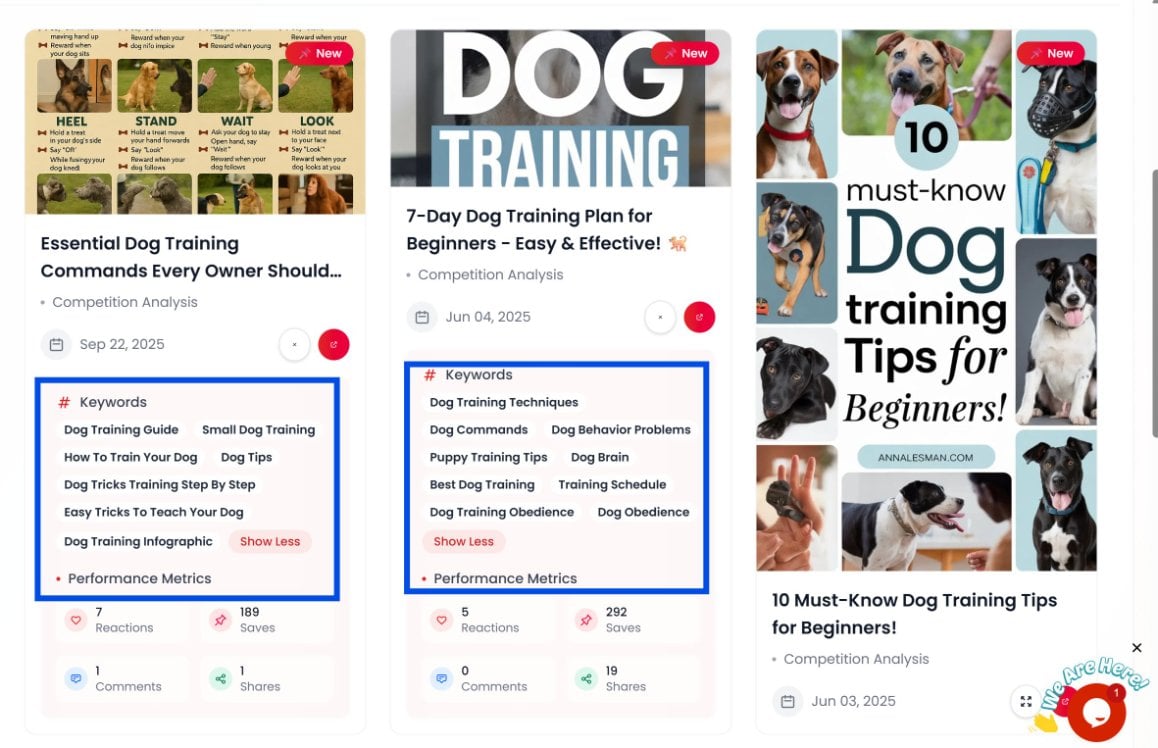
Keywordtopin competition analysis tool
  • A Competitor Analysis tool that can show users data on any Pinterest account and how they are performing on Pinterest.
  • An easy-to-use pin scheduler that is both simple and effective at helping users schedule pins ahead of time.


What Can You Use KeywordToPin To Do?
KeywordToPin is such a feature packed Pinterest keyword research tool that bloggers and marketers like yourself use it to:
  1. Research Pinterest keywords and topic ideas that’ll form a content road map for their websites, blogs and stores. They research these keywords, refine them using the filter tool, then save and/or export the keyword report for future analysis.
  2. Similar to researching keywords, they use it to discover new ideas and topics that are beginning to gain traction. That way they stay ahead of the competition. They can also save and/or export these discovered ideas.
  3. Research, study and analyze competition for every target keywords using the competition analysis tool. With this tool they can see exactly what is ranking for their target keyword and can plan how to create their own pin to compete. Results from this research can also be saved and/or exported for future analysis.
  4. After developing a working content idea and creating the right pin designs, they use KeywordToPin’s easy-to-use pin scheduler to schedule ahead of time.
KeywordToPin Is The Only Pinterest Keyword Research Tool That'll Supercharge Your Traffic With Accurate Data, Analytics and Competition Based Insights.

Plans & Pricing
keywordtopin affordable pricing plans


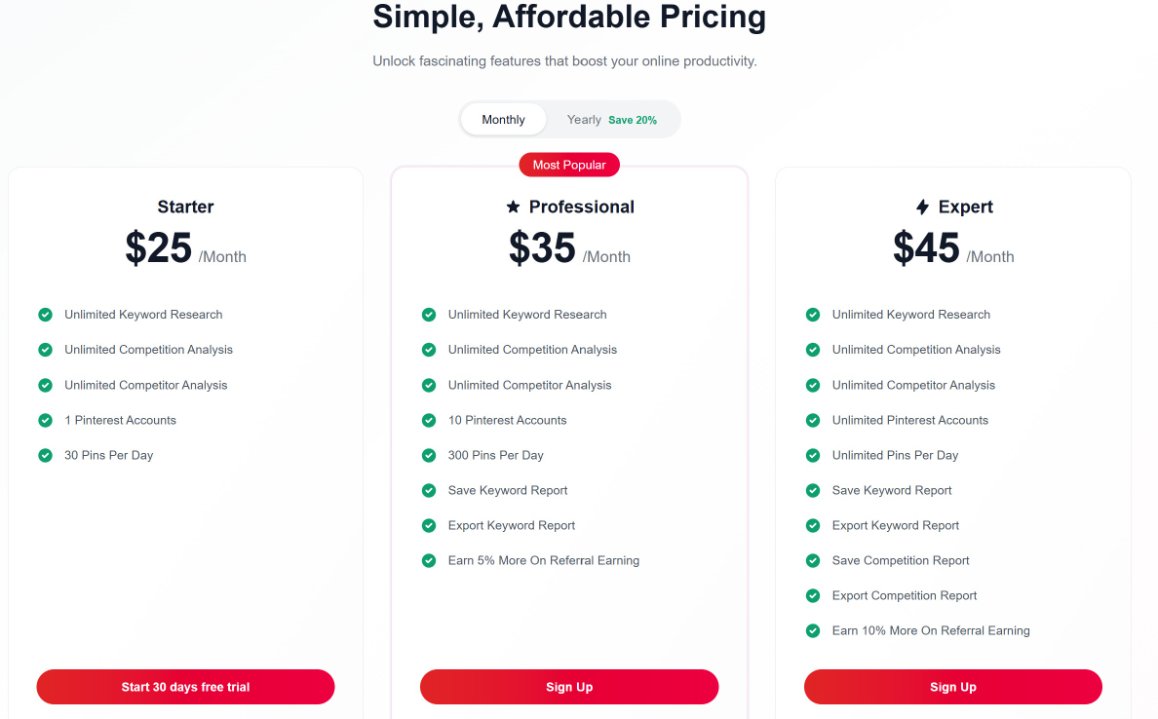
There are just 3 pricing plans on KeywordToPin. The plans are as follows:
Starter Plan at $25 a month

Professional plan at $35 a month
Expert plan at $45 a month

How To Try KeywordToPin


Click Here To Go To KeywordToPin
Sign up to start free trial, then start searching for your Pinterest keywords using KeywordToPin.


Refund Policy:
Full refund if app doesn't work or you don't get upgrade you paid for.

Contact/Support:
[email protected]

 
Marketplace Thread Approved

Summary
This online tool has been tested by the Marketplace team to ensure that it meets the standards for the Marketplace. We cannot guarantee any satisfaction for the tool you receive. Please do your own due diligence in looking into the seller and seeing if this tool is what you are looking for.

Service Information
  • The tool delivered for the review did contain the advertised features for the top-level plan of this software.
  • The tool and its GUI were functional with little to no errors.
  • The tool was able to carry out the tasks given to it for the purpose of the review.
Thread Edit Log
  • The 5 most recent thread edits will appear here
With anything more than 5 going in here
Information For Buyers:
  • Service Quality: The quality of the product or service that we receive is what you should expect, or better. If you feel that the quality of the service has dropped significantly, please let us know via the report button.
  • Disputes: If you do not receive a product or service as advertised, or at all in the event of a dispute, do not be afraid of a "no refunds" refund policy as you are allowed to request a refund through the Dispute Resolution process. For more information and to see whether or not your dispute qualifies, refer to the dispute rules and procedures.
    IMPORTANT: To initiate a dispute, all orders must be started on BHW, and proof of that will be required.
  • Review Copies: Per the Marketplace rules, if a seller does not offer trials or review copies, please do not request them in the sales thread, otherwise your post will be removed and further action may be taken.
 
Review Copy Is Open To Everyone As Trial User. Just Signup And Automatically Get The Review Copy.
 
Review Copy Is Open To Everyone As Trial User. Just Signup And Automatically Get The Review Copy.
Get Your Review Copy Now
 
KeywordToPin Is The Pinterest Keyword Tool Used By Successful Bloggers And Marketers
keywordtopin keyword research dashboard

Key Features of KeywordToPin
  • Powerful & Accurate Keyword Research Tool with search volume and keyword data that everyone is using. KeywordToPin maintains an up-to-date keyword & search volume database to help marketers make an informed decision when researching keywords for content. The filter feature of this tool puts the competition to shame with the help of its positive & negative keyword filter, as well as search filter by volume.
keywordtopin keyword research tool
  • A super effective Pinterest keyword & idea discovery tool for picking out new topics, niches and ideas as they are beginning to gain steam, before everyone else.
keywordtopin discover keyword tool
  • A Smart Competition Analysis tool that gives users access to competition information on how their competitors are performing on Pinterest search engine. This tool shows users what kind of pin designs are ranking for any given keyword, their descriptive keywords that help them to rank, as well as their performance(engagement) that helps them to rank.
Keywordtopin competition analysis tool
  • A Competitor Analysis tool that can show users data on any Pinterest account and how they are performing on Pinterest.
  • An easy-to-use pin scheduler that is both simple and effective at helping users schedule pins ahead of time.


What Can You Use KeywordToPin To Do?
KeywordToPin is such a feature packed Pinterest keyword research tool that bloggers and marketers like yourself use it to:
  1. Research Pinterest keywords and topic ideas that’ll form a content road map for their websites, blogs and stores. They research these keywords, refine them using the filter tool, then save and/or export the keyword report for future analysis.
  2. Similar to researching keywords, they use it to discover new ideas and topics that are beginning to gain traction. That way they stay ahead of the competition. They can also save and/or export these discovered ideas.
  3. Research, study and analyze competition for every target keywords using the competition analysis tool. With this tool they can see exactly what is ranking for their target keyword and can plan how to create their own pin to compete. Results from this research can also be saved and/or exported for future analysis.
  4. After developing a working content idea and creating the right pin designs, they use KeywordToPin’s easy-to-use pin scheduler to schedule ahead of time.
KeywordToPin Is The Only Pinterest Keyword Research Tool That'll Supercharge Your Traffic With Accurate Data, Analytics and Competition Based Insights.

Plans & Pricing
keywordtopin affordable pricing plans


There are just 3 pricing plans on KeywordToPin. The plans are as follows:
Starter Plan at $25 a month

Professional plan at $35 a month
Expert plan at $45 a month

How To Try KeywordToPin


Click Here To Go To KeywordToPin
Sign up to start free trial, then start searching for your Pinterest keywords using KeywordToPin.


Refund Policy:
Full refund if app doesn't work or you don't get upgrade you paid for.

Contact/Support:
[email protected]

The Difference Between Your Success And Failure On Pinterest Is Keyword Research.

KeywordToPin Would Solve That For You.
 
There's A Difference Between Marketers & Bloggers That Use KeywordToPin And Those That Don't
Pinterest analytics CTR growth.JPG

This Is The Difference.


Try KeywordToPin Now
 
Review
I tried KeywordToPin for keyword research + discover + competition stuff.


Keyword search is solid, pulls up loads of related Pinterest keywords fast. Good for long-tail ideas.


Discover is alright for brainstorming when you’re stuck.


Competition/analytics is actually the most useful part imo as you can see whats already working and just build around that instead of guessing.


It’s pretty straightforward overall. Not overhyped, but very useful if you’re doing Pinterest SEO.
 
My review of K2P

Keywordtopin covers all aspects of Pinterest research and it's divided into 6 sections... or, it has 6 main functions I should say...

1) Discovery and exploration... this section gives a quick look at the popular topics in the niche of your choosing. Or, it can show you which topics are popular on Pinterest in general (across all niches??) in case that you're having a hard time deciding which niche to get into.)

In this section you can't see the number of searches that topics get, but there is a "Popularity" metric which I assume is a ratio of how popular that topic is across Pinterest? I don't know exactly how this works, but I'm guessing that this is how :)

Regardless, if you need ideas for what's hot / trendy on Pinterest you can find that info in this section...

2) Keyword research

Unlike with SEO tools that you may have gotten used to when doing SEO and which show you all sorts of data, with K2P you only get to see the number of searches that keywords have on Pinterest.

But this is all you need to get started anyway, as Pinterest is not as complicated as Google, so I personally didn't need anything else to find good keywords besides the search volumes...

So, just type a keyword of your choice in (or - why not - use one that you've discovered earlier via the brainstorming tool), and - if the keyword has enough search volume that you're happy with - you can then move on to pin analysis.

Also, something else that I've noticed in this section that I don't think was here last time when I checked the tool is the "refine results" function (see image below):

screenshot 1.png


This one's self-explanatory (basically you can filter your list of keywords by number of searches, included / excluded words, etc). And like I said, this feature wasn't here when I last used the software, so it's nice to finally have it, I think that I've used this filter after each search that I did :D

3) the 3rd function of the software (and where the magic happens, the meat and bones of the tool if you will) is Pin analysis.

That is, you get to see which pins (and which TYPES of pins, which is actually pretty important for Pinterest marketing) perform best for your chosen keyword. Namely, you can see:

-the keywords / tags that are relevant to each pin (this can help you find tags that you might not have thought about otherwise, and which - if added to your pins - can make your pin discoverable inside of the Pinterest ecosystem by other searchers, which means more - and free, unaccounted for - traffic for your own pins, which is neat)

- the other usual stuff (that you can see in OP's screenshots) that you're expected to see when doing Pinterest research: saves, reactions, shares, etc... (all of the good stuff that comes with using this platform.)

You can also sort the pins by number of saves, pin freshness, etc., and also save the list of pins to your "Saved Reports" section (which I will touch upon later) for a quick analysis.

4) the 4th main function of the software, one which I don't see the purpose of at the moment - but probably that others will - is Competitor analysis.

More specifically, in this section you can input the username of a Pinterest member to retrieve all sorts of data (number of pins and boards, followers, engagement, etc.) about their profile.

Like I said, I personally didn't find a use for this yet, but the data is there should anyone need it, so there's that!

screenshot 2.png


5) the 5th function of the software is "Saved Reports", which - again - should be pretty self-explanatory for most people. But in case that it isn't, in here you can find all of the reports that you've saved for your research (well, for the pin analysis research, not for the keywords research, for keyword research you can simply export your list and manipulate it offline if you need, although if we asked OP nicely he might be able to add this feature in at some point :p

Anyway, personally I did find this section useful as it showed me an overview of all of the pins that I've pulled (NOT clicked on to be analyzed, but simply pulled from Pinterest's database), along with their description and number of saves and shares, and this helped me see at a glance which pins were the best, and which ones were the worst. Pretty neat feature to have, I thoroughly enjoyed it.

6) last but not least, the pin scheduler... and while I've not used this yet ('cause I don't have a Pinterest campaign running at the moment) I think this is where you can automate your pin publishing campaigns which - if that's what this is - I think this alone is worth the full price of the software. As someone who had MANUALLY published dozens of pins per day in the past I can tell you that this is not something I would ever do again. So yeah, if that's what the pin scheduler does then this alone is worth using the software for...

And that's about it! This is my K2P review, I hope that it helped you in some way. And if you're looking to get into Pinterest marketing K2P gets my green light as it removes all of the guesswork out of getting Pinterest traffic. It's also very simple and intuitive to use, in a matter of hours (or days if you're taking your time with it) you can use it like a champ :)
 
Last edited:
You're Delaying Your Website Traffic When You Don't Use KeywordToPin

image_2026-06-03_135730136.png


3 Months Ago This Pinterest Account Was Dying. But After New Keywords From KeywordToPin Were Used. See The Results.
 
Got a review copy of KeywordToPin and tested it for a few days mainly for Pinterest keyword research.

The tool is simple and easy to use. It quickly generates relevant keyword ideas, including some solid long-tail terms I wouldn’t find manually. The data is basic but enough to decide what’s worth targeting.

The best feature for me is the pin analysis — seeing what’s already performing (saves, engagement, etc.) makes it easier to plan content instead of guessing.

Discovery and competitor insights are helpful for ideas, though I see them more as support features.

Overall, it’s not a “magic” tool, but it’s genuinely useful if you’re focusing on Pinterest SEO and want to save time on research.
 
Met The Owner Of This Account On Reddit, They Were Complaining Of Total Drop In Impression And Clicks.
Just Few Weeks Of Using KeywordToPin Gave Them This Rresult


1781976163610.jpeg

You're Wasting Valuable Time And Leaving Money On The Table If You're Using KeywordToPin
 
Met The Owner Of This Account On Reddit, They Were Complaining Of Total Drop In Impression And Clicks.
Just Few Weeks Of Using KeywordToPin Gave Them This Rresult


View attachment 530230
You're Wasting Valuable Time And Leaving Money On The Table If You're Using KeywordToPin
Take Action With KeywordToPin Today
 
Back
Top