

moboweb
BANNED
- Sep 1, 2012
- 118
- 74
I have been to BHW since long, but just decided to go full time with IM business. So, I started testing and learn a lot from other people. I personally feel "sharing is caring"
In the IM business we always encounter the phone verification part. Either it can be SEO, affiliate marketing, facebook, instagram or anything else. [ opps, I missed Tinder here]
I see many people get pain when it comes to phone verification, we end up paying huge just to exchange single SMS exchange.
I'm not going into much details about needs, let me go straight to the point.
Getting Phone number for our need:
For this I use the power for Apps, there are plenty of app available but sometimes we miss the gem in the crowd.
While working with instagram, I found a great app, which provides you "UNLIMITED" number of US phone number that you can use, either to get SMS verification or Call Verification.
I'm going Step by Step so you can get started easily without any question in mind.
STEP 1: Go to android app store and search for "groove ip", install it.

Step 2 : You'll be at sign up page, dont worry its pretty easy to sign up, kinda few sec.

Step 3 : choose any of your app store email. and select any password, gender and age group.

Step 4 : You'll be asked for verification code, don't worry about this, Next step shows where you find this code.

Step 5 : check your notification you'll see some code there. Enter it on previous step.

Step 6 : here you'll see "choice of your number" choose for any area code or simply go for no preference.

Step 7 : Here's you'll select any number of your choice.

STEP 8 : You got your new personal number, Use it to receive calls or any SMS.

STEP 9 : Once you done with this number, just go to "delete" as shown in this step and hit that button.
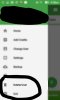
STEP 10 : You can delete your account now.

As you deleted your account, you're free to create new number with exact same steps, you don't need to change email or anything, just repeat the steps i have shown you and you'll have another free number.
Remember :
1. Sometimes codes didn't show, and groove ip ask for 2 credit to view code, in that case you can either buy credit or view some video. But dont worry you can first 2-3 code free and i had this issue just in a while.
2. Google DO NOT accept these numbers, so dont use them for gmail account. Use them for instagram, Amazon, facebook, whatsapp, viber, tinder and what not... There are plenty of Yes, paypal and amazon do accept them.
P.S. Please ignore my English, i'm from 3rd world country.
In the IM business we always encounter the phone verification part. Either it can be SEO, affiliate marketing, facebook, instagram or anything else. [ opps, I missed Tinder here]
I see many people get pain when it comes to phone verification, we end up paying huge just to exchange single SMS exchange.
I'm not going into much details about needs, let me go straight to the point.
Getting Phone number for our need:
For this I use the power for Apps, there are plenty of app available but sometimes we miss the gem in the crowd.
While working with instagram, I found a great app, which provides you "UNLIMITED" number of US phone number that you can use, either to get SMS verification or Call Verification.
I'm going Step by Step so you can get started easily without any question in mind.
STEP 1: Go to android app store and search for "groove ip", install it.
Step 2 : You'll be at sign up page, dont worry its pretty easy to sign up, kinda few sec.
Step 3 : choose any of your app store email. and select any password, gender and age group.
Step 4 : You'll be asked for verification code, don't worry about this, Next step shows where you find this code.
Step 5 : check your notification you'll see some code there. Enter it on previous step.
Step 6 : here you'll see "choice of your number" choose for any area code or simply go for no preference.
Step 7 : Here's you'll select any number of your choice.
STEP 8 : You got your new personal number, Use it to receive calls or any SMS.
STEP 9 : Once you done with this number, just go to "delete" as shown in this step and hit that button.
STEP 10 : You can delete your account now.
As you deleted your account, you're free to create new number with exact same steps, you don't need to change email or anything, just repeat the steps i have shown you and you'll have another free number.
Remember :
1. Sometimes codes didn't show, and groove ip ask for 2 credit to view code, in that case you can either buy credit or view some video. But dont worry you can first 2-3 code free and i had this issue just in a while.
2. Google DO NOT accept these numbers, so dont use them for gmail account. Use them for instagram, Amazon, facebook, whatsapp, viber, tinder and what not... There are plenty of Yes, paypal and amazon do accept them.
P.S. Please ignore my English, i'm from 3rd world country.
Last edited:


