Conor's guide to generating leads online

Slight update to the Distill code I mentioned here: https://www.blackhatworld.com/seo/conors-guide-to-generating-leads-online.838904/#post-9525701

{
"selections": [
{
"frames": [
{
"index": 0,
"excludes": [],
"includes": [
{
"type": "xpath",
"expr": "//div[contains(.//div[span], 'min') and contains(concat(\" \", normalize-space(@Class), \" \"), \" _1dwg _1w_m\")]"
},
{
"type": "xpath",
"expr": "//div[contains(.//div[span], 'just now') and contains(concat(\" \", normalize-space(@Class), \" \"), \" _1dwg _1w_m\")]"
}
]
}
],
"dynamic": true,
"delay": 0
}
],
"regexp": {
"expr": "",
"flags": ""
},
"ignoreEmptyText": true,
"includeStyle": false,
"dataAttr": "text"
}
 
One more tweak to make browsing through Distill notifications a little simpler:
  1. Install the Chrome extension Highlight This: https://chrome.google.com/webstore/detail/highlight-this/fgmbnmjmbjenlhbefngfibmjkpbcljaj
  2. Create a new word list to highlight all of your keywords on the page you're monitoring (facebook.com for example).
  3. When Distill notifies you of a new post, use Shift, CTRL, Space to navigate through all your highlighted keywords and quickly find the new posts relevant to you on that page.
 
Hi Op
The imacro script dosent work with new ifttt web site .Could You share the working script?
 
Hi Op
The imacro script dosent work with new ifttt web site .Could You share the working script?

Try something like this:

Code:
VERSION BUILD=844 RECORDER=CR
SET !DATASOURCE Scrape.txt
SET !DATASOURCE_LINE {{!LOOP}}
URL GOTO=https://ifttt.com/create
WAIT SECONDS=5
TAG POS=1 TYPE=SPAN ATTR=TXT:this
WAIT SECONDS=5
TAG POS=1 TYPE=IMG ATTR=SRC:https://assets.ifttt.com/images/channels/4/icons/on_color_large.png
WAIT SECONDS=5
TAG POS=1 TYPE=SPAN ATTR=TXT:New<SP>feed<SP>item
WAIT SECONDS=5
TAG POS=1 TYPE=TEXTAREA FORM=NAME:NoFormName ATTR=NAME:fields[feed_url] CONTENT={{!COL1}}
WAIT SECONDS=5
TAG POS=1 TYPE=INPUT:SUBMIT FORM=NAME:NoFormName ATTR=*
WAIT SECONDS=5
TAG POS=1 TYPE=SPAN ATTR=TXT:that
WAIT SECONDS=5
TAG POS=1 TYPE=IMG ATTR=SRC:https://assets.ifttt.com/images/channels/6/icons/on_color_large.png
WAIT SECONDS=5
TAG POS=1 TYPE=SPAN ATTR=TXT:This<SP>Action<SP>will<SP>send<SP>you<SP>an<SP>HTML<SP>based*
WAIT SECONDS=5
TAG POS=1 TYPE=INPUT:SUBMIT FORM=NAME:NoFormName ATTR=*
WAIT SECONDS=5
 
element SPAN specified by TXT:that was not found, line: 16 (Error code: -921)
script stopped ( dosen't load a rss from a Scrape.txt file)
Could you please check it out or give an advice ?
 
Last edited:
element SPAN specified by TXT:that was not found, line: 16 (Error code: -921)
script stopped ( dosen't load a rss from a Scrape.txt file)
Could you please check it out or give an advice ?

This one should work, but you'll need to use Firefox, because Chrome doesn't support the EVENTS feature:

Code:
VERSION BUILD=844 RECORDER=CR
SET !DATASOURCE Scrape.txt
SET !DATASOURCE_LINE {{!LOOP}}
URL GOTO=https://ifttt.com/create
WAIT SECONDS=1
TAG POS=1 TYPE=SPAN ATTR=TXT:this
WAIT SECONDS=1
TAG POS=1 TYPE=IMG ATTR=SRC:https://assets.ifttt.com/images/channels/4/icons/on_color_large.png
WAIT SECONDS=1
TAG POS=1 TYPE=SPAN ATTR=TXT:New<SP>feed<SP>item
WAIT SECONDS=1
EVENT TYPE=CLICK SELECTOR="HTML>BODY>MAIN>DIV>DIV>DIV:nth-of-type(2)>SPAN>DIV:nth-of-type(2)>FORM>DIV>UL>LI>SPAN:nth-of-type(2)>DIV>DIV>TEXTAREA" BUTTON=0
WAIT SECONDS=1
EVENTS TYPE=KEYPRESS SELECTOR="HTML>BODY>MAIN>DIV>DIV>DIV:nth-of-type(2)>SPAN>DIV:nth-of-type(2)>FORM>DIV>UL>LI>SPAN:nth-of-type(2)>DIV>DIV>TEXTAREA" CHARS={{!COL1}}
WAIT SECONDS=1
TAG POS=1 TYPE=INPUT:SUBMIT FORM=NAME:NoFormName ATTR=*
WAIT SECONDS=1
TAG POS=1 TYPE=SPAN ATTR=TXT:that
WAIT SECONDS=1
TAG POS=1 TYPE=IMG ATTR=SRC:https://assets.ifttt.com/images/channels/6/icons/on_color_large.png
WAIT SECONDS=1
TAG POS=1 TYPE=SPAN ATTR=TXT:This<SP>Action<SP>will<SP>send<SP>you<SP>an<SP>HTML<SP>based*
WAIT SECONDS=1
TAG POS=1 TYPE=INPUT:SUBMIT FORM=NAME:NoFormName ATTR=*
WAIT SECONDS=1
 
almost perfect ., only last line dosen't work ,... ...but i will try figured it out myself .


many thanks
 
I wish I had any clue of what this is about and how to do it :D

The imacros part is optional. The majority of this thread is simply a collection of methods I've discovered to find leads online.
 
One more update (With screenshots), for anyone using the distill method.

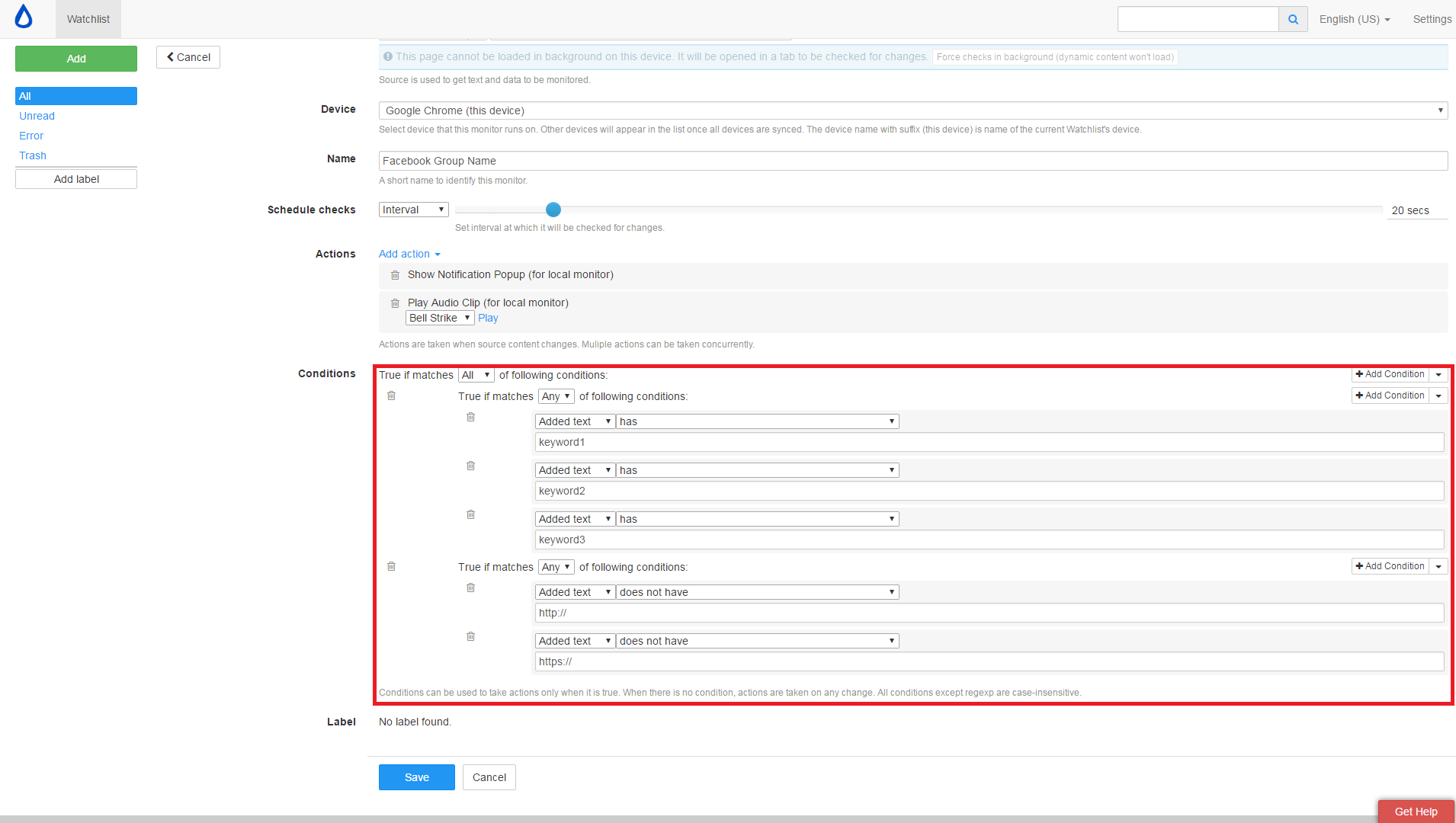
So, one problem I had was that a few Facebook groups I'm a member of would constantly give me update notifications with useless posts containing some spammy link to a crappy blog. Nothing of any use to me. So, I set some filters in distill to only notify me of quality posts.

This is what my settings page looks like for all my Facebook groups:

VPN9mfL


You'll notice (In the red box) I've added 2 different sets of conditions, using the "Add Compound Condition" feature in the dropdown on the right. This is basically to search for posts containing any of my keywords, but not if they contain any links. This in turn stops me from receiving notifications for useless spammy crap. It can also be used to filter out various other things if you use your imagination.
 
So this is a slightly different bump than the others I've made in this thread. There's no fancy new method in this post. It's just to provide whoever might be reading with some motivation/something to think about.

My brother, like myself, works from home full time. I recently got some lead sources set up for him, using the exact same methods I've posted in this thread. He started getting work in from day one. How many other IM ventures can you think of that allow you to start making money immediately?

It takes less than an hour to set up a couple of social media accounts and get some lead sources up for yourself. If you can't make that work, then I don't know what else to suggest you do with your life.

PS: Before anyone asks, I'm not affiliated with any of the tools or websites I've posted about in this thread.
 
Noob question here if anybody cares to answer. What offers do you promote to the people you email? I'm not really sure I follow this correctly.
 
Noob question here if anybody cares to answer. What offers do you promote to the people you email? I'm not really sure I follow this correctly.

He's saying, in this example, if you had an SEO service to offer to someone then you would use these methods to find people who are actively looking for a SEO service.

You don't have to have an SEO service, you could offer CPA offers such as people looking for free iPhones or whatever, you just need to use your imagination and your experiences to help you out.
 
He's saying, in this example, if you had an SEO service to offer to someone then you would use these methods to find people who are actively looking for a SEO service.

You don't have to have an SEO service, you could offer CPA offers such as people looking for free iPhones or whatever, you just need to use your imagination and your experiences to help you out.

Pretty much. Personally I've always preferred offering a service, rather than building lists or sending people offers. I just enjoy it more. It's the same as looking for a job in the newspaper and applying to it. That's pretty much all you're doing, but on a much larger, more automated scale.
 
A little bit of an update, for whoever is using Distill + Facebook for finding leads. The old code I pasted a few months ago doesn't work anymore.

Use the following code to grab the content of every Facebook post, without worrying about the stupid comments:

Code:
{
  "selections": [
    {
      "frames": [
        {
          "index": 0,
          "excludes": [
            {
              "type": "css",
              "expr": ".commentable_item"
            }
          ],
          "includes": [
            {
              "type": "css",
              "expr": "._5pcr.fbUserPost"
            }
          ]
        }
      ],
      "dynamic": true,
      "delay": 0
    }
  ],
  "regexp": {
    "expr": "",
    "flags": ""
  },
  "ignoreEmptyText": true,
  "includeStyle": false,
  "dataAttr": "text"
}

Also, a quick tip: Try looking for local community groups when targeting Facebook groups to monitor for leads. For example, a New York group you might want to keep an eye on (if you live in the area) would be one like this one:
Code:
https://web.facebook.com/groups/828029757231861/
 
A little bit of an update, for whoever is using Distill + Facebook for finding leads. The old code I pasted a few months ago doesn't work anymore.

Use the following code to grab the content of every Facebook post, without worrying about the stupid comments:

Code:
{
  "selections": [
    {
      "frames": [
        {
          "index": 0,
          "excludes": [
            {
              "type": "css",
              "expr": ".commentable_item"
            }
          ],
          "includes": [
            {
              "type": "css",
              "expr": "._5pcr.fbUserPost"
            }
          ]
        }
      ],
      "dynamic": true,
      "delay": 0
    }
  ],
  "regexp": {
    "expr": "",
    "flags": ""
  },
  "ignoreEmptyText": true,
  "includeStyle": false,
  "dataAttr": "text"
}

Also, a quick tip: Try looking for local community groups when targeting Facebook groups to monitor for leads. For example, a New York group you might want to keep an eye on (if you live in the area) would be one like this one:
Code:
https://web.facebook.com/groups/828029757231861/


Thanks, have you tried using distill for other websites besides fb like online forums for example and how PC consuming is distill?
 
Thanks, have you tried using distill for other websites besides fb like online forums for example and how PC consuming is distill?

Yeah, it works on pretty much any website with content. I use it mostly with Facebook, but there are a couple of other popular social sites in there too.

As for the resources it uses, it depends how many tabs you choose to have open at the same time, and how frequently. I've set my Distill to run every lead source once every 20 seconds, and to have a maximum of 3 tabs open at the same time. On my i3 laptop, that still gives me enough room to do work and listen to music without anything crashing or freezing.
 
I know it's been a while but I'm going to revive my thread with a couple of useful little things I've learnt:
1. Stay away from saturated leads. The nice thing about using Facebook for leads is that you can see more or less how many people have responded. If it's more than 10 or 20, don't waste your time. No one goes through that many applications for the average job.
2. Stand out from the competition by paying attention. If the OP asks you to drop them an email with your prices and references, don't just copy paste a link to your Facebook page or ask them to phone you. People who pay attention to detail are the ones who get noticed.
3. Stop calling people "Sir". No one likes that, I promise.
4. Stop using "cheap" as your selling point. Quality is always better than quantity, and you are decreasing the value of your market as a whole when you undercut competition like that. I'm looking at all the graphic designers who sell logos for $5.
5. Charge a deposit. Always. If they don't want to pay, they're not worth the trouble.

This is everything I can think of for now. Sorry for the ancient bump :D
 
Back
Top