okazaki
Senior Member
- Apr 16, 2015
- 886
- 409
Hi
In this thread I will show you how I get the gray badge for my page. first thing to know that request gray badge is available just for U.S.
But if you follow this step you can make "Page Verification" option visible for non U.S.
If "Page Verification" option is already visible in your page you can skip first step and go through the second step.

First step: Make "Page Verification" option Visible
Now to get started you need first change your page category to "local business" and add a fake U.S address in the about section.
After, open you setting page you will find "Page Verification" option shown, if not you need to change your ip address to U.S.
for new created page you need to wait some time before "Page Verification" option can be visible.


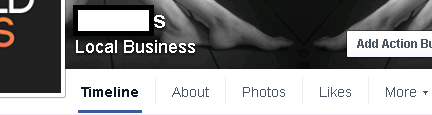
Second step: Get Fake document
Try to find in google a good image copy of "certificates of registration of business name",
chose one and try to edit them using photoshop and change the name of the company in the document with your page name.
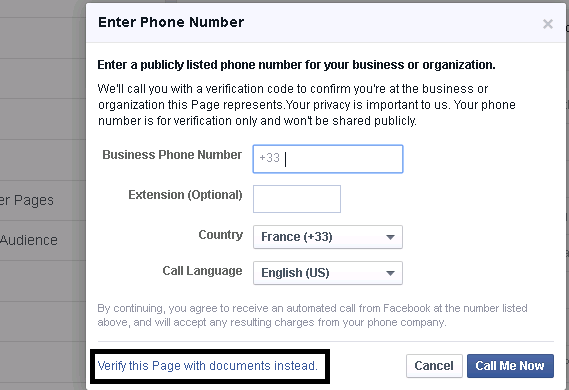
Now go to Setting-->Page Verification--> Verify Page.
Click in "Verify this Page with documents instead" to verify you page with document
Upload you fake document and click "Send Document"
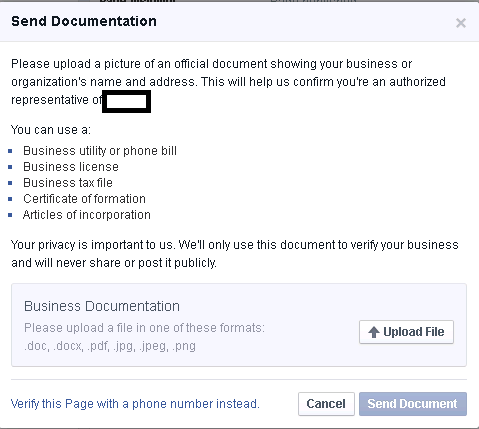
After sending document you can change your page address to your new address it's not necessary to be a U.S address,you can use any other address .
but the address need to be the same in your document. in first step I tell you to change your address to U.S address just to make "Page Verification" option visible.
Now you need to wait about 2 days and you will get a message from facebook support like this:


Some time facebook ask you for the bill document you can make a fake electricity bill containing your fake name,address and send it to them.
Resume:
To make "Page verification" option visible you need to:
- Change category to "Local Business".
- Add fake U.S address to your page.
- Change your ip address to U.S, is not necessary U.S ip address, you can use a EU ip address for me i do it just by a French ip.
To make fake document you need to:
- Create a fake "certificates of registration of business name" document containing your fake address and name.
note that the address in document need to match the address in your about section.
- Upload your document.
- Wait 2 days and you will get a response from facebook.
In this thread I will show you how I get the gray badge for my page. first thing to know that request gray badge is available just for U.S.
But if you follow this step you can make "Page Verification" option visible for non U.S.
If "Page Verification" option is already visible in your page you can skip first step and go through the second step.
First step: Make "Page Verification" option Visible
Now to get started you need first change your page category to "local business" and add a fake U.S address in the about section.
After, open you setting page you will find "Page Verification" option shown, if not you need to change your ip address to U.S.
for new created page you need to wait some time before "Page Verification" option can be visible.
Second step: Get Fake document
Try to find in google a good image copy of "certificates of registration of business name",
chose one and try to edit them using photoshop and change the name of the company in the document with your page name.
Now go to Setting-->Page Verification--> Verify Page.
Click in "Verify this Page with documents instead" to verify you page with document
Upload you fake document and click "Send Document"
After sending document you can change your page address to your new address it's not necessary to be a U.S address,you can use any other address .
but the address need to be the same in your document. in first step I tell you to change your address to U.S address just to make "Page Verification" option visible.
Now you need to wait about 2 days and you will get a message from facebook support like this:
Some time facebook ask you for the bill document you can make a fake electricity bill containing your fake name,address and send it to them.
Resume:
To make "Page verification" option visible you need to:
- Change category to "Local Business".
- Add fake U.S address to your page.
- Change your ip address to U.S, is not necessary U.S ip address, you can use a EU ip address for me i do it just by a French ip.
To make fake document you need to:
- Create a fake "certificates of registration of business name" document containing your fake address and name.
note that the address in document need to match the address in your about section.
- Upload your document.
- Wait 2 days and you will get a response from facebook.
Last edited: