Majestic - http vs non http

BronxFX

Newbie
Joined
Feb 21, 2014
Messages
41
Reaction score
17
so ive been checking some of the domains for my pbn and it turns out, majestic is making huge difference with http and without http domain. check this one for example without http:// in the url:

A97VYWU


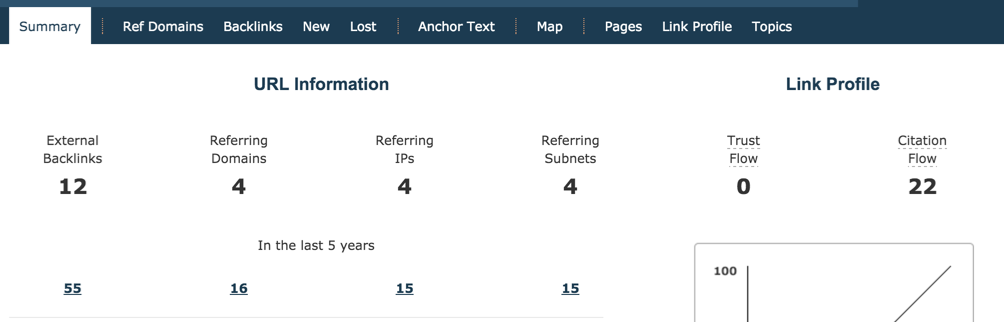
and this is the same thing in the majestic tool with http://
hvkT024


what the hell? every domain in the end has http:// when you put it online. is this something you look on? I know the www vs non www thing, but this is... bullshit. also, moz reports the same thing with and without http://.

also, how much of a deal is if the site has links to http://www.domian.com and I use that domain as domain.com and post a few posts with my links. am i missing a lot of link juice or not?

please explain this to me, its confusing.

also, ive been using majestic, but after learning about this, i will probably need to change to some other tool
 
Good morning. Yes and by the way Obama has become a President.

When you check http://www.domain.com you get results from the baclinks pointing to http://www.domain.com.
When you check http://domain.com, you get results pointing to http://domain.com.
When you check domain.com, you get results from the entire domain, from all the pages.

So much about the rant. Trust Flow is NOT based on the power of backlinks, but their topical relevance. People are yet to understand that.
So if you have 5 backlinks. Each one is TF 30, but each of them is from a website with different topic, your trust flow will not be as good as if those 5 backlinks were from the sites in the same niche.
 
Last edited:
the above comment is exactly right, it all depends on how the site was set up by the previous owner which would mean what urls they used for their backlinks.
 
Good morning. Yes and by the way Obama has become a President.

When you check http://http://www.domain.com you get results from the baclinks pointing to http://http://www.domain.com.
When you check http://domain.com, you get results pointing to http://domain.com.
When you check domain.com, you get results from the entire domain, from all the pages.

So much about the rant. Trust Flow is NOT based on the power of backlinks, but their topical relevance. People are yet to understand that.
So if you have 5 backlinks. Each one is TF 30, but each of them is from a website with different topic, your trust flow will not be as good as if those 5 backlinks were from the sites in the same niche.

thanks for clearing that up. i still don't understand how can it be so much difference between http and non http and wether or not i should use it in my pbn since when you setup your domain, it automatically gets http, right? so with http it only has 2 referring domains and a few backlinks. with http it's a totally different story. so confused.

why does moz show same metrics with and without http, but majestic don't? i know those are different tools, but if it really makes a difference, then moz should also show other numbers, right?
 
Because as Nargil said, when you are using http you are not getting the results for the entire domain. Read his post again.
 
thanks for clearing that up. i still don't understand how can it be so much difference between http and non http and wether or not i should use it in my pbn since when you setup your domain, it automatically gets http, right? so with http it only has 2 referring domains and a few backlinks. with http it's a totally different story. so confused.

why does moz show same metrics with and without http, but majestic don't? i know those are different tools, but if it really makes a difference, then moz should also show other numbers, right?

Because when I throw 300 PBN links at http://domain.com and 0 at http://www.domain.com, because my money site was set up as http://domain.com, then there is an obvious difference. It's not exactly a hard concept to understand. Also, when I check the domains for PBN, I focus on http://www.domain.com. It's up to you how you set up a domain, whether with or without www, it's like 3 clicks in Wordpress. And it's a common method to redirect all dead pages to homepage, thus retaining significant majority of the link juice.

Basically if there were links pointing to, for example, http://www.domain.com/whatever-page, which is now nonexistent now, because you haven't build it, it will automatically get redirected to homepage and thus also any links that were pointed to that page. I use link juice keeper plugin for this, but there are also some codes I believe. Try not to leave too many footprints.

Once again I have to say that TF is just a metric. I use it merely for PRIMARY filtering of the domains. I don't have time to go manually through 2000 domains a day, so I have to draw a line somewhere. I came across so many amazing TF 10 domains, with awesome backlink profile, despite the TF. I already explained you how the TF works, so do some further reading on that if you still don't understand the concept.

Regarding Moz, I don't use it, it's heavily unreliable, so I can't say much about that. I presume they automatically use the entire domain like "domain.com" when checking.

If you want, PM me the domain and I will tell you whether and why it's crap/good. If it's crap, I will send you 1 - 2 domains which I have just lying around for PBN purposes.
 
thanks for the answer. i totally forgot about link juice keeper and with that plugin i wont have any problems. really, thank you for explaining this to me. learned a lot :)
 
wasn't aware of this too.. thanks this helped me out actually a lot. I was wondering what the difference is between www.domain.com and domain.com in the figures.
 
Back
Top