Permanently Closed Marketplace Sales Thread

Status
Not open for further replies.
Not only LION's, it means Linkedin Open Networker, people who shares emails on their profiles if you choose for it. But it targets everybody registered to linkedin thanks to search engines.

Great. Have purchased but no download link yet. When will I receive it? Thanks.
 
Last edited:
Great. Have purchased but no download link yet. When will I receive it? Thanks.
On your paypal email, im adding some extra messages on status for each URL grabber, and a stop button. And I will compile 2.7.
It might have some issues but I will look into them for the 2.71 update. I will launch today.
 
This is my post #1,000 so here we go this big update:
We have changed the way we will work now along with LION Marketer (LION = Linkedin Open Networker).
Why it is so special? Now you have memory to store all your actions within the system.
It has a Mailer, since this can be interpreted as a "spamming" tool, that is wrong. Use this wisely, don't abuse on the minimum and maximum seconds of waiting on actions, and please try to spin all your messages and use custom variables. Yes, CUSTOM VARIABLES. You can now use them on the Mass Messaging tool, we are adapting it to Leads scraped that have an email, so we can use custom variables of the info and direct contact profiles, companies and universities.
PRICING:


Obviously we rely on giving it for free to founders because they supported us before on a fixed price. For all new licenses this cost will increase to $350 USD for founders. Instead of $200 as it was costing.


Why almost the half? We want quality and not quantity of sales, since it now have the mailing tool. Which is not mass mailing, its strategic mailing.For more information about latest update and how to use it: http://marketingmall.net/new-update-for-lmp-its-v2-7/http://marketingmall.net/new-update-for-lmp-its-v2-7/
This new version and innovation for Linkedin Marketer has main functions:
  • Nice data-mining for Profiles, Companies, Groups, EDU.
  • Global Email Extraction from searches with email pattern.
  • Mailer with limited timing to not (only founders can modify min seconds and max seconds)
  • Great panel for scheduling actions on the database. This actions can be, Visit Profile, Send Message(Private to profile, To Company, Leave Group Message), Try to Connect/Join/Follow)
  • Perfect UID extractor for Profiles, Companies, Groups and EDU's. (You can use for advertising campaigns)
  • Profile Visitor, now upgraded with an alert routing that you check who visits you, and if the UID matches, then you will be asked to attempt to connect (since you dont need email anymore) or cancel the connection match.
  • Mass Message Sender to scheduled profiles for messaging. (Soon, create campaigns)
  • Group Automated UID Scraper, you can connect with people that discussed and you commented. All people that liked the post will be able to connect with you.
  • Mass Group Broadcaster with spinned messages. (You might have something very important to say to all your groups or selected ones? This is the way. Soon to come campaigns builder. It needs some work, probably will be released fully at v2.73)
  • Store all operations on data/logs.txt and email sending campaigns on data/emails_logs.txt.

  • You can choose random message from your contacts using specific variables for using along with a spinned message.
  • Messages contacted are now marked on the database.
  • Profiles visited are now also marked as visited on the table, which tells the date and scraped the UID. This will allow you to run a process to find matches on profiles that visited you.. (Requires testing)
  • Yes, the Mailer is now on, and it will contact emails scraped as global, so please use this mailer wisely when you scrape for URLs/Emails (Not Leads) So you get emails specifics for companies, profiles, groups and universities. This will be more targeted and will give you better.

Coming functions: v2.71,v2.72 and so...


  • Toggle email sending for companies, groups and universities. Apart from existing profile sending.
  • Who visited you and compare with visited profiles in database to do matches.
  • Adding all scraped data to database.
  • Including HTML emails on sending.
  • Adding files on the mass sending such as pdf, jpg, etc.
  • It will remember last configurations on a config file.
  • It will store all operations on database to show charts later.


TIPS:

  • Remember Spamming is not correct. This will automate you process for getting quick quotations, direct networking over email, and customized messages using their company name, industry, name, etc. Think about it, its a very effective tool that will make your work easier when it comes to networking, asking for mass quotations, questions to company email.
  • Be pro-active, analyse the profiles in the grid manually so you decide what to do.
 
Here is a video of how to use the Lead Deck tab:


Last edited by a moderator:
Still testing out 2.7. One question though, how do I get the details of all the profile leads that were extracted? I referring to the kind of information shown in the OP of this thread.

Thanks
 
Still testing out 2.7. One question though, how do I get the details of all the profile leads that were extracted? I referring to the kind of information shown in the OP of this thread.

Thanks
You migrate leads to CSV. Its on the video tutorial.
We are adding a databas that you can check within or download DB Browser for SQLite and open the Database.sql
 
Not sure whether you got my email ... but here's my question:

You migrate leads to CSV. Its on the video tutorial.
We are adding a databas that you can check within or download DB Browser for SQLite and open the Database.sql

Cool. I tested this and the downloaded CSVs does show the details.

How do I do the same with the profiles that were scraped at the "Browser navigation"?

Also, is it normal to get this message when i go to the "Browser navigation" tab:

"Looks like you're using a browser that's not supported. Learn more about browsers you can use."
 
Not sure whether you got my email ... but here's my question:


Cool. I tested this and the downloaded CSVs does show the details.

How do I do the same with the profiles that were scraped at the "Browser navigation"?

Also, is it normal to get this message when i go to the "Browser navigation" tab:

"Looks like you're using a browser that's not supported. Learn more about browsers you can use."

Browser navigation profiles are added to database, does cannot be scraped in that way yet. We will set an UID importer so you can navigate that leads grabbed from the inner search of the program.

About the issue of Browser not supported, thats strange. You should update your Chrome, Firefox and such.
 
Browser navigation profiles are added to database, does cannot be scraped in that way yet. We will set an UID importer so you can navigate that leads grabbed from the inner search of the program.

About the issue of Browser not supported, thats strange. You should update your Chrome, Firefox and such.

Can I request for the software to be enhanced such that we can at least get the email addresses plus other details of my first level connections? And how soon can this be done? Right now, we can only export all the email addresses from LI for all the first level connections.

As for the browser ... which browser does the software make use of? I ask because I don't get the message when I goto LI using either Firefox or Chrome.

Thanks.
 
Can I request for the software to be enhanced such that we can at least get the email addresses plus other details of my first level connections? And how soon can this be done? Right now, we can only export all the email addresses from LI for all the first level connections.

As for the browser ... which browser does the software make use of? I ask because I don't get the message when I goto LI using either Firefox or Chrome.

Thanks.

This will be done using API, and yes we have had many discussions about this, but usually users are not experienced on setting up a Linkedin Developer account and get the API key to do requests with your own permissions.

You want to grab 1st level connections, do you think that if we load UIDs the Lead Grabber can handle grabbing the data of a list of UIDs? This way you can export your UIDs grabbed on the Messenger tab, which are your direct connections (1st level connections).
That is what you want to do right?
 
This will be done using API, and yes we have had many discussions about this, but usually users are not experienced on setting up a Linkedin Developer account and get the API key to do requests with your own permissions.

You want to grab 1st level connections, do you think that if we load UIDs the Lead Grabber can handle grabbing the data of a list of UIDs? This way you can export your UIDs grabbed on the Messenger tab, which are your direct connections (1st level connections).
That is what you want to do right?
Not sure what you mean. But what may work is this.

Goto "browser navigation" to grab the UIDs of the 1st level connections. And then export these to the Lead Deck -> Lead Grabber so that the rest of the data can be grabbed and made available to download using CSV data. Hope this makes sense.
 
Not sure what you mean. But what may work is this.

Goto "browser navigation" to grab the UIDs of the 1st level connections. And then export these to the Lead Deck -> Lead Grabber so that the rest of the data can be grabbed and made available to download using CSV data. Hope this makes sense.

Got it, thats a nice suggestion. I will include it to v2.71
 
LinkedIn allows you to Export all 1st Connections to Excel so why would you need this? I thought the use it to extract emails from areas of LI that you would like to target and not Connections you already have?
 
LinkedIn allows you to Export all 1st Connections to Excel so why would you need this? I thought the use it to extract emails from areas of LI that you would like to target and not Connections you already have?

Thanks for the heads up, I thought that was deactivated. But I guess not:
http://community.linkedin.com/questions/348546/exporting-contacts-from-linkedin-1.html
 
LinkedIn allows you to Export all 1st Connections to Excel so why would you need this? I thought the use it to extract emails from areas of LI that you would like to target and not Connections you already have?

I am aware of this but it does not provide all the details that can be scrapped. E.g. city, country etc. I need as much information as possible about my connections for targeted marketing.
 
Last edited:
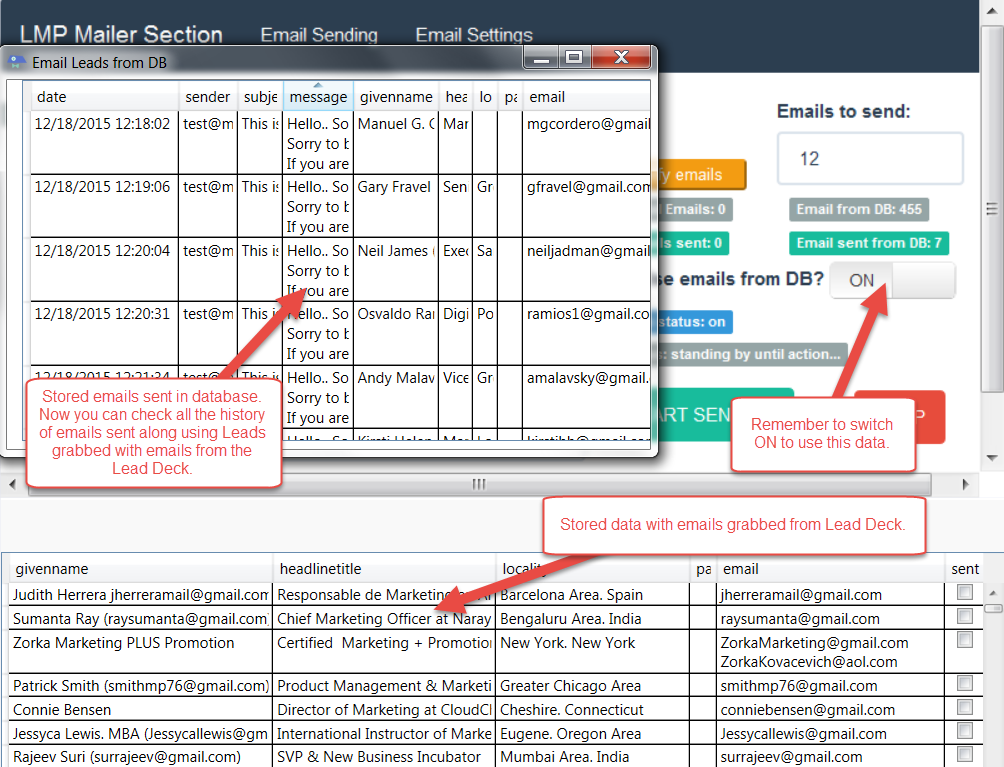
Well Im working on fixes and a little new feature:
2a6ekoF


This let us email the people we grab from Lead Deck and target them directly. Soon will add custom variables on those emails.
This release will be v2.71

What do you think?
 
Well Im working on fixes and a little new feature:
2a6ekoF


This let us email the people we grab from Lead Deck and target them directly. Soon will add custom variables on those emails.
This release will be v2.71

What do you think?

Your proposed features sound good.
 
Status
Not open for further replies.
Back
Top