Is my site being hacked?

Weltenbummler

Registered Member
Joined
Feb 20, 2013
Messages
89
Reaction score
52
I am in the middle of making changes to my site when out of the sudden my logo changed to this picture:
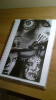
logo.png

What's even funnier, the link didn't change, it stayed the same (the same folder, file name, file on date in media library was same, it all just looks different). After downloading, the file looks changed (the above instead of logo). After few minutes photos in posts started changing randomly. What sounds like a coincidence is that I was in the middle of giving attribution to images on my site. All I've done today was install piwik plugin and add few attribution to flickr/wikipedia commons images.

what is even more strange is that when I open the site in different browser where I am not logged in as admin (or even incognito mode of the same one) everything looks normal (though the logo downloaded to my hard drive looks like the above). I just opened media library and more and more pictures are changed (though when I click them they look normal)

Has anyone encountered similar problem and knows what's going on? Am I being hacked? (it all appeared first time when I refreshed the page to see the changes in my post).
 
I am in the middle of making changes to my site when out of the sudden my logo changed to this picture:

View attachment 72577

What's even funnier, the link didn't change, it stayed the same (the same folder, file name, file on date in media library was same, it all just looks different). After downloading, the file looks changed (the above instead of logo). After few minutes photos in posts started changing randomly. What sounds like a coincidence is that I was in the middle of giving attribution to images on my site. All I've done today was install piwik plugin and add few attribution to flickr/wikipedia commons images.

what is even more strange is that when I open the site in different browser where I am not logged in as admin (or even incognito mode of the same one) everything looks normal (though the logo downloaded to my hard drive looks like the above). I just opened media library and more and more pictures are changed (though when I click them they look normal)

Has anyone encountered similar problem and knows what's going on? Am I being hacked? (it all appeared first time when I refreshed the page to see the changes in my post).

http://yaatess.deviantart.com/art/Darkness-Montage-Mental-illness-340204937
 

Thanks, though I believe I've never seen this image before in my life. I also don't link to anything on deviantart on my site nor do I recall visiting deviant art at least in a very long time. How is that possible?

You can have a look at the IPs logging into your site through cPanel to confirm.

Thanks, I am not using Cpanel on this server (though it's something quite similar) but I bet there's a way to check the logs. Maybe my iThemes security has saved something somewhere too (dunno if it does).
 
check first with another device from a remote desktop preferably or ask some friends if they can screenshot your site
as if it does not happen on other devices the issue could be a local virus
at least rule that out
 
check first with another device from a remote desktop preferably or ask some friends if they can screenshot your site
as if it does not happen on other devices the issue could be a local virus
at least rule that out

Hey nanexo, I believe it must have been local - I scanned my site and nothing was found. I also checked logs in the security plugin and nothing suspicious was there. I asked my friend to check the site and also checked it personally on mobile and it looked normal. The only strange thing is that when I downloaded images from media library on my HD they were not the original ones but the already changed. Cleaning the browser seems to help, dunno what was that - hope it wasn't anything serious on the server/site side.
 
Hey nanexo, I believe it must have been local - I scanned my site and nothing was found. I also checked logs in the security plugin and nothing suspicious was there. I asked my friend to check the site and also checked it personally on mobile and it looked normal. The only strange thing is that when I downloaded images from media library on my HD they were not the original ones but the already changed. Cleaning the browser seems to help, dunno what was that - hope it wasn't anything serious on the server/site side.

- check if router not infected
reset your router and check your dns settings in the router admin if they are not the standard ones for your provider you could be spoofed
best thing to rule this out is to do a full reset and then update the firmware of the router

--------------------
To rule out if it is not your browser infected with a malicious extension
--
Download new browser you never used before like opera and use private window - try that

Create a new browser user with chrome or FF
https://support.google.com/chrome/answer/142059?hl=en
Then run the site again from that user

If nothing shows on those but it does show on normal browser you always use it is browser infected directly - means you need to completely uninstall all browsers and remove the local windows folders in app data - when viewing hidden files and folders too
also clean registry after that before reinstalling

-- if it does show then go and check your HD with as many virus scanners as possible and be sure to do complete scan and a rootkit scan and active memory scan
 
Thank you for your help nanexo. It seems it was in my browser, I am not really sure how I got infected but I believe I got it somehow through flickr because, apart from google images and my own site, it was the only site I was visiting at that time - sounds unbelievable though. I have cleaned everything and it all seems to function perfectly normal now.

- check if router not infected
reset your router and check your dns settings in the router admin if they are not the standard ones for your provider you could be spoofed
best thing to rule this out is to do a full reset and then update the firmware of the router

--------------------
To rule out if it is not your browser infected with a malicious extension
--
Download new browser you never used before like opera and use private window - try that

Create a new browser user with chrome or FF
https://support.google.com/chrome/answer/142059?hl=en
Then run the site again from that user

If nothing shows on those but it does show on normal browser you always use it is browser infected directly - means you need to completely uninstall all browsers and remove the local windows folders in app data - when viewing hidden files and folders too
also clean registry after that before reinstalling

-- if it does show then go and check your HD with as many virus scanners as possible and be sure to do complete scan and a rootkit scan and active memory scan
 
Back
Top