[BETA TESTERS] Proxy Buddy - Proxy Checker and Scraper

Status
Not open for further replies.
Thanks for the software

The only option i would love is a way to schedule your scrapes (like it is now) but that you can save the proxies to a txt file so that a scraper like Gscaper has a constant flow of new proxies

Also an option to check selected proxies would come in handy

But it is a great proxy scraper
 
Thanks for the software

The only option i would love is a way to schedule your scrapes (like it is now) but that you can save the proxies to a txt file so that a scraper like Gscaper has a constant flow of new proxies

Also an option to check selected proxies would come in handy

But it is a great proxy scraper

Hey thanks for your message :).

If you check "Automatically save working proxies every xx minutes." Proxy Buddy will automatically save your tested proxies to a txt file.

I could implement such a feature but I think it's not necessary.
To check all your selected proxies you only need to click on the checkbox of one of your selected proxies. Now all selected proxies will be checked.
 
A new version with a bunch of improvements is now available!
Also new proxy source are available! Right click your source list and download them from our servers!

Azceotc


Version 1.1 (06-12-2014)
[ADDED] Scrub proxy feature
[ADDED] Encryption for mail and FTP password
[ADDED] Error reporting/Error tracking
[ADDED] Check proxies by speed
[ADDED] Proxy Up/Down tracking
[IMPROVED] Save/Load function
[IMPROVED] GUI (Graphical user interface)
[IMPROVED] Threading (use upto 5000 threads)
[FIXED] Major & Minor Bugs
 
Last edited:
Its very fast. Uncapped the TCP limitations and ran 1000 threads, crunched through 40,50,60k found proxies in no time. Unfortunately the passed ones always die so soon. Adding custom footprint search of google for proxies would be icing on cake, though I suppose you'd then have a scraper :)

Also with the number of proxies its able to check, might be helpful to record "removed" dead proxies into dbase, with last checked time. When proxy buddy rescrapes, it could check against this database before adding new proxies to check. If last checked within XXX number of minutes, don't add to list.
 
This is my assessment g4m3r,

Would I purchase the program? No. The reasoning is several fold, some of which we have gone over in private mail. The program is based on dotNet 3 and 2. While I understand your reasons of wanting to appeal to the undeveloped market (Africa, South America, etc) that still uses XP, I believe that it is a false reason. Windows XP has about 13 percent of the world wide market, Windows 7 has about 57 percent of the world market, W8 about 7 percent, W8.1 about 12 percent. Other OS's (Linux, etc) about 3 percent. All variants of OSX about 5 percent, Windows Vista has about 2.5 percent of the market.

Windows XP can easily run dotNet 4.

dotNet 3 interferes with dotNet 4 + and can (it has with me) cause catastrophic system failure when the other higher level dotNets are installed. Windows Vista + install dotNet 4 and above by default. The means that from the gate your program may interfere with the functioning of higher OS's. When I run the beta of ProxyBuddy on W7 and W8.1 I have to be very careful not to run other dotNet programs that target higher versions of dotNet.

Moving on to other things.

The program will crash if all proxies are cleared and the the program is closed with no proxies in the list. The user interface is confusing. What is working proxies versus Google proxies. What are Total V found V Down? There is no option to save proxies locally. There is no option to filter the display (Google passed, etc) to select to copy to the clipboard. There is no option to select a group to delete, except by selecting one at a time via the check box. Most of the Scheduling tab is disabled. While not tested on the new release, if the timeout under options were changed, the program would crash.

With the number of threads that you now have available, you are taking the chance of allowing the inexperienced user to overrun the buffer of his/her modem and crashing the modem.

What you do have is a good start however!
 
This is my assessment g4m3r,

Would I purchase the program? No. The reasoning is several fold, some of which we have gone over in private mail. The program is based on dotNet 3 and 2. While I understand your reasons of wanting to appeal to the undeveloped market (Africa, South America, etc) that still uses XP, I believe that it is a false reason. Windows XP has about 13 percent of the world wide market, Windows 7 has about 57 percent of the world market, W8 about 7 percent, W8.1 about 12 percent. Other OS's (Linux, etc) about 3 percent. All variants of OSX about 5 percent, Windows Vista has about 2.5 percent of the market.

Windows XP can easily run dotNet 4.

dotNet 3 interferes with dotNet 4 + and can (it has with me) cause catastrophic system failure when the other higher level dotNets are installed. Windows Vista + install dotNet 4 and above by default. The means that from the gate your program may interfere with the functioning of higher OS's. When I run the beta of ProxyBuddy on W7 and W8.1 I have to be very careful not to run other dotNet programs that target higher versions of dotNet.
First of all thanks for your post :).
I'm using .Net Framework 4.0 as target framework.


Moving on to other things.

The program will crash if all proxies are cleared and the the program is closed with no proxies in the list. The user interface is confusing. What is working proxies versus Google proxies. What are Total V found V Down?

I never ever produced such a bug (may it was on a older version?).

Working proxies - proxies that are online
Google proxies - proxies that passed google (you can search google with them)

Total proxies - proxies that are inside your list
Found proxies - proxies that Proxy Buddy found since start
Down proxies - proxies that are timed-out or completely unavailable

KlJxumN


If you hover the text you will see a tooltip :).


There is no option to save proxies locally.

The are 2 options to save the proxies locally.
BtWFUwI


There is no option to filter the display (Google passed, etc) to select to copy to the clipboard. There is no option to select a group to delete, except by selecting one at a time via the check box.

There are options to filter you proxies.
If you only want to keep Google Passed proxies:
oTnqPDq


Here you can see the copy feature in action :).
I6jq77W


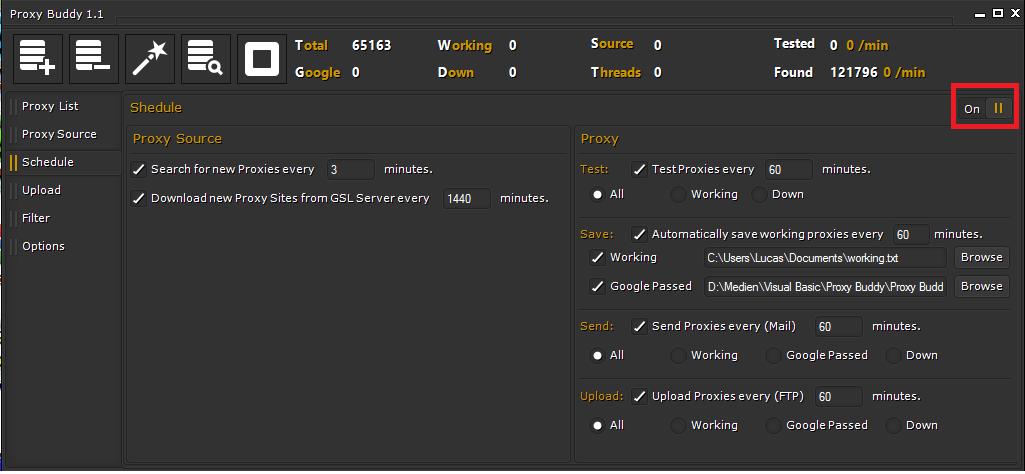
Most of the Scheduling tab is disabled. While not tested on the new release, if the timeout under options were changed, the program would crash.

You need to manually enable all Scheduling features you want.

XzPiJ4L


With the number of threads that you now have available, you are taking the chance of allowing the inexperienced user to overrun the buffer of his/her modem and crashing the modem.

What you do have is a good start however!

Yes you are right for normal personal computers the amount of threads is too high but for servers well :) . I will implement a warning message :).

I will write a manual soon.
Thanks I also think so, I learned a lot since I released the beta version. And in my opinion, experience is the best thing you can get.
 

Attachments

  • BtWFUwI.png
    BtWFUwI.png
    58.9 KB · Views: 3
Last edited:
First of all thanks for your post :).
I'm using .Net Framework 4.0 as target framework.


I never ever produced such a bug (may it was on a older version?).

Working proxies - proxies that are online
Google proxies - proxies that passed google (you can search google with them)

Yes you are right for normal personal computers the amount of threads is too high but for servers well :) . I will implement a warning message :).

I will write a manual soon.
Thanks I also think so, I learned a lot since I released the beta version. And in my opinion, experience is the best thing you can get.

Yes, experience is the best thing you can get. The bug when there are no proxies is reproduced on my system when you clear all proxies and then close the program. At the moment I am not reproducing the bug either. I will see what I can do to reproduce it. I know what a Google passed proxy is. The confusion comes from both the Google passed and working proxies. Most programs separate these two as total proxies and google proxies. Here is an Image from Scrape Box as an example:

SCBox1_zps8fa7b323.png


The problem with the scheduling screen is that it appears to be disabled. If I click on any of the check boxes or radio buttons, nothing changes - including the activated button or check box.

The problem with the filters is that I may only need to temporarily disable some of them. This is also true of the selection of proxies - I may need to select a few, or the entire group, without having to individually check them off. Say click on the on I want, scroll down to the last one I want, and click copy to clipboard. The problem with local saving of the working/Google proxies is that there is none that is automated. As an example, here is a screenshot of GScraper proxy options.

GScraper_proxy_zpsc7d4874f.png


Notice that the proxy list can be reloaded every X minutes from a local file. Proxy Buddy does not allow the option of saving a file locally. Many different softwares allow the loading of a proxy list from a local file every so often. This should be one of the strengths of PB because the proxies would be pretested. PB does not allow this option.

When I installed and booted PB, it promptly DL'd and installed .net 3.5 and 2.0. It is not much of a problem because I installed and initially ran PB with Revo Uninstaller and can easily remove them later.
 
I believe Proxy Buddy saves to proxies.txt in data folder, within program files folder. It's true that there is just that default option, without ability to specify alternative save location, but appears program is still in early development.
 
Really amazing program, very fast and works no problems, found good proxy.

Somethings I would really like to see:

Socks4/5 support
Estimated times (check time, etc.)
Copy selected proxies, instead of checked.

And maybe more if I think about it. Thanks dude!
 
Yes, experience is the best thing you can get. The bug when there are no proxies is reproduced on my system when you clear all proxies and then close the program. At the moment I am not reproducing the bug either. I will see what I can do to reproduce it. I know what a Google passed proxy is. The confusion comes from both the Google passed and working proxies. Most programs separate these two as total proxies and google proxies. Here is an Image from Scrape Box as an example:

SCBox1_zps8fa7b323.png

Proxy Buddy separates the Proxies in
- +Working (Online)
- +Google Passed (Online + Passed Google Search)
- +Down (Offline or Timed out)
- +Not tested
- =Total Proxies

I don't think that this is confusing.
I see that Scrapebox separate the list into Total Proxies, Anonymous (Online + Anonymous and or Elite) and Google Passed.
I think Scrapebox is more confusing because where you see the total amount of proxies that are online? How many proxies are offline? Where you see if the source is worth it?

The problem with the scheduling screen is that it appears to be disabled. If I click on any of the check boxes or radio buttons, nothing changes - including the activated button or check box.

You need to enable scheduling first. I marked it for you in my post before.
XzPiJ4L


The problem with the filters is that I may only need to temporarily disable some of them. This is also true of the selection of proxies - I may need to select a few, or the entire group, without having to individually check them off. Say click on the on I want, scroll down to the last one I want, and click copy to clipboard. The problem with local saving of the working/Google proxies is that there is none that is automated. As an example, here is a screenshot of GScraper proxy options.

GScraper_proxy_zpsc7d4874f.png


Notice that the proxy list can be reloaded every X minutes from a local file. Proxy Buddy does not allow the option of saving a file locally. Many different softwares allow the loading of a proxy list from a local file every so often. This should be one of the strengths of PB because the proxies would be pretested. PB does not allow this option.

I'm a bit confused now :D.
You can check the check-boxes of each group (all, untested, down, working, google passed, elite, anonymous, transparent, slower than, faster than), export them, copy them, remove them, test them.
You can export your scraped and or tested proxies manually to a .txt or excel file.

In the scheduling settings you have the ability to export your tested proxies to .txt. In the new version you can specify the export path and file name (see my last pic).

If you are confused about Proxy Buddy and you got some more questions I may could show you everything via. Teamviewer, just shoot me a PM.

Thanks for your questions :).

I believe Proxy Buddy saves to proxies.txt in data folder, within program files folder. It's true that there is just that default option, without ability to specify alternative save location, but appears program is still in early development.

In the new version you can specify the export path and file name (see my last pic).

Really amazing program, very fast and works no problems, found good proxy.

Somethings I would really like to see:

Socks4/5 support
Estimated times (check time, etc.)
Copy selected proxies, instead of checked.

And maybe more if I think about it. Thanks dude!

Socks 4/5 support is planned :).

I will implement the estimated times for scraping and testing soon.
Thank you!
 
Last edited:
The schedule to save google passed proxies... In the proxy list, after testing, I notice that "google passed" doesn't necessarily mean "elite". Sometimes "google passed" are transparent.
If proxy buddy is being used to automatically export a list of google passed proxies to another application, the inclusion of transparent proxies could be dangerous.
 
This is also true of the selection of proxies - I may need to select a few, or the entire group, without having to individually check them off. Say click on the on I want, scroll down to the last one I want, and click copy to clipboard.

You might have missed (I did). If you select a group of proxies in the list screen, and then check any one, the entire group selected will also check. Or uncheck.

But it is true that the context menus on right click are getting a little too complicated. Perhaps the developer finds a use for the check / uncheck system, to keep items persistently selected.

A quick menu to apply actions to "selected" might be helpful.
 
Proxy Buddy separates the Proxies in
- +Working (Online)
- +Google Passed (Online + Passed Google Search)
- +Down (Offline or Timed out)
- +Not tested
- =Total Proxies

I don't think that this is confusing.
I see that Scrapebox separate the list into Total Proxies, Anonymous (Online + Anonymous and or Elite) and Google Passed.
I think Scrapebox is more confusing because where you see the total amount of proxies that are online? How many proxies are offline? Where you see if the source is worth it? ...

I will attempt to explain a little further for you. In the explanation, I will show a side by side example with a program that dailly 180 initially wrote, and that I extended to include two methods of proxy checking in which there is an actual connection through the proxy server and a download of a page from the search engine rather than simply checking for headers of 200, 302, 404, etc.

I had done some other work to add a server connection timeout and a read/write timeout in addition to testing though Google and Bing as well as changing the search from http to https. The WebClient is SSL (all versions) enabled. The WebRequest not so much.

This program is not something developed to compete with you. Rather, it is a testing of a new form off polymorphism that I developed that I call "Object Based" polymorphism. The program execution changes based on what item it pulls from the queue. That object can be any object including custom classes. I currently have no code written for the load functions, but that is a simple matter. In a few days, when I remember the credentials for one of my Google accounts, I will put a demonstration video online and more than likely the source on GitHub or CodeProject as well as make it available here.

Combined_1_zps306dde5f.png


Lets look at the first picture. You have a total of 52 proxies out of which 121 are working, and out of that total of 52 proxies 61 have passed your Google check. Gee... The numbers just do not add up the reality is that there ae only 51 proxies in the list, or if you wish 52 because I am using zero based counting (in other areas, that is corrected, but not here).

Combined_2_zps31f525fd.png


In a C&P from PB to PPS (Public Proxy Scraper), and a removal of dups in which no lines are removed, 51 total proxies are shown. The numbers in PB are simply incorrect! You cannot have a total of 51/52 proxies of which 61 have passed Google checking, and of which 60 are down. Too boot, this is from a list of 51 of which 121 are working. Do you see the problem? Do you see why your user interface (GUI) is confusing. The scheduling button also falls into both poor user experience and poor user interface choices. You cannot see it. If you would have not pointed that button out, I would have never seen it (my corrected eyesite is 20/20 and I am about 18 inches from two 20 inch monitors, one monitor is 1600 X 900 and the other is 1280 X 1024, both are DVI). On my laptops, the GUI is even worse (1400 X 900 displays).

Moving on from the display and GUI problems, to the testing of the proxies. Simply reading headers to determine if a proxy is Google passed just does not cut it! I took the list of Google passed proxies from PB and C&P'd them to PPS. I used the WebClient that is SSL enabled by default and tested to see if I could download pages from the Google URL shown in the background of Visual Studio. The following image shows that out of 52 proxies, only 8 can download data from Google - 44 are Google blocked. If I test against Bing, the vast majorities of the proxies will download data, which means the proxy is up and working. Also, as long as I do not scrape or check proxies with both PB and PPS .net will not crash.

Combined_3_zpsaea4374d.png


You are probably using a different method of connecting to the proxy server than I am. I have everything abstracted away rather than directly handling the connections. However, this does not excuse the incorrect results that PB is providing. It appears that you are reading the headers to check for a connection. This provides incorrect results, more than likely, because of the proxy servers cache; but I really do not know. At some time, the timers you have will fire and attempt to correct the numbers, but they are still incorrect.
 
Last edited:
I will attempt to explain a little further for you. In the explanation, I will show a side by side example with a program that dailly 180 initially wrote, and that I extended to include two methods of proxy checking in which there is an actual connection through the proxy server and a download of a page from the search engine rather than simply checking for headers of 200, 302, 404, etc.

I had done some other work to add a server connection timeout and a read/write timeout in addition to testing though Google and Bing as well as changing the search from http to https. The WebClient is SSL (all versions) enabled. The WebRequest not so much.

This program is not something developed to compete with you. Rather, it is a testing of a new form off polymorphism that I developed that I call "Object Based" polymorphism. The program execution changes based on what item it pulls from the queue. That object can be any object including custom classes. I currently have no code written for the load functions, but that is a simple matter. In a few days, when I remember the credentials for one of my Google accounts, I will put a demonstration video online and more than likely the source on GitHub or CodeProject as well as make it available here.

Lets look at the first picture. You have a total of 52 proxies out of which 121 are working, and out of that total of 52 proxies 61 have passed your Google check. Gee... The numbers just do not add up the reality is that there ae only 51 proxies in the list, or if you wish 52 because I am using zero based counting (in other areas, that is corrected, but not here).

Thanks now I know what you mean. I will fix this! :)

Nice, I will watch your video.

In a C&P from PB to PPS (Public Proxy Scraper), and a removal of dups in which no lines are removed, 51 total proxies are shown. The numbers in PB are simply incorrect! You cannot have a total of 51/52 proxies of which 61 have passed Google checking, and of which 60 are down. Too boot, this is from a list of 51 of which 121 are working. Do you see the problem? Do you see why your user interface (GUI) is confusing. The scheduling button also falls into both poor user experience and poor user interface choices. You cannot see it. If you would have not pointed that button out, I would have never seen it (my corrected eyesite is 20/20 and I am about 18 inches from two 20 inch monitors, one monitor is 1600 X 900 and the other is 1280 X 1024, both are DVI). On my laptops, the GUI is even worse (1400 X 900 displays).

Moving on from the display and GUI problems, to the testing of the proxies. Simply reading headers to determine if a proxy is Google passed just does not cut it! I took the list of Google passed proxies from PB and C&P'd them to PPS. I used the WebClient that is SSL enabled by default and tested to see if I could download pages from the Google URL shown in the background of Visual Studio. The following image shows that out of 52 proxies, only 8 can download data from Google - 44 are Google blocked. If I test against Bing, the vast majorities of the proxies will download data, which means the proxy is up and working. Also, as long as I do not scrape or check proxies with both PB and PPS .net will not crash.

You are probably using a different method of connecting to the proxy server than I am. I have everything abstracted away rather than directly handling the connections. However, this does not excuse the incorrect results that PB is providing. It appears that you are reading the headers to check for a connection. This provides incorrect results, more than likely, because of the proxy servers cache; but I really do not know. At some time, the timers you have will fire and attempt to correct the numbers, but they are still incorrect.

You are right I will work on the GUI soon.

I don't just use headers to test the proxies against google search.
I download the data and check if google blocked this proxy.
May google blocks the proxy because your search don't look natural. Or may your local IP is blocked by google then transparent proxies would be blocked by google.

I also tested the google passed proxies on a random basis with my local webbrowser, seems to be working correctly with google search.
1UOozc0


The schedule to save google passed proxies... In the proxy list, after testing, I notice that "google passed" doesn't necessarily mean "elite". Sometimes "google passed" are transparent.
If proxy buddy is being used to automatically export a list of google passed proxies to another application, the inclusion of transparent proxies could be dangerous.

Thanks your are right :).
 
Last edited:
Thanks now I know what you mean. I will fix this! :)

You are right I will work on the GUI soon.

I don't just use headers to test the proxies against google search.
I download the data and check if google blocked this proxy.
May google blocks the proxy because your search don't look natural. Or may your local IP is blocked by google then transparent proxies would be blocked by google.

Highly unlikely that my local IP is blocked. Just about any time I have VS running, I also have a browser open on the second monitor in which I am running news feeds and searching for data on how others may have accomplished the task I am working on.

Edit add:
I forgot to mention that when I download a page, I look for a string in the page that would indicate that the data is not garbled. In the search results shown the string in the html would have been <title>test. This could affect the result I get because some proxy servers strip some tags.
 
Last edited:
The discussion of proxy test is interesting. Does this run off a server you host? I know public proxies die fast, but sometimes I check one, it's rated elite. I check again, it goes to transparent. Check again, it's back to elite. Normal proxy behavior or something in testing methodology?
 
The discussion of proxy test is interesting. Does this run off a server you host? I know public proxies die fast, but sometimes I check one, it's rated elite. I check again, it goes to transparent. Check again, it's back to elite. Normal proxy behavior or something in testing methodology?

Hello blkelvis,

thanks for your post.

No currently not, testing proxies is client based. But cloud based features are planned ;) (Cloud testing & scraping).
This is because we use proxy judges to test the anonymity. If the judge server is down or pass back errors the proxy will be rated as transparent. I already realized this and work on a fix :).
 
Status
Not open for further replies.
Back
Top