How I Made My Website 82% Faster

Some decent improvement just from installing the plugin and following the guide. my load time seems to have 1/2'd but the score is pretty much the same. I hope it's making it faster for my users

test1before.JPGtest1after.JPG

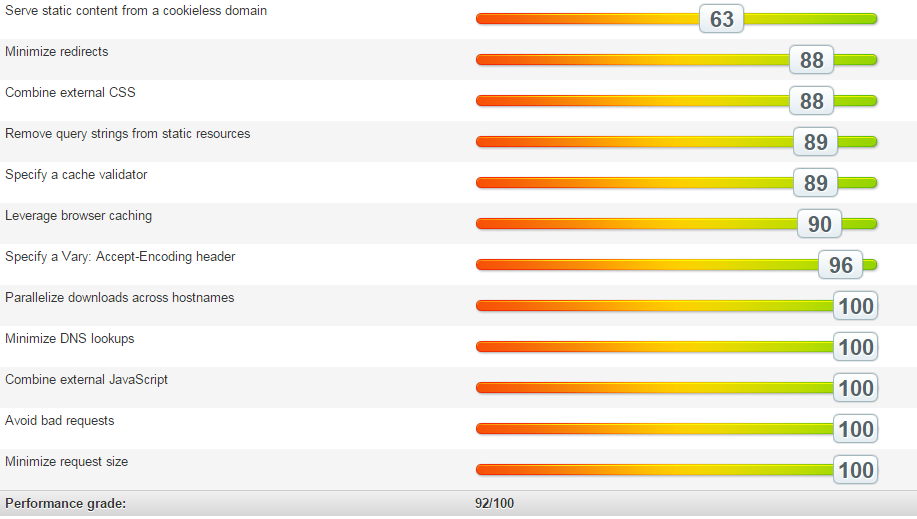
How would you guys go about "Remove query strings from static resources"? I got a 57 on this section

Also looking to combine all javascript fiels and css files - scored horrible on those areas as well
 
Last edited:
I'm figuring this out myself, query strings seem to be my biggest problem. Installed a plugin but didn't work even after clearing my cache. We'll see.
That's great to see your site is getting faster, improvement is always a good sign.
Some decent improvement just from installing the plugin and following the guide. my load time seems to have 1/2'd but the score is pretty much the same. I hope it's making it faster for my users

View attachment 55493View attachment 55492

How would you guys go about "Remove query strings from static resources"? I got a 57 on this section

Also looking to combine all javascript fiels and css files - scored horrible on those areas as well
 
I've installed the first Plugin with no changes made in Pingdom (with queries) and it's my lowest scoring stat. I won't stop experimenting though.
Ran a Google Page Speed test and it shows only Leverage Browser Caching for Desktops. My mobile speed is the worst and recommends "Eliminate render-blocking JavaScript and CSS in above-the-fold content" so I've still got work to do. Then I migrate to my dedicated WPEngine to finish off.

Did you try this plugin? Not too sure if you're running wordpress op

Gonna see if this has worked for any others

https://wordpress.org/plugins/remove-query-strings-from-static-resources/

This looks like a possible solution too:
https://wordpress.org/support/topic/how-to-remove-query-strings-from-static-resources
 
Last edited:
I decided to try and speed up another site that was previously taking 4.7seconds to load according to Pingdom.

I'll start by saying I'm not using the cache plugin on this site, I installed this plugin https://wordpress.org/plugins/speed-booster-pack/
and used these settings

Speed.png

Along with that plugin I used the EWWW image optimizer and that's it.

The result I got was amazing.

Speed 2.png

4.7 seconds to 871ms! This plugin might not work for you, but it's worth a try!

Going to add the cache plugin later to see if it gets even quicker!
 
Last edited:
amazingly useful, highly appreciated mate.

Thanks funkybunker for reminding me that I shouldn't ignore the website loading aspect if I want to build serious projects :)
 
Ywvnkgh


Before testing, it averaged 1.40 - 1.60 seconds and often went above 2.00

Here's the http://zemalf.com/1443/w3-total-cache/ & https://www.besthostnews.com/guide-to-w3-total-cache-settings-with-cloudflare/. The first is a little dated but I've spent around an hour optimizing my site this way so it's no problem.
I've still got to fiddle with query strings and browser caching so this will only get faster. Optimizing images is also a must & I recommend https://wordpress.org/plugins/ewww-image-optimizer/installation/.

I forgot to mention I'm still on Shared Hosting but switching to dedicated. That's in the air right now so this should improve your site speed regardless.

WoW
Your website loads faster than Matt Cutts google+ page:D
HAZHRvz


What you achieved is really great job, but i will tell you later why its BULLSHIT:D.
And all i can say about optimizing images is DONT use plugins for that. It will just slow done your website.
Use online tools. This is my favorite: https://kraken.io/web-interface .(No i dont even know who they are i just found them the best so far.)

p.s.: Now start playing with pingdom. Check the result for the following little:D companies who are using some cheaaap dedicated servers.
http://www.microsoft.com
http://www.apple.com/
http://www.amazon.com/
Now you should understand why optimizing using pingdom is BULLSHIT. There is a huge chance you are going to lose more than you get.
 

Attachments

  • HAZHRvz.png
    HAZHRvz.png
    41.3 KB · Views: 4
Your performance can change depending on the country/server. This is my performance in Texas:
HUqhOrel


And here's the Netherlands

WXYMMUEl


I'm located in the States so that's crazy to have (somewhat) better grades overseas. Test from different sources to discover your average rating.
 
2QEmgJx

J7aIpvx


It's getting faster overall after 11 days of altering. Shrinking my website and hey, I can't complain. I'm still faster than 9gag ;)

aKKOJru
 
Iam using GTmetrix for all the performance checks, moreover using w3 total cache with CDN will work wonders with CSS,JS compression and yahoo image compression service smush.it is very useful for overall website optimization..
 
Iam using GTmetrix for all the performance checks, moreover using w3 total cache with CDN will work wonders with CSS,JS compression and yahoo image compression service smush.it is very useful for overall website optimization..

Yeah, I'm using kraken.io for images before uploading to my server, and EWWW is shrinking them even more so that's fantastic. I noticed it just takes time after altering your plugins to see significant improvement in pingdom.

any idea to make PC and internet speed fast ?

Sorry bud, that's up to your specific machine and internet provider. If you're operating a Windows 7 Desktop like me, you can go to Control Panel > Hardware & Sound > Power Options > click on High Performance. The next step is to visit My Computer > System Properties > Advanced System Settings > Performance Settings > click Adjust For Best Performance. That's why I do, I'm saving up for a stronger machine.
 
Sorry bud, that's up to your specific machine and internet provider. If you're operating a Windows 7 Desktop like me, you can go to Control Panel > Hardware & Sound > Power Options > click on High Performance. The next step is to visit My Computer > System Properties > Advanced System Settings > Performance Settings > click Adjust For Best Performance. That's why I do, I'm saving up for a stronger machine.

Thanks buddy I have applied
 
Can the speed booster pack be used along side wp super cache plug in?
 
Kindly help for drupal sites?
i can see cloud flare in my hosting "Namecheap" is that all i need o activate?
 
Back
Top