
You are using an out of date browser. It may not display this or other websites correctly.
You should upgrade or use an alternative browser.
You should upgrade or use an alternative browser.
GSA Search Engine Ranker - Extremely Powerful Linkbuilding Software (Free 5 Day Trial)
- Thread starter s4nt0s
- Start date

- Jul 10, 2009
- 6,315
- 2,643
Hi santos, which one to check on 'type of backlink to create' to get only profile link that allow for signature or bio section?
There are many different platforms that leave a profile link. Forums should have a lot of those but if you hover over the platform it will tell you what type of link it is.
So badically the threads are like wsys to run more tsdks at the same time?
Thats becsuse im running my vps ser at 450 threads (1gb ram) without a hassle.
If threads are NOT that, if i lower the threads, will my lpm increase? (Im around at 30 lpm)
Yes more threads allow the use of more things to be done simultaneously but sometimes having it too high is overkill and not needed. 30 LPM is pretty good but if you want to increase more you should follow the steps suggested on the forum by the power users. The thread titled, "My Compiled List Of Tips/Notes/Threads/Resources For Using SER" has links to more threads about increasing LPM if thats what you're interested in.
hi!
I am a new user GSA and I have a problem at the beginning with Captcha Sniper. How to use Captcha Sniper from my second VPS server? In other SEO program I type a URL address. I do not know how to do it in the GSA.
The software is brilliant. Where can I find information for beginners (beginners with GSA ).
).
I am a new user GSA and I have a problem at the beginning with Captcha Sniper. How to use Captcha Sniper from my second VPS server? In other SEO program I type a URL address. I do not know how to do it in the GSA.
The software is brilliant. Where can I find information for beginners (beginners with GSA
).hi!
I am a new user GSA and I have a problem at the beginning with Captcha Sniper. How to use Captcha Sniper from my second VPS server? In other SEO program I type a URL address. I do not know how to do it in the GSA.
The software is brilliant. Where can I find information for beginners (beginners with GSA
Go to the server which is running gsa. Right click and open notepad as admin and navigate to c:\windows\system32\drivers\etc\ . You won't be able to see it as you need to select open All files in the Open window. From there copy the below lines and paste them inside the host file. Replace yourcsserverip with your captcha sniper's server ip.
yourcsserverip api.decaptcher.com
yourcsserverip api.de-captcher.com
yourcsserverip api.de-captcher.info
yourcsserverip api.decaptcher-reloaded.com
yourcsserverip poster.decaptcher.com
yourcsserverip poster.de-captcher.com
- Jul 10, 2009
- 6,315
- 2,643
Thanks s4nt0s, i have read the forums but havent really optimised ser to increase lpm
Yes. If that's what you're looking to do, then I'd definitely check out those threads.
hi!
I am a new user GSA and I have a problem at the beginning with Captcha Sniper. How to use Captcha Sniper from my second VPS server? In other SEO program I type a URL address. I do not know how to do it in the GSA.
The software is brilliant. Where can I find information for beginners (beginners with GSA
You can setup captcha sniper by clicking the big options button and choose the captcha tab. Captcha sniper is an option in the drop down menu.
You can get started here: http://www.youtube.com/channel/UC4xcRhth5i2MUS1vFHPxQkg and the forum found in the help menu of the software.
Payment sent. Order REF# 446618305. Please confirm.
Btw, how long will it take to process my order?
Cheers!
It shouldn't take longer than 24 hours. Let me know if its getting close to that time and you still haven't received it yet.

mogs03
BANNED
- Jan 9, 2012
- 611
- 207
Payment sent. Order REF# 446618305. Please confirm.
Btw, how long will it take to process my order?
Cheers!
It shouldn't take longer than 24 hours. Let me know if its getting close to that time and you still haven't received it yet.
Edit: Received the licence key. I didn't notice that it went to my spam folder.
Last edited:
- Jul 10, 2009
- 6,315
- 2,643
Edit: Received the licence key. I didn't notice that it went to my spam folder.
Yep. It seems to land there often for most people
Glad you got it.
--------------
6.26 - new: added MegaOCR as captcha provider
- new: added SpamVilla (recapcha only) as captcha provider
- fix: minor bug fixes on script engine
- new: improved some engines
- new: added some more generic anchor texts (thanks to the one pointed out
the source on our forum)
- fix: LinkCentaur indexing bug

GreyKnight
Regular Member
- Mar 19, 2013
- 407
- 204
Just minor complaint from me : The software are unable to update, saying that setup file is corrupted. I am told to get a new file from the site.
Also, currently I only run about 20 threads, and have around 1 GB of memory (planning to upgrade to 2 GB) but still encounter some lag when I am using the PC. Any thoughts on this?
Also, currently I only run about 20 threads, and have around 1 GB of memory (planning to upgrade to 2 GB) but still encounter some lag when I am using the PC. Any thoughts on this?
- Jul 10, 2009
- 6,315
- 2,643
Just minor complaint from me : The software are unable to update, saying that setup file is corrupted. I am told to get a new file from the site.
Also, currently I only run about 20 threads, and have around 1 GB of memory (planning to upgrade to 2 GB) but still encounter some lag when I am using the PC. Any thoughts on this?
Were you able to grab the new setup file? Its right here in the sales letter (free trial button) or on the official site (free trial). Something could have got corrupted during the download.
Are you running a VPS or is this a home PC? If you're getting some lag on your end your computer might not have the resources to handle it. If its a VPS the lag could be due to latency between you and the connection between the VPS.
---------------------------------------------
6.27 - new: improved pligg engine (again)
- fix: bug in script engine from yesterday build when using "post data"
- new: allows the usage of %datetime% macro in "search term"
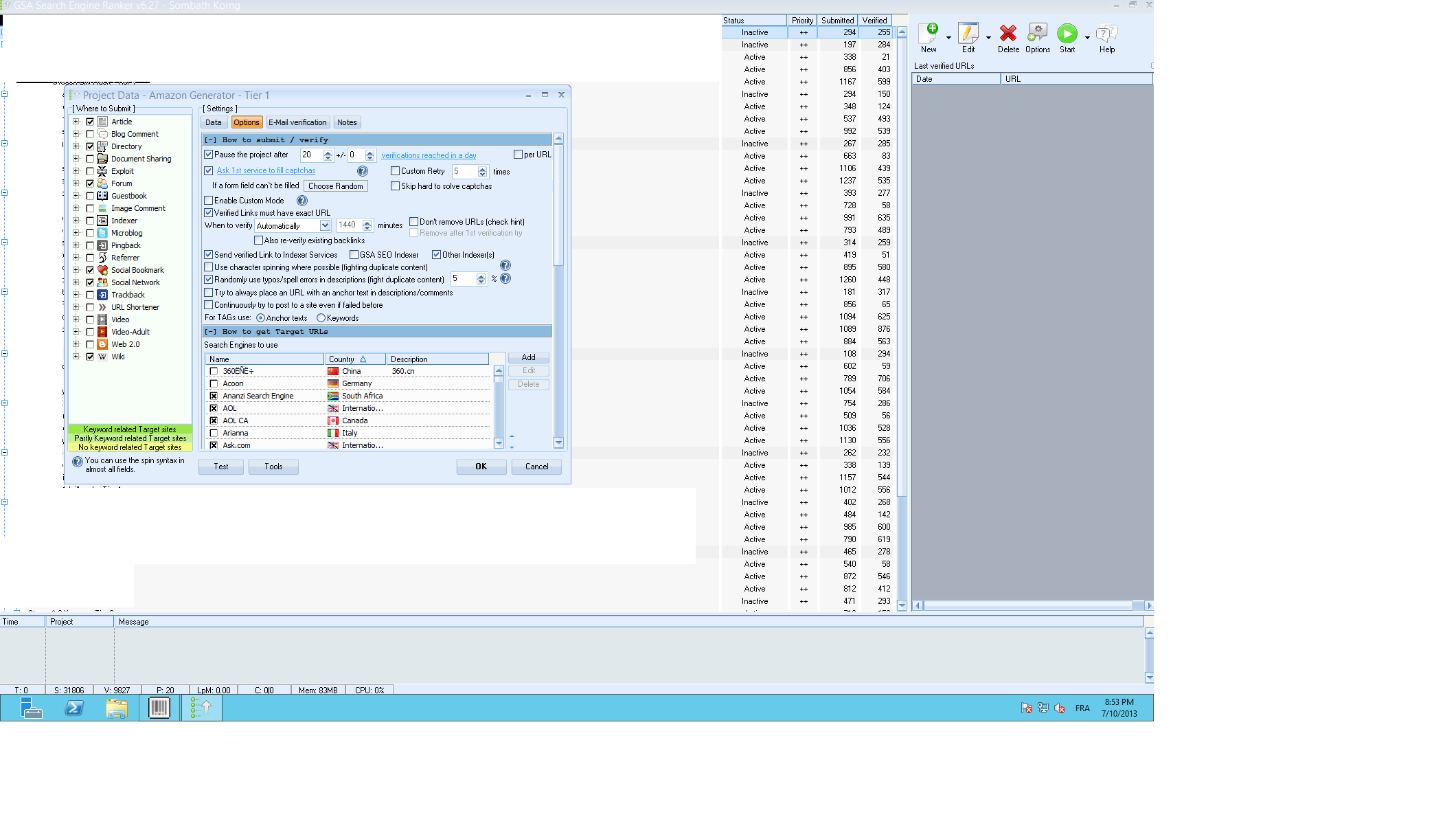
santos, i have setup all my tier 1 backlinks campaign to stop after 10 verification reached per days....
but the problem its they never stop. and now all my tier has 200-300 backlinks :/
how can i fix this bug :/
Here are some screenshot :
but the problem its they never stop. and now all my tier has 200-300 backlinks :/
how can i fix this bug :/
Here are some screenshot :
Last edited:

prophecyprojekt
Regular Member
- Jul 30, 2012
- 326
- 91
I tried SEREngines.com and although I was quite satisfied with the results I had to stop all other campaigns, setup new settings and run the engine by itself.
Did I do it wrong? Can I run all of my crazy campaigns with my crazy settings and SEREngines.com at the same time?
:/
Did I do it wrong? Can I run all of my crazy campaigns with my crazy settings and SEREngines.com at the same time?
:/

seowarrior008
Senior Member
- Feb 7, 2012
- 930
- 248
This is great tips, thanks a lot! I am wondering if there is any quicker way to complete this?? saying if u have 100 hotmail accounts, u manually login each one to change option one by one??? Is there any bot to complete bulk checking quickly?? Hope anyone here is willing to share source! Thanks a lot in advance!!!
For everyone who wants GSA to check the spam folder on hotmail, that isnt simple and shouldnt need to be done. There is a trick for hotmail to have it send everything to the inbox. 1. Login to the hotmail account, go to Options->More Options, in the top right. 2. Click on "Rules for sorting new messages" under "Customizing Hotmail" 3. Click on New. 4. In Step 1 make sure the first selection box is set to "Sender's address", and the second box is set to "contains". Lastly put the @ symbol/character in the box. 5. In Step 2 make sure "Move to Inbox" is selected. 6. Hit the Save button. With the steps above, no more spam in the spam folder, everything is in the inbox.
GreyKnight
Regular Member
- Mar 19, 2013
- 407
- 204
Were you able to grab the new setup file? Its right here in the sales letter (free trial button) or on the official site (free trial). Something could have got corrupted during the download.
Are you running a VPS or is this a home PC? If you're getting some lag on your end your computer might not have the resources to handle it. If its a VPS the lag could be due to latency between you and the connection between the VPS.
---------------------------------------------
6.27 - new: improved pligg engine (again)
- fix: bug in script engine from yesterday build when using "post data"
- new: allows the usage of %datetime% macro in "search term"
Yes, I got no problem in getting the new setup file. My problem is that the software has trouble updating itself, that it will need the original setup file (from the site) to run it.
I use my personal computer, I don't use VPS. From what can I see, the CPU is only used around 15%, but the program itself sometimes have some slow response. Probably it is just my computer, but may be you could just look at it.

cookie1979
Regular Member
- Jul 16, 2011
- 432
- 131
Hi, wondering if you tell me in laymen's terms what the "verified links must have exact url" and when I should or should not use it. Also, is it better to use one or multiple email accounts in each job? Further to that, should I use different emails for each tier? Just not sure weather having 100's of emails in each account will slow down the system, or make finding the emails harder if more than one tier is working on the same platform.
Raja Badar
Newbie
- Feb 23, 2012
- 23
- 0
I know 2 , 3 people, they are selling SGA SER and GSA CB In Cheap rate.
Do you know why they are selling?
They said they have official authority and their license are also unique, (not one license to many people)
Do you know why they are selling?
They said they have official authority and their license are also unique, (not one license to many people)

rpkrocks
BANNED
- Feb 4, 2010
- 1,037
- 978
I know 2 , 3 people, they are selling SGA SER and GSA CB In Cheap rate.
Do you know why they are selling?
They said they have official authority and their license are also unique, (not one license to many people)
Yes there is a GUY on BBHF who claims in his SIG(as well as posts) that you can GSA SER for 60$ from him w/ Guaranteed genuine license .
rpkrocks
BANNED
- Feb 4, 2010
- 1,037
- 978
@S4ant0s
I have a problem: Whenever i update GSA SER and 'start' campaigns (which is default 'stop' on update) ,GSA Forgoes the schedule and start building links again to those projects which were at halt due to scheduler, so sometimes after update instead of daily 1000 BL it makes 2000 .
I have a problem: Whenever i update GSA SER and 'start' campaigns (which is default 'stop' on update) ,GSA Forgoes the schedule and start building links again to those projects which were at halt due to scheduler, so sometimes after update instead of daily 1000 BL it makes 2000 .
Awesome. Thanks for the orders guys!
Yep. Those results are definitely poor, but I guarantee you its do to your settings and lack of knowing how to setup the software.
When I read your comment I threw together a test campaign. With contextual PR links only. You said its only good at building crap links and that's 100% untrue so I had to prove it wrong
In less than an hour I have 1290 submitted, 266 verified contextual article/wiki/blog links with PR. (75 threads)
All links are from 20 different blog, social network wiki platforms. PR ranges from 1-7
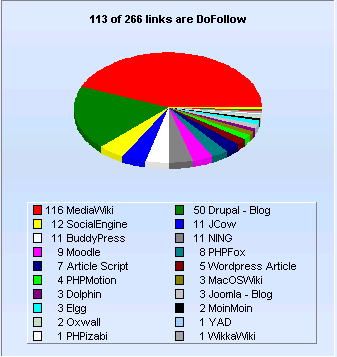

These are all contextual platforms and all domains have PR of at least 1 but many have higher PR.
Here is a backup of that campaign if you want to check it out: http://rghost.net/46900113
I could have had many more links if I disabled the PR filter, increased threads, etc..
You shouldn't give up so fast.
That's the same I'm getting with 50 threads and using expert decoders as captcha service. Yesterday after James updated it, I got around 18. His test he's getting around 23 when he retries the failed. Check the SERengines thread on the forum.
As far as I know, nothing was changed in that area.
You can get the previous version in the install folder. It's called search_engine_ranker_old.
-----------------------------------------------------------------------------------
6.14 - new: improved some engines
- fix: issue with redirect and cookies
- new: the order of search query parameters and query string itself is now
randomized to look more natural
- new: better captcha handling/retry
- new: ability to use predefined masks when selecting projects
- new: added new project modes (search only and search+verify)
If i want to test your backup file wouldn't that overwrite all my campaigns or things like this?