3 computers, 3 different IP's, same house?

singingsleep

Regular Member
Joined
Dec 13, 2008
Messages
412
Reaction score
390
So I want to set up some slave computers, I have dynamic ADSL internet and can change IP's easily on my main machine. I have spent the past few days trying to research how to set them up to all have different IP's. Some people are saying I'm gonna have to buy IP's from my ISP (i'm not gonna go with that), use proxies (always a possibility) OR set up a clusterfuck of switches and routers. Does anyone know if it's possible to set up multiple computers using the same internet account on dynamic IP's to all have different IP's and be able to switch them at will the way I do with my main computer? Is it possible to have more than one internet account/modem thru my ISP even if I have to have my home wired for this or whatever? If they try to sell me static IP's and I'm like "no I need a whole nother thingy, two of em in fact", are they going to be suspicious?

Also, why does it seem like people tend to use VPS instead of physical bots, I'd feel better having access to the machines personally and it would save me monthly fees, am I missing something?

Any help appreciated, thanks in advance :D
 
Last edited:
Well, you gotta do just what you have been advised, either buy different IPs from your ISP or go for private proxies and assign a different IP to each machine.

Without it, its not possible to have each machine on a different IP when using the same internet account.
 
You need private proxies for sure. Even if your internet connection has dynamic IP, you can connect it only once... So, proxies are the easiest things to go for.
 
not sure about others but i used VPS for high speed connection to run bots.
home machine net sucks and it might unstable the bot so i have to restart any tasks as it will intercepted with slow response. so bots runs pretty awesomely on VPS then home machine.

There is firefox addon for changing IP's not using currently but it was working fine before.
so try your luck here is link, i think it serve the purpose you are looking for.
it can change ip's from your IP range so suppose your ip is 127.0.0.1 then it can use ip's from that range 127.0.0.1-127.0.0.255 last number will be changed. hope it's clear :)

Code:
https://addons.mozilla.org/fr/firefox/addon/176007/
 
So you want to set up computers to run software for you?
If so, consider renting a VPS. It's cheap and very easy to use plus the server will have very fast internet speed.

I doubt it's possible to assign computers different IPs when they are all connected to the same router/modem unless you use VPN or proxies.
 
Most residential ISPs will not give"infinite IPs" they give you just one dynamic IP from their pool of IPs that can be changed (by you/with time/with resets) and it will not propagate to others connected computers, unless you have a specific modem/router that can receive and forward multiple IPs where those IPs are allocated to your router/modem by your ISP.

However you can use a VPN on one or all of your computers that will allow you to change the IP, you could use proxy on your browser or program if it allows it.

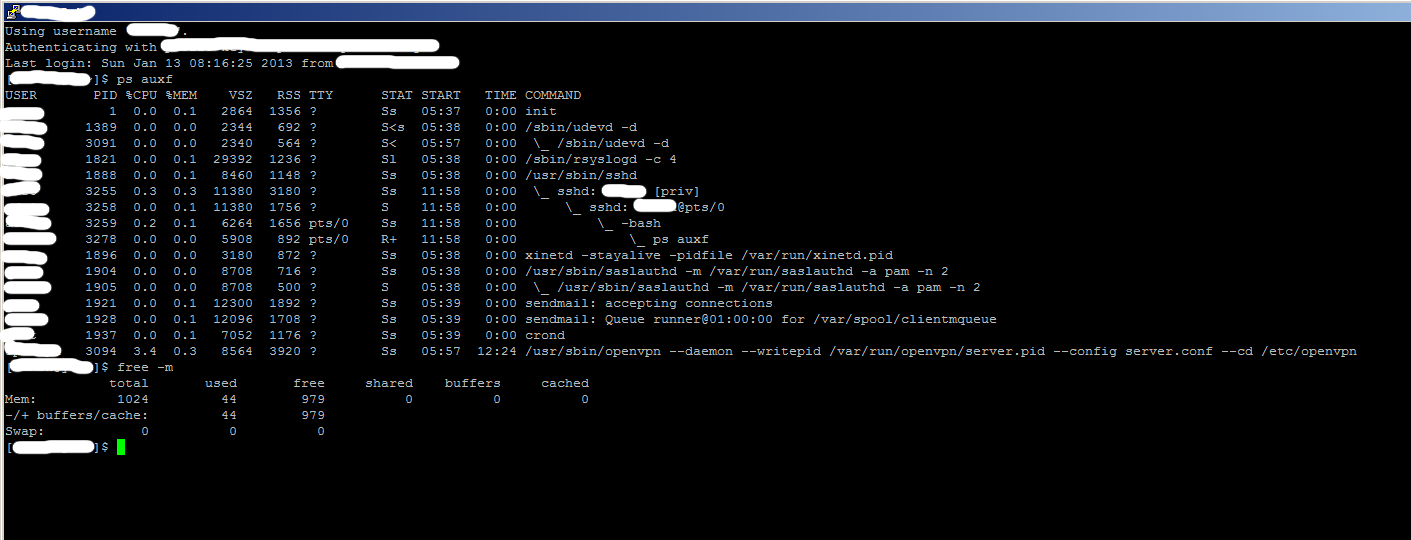
TOR is one free option to VPN however you could also hire your own VPS and with 7 bucks you would get a VPS enough to run OpenVPN have 4 IPs available to use and still have 900 MB memory left to be consume as OpenVPN uses very little memory.
Also, why does it seem like people tend to use VPS instead of physical bots, I'd feel better having access to the machines personally and it would save me monthly fees, am I missing something?

- They have a facility with proper equipment that can keep your VPS online with a good uptime
- You don't waste energy
- You don't waste your bw
- You don't have to buy a PC that depending on the needs can cost lots of dollars
- VPS can cost as low as 5 bucks and yet do what u need
- You can have access to your VPS with remote desktop, teamviewer, KVM over IP and other options available within the company u choose
- Depending on the situation it will cost less on the long run until u start making money

There may be other points im overlooking but I guess these are an start.

Here is a little image of one of my VPSs running OpenVPN with 15 IPs being used 24hs non stop:
gmbO8
 
Last edited:
I am not sure about that, 1 year ago I had dynamic address, and I was able to use 2 IP on 2 COMPUTERS [maybe even on more hadn't got more pcs :D], I guess you're using router that auto-connects itself, so you gotta set up the router on manual connection [name vary per routers, Bridge Mode in mine] and then connect all computers to the router [either cable or wifi] and then create a separate connection on each computer [hit google -> create broadband connection win7 or xp or whatever you have]. Then manually connect each pc using the broadband connection.
See if that works.
 
There is a difference between REAL IP and local network IP, so perhaps you mistook that 192.168.0.1 and 192.168.0.2 as being 2 different IPs where when you would go to http://checkip.dyndns.org from both PC's it would result on the same IP.

Some routers/modems when connected to a hub and related devices can auto switch to local network DHCP mode to satisfy all connected devices.
 
This is awesome info guys, thanks so much. Ya'll are right, it did cross my mind that since I am going to need to change IP's that my ISP isn't going to have infinite IP's to use even though they've been a good range of clean ones so far, if I'm power using then eventually I'm going to have to have a private proxy solution. I'm still not sure about a VPS because I've never used one in this kind of application but in theory it should work, and I could have more machines running for cheaper than it would cost to buy the two I was gonna buy. I don't need anything too fast really, just some simple automated software running (it has built in proxy support).
 
I am not sure about that, 1 year ago I had dynamic address, and I was able to use 2 IP on 2 COMPUTERS [maybe even on more hadn't got more pcs :D], I guess you're using router that auto-connects itself, so you gotta set up the router on manual connection [name vary per routers, Bridge Mode in mine] and then connect all computers to the router [either cable or wifi] and then create a separate connection on each computer [hit google -> create broadband connection win7 or xp or whatever you have]. Then manually connect each pc using the broadband connection.
See if that works.

HAHA see? This keeps happening everywhere I look up the subject. Most people say it can't be done, and then someone says it can, lol. I may try this sometime, this is an approach I hadn't read about yet, thanks!
 
There is a difference between REAL IP and local network IP, so perhaps you mistook that 192.168.0.1 and 192.168.0.2 as being 2 different IPs where when you would go to http://checkip.dyndns.org from both PC's it would result on the same IP.

Some routers/modems when connected to a hub and related devices can auto switch to local network DHCP mode to satisfy all connected devices.

Yay dude you're giving me low posts, I know whats local and what's internet ip, I have passed CCNA1 and CCNA2 currently going towards 3 'n 4 [which are craps] but at least Ip's are described.

So about the DHCP server, "which is ISP" side located most likely works this way
step1->You hit him with username/password
step2->He does some checks if he does [it may be mac address checks, or if you're using ADSL phone number chekcs or so]
step3->He give you an ip
 
If it have proxy support then just go for a proxy provider like http://proxy51.com/ 17.50 for 50 shared proxies or http://buyproxies.org/

Thanks, I will look into those. I wasn't even going to go into asking who's the best for proxies/VPN's since that's a whole other can of worms but checking out those sites did give me a new question:

If one of the biggest draws of a VPN is that it's internet speed is faster, since I need to be able to change IP's somewhat regularly and will need proxy service, won't the VPN only really work as fast as the proxy will let it? In my experience, most proxies I've used have been somewhat groggy and some have been downright 1994-type 2400 bps modem speed lol, even ones I purchased.
 
Oh and the end OP, If the method I told you about different IP doesn't work, you don't have to run that much PCs, if one of them is "powerful" enough, you can create Virtual Pcs [virtual computers using vmware player is what I suggest]on it, and keep them running on background, so you can install on those virtual pcs anything you want [VPNs or so], and you can run anything you want.
 
Public proxies are a bunch of crap compared to private proxies, to be fairly honest with you I don't think you will actually need a VPN since your application have proxy support and you can buy lots of private shared/dedicated proxies for less compared to using VPN so I did say go with proxies.

Well I don't know which is the best, I have used buyproxies and they were nice never had any problems, I have not used proxy51 but was recommended to try it.

VPN has its own charm and allows you to do more things that proxy will not but for your needs proxies should be just fine and run just as fast as a VPN, of course private proxies.
 
Public proxies are a bunch of crap compared to private proxies, to be fairly honest with you I don't think you will actually need a VPN since your application have proxy support and you can buy lots of private shared/dedicated proxies for less compared to using VPN so I did say go with proxies.

Sorry I typed VPN a couple times where I meant VPS, I re-read some of your previous posts and I think some of it is starting to click.
 
Well the speed is really relative it depends on a lot of factors, for example, if you are running the application from your PC then you have the initial overhead of yourpc>proxy server>detination

So let's say your PC have a 200 ms to the proxy and the proxy another 500 ms to the destination then you have a total with overhead of something like 750~800 ms

However if your PC have a good connectivity to the proxy you could have a lower ms and if the proxy is the same to the destination it will also have the same and in the end you will get a better response time and speed.

That is of course just one of the factors that could occur that will define why it will be slow or fast and it could happen to a VPS, a VPN or a Proxy.

However lets say you run the application from your VPS then you're cutting out 1 of the points of exchange which would be your computer to the VPS, the connection would start from the VPS itself which would make things faster but then again depending on what you're running you might need a more powerful VPS and ended wasting more money on it where it could have been cheaper if using your computer with proxy.
 
Well buddy you do not need to buy computers, if you have a like 4GB RAM pc then you can install oracle virtual box and can run about 4 different windows xp all at same time on single pc.

for ADSL you will need to buy different sub accounts . they are cool and may cost less. you can also install limited bandwidth adsl something for !$10 a month.

Also you have option for 2G , 3G usb dongles if you can find cheap data plans. you will get a lot of ips on FLY! from Mvnos of AT&T,Verizon etc.

Have a great luck! let me know if i can help anyway. I am open to PMs :)
 
Also, why does it seem like people tend to use VPS instead of physical bots, I'd feel better having access to the machines personally and it would save me monthly fees, am I missing something?
Electricity costs money too. Low-end VPS will cost you much less monthly than running PC 24/7.
 
Well buddy you do not need to buy computers, if you have a like 4GB RAM pc then you can install oracle virtual box and can run about 4 different windows xp all at same time on single pc.

for ADSL you will need to buy different sub accounts . they are cool and may cost less. you can also install limited bandwidth adsl something for !$10 a month.

Also you have option for 2G , 3G usb dongles if you can find cheap data plans. you will get a lot of ips on FLY! from Mvnos of AT&T,Verizon etc.

Have a great luck! let me know if i can help anyway. I am open to PMs :)

This is interesting, I'll look into this, thank you!

Electricity costs money too. Low-end VPS will cost you much less monthly than running PC 24/7.

I have wondered about this myself, the energy consumption. I figured it wouldn't be too awful with how most computers have power saving features but I really have no clue what the total draw will be. And when I don't know the price of something, it usually ends up being more than I expect.
 
Back
Top