

BlueTurtle
BANNED
- Nov 30, 2011
- 699
- 1,333
I don't know how many people actually know this, but I actually didn't so I thought I'd share it for anyone who doesn't.
You can use your own domain with a gmail account without using ANY hosting companies or email servers. You can actually send and receive email from within gmail so it'll appear from [email protected].
This is incredibly cool for multiple reasons.
1) Gmail gives you 7 gig and increasing space for each account and never deletes, so you'll have a record going back YEARS with all your important mail that you'll never ever ever lose.
2) Their spam filters are amazing.
3) You can even use imap and smtp with them so you can still use your favorite email client and have all your accounts in one place.
This is how you do it. Let's say you have mycompany.com as your domain you want to use.
1) Create a new gmail account and call it [email protected], or whatever you like.
2a) Log in to your domain registrar, namecheap, godaddy etc, then setup email forwarding to your new gmail account, [email protected]. If you can't see how to do it just google "email forwarding godaddy" or "email forwarding my_registrar" for instructions.
2b) You can add as many aliases as you like: [email protected] [email protected], [email protected] and so on and have them all forwarded to your new [email protected].
3) Login to your new [email protected]
4) Click on settings
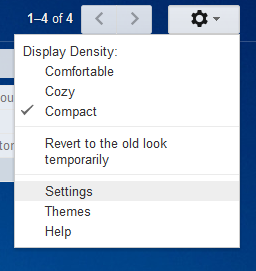
5) Click on the Accounts tab, 3rd from the left.
6) Click "Add another email address you own". Uncheck "Treat as an alias"
7) Enter the email and click verify. They'll send you a code to your existing email for you to enter here.
8) Now click 'make default' just to the right of the new email on the settings screen.
All done!
Now when anyone sends email to [email protected] it'll get automatically forwarded to [email protected] and when you read it in your gmail account it'll say to: [email protected]
When you click reply it'll automatically send it from [email protected], so from the perspective of the person who sent you the mail it doesn't look like you're using gmail.
Done! Enjoy.
You can use your own domain with a gmail account without using ANY hosting companies or email servers. You can actually send and receive email from within gmail so it'll appear from [email protected].
This is incredibly cool for multiple reasons.
1) Gmail gives you 7 gig and increasing space for each account and never deletes, so you'll have a record going back YEARS with all your important mail that you'll never ever ever lose.
2) Their spam filters are amazing.
3) You can even use imap and smtp with them so you can still use your favorite email client and have all your accounts in one place.
This is how you do it. Let's say you have mycompany.com as your domain you want to use.
1) Create a new gmail account and call it [email protected], or whatever you like.
2a) Log in to your domain registrar, namecheap, godaddy etc, then setup email forwarding to your new gmail account, [email protected]. If you can't see how to do it just google "email forwarding godaddy" or "email forwarding my_registrar" for instructions.
2b) You can add as many aliases as you like: [email protected] [email protected], [email protected] and so on and have them all forwarded to your new [email protected].
3) Login to your new [email protected]
4) Click on settings
5) Click on the Accounts tab, 3rd from the left.
6) Click "Add another email address you own". Uncheck "Treat as an alias"
7) Enter the email and click verify. They'll send you a code to your existing email for you to enter here.
8) Now click 'make default' just to the right of the new email on the settings screen.
All done!
Now when anyone sends email to [email protected] it'll get automatically forwarded to [email protected] and when you read it in your gmail account it'll say to: [email protected]
When you click reply it'll automatically send it from [email protected], so from the perspective of the person who sent you the mail it doesn't look like you're using gmail.
Done! Enjoy.


