Permanently Closed Marketplace Sales Thread

Status
Not open for further replies.
Just had an issue when trying to add multiple profiles/websites at once. It added the first one but not the rest. Was just stuck at adding profile...

Another question; I just read over the TOS, and it says about not renting, sharing or leasing it. Does this mean you can't provide a blasts service?
 
It's been about three hours already since I hit stop. It's still in "stopping processes". Does it really take that long?

Is this some sort of bug? If yes, how do I stop the process so I can see the confirmed links?
 
Last edited:
I noticed Captcha Sniper support was added. Can you tell us specifically which platform/footprint/captcha images should be enabled?

Keep up the amazing work.
 
I purchased this today and must say it seems very easy..

I wanted to ask however why i cant see the links.

I mean in the log is says

01-Dec-11 6:09 PM | Posted success blog comment to: xxxxx ( i cant post url yet as im too new)

yet i cannot see the comment on the page.. the last comment was in 2010 ??

Am i missing something or have i set it up wrong somehow ?
 
Got like 30 profiles in it, but i cant see the ones at the bottom.

Do you not have a scroll bar? If not, while I look into this can't you maximise the window to see the profiles at the bottom?

Would like to see this in action first with results.
I want to see the quality and relevancy of this, so not getting "Hey! Nice post!" comments with a backlink that looks spammy.

Of course the bundled comments will appear spammy, not as short as your example but along similar lines, but you can always set your own custom comments for each profile if you would prefer.

Just had an issue when trying to add multiple profiles/websites at once. It added the first one but not the rest. Was just stuck at adding profile...

Another question; I just read over the TOS, and it says about not renting, sharing or leasing it. Does this mean you can't provide a blasts service?

How do you mean you were trying to add multiple at once? There is no option to add multiple profiles at the same time. If you are referring to the "Add multiple Pages to a Single Profile" it does what it says, it will add a group of pages to a single profile and promote them all from a single profile. Adding profiles with the same search keywords is a bad idea as they will have the same linking pattern.

You can sell whatever service you want using NHSEO, there are even people on this forum that have given away a service of running their website through NHSEO for free, this is absolutely fine.

It's been about three hours already since I hit stop. It's still in "stopping processes". Does it really take that long?

Is this some sort of bug? If yes, how do I stop the process so I can see the confirmed links?

This is not common at all. It is possible that you are running too many threads for your machine/connection. How many threads is it set at?

I noticed Captcha Sniper support was added. Can you tell us specifically which platform/footprint/captcha images should be enabled?

Keep up the amazing work.

I don't really understand why you would ever turn any captcha off in CS, maybe there is a reason but I haven't noticed a difference with less enabled. Anyway, The captcha types most commonly used are type 16 and type 30.

If you know why you would turn any of the captcha types off I would actually like to know, never hurts to understand these things better.

any good reviews guys. So I will be purchase.

First post, main website, this whole thread. There are countless good reviews on this and I can guarantee not a single one was incentivized or paid for, every review is from a genuine user. Also there is even a thread where a user managed to get #1 in Google using just No Hands SEO

I purchased this today and must say it seems very easy..

I wanted to ask however why i cant see the links.

I mean in the log is says

01-Dec-11 6:09 PM | Posted success blog comment to: xxxxx ( i cant post url yet as im too new)

yet i cannot see the comment on the page.. the last comment was in 2010 ??

Am i missing something or have i set it up wrong somehow ?

From the FAQ in this thread:
Why do I not see my link when I check a post?
Not all posts will be accepted and result in a link. When No Hands SEO runs it will do all of the link checking for you automatically and ping the page if your link is found. If you are looking at the unconfirmed links or the posted links you are not looking at the confirmed links. If you want to see what links have been confirmed output the confirmed list by right-clicking on your profile(s).
 
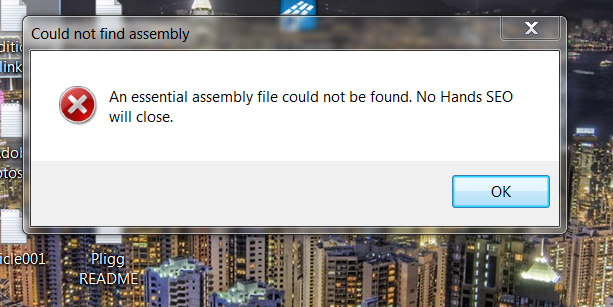
Hi when i try to update the software i get this error.

24yaagk.png
 
Hi when i try to update the software i get this error.

24yaagk.png

Solution is exactly as the error suggests, the database is already in use, probably by another instance of No Hands SEO, if you cannot find it just restart your computer and it will work after.
 
I restarted my computer 3 times already, same error.
I just start the program, click update and this error comes out
 
I restarted my computer 3 times already, same error.
I just start the program, click update and this error comes out

Ah you are using the portable version, in that case you do not have the required file access permissions. As the members area suggests it is always best to have your NHSEO folder in your My Documents folder due to this reason.

Try copying your NHSEO folder to the "My Documents" folder, I would imagine this would get it working fine. Also unless you need to be running multiple instances I would strongly advise using the installed version as it just generally causes less issues such as this one.
 
Ah you are using the portable version, in that case you do not have the required file access permissions. As the members area suggests it is always best to have your NHSEO folder in your My Documents folder due to this reason.

Try copying your NHSEO folder to the "My Documents" folder, I would imagine this would get it working fine. Also unless you need to be running multiple instances I would strongly advise using the installed version as it just generally causes less issues such as this one.

Nope im not using the portable version and infact i've the folder in mydocuments.
 
Nope im not using the portable version and infact i've the folder in mydocuments.

I'm sorry but I don't understand the problem you are seeing here. This message is only shown when the app is loaded and the database is already in use/not accessible so if you are able to load into the app to update it you can load the app.

The only thing I can think of without more details is that you have managed to remove the database file somehow. In your My Documents folder there should be a "No Hands SEO" folder that has a file in it called DATABASE.db3, if this is write protected or not there at all you will not be able to login.

If you can give some idea of what is and isnt happening and when I will be able to better help you. The more details you can give the better. The other alternative is to setup teamviewer for me to get in and sort it out for you.
 
0Pqcg
just started saying this.

Have you deleted your DATABASE.db3 file from your "My Documents\No Hands SEO" folder? or deleted the folder itself? If so, the easiest solution is to reinstall (no need to uninstall).
 
I don't have a scroll bar, at full screen i still can't see past number 31

Currently I don't have a solution to this as I haven't heard of anyone else having this problem. I can see from your image that you must be using quite a high resolution for your monitor and using something to increase the size of everything and would assume this is what is causing the problem.

I'll have a look into it but for now if you were to remove the visual aid on the computer, could be something as simple as increase size of everything by about 20-50%, you should be able to use the control fine.
 
I am debating on buying Captcha Sniper for this, how much higher would the success rate be, has anyone used it with captcha sniper?

Love this software so far, keep up the good work!
 
Currently I don't have a solution to this as I haven't heard of anyone else having this problem. I can see from your image that you must be using quite a high resolution for your monitor and using something to increase the size of everything and would assume this is what is causing the problem.

I'll have a look into it but for now if you were to remove the visual aid on the computer, could be something as simple as increase size of everything by about 20-50%, you should be able to use the control fine.


That image is from sniping tool. My resolution is 1600x900 laptop. I don't use any visual aids.
 
Status
Not open for further replies.
Back
Top