
You are using an out of date browser. It may not display this or other websites correctly.
You should upgrade or use an alternative browser.
You should upgrade or use an alternative browser.
Permanently Closed Marketplace Sales Thread
- Thread starter rickstar
- Start date
- Status
- Not open for further replies.

_Biju_
Junior Member
- Nov 18, 2010
- 171
- 68
Yahoo Account Creator is working just fine on manual. Just follow these steps:
1) Load for new
2) Enter Captcha
3) Create Account
4) Browse down the window
5) Enter the re-captcha
6) Copy Paste the previous text into Yahoo Account Creator (don't know if this is neccesary)
7) Hit Create Account again
8) It will append the login info to the default file
9) Close the software
10) Open it again
11) go back to step 1
1) Load for new
2) Enter Captcha
3) Create Account
4) Browse down the window
5) Enter the re-captcha
6) Copy Paste the previous text into Yahoo Account Creator (don't know if this is neccesary)
7) Hit Create Account again
8) It will append the login info to the default file
9) Close the software
10) Open it again
11) go back to step 1

rickstar
Elite Member
- Dec 9, 2009
- 1,999
- 885
@everybody
Made a little typo with the recent update (in the interest of improving it) and decaptcher may give you a tiny error. Not a problem! Will either downgrade or upgrade in a couple of hours and everything will be back up to full speed.
Alternatively, you can re-download it from your original link.
Thanks for waiting!
Rick
Made a little typo with the recent update (in the interest of improving it) and decaptcher may give you a tiny error. Not a problem! Will either downgrade or upgrade in a couple of hours and everything will be back up to full speed.
Alternatively, you can re-download it from your original link.
Thanks for waiting!
Rick

rowebil
Regular Member
- Sep 20, 2010
- 392
- 53
I was very successful with torrents.. Look at all my threads in torrent section..
I should go back to it because it's the only thing that worked for me.
I got over $666 with torrents. Around $525 in 4 days, then it was a few cents a day here and there, and now I'm at $666.
That was one movie.
Torrents work guys. I have proof of EVERYTHING - if you need encouragement.
Buy this now, and upload like nothing before.
I can guarantee you, the price at which he's selling it for, if it works - it's totally worth it..
I should go back to it because it's the only thing that worked for me.
I got over $666 with torrents. Around $525 in 4 days, then it was a few cents a day here and there, and now I'm at $666.
That was one movie.
Torrents work guys. I have proof of EVERYTHING - if you need encouragement.
Buy this now, and upload like nothing before.
I can guarantee you, the price at which he's selling it for, if it works - it's totally worth it..

EmailMaster
Elite Member
- May 28, 2011
- 4,140
- 1,210
are u going to make it create accounts on those torrent sites ? just wondering 
_Biju_
Junior Member
- Nov 18, 2010
- 171
- 68
I wanted to make a list of things that will improve, but I will PM you the list when it's complete.
There's one thing that I would like to mention here cause it's most important:
I know the batch submit doesn't work now, even if it's available, but it will be really nice if you can use something like {name} in the description, or {words} in the tags field, and it will know that "name" means auto-complete with the torrent name, and "words" will just split the torrent name in every possible combination and submit that as tags.
Just an idea that will be very easy to code.
There's one thing that I would like to mention here cause it's most important:
I know the batch submit doesn't work now, even if it's available, but it will be really nice if you can use something like {name} in the description, or {words} in the tags field, and it will know that "name" means auto-complete with the torrent name, and "words" will just split the torrent name in every possible combination and submit that as tags.
Just an idea that will be very easy to code.
Bensonbravo
Registered Member
- Nov 29, 2011
- 90
- 10
Great app..Would i able to get any discount bro ?

DisavowedKing
Regular Member
- Sep 1, 2010
- 263
- 89
Any discounts for people that purchased Answer Assault?
rickstar
Elite Member
- Dec 9, 2009
- 1,999
- 885
@Biju
Thanks for the feedback!
Batch upload does work just go ahead and press browse then either ctrl + click or shift + click on all the torrents you want uploaded.
Will take a look at other suggestions.
Keep in mind that it's been about 4 days since we released so there are lots of things to come. For easiest response email me a list of suggestions in .txt format.
@DisavowedKing
Yup, there is. Discount code pm'd. All AA users will also receive an email shortly.
Thanks for the feedback!
Batch upload does work just go ahead and press browse then either ctrl + click or shift + click on all the torrents you want uploaded.
Will take a look at other suggestions.
Keep in mind that it's been about 4 days since we released so there are lots of things to come.
For easiest response email me a list of suggestions in .txt format.@DisavowedKing
Yup, there is. Discount code pm'd. All AA users will also receive an email shortly.
DisavowedKing
Regular Member
- Sep 1, 2010
- 263
- 89
I was wondering why you hadn't notified us VIA email or PM that you released a new product! Either way I love Answer Assault and can show links and increased traffic from Yahoo!
Can't wait to see what this will do for my traffic now too!
Can't wait to see what this will do for my traffic now too!
rowebil
Regular Member
- Sep 20, 2010
- 392
- 53
You mean kinda like having different titles? It's the same file and all, but it's uploaded 10 times with different titles and descriptions?
That's a great feature.. You don't want to be 1/100 people with that movie. You want to be 15/100 so the more likely someone will pick one of your accounts to download from.
That's a great feature.. You don't want to be 1/100 people with that movie. You want to be 15/100 so the more likely someone will pick one of your accounts to download from.
I wanted to make a list of things that will improve, but I will PM you the list when it's complete.
There's one thing that I would like to mention here cause it's most important:
I know the batch submit doesn't work now, even if it's available, but it will be really nice if you can use something like {name} in the description, or {words} in the tags field, and it will know that "name" means auto-complete with the torrent name, and "words" will just split the torrent name in every possible combination and submit that as tags.
Just an idea that will be very easy to code.
rickstar
Elite Member
- Dec 9, 2009
- 1,999
- 885
Got the latest update in hand, double checking everything is fine and it will be dropping shortly.
Features include:
- Spintax support now available in torrent title
- Save Queue checkbox enables/disables whether all items in the queue are saved upon exit.
- Possibly the #name tag feature.
Features include:
- Spintax support now available in torrent title
- Save Queue checkbox enables/disables whether all items in the queue are saved upon exit.
- Possibly the #name tag feature.
EmailMaster
Elite Member
- May 28, 2011
- 4,140
- 1,210
nice

sttiger
Regular Member
- Jul 1, 2008
- 445
- 361
rickstar, please fix the error browser thing. I am unable to get the torrent links after successfully uploading them:
Sumotorrent:
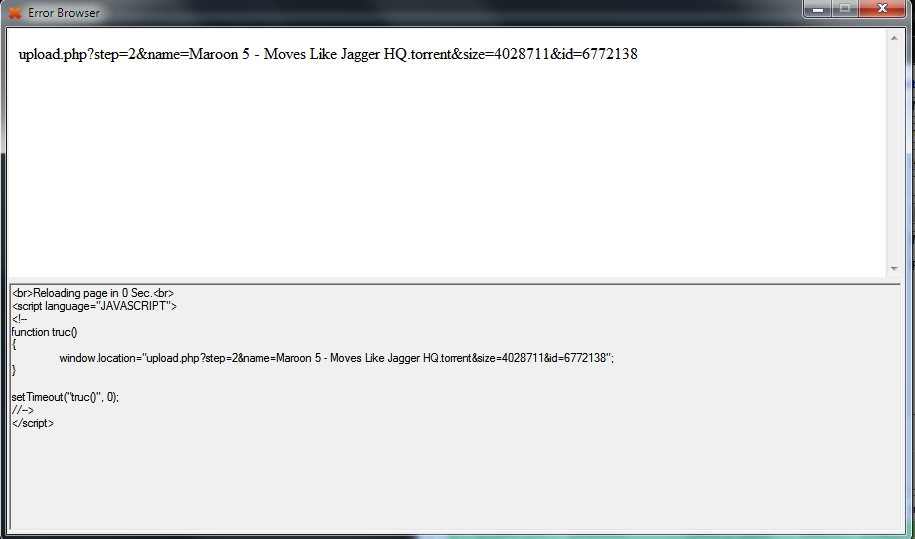
Monova:

And BTJunkie is returning a forbidden 403 error.
Please guide me how do I get the torrent links from Monova and Sumo
Sumotorrent:
Monova:
And BTJunkie is returning a forbidden 403 error.
Please guide me how do I get the torrent links from Monova and Sumo

rickstar
Elite Member
- Dec 9, 2009
- 1,999
- 885
@sttiger
We are working on a simpler way to get the links. Not particularly sure about Monova, but Btjunkie is working on our end.
@black101
No real difference if it's uploaded anonymous or not, both still get uploaded and have the same perks applied.
@Jacton
We don't offer trial versions because we have a refund policy instead. However, if you would like to see how things work I can demo it out for you via Teamviewer.
We are working on a simpler way to get the links. Not particularly sure about Monova, but Btjunkie is working on our end.
@black101
No real difference if it's uploaded anonymous or not, both still get uploaded and have the same perks applied.
@Jacton
We don't offer trial versions because we have a refund policy instead. However, if you would like to see how things work I can demo it out for you via Teamviewer.
- Status
- Not open for further replies.