
You are using an out of date browser. It may not display this or other websites correctly.
You should upgrade or use an alternative browser.
You should upgrade or use an alternative browser.
How to change avatar?
- Thread starter xjackx
- Start date


LBrown
Senior Member
- Mar 22, 2011
- 1,108
- 1,842
According to the FAQ you can upload one after 50 posts (http://www.blackhatworld.com/blackhat-seo/faq.php?faq=vb3_board_faq#faq_common) but it doesn't tell you how. I'd assume it is in your profile, in the same area where you chose your current avatar.
According to the FAQ you can upload one after 50 posts (http://www.blackhatworld.com/blackhat-seo/faq.php?faq=vb3_board_faq#faq_common) but it doesn't tell you how. I'd assume it is in your profile, in the same area where you chose your current avatar.
Yes, but there's no option like that. Just pre-selected avatars...

DebtFreeMe
Regular Member
- Mar 14, 2010
- 430
- 374
If you scroll all the way down to the bottom in the edit avatar area, past all the preselectable avatars you will see the upload option...
If you scroll all the way down to the bottom in the edit avatar area, past all the preselectable avatars you will see the upload option...
I've tried, but there's no such option...
DebtFreeMe
Regular Member
- Mar 14, 2010
- 430
- 374
Hmm. Don't know. That is where it is located for me. I just checked to make sure it was still there.
Maybe you need 100 posts, I'm not sure...
Sorry
Maybe you need 100 posts, I'm not sure...
Sorry

bulletservice
Regular Member
- Mar 1, 2008
- 319
- 342
Go to user cp -> settings and option -> edit avatar ->custom avatar -> from computer -> browse -> select -> upload. Just my 2 cents 

redstone.1337
BANNED
- Dec 30, 2009
- 1,258
- 1,000
Too bad, I can't even upload a custom avatar. Everytime I upload one, it throws a file size error.
Everytime I upload one, it throws a file size error.
lazyfrog
Junior Member
- Jan 19, 2009
- 128
- 51
Go to User CP
On the left hand column find the Edit Avatar in Settings and Options
Click it
You will be having 3 boxes named
Your Current Avatar
Pre-defined Generic Avatars
Custom Avatar
In the first Your Current Avatar box Uncheck Do not use an avatar
In the last Custom Avatar box check Use Custom Avatar
in the last box Click the Choose button Option 2 - Upload Image From Your Computer
Note: The maximum size of your custom image is 100 by 100 pixels or 19.5 KB (whichever is smaller).
Use Microsoft Office picture manager to resize and compress the Avatar images or use any other software to do the same.
Then click save changes.
Thats it.
On the left hand column find the Edit Avatar in Settings and Options
Click it
You will be having 3 boxes named
Your Current Avatar
Pre-defined Generic Avatars
Custom Avatar
In the first Your Current Avatar box Uncheck Do not use an avatar
In the last Custom Avatar box check Use Custom Avatar
in the last box Click the Choose button Option 2 - Upload Image From Your Computer
Note: The maximum size of your custom image is 100 by 100 pixels or 19.5 KB (whichever is smaller).
Use Microsoft Office picture manager to resize and compress the Avatar images or use any other software to do the same.
Then click save changes.
Thats it.

Madruga
Senior Member
- Mar 16, 2011
- 1,003
- 1,628
Note: The maximum size of your custom image is 100 by 100 pixels or 19.5 KB (whichever is smaller).
Use Microsoft Office picture manager to resize and compress the Avatar images or use any other software to do the same.
Or you can simply do it by going to
Code:
www.picresize.comand get it done in 30 seconds

You have the same problem like me, it says in FAQ that you can upload a custom avatar when you've reached 50 posts and been a member for 30 days.
But it seems that there's a problem with that and some users are stuck in the newbie status, like me.
Yes, this!
There's no other option, only pre-selected avatars...

adbot
Power Member
- Feb 12, 2011
- 511
- 549
Its a bug in the system. You will notice that you are also a newbie. You will be permanently stuck at newbie no matter how many posts you make etc. Also you will never have the option to upload an avatar. Most unfortunate. Try and get someone to reset your account or go ahead and get yourself banned. When the ban lifts everything will be fixed. Worked for me.


evilman11
Junior Member
- Apr 6, 2009
- 150
- 430
they must have changed the restrictions on newer accounts or something. back in 2009, when i got to 50 post, i didn't have any problems uploading my own avatar. anyways.. this is where it should be located at in your control panel:

and the place to upload your avatar should be at the bottom of your avatar selection page like this:
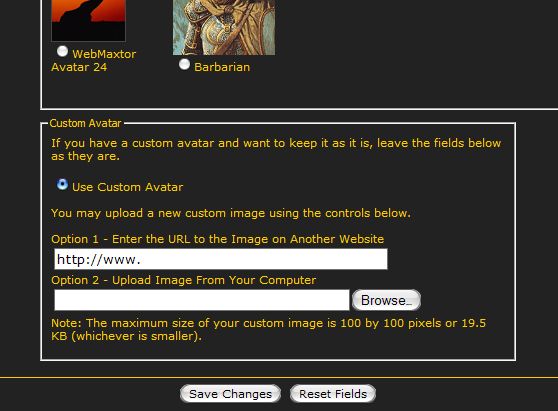
and the place to upload your avatar should be at the bottom of your avatar selection page like this:
Last edited:
