Tool to extract URLs from file

postcd

BANNED
Joined
Nov 14, 2009
Messages
145
Reaction score
8
I need just this simple tool. But i never found any working free or cracked.

Only software which i found it can do it is TextPipe, but on Windows 2008 R2 Datacenter it do not works. (need server license)

Please any software which will extract URLs from BIG txt file. I mean like 50MB big file.

Urls has many forms, like questionmarks htm, html or end with backlash


Thanks
 
You are right , TextPipe is the best , I have uploaded here one (search for it if you have another one from other source) and it must work everywhere on every machine , if it doesn't , try this Link Extractor 2.4:

http://www.blackhatworld.com/blackhat-seo/member-downloads/275046-get-link-extractor-2-4-a.html

50Mb is not a big file at all , it is a small file , TextPipe can manage more than 10Gb , and this software can handle 1GB without a problem too , only problem is that this 2.4 version has 32000 lines limit (urls) so I don't know how many URLs you need to extract . For this reason I have purchased Link Extractor 3.0 which can handle unlimited Urls (lines) , but as you've said , TextPipe is absolutely best .
 
Thanks, i definatelly need more than 32000 lines to be extracted. Please that text pipe you are talking about is Single User license or Server edition?

Go to Help/About
 
Thanks, i definatelly need more than 32000 lines to be extracted. Please that text pipe you are talking about is Single User license or Server edition?

Go to Help/About
To tell the truth I don't know , I don't see a difference between them , but it does absolutely everything , try it , you will see .
 
Im still searching for the tool. Or Text Pipe Server edition. Please anyone can recommend me?
 
Difference is that Single edition do not runs on server.. i mean VPS Windows 2008 R2 Datacenter edition... Program says i need server edition. thats it.. but google did not returned any good results to me
 
Difference is that Single edition do not runs on server.. i mean VPS Windows 2008 R2 Datacenter edition... Program says i need server edition. thats it.. but google did not returned any good results to me
I see now.
 
I hacked something together in the last few minutes that should work for you. I assume you're using windows, the same concept works on anything capable of running a regex... Anyways, save this file as links.vbs or whatever-you-like.vbs ...

Fire it up with a simple links.vbs file-to-parse-with-links-to-extract.txt and let it work. You'll find a file called links-[date of execution].txt on c:\ when it's done. Feel free to tweak it as you wish.

You can also create the vbs file and put on your desktop then drop a txt file to parse whenever you need it if you don't want to mess with commandline. ;)

Code:
'''''''''''''''''''''''''''''''''''''''''''''''''''''''''''''''''''''''''''''''
' Sirgold's AWESOME RegExp to match dirty links
'''''''''''''''''''''''''''''''''''''''''''''''''''''''''''''''''''''''''''''''
Set RegularExpressionObject = CreateObject("VBScript.RegExp") 
With RegularExpressionObject
 .Pattern = "\b(https?|ftp|file)://[-A-Z0-9+&@#/%?=~_|!:,.;]*[-A-Z0-9+&@#/%=~_|]"
 .IgnoreCase = True
 .Global = True
End With

'''''''''''''''''''''''''''''''''''''''''''''''''''''''''''''''''''''''''''''''
' Read from file
'''''''''''''''''''''''''''''''''''''''''''''''''''''''''''''''''''''''''''''''
If WScript.Arguments.Count = 0 Then
  WScript.Echo "Missing source file to parse. Aborting." & vbCrLf & vbCrLf & "Drop the file to parse on the script from Windows. Sirgold RULES!"
  Wscript.Quit
End If

strFileToParse = WScript.Arguments(0)

Const ForReading = 1
Set objFSO = CreateObject("Scripting.FileSystemObject")
Set objFile = objFSO.OpenTextFile(strFileToParse, ForReading)

strContents = objFile.ReadAll
objFile.Close

'''''''''''''''''''''''''''''''''''''''''''''''''''''''''''''''''''''''''''''''
' Extract matches
'''''''''''''''''''''''''''''''''''''''''''''''''''''''''''''''''''''''''''''''
Set objMatches = RegularExpressionObject.Execute(strContents)

For Each objMatch in objMatches
  strLinks = strLinks & objMatch.value & vbCrLf
Next

'''''''''''''''''''''''''''''''''''''''''''''''''''''''''''''''''''''''''''''''
' Process Results
'''''''''''''''''''''''''''''''''''''''''''''''''''''''''''''''''''''''''''''''
If strLinks = "" Then
  WScript.Echo "No Links Found..."
  WScript.Quit
End If

Const ForWriting = 2
strCurDate = Year(now) & Month(now) & Day(now) & Hour(now) & Minute(now) & Second(now) 'Add timestamp to the filename to prevent overwriting
strFileWrite = "c:\links-" & strCurDate & ".txt"
objFSO.CreateTextFile(strFileWrite)
Set objFile = objFSO.OpenTextFile(strFileWrite, ForWriting)
objFile.WriteLine strLinks
objFile.Close
WScript.Echo "Sirgold RULES, done! Check: " & strFileWrite

Should be all...
 
I hacked something together in the last few minutes that should work for you. I assume you're using windows, the same concept works on anything capable of running a regex
You are a lucky man if you can write something like this in a few minutes -:)
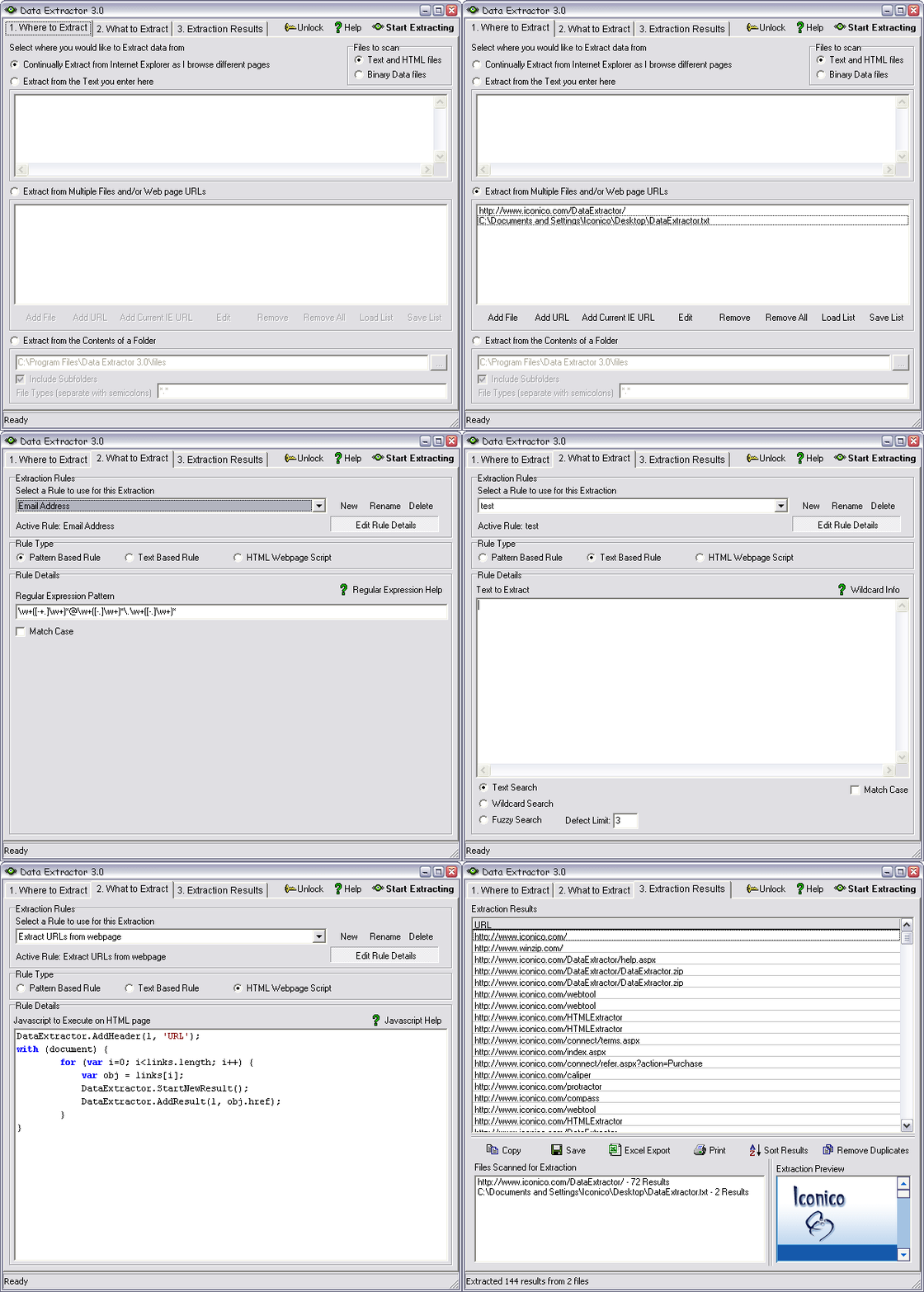
I am not joking , I really envy you .The program I post above and now also below is the program where you can put regex , javascript , html scripts (templates ) to make extracts from , very nice program but has some bugs , that's why I use it rarely

Maybe somebody would be interested so I will say more about it here , download latest version from their website and use serial below:


DataExtractorScreenshot.gif


Data Extractor 3.3


  • Easily extract Email addresses or URLS from text files or the web
  • Extract as you surf pages using Internet Explorer
  • Automatically follow links to extract from entire domains
  • Extract whatever you want from webpages with our NEW powerful javascript enabled rules
  • Search multiple files, URLs and directories
  • Drag and drop files for extraction
  • Export results directly to Microsoft Excel
  • Use fuzzy matching to find information when you're unsure of exact data
  • Specify wildcards or use advanced regular expressions to match any pattern
  • Copy, Save and Print at the touch of a button
  • Use the feature-limited trial version for an unlimited time


If you want full version download latest version from their website :

Code:
http://www.iconico.com/DataExtractor/

and add this serial:
Code:
6080-0148-9448
it should work
 
Last edited:
Can I put that script you have written above to Data Extractor 3.0 to make it run ?
http://www.iconico.com/DataExtractor/

Hey brother,

you just need to cut-paste the script I wrote in a simple text file with extension .vbs that's all! ;) As simple as Right click -> New -> Text Document -> F2 (change filename making sure you can change the file extension) -> extract-links.vbs or somthing.vbs

Drop the file that contains the links on it and let it work. The regex is really solid and shouldn't have any problems. As suggested you could use the same regex with grep but you'd have to mess with command line.

That's why dragging and dropping a file on this script would probably be more convenient for you. Then browse to c:\links-[date].txt and there you go with your extracted links!

You can make a 2nd copy of this vbs file and even tweak the regex to extract hmm say emails or whatever else... It could turn out to be a good exercise should you want to hone your programming skills! :) FYI, this is really a basic snippet! ;)

Finally if you take the time to learn something like visual basic script (wsh, plenty of resources on msdn) that's a "natively supported language on windoze" (remember the w0rm I love you?? lol) you'll find that despite its asinine syntax (shared with all the vbasic variants..) it's a really powerful toy to simply and effectively get shit done, with full capabilities of interacting with ActiveX objects, remote resources and so forth.

HTH.
 
One line in .NET =>

Regex.Matches(TextToSearchFor, "/^(https?:\/\/)?([\da-z\.-]+)\.([a-z\.]{2,6})([\/\w \.-]*)*\/?$/ ");

LOL.. You don't need Software for that.

:D
 
One line in .NET =>

Regex.Matches(TextToSearchFor, "/^(https?:\/\/)?([\da-z\.-]+)\.([a-z\.]{2,6})([\/\w \.-]*)*\/?$/ ");

LOL.. You don't need Software for that.

:D

Where do I add it without a software ? -:) Software above has a field for that , where do I add this string in my computer ?
 
One line in .NET =>

Regex.Matches(TextToSearchFor, "/^(https?:\/\/)?([\da-z\.-]+)\.([a-z\.]{2,6})([\/\w \.-]*)*\/?$/ ");

LOL.. You don't need Software for that.

:D

LOL.. You need VS Compiler (which itself is a software) to use the above line of code. Knowledge about how to compile a code is also a must.
 
Back
Top