
DMSEsquire
BANNED
- Dec 4, 2010
- 235
- 70
Fifteenth post! Now time to PM. Just send email and transaction ID from the Request Serial tab, right?


So i wanted to test it , i made all the setting needed , added a few forums , captcha manual and started the program to create.
After i input the captcha requested i get "Max retries Failed" to all the forums and no profile created.
 were on it..there will be a update soon with the Bug fixes


1. Launch VSEOProfiler.exe
2. In main tab enter your website info and email address; enter pop3 settings of your email account in verifier tab
3. Create 2 files - firstname.txt and lastname.txt (you can name those files whatever you want) and fill them with first names and last names (search google for "top names)
4. In tokens/macros create 2 new tokens: #FIRSTNAME# and point it to firstname.txt and #LASTNAME# which will be pointed to lastname.txt
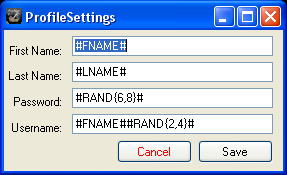
5. Go to settings>profile settings and enter these settings:
#RAND{min,max}# is a function/macro that produces random sequence of alphanumeric (a-z,0-9) characters, min is a minimum length and max is maximum length. You can choose whatever min and max you want and you can place #RAND{x,y}# before and/or after the #FIRSTNAME#.
#RANDA{x,y}# produces only a-z characters
#RANDNUM{x,y}# will have characters 1-9
You don't have to use these macros; if you want, you can just enter regular info in profile settings, but all your profiles will be named the same.
6. Settings>choose one of the captcha settings and configure login info if you're gonna use a captcha service.
7. Settings> configure proxy if you're gonna use one
8. Settings> thread settings; choose how many threads you want to run. I can run 100 threads on my 1.8ghz 1gb ram machine easily.
9. Load>Load sites>from file or from clipboard. Use your own list of forums or the sites.txt that comes with the program.
10. DATABASE>LOAD>choose _db1.7.vpdb from the program folder (you'll have to do this every time you start the program)
11. Start>check urls if you want to check the list for forums that the program could handle (this step is optional)
12. SAVE YOUR SETTINGS! Project>save; because they're not saved automatically
13. Start>create accounts.
14. after that's done, go to start>run verifier (it will click activation links in emails)
15. Start>update profiles. This will add all the info and links to all the profiles.
Tips:
- When you're done creating profiles, click export>export all site:account. You'll be able to load all the sites with account info later and change profile links.
- Make sure you read Help>software manual
- For now, only use vbulletin forum lists, because the software doesn't support other platforms at this moment.
Thanks for the tutorial, I don't think I would've ever figured it out.
Created a bunch of profiles but I messed up somewhere because all my user names are like this #Jason###Rand{2,4}#. Haha, I'm sure I skipped a step or two but at least I got it to work, somewhat
thanks for the tutorial!
is there any way to export the successfull profile urls?

i guess i'm the only one who didn't understand too much how it's working?
anyway, i will wait for some besic guide
thanks to the OP!
You have an extra hash sign between jason and rand, that's why the software didn't recognize the token
Actually, I messed up when I typed it here, this is what it shows as registered #Jason##Rand{2,4}#
#RAND{2,4}#If I have a list of forum domains, is there a way to identify which ones are vbulletin?

