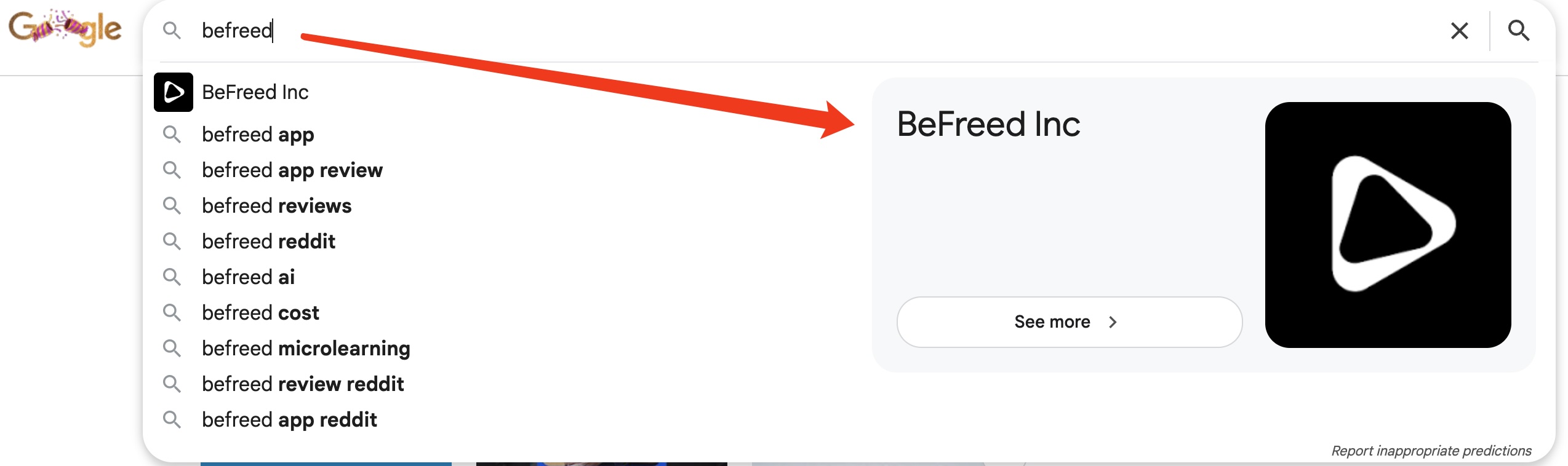
That large icon in Google autocomplete next to brand names is not a separate feature you can apply for or request. It appears automatically when Google recognises your brand as a verified entity in its Knowledge Graph.
So the real question is not "how do I get the icon" but "how do I get my brand into Google's Knowledge Graph." The icon is just the result.
Here is what actually works based on research and testing.
The most important step is Organization Schema Markup on your homepage.
This is a small piece of code you add to the head section of your website. It tells Google your brand name, logo, social profiles, app store links, and Wikidata entry all in one place.
I can share the exact code format as an example if you would like.
Why each part matters:
The @id line is the most important. It gives your brand a permanent unique ID. Google uses this to connect your website, your app, your social profiles, and your Wikidata entry as one single entity. Without this line Google may see all those profiles as separate unrelated things.
The logo width and height fields tell Google your logo dimensions. Google's autocomplete prefers square images at 512 x 512 pixels. If you just put a URL without dimensions Google has to guess. Specify the dimensions and you remove that uncertainty.
The sameAs app store links are the secret that brands like BeFreed Inc used. Adding Google Play and Apple App Store links tells Google directly that your website and your app are the same entity. This combined presence across web and app platforms accelerates Knowledge Graph recognition significantly.
The Wikidata link is the strongest trust signal of all. If your brand does not have a Wikidata entry yet create one. It is free and takes about 30 minutes. Then add the link here.
Beyond the schema code:
Make sure your brand name and logo are identical across every social profile. Inconsistency confuses Google's entity recognition.
Encourage real branded searches from your existing audience. Real human searches accelerate Knowledge Graph recognition faster than any technical fix.
Once a Knowledge Panel appears for your brand claim it immediately through Google Search Console.
How long does this take?
Typically four to eight weeks after implementing everything before you see results. It is not instant. Google needs time to crawl the schema, verify your entity signals, and update the Knowledge Graph. Be patient and consistent.
Test your schema using Google's free Rich Results Test at search.google.com/test/rich-results before going live to make sure everything is implemented correctly.
Hope this helps everyone who has been wondering about this feature.