My hosting is terrible?

scrivimelo

Registered Member
Joined
Oct 3, 2025
Messages
58
Reaction score
10
I’ve had problems with my hosting since I registered my domain. For weeks I was basically the only user, with zero visitors, and I kept getting HTTP 522 errors on even simple actions.

I opened a ticket and they told me I was using too many resources. They said it might be related to how I configured my WordPress plugins.

I didn’t have many plugins and I thought everything was set up correctly, but I still ran into errors on simple tasks. For example, I could never use the built-in tag feature and had to install a separate plugin. If multiple requests ran at the same time, it would exceed the server resources.

I’ve been using this hosting since May.

I patched things temporarily with Cloudflare. By tweaking the setup a bit, I managed to get by since most of my content is static.

In the last few days, traffic has increased because of some good Christmas-related keywords. Now almost nothing works outside Cloudflare. For example, the Media Library cannot show the images on the server. Maybe it’s not even related to traffic. Cloudflare should handle most requests. Perhaps it’s just seasonal and no one is monitoring these issues.

I was planning to stay until the end of the year since it’s already paid, then move. But now I’m wondering if it’s better to move immediately to avoid risking growth.

I’m open to advice on what to do next and on possible alternatives, although my options are limited since I’m using a .it domain.

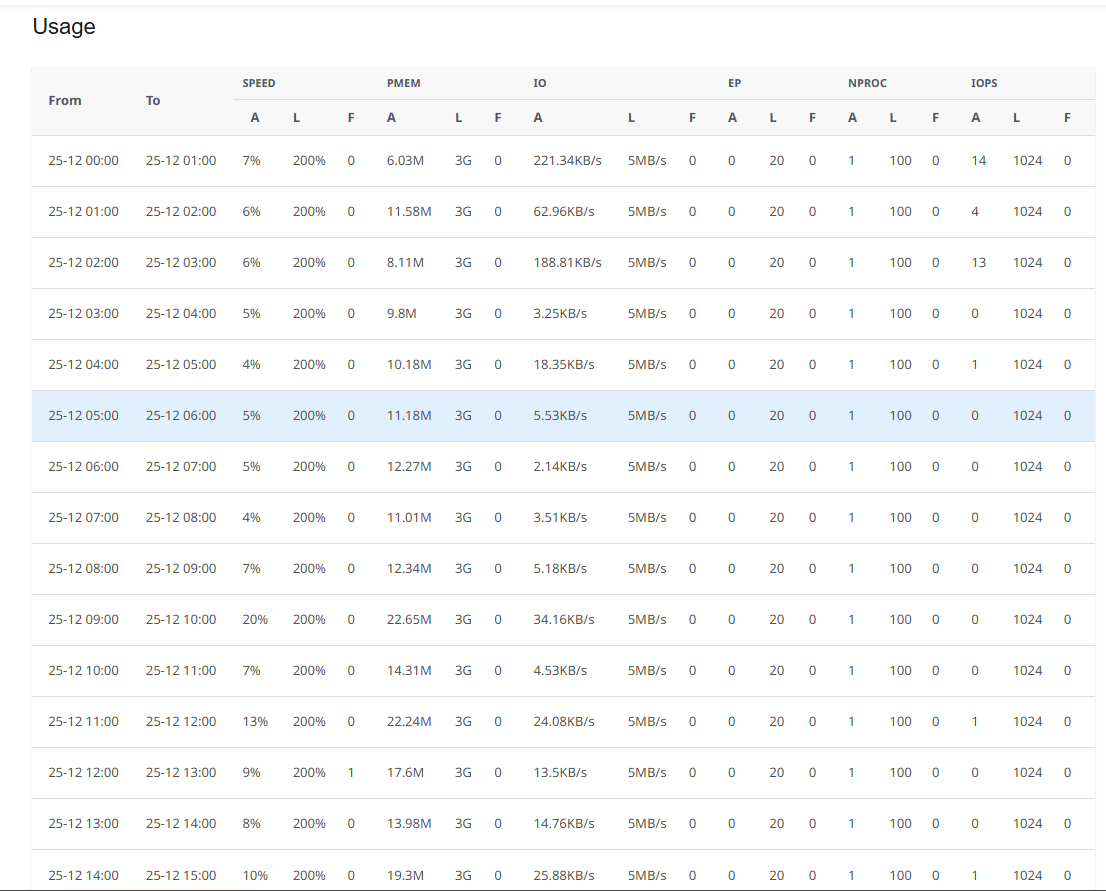
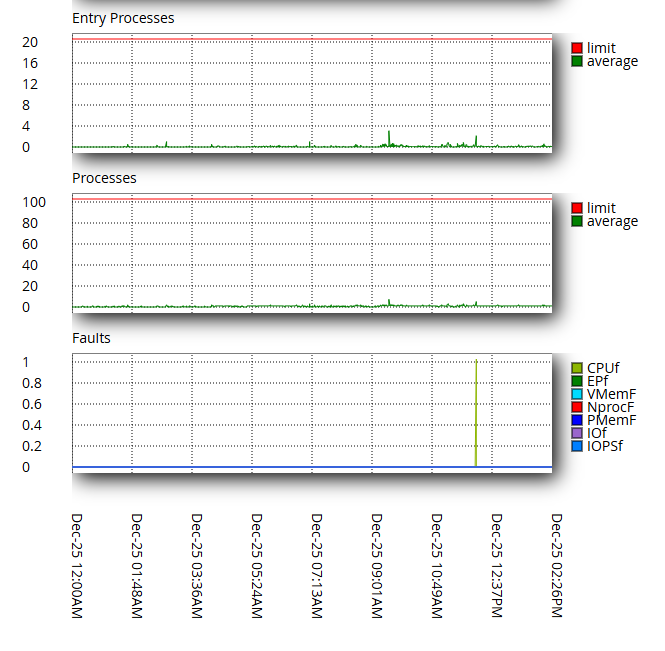
The strange thing is that the hosting tools don’t really show much about resource usage either.

1766669439426.png


1766669466277.png


1766669486174.png


1766669514738.png


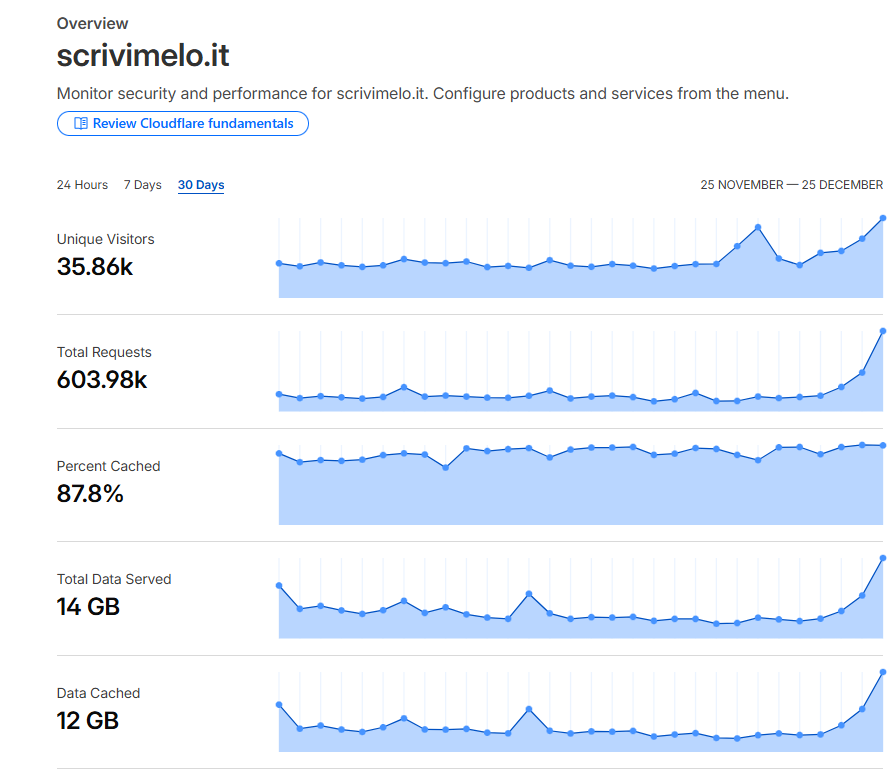
These are my current visitors in the last month:

1766669704757.png


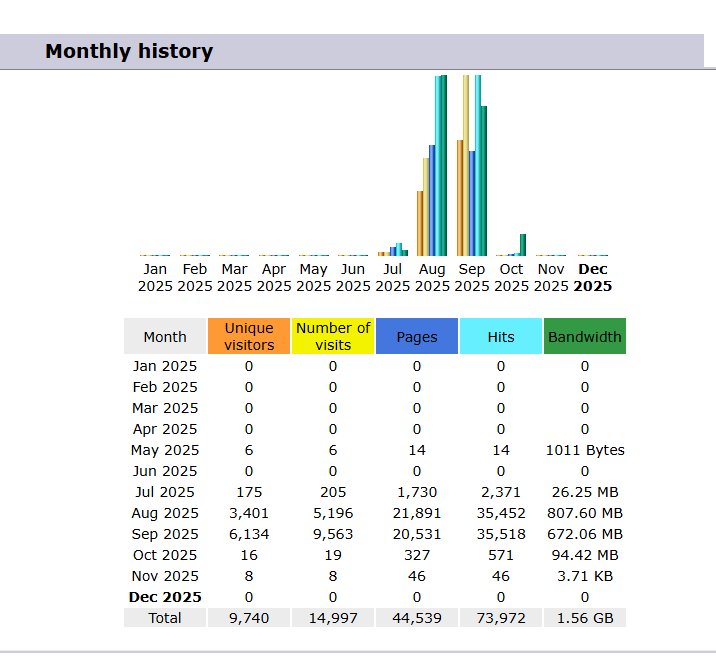
I'm not sure if Awstats works in the server because after I actived Clodflare the server should receive less request but not zero:

1766670178952.png


And these are the resource paid that they said that I've exceed:

1766669886016.png


1766670291037.png
 

Attachments

  • 1766669979001.png
    1766669979001.png
    32.3 KB · Views: 40
Get Namecheap hosting. Very cheap and their support is also very helpful. Sometimes they would go out of their way to help you out.
 
Name cheap and hostinger is great if the site isn't for any heavy stuff
If you plan going heavy..try contabo
 
How about you get a vps on namecheap , dedicated server partition , fork out the 10 usd per month instead of wasting time troubleshooting the unfixable or unreliable.

If the providers support sucks and a hosting issue isn't resolved within a live chat worth of time, they suck. Do not join them being a sucker do not give them any business.
 
How about you get a vps on namecheap , dedicated server partition , fork out the 10 usd per month instead of wasting time troubleshooting the unfixable or unreliable.

If the providers support sucks and a hosting issue isn't resolved within a live chat worth of time, they suck. Do not join them being a sucker do not give them any business.

Namecheap seems a good hosting but they don't support .it domains, also if I imagine this can be fixed in some way...moreover if 99.9% of my users are in Italy will be better also if the server is in the same place...
 
Namecheap seems a good hosting but they don't support .it domains, also if I imagine this can be fixed in some way...moreover if 99.9% of my users are in Italy will be better also if the server is in the same place...
Last time I checked NC is an accredited registrar and the hosting part has little to do with the top level domain support. It should totally work.

Don't worry about the users and server location, a dedicated vps will always be much faster than a shared hosting with 1000 other websitesnon the webserver(not joking, usually it's like 900 a piece) . And safer. If one of the websites on shared hosting gets targeted for ddos , everyone pays, if the server gets somehow breached , everything's hacked.

Dedicated vps you'll have to make it safe yourself, but should totally work on namecheap. Or hetzner or DO etc.
 
Well, some advertise one thing and provide another, like in your example.
For me, we like to clarify, for example, we present the resources in the plans before you buy them, so everything will be clear. I hate those advertisements where they claim some ridiculous amount of RAM and other specs while it's shared with many others. Unless it's a VPS, you don't have those resources, not the CPU and not the memory; it's far from profitable for any hosting provider to dedicate those resources to one client unless you paid a high amount monthly.
 
I’ve had problems with my hosting since I registered my domain. For weeks I was basically the only user, with zero visitors, and I kept getting HTTP 522 errors on even simple actions.

I opened a ticket and they told me I was using too many resources. They said it might be related to how I configured my WordPress plugins.

I didn’t have many plugins and I thought everything was set up correctly, but I still ran into errors on simple tasks. For example, I could never use the built-in tag feature and had to install a separate plugin. If multiple requests ran at the same time, it would exceed the server resources.

I’ve been using this hosting since May.

I patched things temporarily with Cloudflare. By tweaking the setup a bit, I managed to get by since most of my content is static.

In the last few days, traffic has increased because of some good Christmas-related keywords. Now almost nothing works outside Cloudflare. For example, the Media Library cannot show the images on the server. Maybe it’s not even related to traffic. Cloudflare should handle most requests. Perhaps it’s just seasonal and no one is monitoring these issues.

I was planning to stay until the end of the year since it’s already paid, then move. But now I’m wondering if it’s better to move immediately to avoid risking growth.

I’m open to advice on what to do next and on possible alternatives, although my options are limited since I’m using a .it domain.

The strange thing is that the hosting tools don’t really show much about resource usage either.

View attachment 495830

View attachment 495831

View attachment 495832

View attachment 495833

These are my current visitors in the last month:

View attachment 495837

I'm not sure if Awstats works in the server because after I actived Clodflare the server should receive less request but not zero:

View attachment 495840

And these are the resource paid that they said that I've exceed:

View attachment 495838

View attachment 495841

Your hosting support may be correct.

The 522 error from Cloudflare usually indicates a timeout. A timeout can occur when the website does not respond fast enough. In cPanel, I see "1 CPU fault". Based on this, I'd say your WordPress website is doing some heavy processing, which may be causing a timeout. You may wish to check your site's configuration and see if you are sending any external API calls or if a plugin/theme is broken.

The 525 error means that there is an SSL certificate error, and it needs to be fixed. This is most likely caused by an invalid Cloudflare configuration (switch to "Full" SSL mode in CF) or by your domain not having SSL installed in your hosting account (unlikely, as cPanel should automatically install Let's Encrypt). Also, make sure your website is configured to use HTTPS.

Review these things and your site should work just fine.

Your hosting account has 2 CPU cores and 3GB of RAM. That's enough for a lot more visitors than you get, so the issue is most likely with your website.
 
Your hosting support may be correct.

The 522 error from Cloudflare usually indicates a timeout. A timeout can occur when the website does not respond fast enough. In cPanel, I see "1 CPU fault". Based on this, I'd say your WordPress website is doing some heavy processing, which may be causing a timeout. You may wish to check your site's configuration and see if you are sending any external API calls or if a plugin/theme is broken.

The 525 error means that there is an SSL certificate error, and it needs to be fixed. This is most likely caused by an invalid Cloudflare configuration (switch to "Full" SSL mode in CF) or by your domain not having SSL installed in your hosting account (unlikely, as cPanel should automatically install Let's Encrypt). Also, make sure your website is configured to use HTTPS.

Review these things and your site should work just fine.

Your hosting account has 2 CPU cores and 3GB of RAM. That's enough for a lot more visitors than you get, so the issue is most likely with your website.
Thank for your reply, yes 522/525 was a problem specific of the Christmas period, I believe that there was some problems in the server, in the past I had also some problems with SSL in my hosting and I decided to use Cloudflare certificate.

By the way I forgot to mention that, before these days, the error that make me think that my host was terrible is the http 507 (insuffcient storage), use seems not only when you exceed storage (because I don't) but also when you use too much CPU...

I already migrated to a new host and seems working better, of course I need to wait a bit to evaluate: I'm just a bit sad that I had to migrate in the moment where my website was improving exponentially, but I didn't loose a lot, I can restart to work and hoping that Google will notice that I'm improving...
 
If you need reliable and professional web hosting services, try GTHost.com or NeironVPS.com vps solutions. They provide excellent hosting solutions with great flexibility and customization options.
 
I’ve had problems with my hosting since I registered my domain. For weeks I was basically the only user, with zero visitors, and I kept getting HTTP 522 errors on even simple actions.

I opened a ticket and they told me I was using too many resources. They said it might be related to how I configured my WordPress plugins.

I didn’t have many plugins and I thought everything was set up correctly, but I still ran into errors on simple tasks. For example, I could never use the built-in tag feature and had to install a separate plugin. If multiple requests ran at the same time, it would exceed the server resources.

I’ve been using this hosting since May.

I patched things temporarily with Cloudflare. By tweaking the setup a bit, I managed to get by since most of my content is static.

In the last few days, traffic has increased because of some good Christmas-related keywords. Now almost nothing works outside Cloudflare. For example, the Media Library cannot show the images on the server. Maybe it’s not even related to traffic. Cloudflare should handle most requests. Perhaps it’s just seasonal and no one is monitoring these issues.

I was planning to stay until the end of the year since it’s already paid, then move. But now I’m wondering if it’s better to move immediately to avoid risking growth.

I’m open to advice on what to do next and on possible alternatives, although my options are limited since I’m using a .it domain.

The strange thing is that the hosting tools don’t really show much about resource usage either.
View attachment 495830

View attachment 495831

View attachment 495832

View attachment 495833

These are my current visitors in the last month:
View attachment 495837

I'm not sure if Awstats works in the server because after I actived Clodflare the server should receive less request but not zero:
View attachment 495840

And these are the resource paid that they said that I've exceed:

View attachment 495838

View attachment 495841
It seems that you have a classic case of “bad neighbors” on shared hosting or very strict resource restrictions from your provider. Statistics from Cloudflare and the hosting panel differ greatly due to caching: Cloudflare processes over 85% of requests, so the server only sees dynamic content. Errors 522/525 indicate that the server cannot process all requests in time — the PHP queue is full or resources are limited.

On shared hosting, the Entry Processes limit (you have 20) is quickly exhausted, especially with open WordPress admin tabs or active plugins. This explains why resource consumption graphs show “0” but errors appear regularly. You may also experience problems loading images and media libraries due to low memory_limit and simultaneous file restrictions.

To resolve the situation, we recommend switching to hosting with Litespeed support or to a VPS, where all resources will be yours and the Entry Processes limit will disappear. While the site is still on the old hosting, it is useful to install the Query Monitor plugin, disable WP-Cron and configure real Cron, as well as check the error logs. The .it domain can be transferred or simply change the DNS, leaving the registrar.
 
You'd better choose VPS. I know Swisslayer.com is reliable one. Excellent uptime and lightning-fast speeds — my website has never run smoother!
 
Back
Top